|
VOOZH | about |
|
VOOZH | about |
TrueFoundry recognized in Gartner Hype Cycle for Platform Engineering 2026. Read the full report →
Join our VAR & VAD ecosystem — deliver enterprise AI governance across LLMs, MCPs & Agents. Become a Partner →
Get instant access to a live TrueFoundry environment. Deploy models, route LLM traffic, and explore the full platform — your sandbox is ready in seconds, no credit card required.
Blazingly fast way to build, track and deploy your models!
If you're building AI agents that need to interact with external tools and APIs, you've likely hit the same wall we did: the N×M integration problem. As the number of agents (N) and tools (M) increases, each agent ends up implementing its own connection, authentication, and error handling for each tool. This creates an N×M matrix of point-to-point integrations that becomes difficult to manage, secure, and observe.Every agent connecting directly to every tool creates a tangled web of point-to-point connections.
Today, we're excited to announce the TrueFoundry MCP Gateway: an enterprise-ready platform that centralizes access to AI development tools using the Model Context Protocol (MCP). Instead of managing hundreds of individual tool configurations across your development teams, you can provide secure, governed access to curated AI tools through a single platform.
When agents connect directly to tools, every agent becomes its own miniature integration hub. This works fine for one agent talking to one tool, but it quickly falls apart as your application grows.
In a direct-connect model, each agent stores and manages credentials for every tool it accesses. This creates a massive attack surface. You've got API keys, OAuth tokens, and database connection strings scattered across multiple agent codebases, configuration files, and environment variables. This credential sprawl makes secure rotation nearly impossible and dramatically increases your risk of a leak. If one agent gets compromised, it could expose credentials for dozens of critical internal and external services.
Without a central point of traffic control, you can't get a unified view of agent-tool interactions. Is a specific tool slow? Is an agent making too many calls? Which user action triggered a cascade of five different tool calls? To answer these questions, you'd need to stitch together logs from N different agents, which is often impractical. You end up with an observability black hole where debugging is reactive and performance tuning is based on guesswork, not data.
Each external tool has its own failure modes, rate limits, and transient error conditions. In a decentralized model, every single agent developer has to implement robust error handling like exponential backoff, retries for idempotent operations, and circuit breakers. This results in inconsistent and often incomplete implementations. One agent might retry a failed call aggressively, accidentally launching a denial-of-service attack on a struggling tool, while another might fail silently and derail a critical business process.
Every new tool integration becomes a significant development effort, repeated across multiple agents. Developers waste time writing boilerplate code for authentication, request signing, and response parsing instead of focusing on core agent logic. When a tool's API changes, you have to identify and update every agent that uses it individually. This high maintenance overhead slows down development velocity and makes it difficult to expand an agent's capabilities.
MCP is an open protocol that standardizes how applications provide context to LLMs. Think of MCP like a USB-C port for AI applications—it provides a standardized way to connect AI models to different data sources and tools.
MCP Servers are programs that expose data and capabilities to LLMs via the MCP protocol. For example:
An MCP Gateway is a specialized reverse proxy that sits between your AI agents (the clients) and your tools (the MCP servers). In practice, it functions as a centralized MCP hub, consolidating tool discovery, authentication, routing, and observability into a single control point for all agent-tool interactions. Instead of agents connecting directly to dozens of different tool endpoints, they all connect to a single, unified gateway endpoint. The gateway then securely routes requests to the appropriate upstream tools. This architecture solves critical problems for developers building agentic systems:
Centralized Security & Governance: The gateway becomes a single chokepoint for all agent-tool interactions. You can enforce authentication, authorization (like role-based access control), and create detailed audit logs in one place.
Unified Observability: An MCP Gateway centralizes logging, metrics, and tracing. You can monitor latency, track error rates, and trace a complex agent task across multiple tool calls from a single dashboard.
Operational Efficiency: A gateway simplifies tool management. It maintains a central registry of available tools, so agents can discover them dynamically. It manages credentials for all upstream tools, securely injecting them into requests as needed.
Cost Management: AI agents can be expensive, making many calls to LLMs and paid tool APIs. A gateway gives you the control to manage these costs through caching, rate limiting, and budget controls.
Key Metrics for Evaluating Gateway
| Criteria | What should you evaluate ? | Priority | TrueFoundry |
|---|---|---|---|
| Latency | Adds <10ms p95 overhead for time-to-first-token? | Must Have | ✅ Supported |
| Data Residency | Keeps logs within your region (EU/US)? | Depends on use case | ✅ Supported |
| Latency-Based Routing | Automatically reroutes based on real-time latency/failures? | Must Have | ✅ Supported |
| Key Rotation & Revocation | Rotate or revoke keys without downtime? | Must Have | ✅ Supported |
| Key Rotation & Revocation | Rotate or revoke keys without downtime? | Must Have | ✅ Supported |
| Key Rotation & Revocation | Rotate or revoke keys without downtime? | Must Have | ✅ Supported |
| Key Rotation & Revocation | Rotate or revoke keys without downtime? | Must Have | ✅ Supported |
| Key Rotation & Revocation | Rotate or revoke keys without downtime? | Must Have | ✅ Supported |
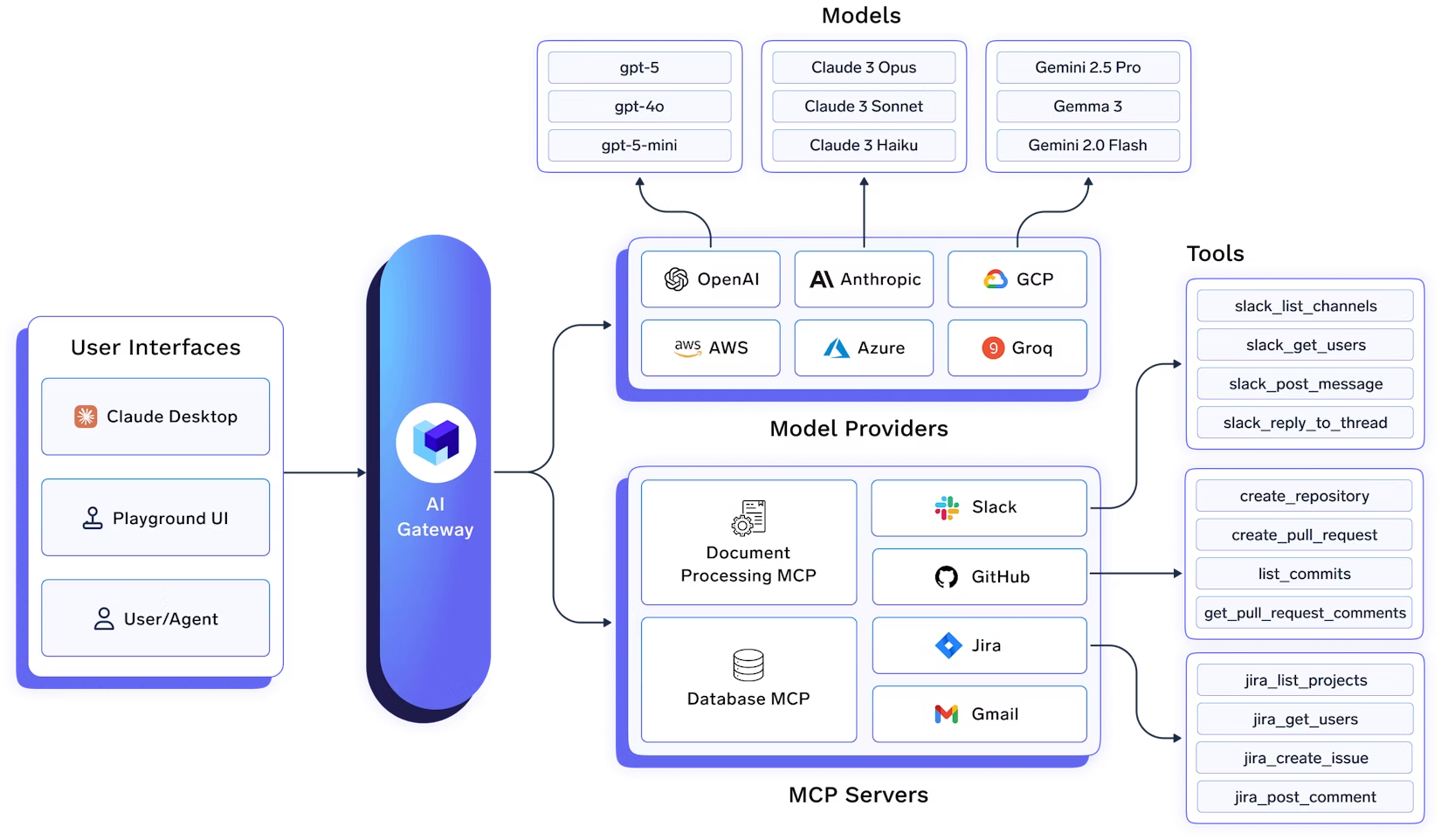
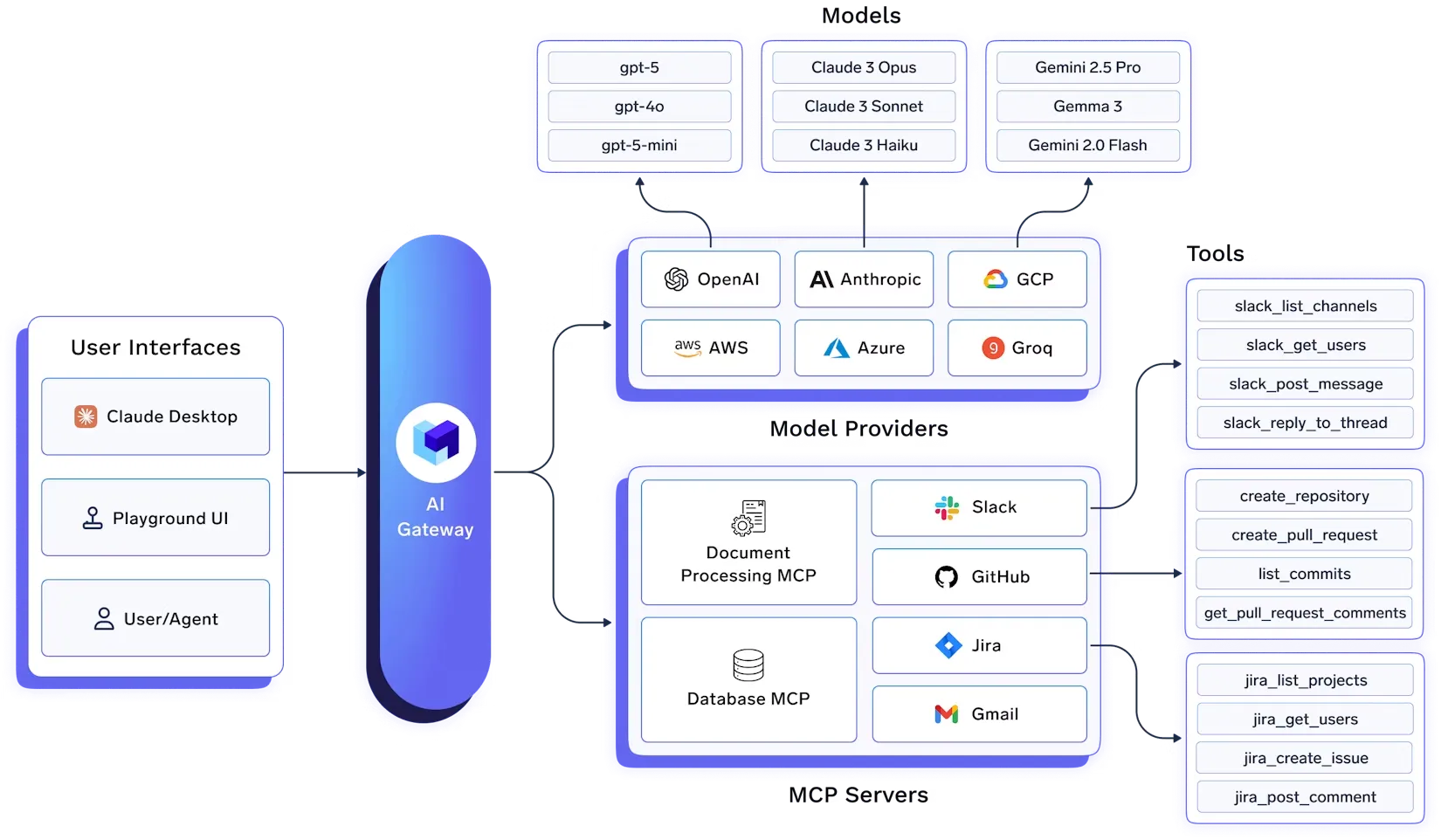
The TrueFoundry AI Gateway is an enterprise-ready platform that centralizes access to AI development tools using MCP. It provides an MCP registry, centralized authentication, and a built-in MCP client that orchestrates the agentic loop between the LLM and the MCP servers.
Agents authenticate once to the MCP Gateway, which routes their MCP requests to registered MCP servers (Slack, GitHub, internal tools), with the Control Plane managing tokens, OAuth flows, and access policies.
1. Centralized MCP Registry
You can add public as well as your self-hosted MCP servers which are registered in the TrueFoundry Control Plane. The Control Plane maintains the centralized registry of all the MCP servers and their authentication mechanisms. It handles user-specific OAuth2 flows, securely storing and refreshing access tokens and ensuring users can only access resources they are authorized for.
This solves the credential sprawl problem: instead of every developer managing their own API keys and OAuth tokens for each tool, the gateway manages them centrally. Users authenticate once with the gateway, and the gateway handles all downstream authentication.
2. Fine-Grained Access Control
While registering an MCP server, you can specify the list of users/teams that have access to it. This allows fine-grained access control at an enterprise level. This is done via MCP Server Groups, wherein you can define managers who can manage and give others access to the MCP servers.
For example, you might have:
Each group only sees the tools they're authorized to use, reducing the attack surface and preventing accidental misuse.
3. Unified Authentication
Any user can generate a single Personal Access Token (PAT) using which they can access all the models and MCP servers that they have access to. You can also generate a Virtual Account Token (VAT) to provide access to a specific set of MCP servers to an application.
The gateway supports multiple authentication methods:
The gateway handles the complexity of OAuth2 flows, including:
4. Virtual MCP Servers
One of the most powerful features is the ability to create Virtual MCP Servers. These allow you to combine tools from multiple MCP servers into a single, curated MCP server that your application can connect to.
For example, suppose you have integrated MCP servers for GitHub and Slack. A team in your company is working on an Agent that requires access to these two MCP servers, but you don't want to expose dangerous tools like `delete_project`, `delete_pr`, etc.
A Virtual MCP Server allows you to create a new MCP server by taking a subset of safe tools from GitHub and Slack MCP servers. This new Virtual MCP Server can be accessed like any other remote MCP server and does not require a deployment. It's managed entirely by the gateway.
This is particularly useful for:
5. Agent Playground
TrueFoundry AI Gateway provides a playground where users can experiment with prompts and different tools of MCP servers to build agents. The gateway comes with commonly used tools like Websearch, WebScraping, document extraction, and code execution.
The gateway comprises an MCP client that orchestrates executing the tools decided by the LLM providers. The Gateway also streams the progress of the request back to the UI so that the user can see the LLM responses, tool calls, and the tool responses in real-time.
This makes it easy for developers to:
6. Use MCP Servers in Code
The Gateway provides code snippets showing how you can start using the MCP servers in your code. You can use the MCP Gateway API directly or integrate with popular MCP client libraries.
Here's an example of using the gateway from Python:
import asyncio
from fastmcp import Client
from fastmcp.client.transports import StreamableHttpTransport
asyncdefmain():# Connect to the gateway using your Personal Access Token transport = StreamableHttpTransport(
 url="https://{controlPlaneURL}/mcp/{groupName}/{mcpServerName}/server",
 auth="Bearer your-tfy-token" )
asyncwith Client(transport=transport) as client:
# List available tools tools = await client.list_tools()
print(f"Available tools: {tools}")
# Call a tool result = await client.call_tool(
 name="github_list_repositories",
 arguments={"org": "my-org"}
 )
print(f"Result: {result}")
asyncio.run(main())
6. Four-Layer Authentication & Authorization
The gateway implements a comprehensive four-layer authentication and authorization system:
Layer 1: Gateway Authentication
Any user/application requires a token to talk to the gateway - either a TrueFoundry API key or your own IDP token. TrueFoundry AI Gateway can verify your own IDP token and extract the user's email from the token based on the SSO settings.
This means you can integrate with your existing identity provider (Okta, Azure AD, Google Workspace, etc.) without requiring users to create separate TrueFoundry accounts.
Layer 2: Gateway Access Control
You can define at the gateway layer which users have access to which MCP servers. This allows fine-grained access control at an enterprise level. This is done via MCP Server Groups, wherein you can define managers who can manage and give others access to the MCP servers.
Layer 3: External Service Authorization (MCP Server Auth)
This is the authorization implemented by the MCP Server for accessing the external service. TrueFoundry allows MCP servers to be integrated with the following auth mechanisms:
The gateway handles the complexity of OAuth2 flows:
Layer 4: Custom Headers
You can pass any custom headers to MCP servers using the `x-tfy-mcp-headers` header. This is useful for authentication tokens, metadata, or any headers your MCP server needs. Custom headers always override the default authentication configured for the MCP server.
A large engineering organization wants to give all developers access to GitHub, JIRA, and Slack through AI agents, but with different permission levels:
With TrueFoundry MCP Gateway:
A SaaS platform wants to allow their customers to build AI agents that interact with the customer's own tools (e.g., their GitHub, their Slack):
An organization wants to expose internal tools (databases, APIs) to AI agents, but with strict security requirements:
Getting started with TrueFoundry MCP Gateway is straightforward:
The gateway supports both user authentication (via OAuth2 flows) and machine-to-machine authentication (via Client Credentials grant), making it suitable for both interactive agents and automated workflows.
Let's walk through building a complete MCP server with OAuth2 authentication and integrating it with TrueFoundry MCP Gateway. We'll create a simple calculator MCP server that demonstrates both user authentication (via the Gateway) and machine-to-machine authentication.
Refer to this documentation for the full tutorial - https://docs.truefoundry.com/docs/ai-gateway/mcp-server-oauth-okta
The complete code for this tutorial is available in our [GitHub repository]
This tutorial demonstrates:
The gateway handles the complexity of OAuth flows, token management, and refresh, allowing users to access all their authorized MCP servers with a single Personal Access Token.
As AI agents move from prototypes to production, the integration architecture becomes critical. The N×M integration problem isn't just a theoretical concern—it's a real barrier to building reliable, secure, and scalable agentic systems.
An MCP Gateway isn't a niche component anymore. It's critical infrastructure for any team building production-grade AI agents. It provides the essential control plane for managing the security, observability, and operational complexity of agent-tool interactions at scale.
By centralizing tool access through a gateway, you're not just solving today's problems—you're laying a scalable foundation for the future. As your agent ecosystem grows, the gateway grows with it, providing consistent security, observability, and operational patterns across all your agent-tool interactions.
The TrueFoundry MCP Gateway solves the fundamental integration challenges that every team building AI agents faces. By providing a centralized, secure, and observable platform for agent-tool interactions, it enables teams to:
If you're building AI agents and struggling with the N×M integration problem, we'd love to hear from you. The TrueFoundry MCP Gateway is available now, and we're excited to see what you build with it.
For more information, check out our documentation or reach out to discuss your specific use case.
What are your thoughts on MCP Gateways? Have you faced similar integration challenges? We'd love to hear your experiences in the comments.
TrueFoundry AI Gateway delivers ~3–4 ms latency, handles 350+ RPS on 1 vCPU, scales horizontally with ease, and is production-ready, while LiteLLM suffers from high latency, struggles beyond moderate RPS, lacks built-in scaling, and is best for light or prototype workloads.
Product
Company
Resources









.webp)
.webp)
.webp)
.webp)
.webp)
.webp)
.webp)

.webp)
.webp)