
Backing up your PC and other devices has been a practice since the middle of the 20th century with the advent of magnetic tape storage, though one could argue it all started with punch cards. These tapes were colossal storage devices compared to USB and M.2 SSD drives of today and stored very little, with a capacity of just a couple of megabytes. This was a marvel at the time, but you couldn't even fit a three-minute .mp3 music track on one. We've passed through the ages with hard drives, floppy disks, solid-state storage, and the cloud.
How we've stored backups has certainly evolved, but unlike other innovations, it's recommended to use a variety of mediums for storing backups — tapes, hard drives, SSDs, the cloud, and more can play pivotal roles in a 3-2-1 backup strategy. What has changed with these technologies is the amount of data that can be stored. Hard drives can be found at your favorite retailer with capacities of more than 20 TB per unit. NAS and storage servers can boast a lot of room for storing just about everything from your digital life.

Our data needs have evolved
We'll create a lot of data in 2025
It's difficult to comprehend just how much data is created worldwide daily. Almost everyone in an advanced economy has a mobile phone. This alone creates countless megabytes of data through imagery, downloaded apps, and communications. All this data needs to be backed up somewhere. As technological advancements seemed to pick up some pace in the data space (pun intended!), we saw the launch of cloud storage services in the mid-2000s. Now you can upload files to servers for next to nothing.
Interestingly, mechanical hard drives weren't always a favorite for backing up data. Earlier drives were expensive, slow, and didn't have large capacities. Floppy disks and magnetic tape were popular through the 1980s until the costs of using Compact Disc (CD) plummeted in the early 1990s. CDs and later Digital Versatile Discs (DVDs) could hold lots of data, sometimes up to 4 GB. Removable flash storage started to appear just before the new millennium, though they stored far less than modern counterparts.
World of Warcraft launched in 2004, requiring just 4 GB of space. If you were to download and install the MMORPG today, you'd need an HDD or SSD with more than 100 GB of space to spare.
As computers grew in popularity, so did the amount of data stored on them through software and games. World of Warcraft launched in 2004, requiring just 4 GB of space. If you were to download and install the MMORPG today, you'd need an HDD or SSD with more than 100 GB of space to spare. How we consume media has also evolved, causing an increase in data storage requirements. Vinyl was popular until CDs, which were then replaced by digital formats and MP3 players.
Streaming is huge today, and subscriptions are available to enjoy your favorite music, movies, and shows on the go. Purchasing this media is also possible (and what I prefer), requiring yet more local storage. Mobile device and PC companies have attempted to alleviate this issue by offering hardware with increasing capacities and accompanying cloud storage platforms with free tiers, but these can quickly be filled with content in just a few months, depending on usage.

5 best practices for preserving data integrity in your backups
A backup isn't really a backup unless it's been tested.
It's (almost) all in the cloud
Do you even own anything anymore?
OneDrive, Google Drive, and iCloud are three cloud-based storage platforms you'll often find preinstalled on various branded hardware. All three offer free tiers for stashing some files, mostly photos from your device. These lowest plan tiers often have severely limited storage capacities. Apple and Microsoft offer just 5 GB, while Google Drive allows you to go up to 15 GB. These sound like considerable space for data but it can quickly fill up with the latest smartphone cameras.
"It's in the cloud, so it's always going to be available." is not a mantra one should adhere to.
Where cloud storage makes sense is for convenience. Upload a file to OneDrive on your PC and it will be available within a few seconds of completing on every other device you have logged into your Microsoft Account. That's pretty handy and allows you to migrate data between devices regardless of where you happen to be located. Not everyone wants to carry around large hard drives or DVDs, which is why most people will take advantage of the free cloud storage on their products.

How a NAS can replace cloud storage and save you money
Moving all your data off the cloud and onto a NAS is easier than you think.
This also means we often overlook the necessity of backing up. "It's in the cloud, so it's always going to be available." is not a mantra one should adhere to. The company could encounter issues where availability is not guaranteed. There's also the case of relying on a third party to manage your data, including its security. We've all seen reports of media and other sensitive information from cloud storage being leaked online due to someone gaining access to the account.
But it also begs the question: do we even own anything anymore? With the advent of cloud services, we're purchasing digital copies of games, relying on storefronts to always be online. The same goes for streaming services, except you're not purchasing individual media, but rolling monthly access to colossal libraries. Remember watching that awesome movie on Netflix last year? There's a chance it may no longer be available. And that's without considering the multiple active subscriptions people have.
The best backup strategy (and one I continue to use today) is the 3-2-1 rule. Cloud storage can count as one of the three available backup copies, but you should always consider backing up your backups to other destinations. Consider using an external drive, USB drive, or even a DVD if you still have a writer inside your PC. It's important to consider potential disasters, which could knock out datacenters, homes, businesses, and everything in between.

5 best cloud storage services for storing long-term backups
Ready to take your backups to the cloud? Here's what you'll need.
The explosive growth of NAS
Self-hosting and DIY storage
Network-attached storage (NAS) was present at the turn of the current century, but it was tailored to businesses and big data. Branded turnkey solutions from Synology, TerraMaster, Asustor, QNAP, and others have made it much more accessible for almost anyone to buy a small compact system and start backing up their digital lives in 2025. But NAS enclosures are also growing in popularity because of another reason: self-hosting absolutely everything from home.
As well as acting as a means to store files, a NAS has a processor, RAM, and other parts you'd find inside a server or desktop PC. Once more than one drive has been installed (because you do want to use RAID, right?), you can download various apps and services. It's possible to use a single NAS to not only allow anyone in your household to back up all their devices, but also connect to a DIY media streaming service, photo management platform, home surveillance solution, Microsoft 365 alternative, smart home interface, and more.
Using a NAS and building out your own cloud storage solution is the way to go if you're like me and prefer to purchase movies, shows, and music for continuous streaming — 4K movies alone take up a lot of space. But anyone can buy a NAS, and you can find different enclosures tailored to different needs and price segments. Sure, it's possible to splash more than $2,000 on a shiny new NAS, but there are also models available for just $200. The latter, which would be a better fit for device backups only. Or, build your own.
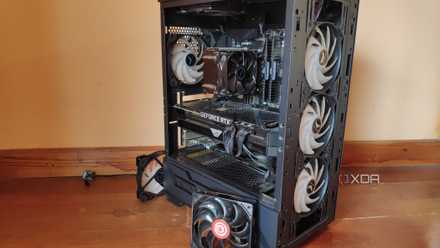
How to turn an old PC into a NAS
If you have an old PC still lying around, you could turn it into a NAS.
How to protect all of your data
Regularly back everything up
It's vital to back up as much as you can to ensure your data is safe from potential data loss and ransomware. I recommend following the 3-2-1 backup strategy, which consists of making three (or more) copies of all your data and backups, stored using at least two different storage device types, and one kept off-site. The off-site backup can be as easy as using a cloud storage provider, but this would likely incur some additional cost. Cold storage is also another option for long-term backups.

How to quickly set up and follow the 3-2-1 backup rule
It's easy to keep all your data safe.