
It seems no one around me is truly content with the performance of their home network. They're either dealing with latency issues on Wi-Fi or capped speeds on Ethernet. Restarting the router is only a temporary fix since the real problem is the router itself. Your ISP's router is most likely an outdated and severely restricted piece of hardware that's bottlenecking your network, and you probably know that already. Instead of blaming your cables, plan speed, or devoices, you should admit that the router might need a replacement. Without an aftermarket router, you can't expect to fully tap into the potential of your network. Besides the performance and flexibility that your ISP-provided router steals from you, poor security is an even bigger concern. And in case you didn't know, your ISP can also monitor your web traffic and has a backdoor in place for "troubleshooting." So, if you haven't already, replace your ISP router right now.
7 stupid ways your ISP router breaks your home network
For something that's supposed to be the beating heart of your home network, it sure doesn't feel that way
Missing features and settings
You can't access your router's basic features
Most of your Wi-Fi problems exist not because your router isn't capable, but because your ISP locks it down, forcing it to run in a bottlenecked configuration. The features and settings that would otherwise allow you to extract the most out of your network are hidden from you in the name of simplicity. Indeed, the average user doesn't change their router's settings, but it's also true that many people absolutely want to tweak their QoS settings, set up VLANs, and use a custom DNS. These features can not only boost your network's performance, but also bypass ISP restrictions that limit what you can visit on your network.
QoS settings are often missing from ISP routers, effectively forcing you to suffer from airtime fairness problems where slower devices make the entire network sluggish, making a perfectly fine network feel slower for high-bandwidth devices. Even something as simple as the ability to configure virtual networks is absent from the firmware on many ISP routers. This makes it harder for you to separate the network traffic among devices or create guest networks for infrequent visitors. Lastly, it's often impossible to switch from your ISP's default DNS. So, if you want to block your ISP from monitoring your network activity, the router's firmware doesn't allow that.
Often, the router itself supports these features, but the ISP limits which ones you can use by installing custom firmware. This effectively blocks you from using your hardware to the fullest, simply because the ISP doesn't deem it worthwhile. It might do it to avoid user configuration issues, but the result is a subpar network with no means for you to do anything about it.

There's a setting buried in every router that your ISP doesn't want you to touch
Switch back and take control.
Underpowered hardware and older Wi-Fi standards
Don't compromise on your network's backbone
The other major downside of using your ISP-provided router is being stuck with outdated hardware. ISPs are used to keeping older routers in circulation long after they're obsolete by most standards. They want to reduce costs and avoid retraining their personnel, so they dump outdated and underpowered routers on customers instead. When everyone's talking about Wi-Fi 7 routers, many unsuspecting customers are still using Wi-Fi 5 routers. Your internet might be working just fine on an older router, but you're missing out on key upgrades that can significantly improve your network performance. If your router supports anything older than Wi-Fi 6, you're missing out on features like OFDMA and MU-MIMO, limiting its ability to effectively manage multiple devices.
Sometimes, your router may not be old, but it can still be too weak to support your home network. Most modern home setups have multiple computers, TVs, smartphones, smart devices, and home automation devices competing for bandwidth on the same connection. A router with ill-equipped internals can easily be overwhelmed by such a setup, failing to manage bandwidth among all your devices as the load varies. It can overheat and result in performance throttling, making your network feel unresponsive even if you're on a high-speed plan. ISPs don't easily replace the router even if you submit multiple requests. Most of the time, the simplest way out is to buy an aftermarket router, connect it to the ISP router, and put the latter in bridge mode to avoid double NAT issues. A modern Wi-Fi 6 router will cost you less than $60, making it a great value upgrade for your entire network. For around $100, you can jump to a Wi-Fi 6E router as well, further improving your network performance.
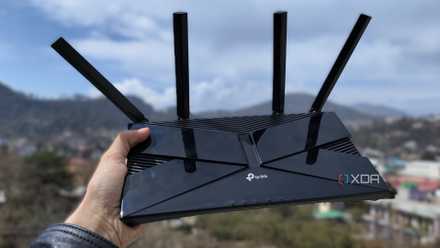
TP-Link Archer AX21
- Supported standards
- 802.11ac, 802.11ax, 802.11b, 802.11g, 802.11n
The TP-Link Archer AX21 is one of the best-selling Wi-Fi 6 routers, with a low price, solid features, and reliable hardware. It has an AX1800 dual-band connection and easy setup and management with the TP-Link Tether app.
You don't need Gigabit Wi-Fi — here are the upgrades that actually matter
Higher speeds won't fix your Wi-Fi — your existing network may be flawed in other ways
Compromised security and lack of control
Your network is never in the best shape
Finally, your ISP router is most probably keeping your network exposed to security exploits, thanks to older security standards and painfully slow firmware updates. Just like outdated Wi-Fi standards, older encryption standards like WPA2 make your network less secure, since they are more prone to brute-force attacks. Most ISP-provided routers don't have the latest WPA3 protocol, either due to the model being too old or the ISP being too slow to push a firmware update. You might be using a network that's exposed to security attacks without even realizing it.
Another aspect of slow or non-existent firmware updates is that you're deprived of performance and stability improvements that your router model could otherwise take advantage of. With an aftermarket router, you're in control instead of the ISP, and you can jump to the latest firmware version whenever it's available. This lack of control also shows up in the inability to use port forwarding on many ISP routers, which prevents you from self-hosting services. Your ISP might also throttle your bandwidth based on your usage patterns, irrespective of the speed of your plan. If you experience reduced speeds at a particular time of day, your router could be the reason the ISP is able to make that happen. An aftermarket router might be the only way to escape the bane of bandwidth throttling, as well as upgrade to modern security standards and the latest firmware.
5 security settings I immediately change on my router (and you should too)
Seriously, do these things before you start using your internet.
Don't stick to your ISP's router any longer
You may have spent years with your ISP's compromised router already, but there's no reason to maintain the status quo. Upgrading to an aftermarket router is affordable, fairly simple, and beneficial to your network in multiple ways. Your ISP-provided router isn't just limiting your network's performance; it's also exposing it to security threats. Your own router will offer a lot more control and flexibility, and you'll wonder how you lasted this long without it.