
I get that buying a new graphics card and CPU are some of the most exciting PC upgrades you can make to your PC. After all, the bulk of the performance of your rig is determined by these core components. That said, in a bid to move to the next performance tier, don't forget the non-hardware upgrades that can make as much difference to your overall setup. Protecting your expensive hardware from power surges is just as important as upgrading to more powerful components. And removing a cramped desk and an uncomfortable chair from your setup will pay dividends over the long term. Here are some PC setup upgrades you shouldn't ignore anymore.
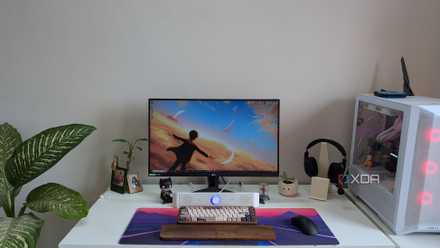
My 5 favorite things in my gaming PC setup (not the PC or monitor)
Some of my favorite parts of my desk setup have nothing to do with my PC or gaming monitor
UPS for power backup and preventing electrical damage
Why leave your expensive PC exposed?
People will spend $2,000–$3,000 on a high-end gaming PC, but still skip a UPS because they think it's not necessary. A UPS isn't just a nice-to-have addition to your setup that keeps the system on for a few minutes when the lights go out. It's an insurance policy to protect your sensitive equipment from power surges and brownouts. These events might be rare, but you only need a single intensive power surge to fry your electronics, leaving you with hundreds or thousands of dollars of dead hardware. Cheap surge protectors or power strips aren't built for sustained power surges and do next to nothing in the case of brownouts, where the incoming voltage drops below recommended levels.
An unstable power supply can degrade your power supply's lifespan and lead to unexplained system instability over time. No matter which PSU your PC has, a UPS is more important than your power supply. It acts as a shield between the incoming supply and your PSU, so that power anomalies don't reach your expensive components. A quality UPS with built-in surge protection not only gives your PC better protection against unclean power, but also prevents annoying interruptions and potential data corruption due to power cuts. It's a small investment when you consider what's at stake.
APC UPS 1500VA Sine Wave UPS Battery Backup

6 mistakes to avoid when buying your first UPS
What I wish I knew before picking a UPS
Monitor arm for flexibility and more desk space
One of the most value-for-money upgrades
You don't need a dual or triple-monitor setup to benefit from a monitor arm. If you have a decently large gaming monitor on a compact desk, a monitor arm can be a surprisingly powerful upgrade to your setup. Not all monitors come with decent ergonomics that allow height, tilt, and swivel adjustments. I don't know about you, but I need my display at just the right height for it to feel natural, both during work and gaming. Besides, if your monitor is large enough, it can leave little space for everything else on your desk. A monitor arm is a cheap yet highly useful accessory that can bring basically any kind of display adjustment to your setup.
Even if your monitor's stock stand features good ergonomics, it most likely occupies much more space than it needs to. Fancy monitor stands jutting out from under the screen can make it harder for you to keep all your peripherals and accessories. Replacing the stock stand with a monitor arm can not only increase your available desk space, but also allow you to move your screen away from your eyes, reducing the strain. When you move to a dual (or triple) monitor setup, monitor arms will become all the more essential, especially if you use different screens for different purposes.

3 cheap upgrades that made my multi-monitor setup so much better
I just needed to spend a little bit more
Cable management tray to eliminate the clutter
A visual as well as practical upgrade
Cable management isn't limited to the inside of your tower, especially when you have tons of wires running from your monitor, speakers, and peripherals to your PC. After building a PC, most people never bother about the jungle of cables behind their desk, even if the mess is fully visible. All those cables hanging or lying on the floor aren't a problem unless you have kids or pets in the house. A single yank of the wrong cable can lead to serious cable damage or worse. Using a cable management tray affixed under or behind your desk can easily solve this hazard. Besides protecting your setup from accidents, it can clean up the esthetics and give you the impression of a cable-free setup.

7 cable management tricks I regret not learning sooner
Making sense of the cable mess inside and outside my PC would have been simpler
Ergonomic chair to improve your posture
Don't ignore ergonomics until it's too late
I've learned the importance of a good chair the hard way. Years of working on a plastic chair that was the wrong height and lacked any kind of support introduced me to lasting back problems. After consulting with multiple physiotherapists over the years, I bought an ergonomic office chair with decent lumbar support, height adjustment, movable armrests, and a mesh back for breathability. You don't realize the importance of ergonomics and comfort until it's too late, but if you're still free from back and neck issues, it's high time you bought a quality ergonomic chair.
Taking ample breaks between work or gaming sessions is still important, but an ergonomic chair also helps keep your posture straight. Avoid gaming chairs that just look great and do nothing useful for your posture. Some gaming models might actually be good, but consult reviews before you pay for the brand name.
FlexiSpot Premium Ergonomic Office Chair C7
- Material
- Mesh
- Height Adjustable
- Yes
- Adjustable Arms
- Yes
FlexiSpot's C7 Ergonomic Chair is an all-day office chair designed for enhanced lumbar support. There are plenty of customization options, including the headrest, back support, armrest, height, seat tilt, and recline. But the mesh material is stiffer than memory foam or leather, and the lumbar support is too aggressive for some people.

The best $300 I ever spent on my PC wasn't a component
Sometimes the best upgrades are outside of your PC chassis
Large desk for a comfortable workspace
This one is inevitable
Most gaming setups have at least a 27-inch monitor, if not something larger. With ultrawide displays entering the picture, desk space can quickly become a luxury in your setup. You need space for your tower, keyboard, mouse, headphones, speakers, and maybe some additional accessories. With a large monitor hoarding most of the desk space, things can quickly feel cramped. A monitor arm can help, but at some point, you need to admit defeat and upgrade your desk. Working on a 4ft x 2ft desk forever just isn't viable if you want an immersive monitor, a large deskmat, and plenty of peripherals on your desk.
I've been meaning to upgrade to at least a 5ft x 3ft desk for a while, but I haven't found the time to properly research one. If you want a desk tailored to your exact needs, you'll probably have to get a custom-made model. Prebuilt desks probably won't have the compartments, cable management features, and design that you have in mind. That said, the priority when buying a PC desk is to consider your future needs and how large it will look in your room. Balancing these factors is the key to buying the right model.

Want a great-looking PC setup? These 8 upgrades are all you need
Upgrading the look of your PC setup doesn't have to be costly or complicated
Your PC setup is as important as what's inside the tower
Building a great PC is only one part of having a great PC setup that motivates you to use it every day. The core components inside the PC determine the performance, but the elements outside it are equally important. Whether it's comfort, ergonomics, or protection, non-hardware upgrades like a spacious desk, quality chair, and UPS add tons of value to any setup. Before you spend the entirety of your budget on your tower, consider balancing the inside and outside of your PC for an overall flexible and powerful PC setup.