
Last year, System76 made a splash in the Linux scene with the introduction of its homegrown desktop environment called COSMIC, replacing its previous implementation of GNOME used in Pop! OS. I was a big fan of it from the start, but it was also easy for myself and many others to see some cracks and problems that made it hard for many to stick with the platform.
A few months later, COSMIC has made some progress in small ways and polished up the UI here and there, but it's still not quite ready to take over your Linux desktop. However, that doesn't mean it will never be ready, and there's already a ton of potential here.
COSMIC improves on GNOME
A solid foundation, made much better
The COSMIC desktop was designed to replace GNOME in System76's own Linux distro, and because of that, it's very easy to see the influence GNOME has on the entire desktop philosophy. There's a menu bar at the top with a bunch of system options and a dock at the bottom with some pinned apps and an app launcher, and the overall UI language shares some clear similarities with the default GTK apps in GNOME.
However, COSMIC takes many of those ideas and makes them better and more flexible. The menu bar, for example; GNOME collapses all the system actions into a single menu, which makes for a fine unified Control Center, but I kind of like how COSMIC has separate buttons for different settings like brightness, sound, or power options, which you can remove or shuffle around on the menu bar. This also opens up space for more advanced options, like how you immediately see a restart button in the power menu, rather than have to open the system menu, click Power and then choose to restart.
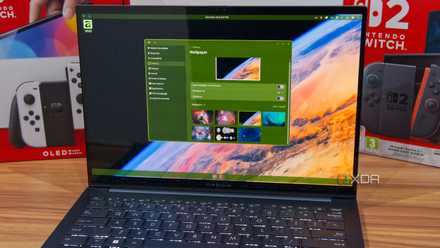
I switched to the COSMIC Linux desktop, and I can't wait for the future
COSMIC is out of this world, even with its flaws
I'd also say I much prefer COSMIC's approach to the app launcher compared to GNOME. Whether you use the keyboard our the mouse to navigate, GNOME's launcher takes over the entire screen and it feels jarring. COSMIC fixes this approach with a floating launcher that feels much more natural on the desktop while still having a unique identity that doesn't try to replicate Windows or macOS. The current iteration struggles with feeling unfinished, but there's a good basis to build upon here. Some smoother animations would be all it takes to make it appear way more polished.
It has some great ideas, too
Genuinely useful capabilities
On top of improving some of the basics of GNOME, COSMIC also has genuinely useful ideas of its own that make it a great potential contender as a major Linux desktop. Its masterful handling of windows is a big example, bringing features that often require extra software and still providing some important flexibility for users.
For starters, you can easily toggle between floating windows or a tiling desktop at any time, and choose the default behavior for new workspaces, too. A full tiling window manager is something that requires extra add-ons on KDE or GNOME, so to have it not only integrated but so easily accessible and with options to turn on or off for different desktops is something that deserves a lot of praise.
Not only that, but COSMIC also adds a feature that Windows enthusiasts may be familiar with: the ability to stack multiple windows into one and make them function essentially as tabs. You can have your file manager, web browser, and office suite all in the same window, offering a different way to manage your projects. And there's still more: you can right-click an app's title bar to do things like take a screenshot of just that window, or pin it above other windows.

COSMIC feels like the first Linux desktop designed for normal people
Easy to use and customizable in the right ways
And then there's the customization, which is one of COSMIC's big claims to fame. The UI framework offered by COSMIC is easily themable, and all you need to do is change a few colors to have your own fully custom theme, which you can export and share with others if you want to. It doesn't take a lot of work, but it fully changes the look and feel of your desktop and most COSMIC apps, which is really cool since theming in desktops like KDE can sometimes feel a little daunting.
And it's already getting better
It needs more work, but it's getting there
Even after a few months, COSMIC still has some issues that make it feel a little less robust than its competitors, like the launcher feeling somewhat lifeless or slow at times, but the team has been making some improvements that address user complaints. That includes the addition of drop shadows which were missing in the first release, so now focused windows stand out a bit more over the background. Earlier releases also had power buttons that looked very out of place in the UI, but they've been polished up and the design language feels more consistent now.
One issue I noticed in earlier releases is that while COSMIC's theming engine tries to apply to regular GTK apps, too, the colors wouldn't properly be applied and you'd get some odd coloring in apps like Bazaar. That seems to have been fixed, and now COSMIC's own apps, GTK apps, and even Qt6 apps have a unified color scheme, making things look more uniform than you might expect.
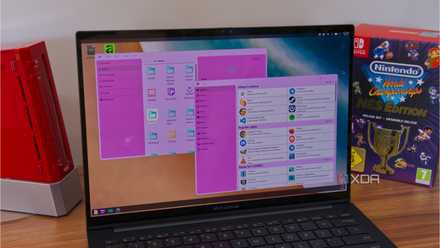
I tried COSMIC apps on KDE, and the customization alone almost made it worth the hassle
The best customization options, but something is missing
There's a lot of smaller things here and there, too. COSMIC has added the ability to view the battery percentage on the battery applet, support for dragging and dropping tabs in COSMIC Files and Text Editor, added "Move to" and "Copy to" options to the context menu in Files, improve support for WPA3 networks in Settings, and more. Personally, I've also pointed out how Vicinae would crash everytime I dismissed its window, causing it to take longer to come up the next time I tried to use it. That seems to have been fixed, too.
Deals on Linux-ready PCs, monitors, and desktop gear
And System76 is in it for the long haul, as the company has a detailed roadmap of planned features for its next couple of major releases, called Epochs. These include many things like improvements to the visual effects, a built-in clipboard manager, firmware management in Settings, new wallpaper options, and more. These things should be coming gradually in the next year or two, and by then, COSMiC will probably belong right next to the big names for Linux desktops.
COSMIC has a bright future
Even if it's not fully ready yet, I see a bright future for COSMIC ahead. The ideas and potential it has are already tremendous, and personally, I'd choose it over GNOME already. Replacing KDE will be harder, but I believe the team at System76 has a great formula on its hands, and it's only a matter of time until it can fully shine.