|
VOOZH | about |
|
VOOZH | about |
Linux,Windows,serwer, i tak dalej ;)
Small project, using trappers instead of zabbix-agent active mode. I wanted to have better control over the pushing layer and intervals.
Written by marcinbojko
24 kwietnia, 2018 at 18:15
Napisane w work
Tagged with dsc, foreman, github, grafana, linux, open source, opensource, powershell, windows, work, zabbix
So, the question is – how to deploy and maintain farm of Microsoft SQL Servers? With different domains, install sources, roles, features. Should we create unattended installers for every single instance?
No, we shouldn’t.
We should use Powershell DSC – https://github.com/PowerShell/xSQLServer
With Foreman/Puppet and win_manage, we have something like:
The simplest way:
instance1:
  dsc_instancename: MSSQLSERVER
  dsc_sourcepath: "\\our.server.com\ourshare"
  dsc_sourcecredential:
    user: anonymous
    password: anonymous
  dsc_setupcredential:
    user: DOMAIN\someuser
    password: somepassword
Or, more sophisticated:
instance1:
  dsc_instancename: MSSQLSERVER
  dsc_sourcepath: "\\our.server.com\ourshare"
  dsc_sourcecredential:
    user: anonymous
    password: anonymous
  dsc_setupcredential:
    user: DOMAIN\someuser
    password: somepassword
  dsc_features: SQLENGINE
  dsc_forcereboot: true
  dsc_agtsvcaccount:
    user: DOMAIN\scvaccount
    password: somepassword
  dsc_sqlsvcaccount:
    user: DOMAIN\sqlaccount
    password: somepassword
  dsc_sqlcollation: SQL_Latin1_General_CP1_CI_AS
  dsc_sqlsysadminaccounts:
    - DOMAIN\someadmin
    - DOMAIN\someotheradmin
  dsc_securitymode: SQL
  dsc_sapwd:
  user: sa
  password: paaaswordisverysecure
  dsc_sqluserdbdir: D:\MSSQL\Data
  dsc_sqluserdblogdir: E:\MSSQL\Data
  dsc_browsersvcstartuptype: Disabled
Whole install from local source takes aprox. 400 seconds (with other OS related settings) to finish.
Written by marcinbojko
22 stycznia, 2017 at 21:11
Napisane w work
Tagged with desiredstate, dsc, foreman, opensource, powershell, puppet, windows, win_manage, work
Administrator:
  dsc_username: Administrator
  dsc_disabled: false
  dsc_password:
    user: NT AUTHORITY\\SYSTEM
    password: P@$$w0rd
Written by marcinbojko
26 listopada, 2016 at 13:52
Napisane w work
Tagged with chocolatey, dsc, foreman, powershell, puppet, windows, win_manage
Nobody likes Windows Updates even Microsoft itself. But sometimes one should make sure, you have perks your system needs. But, we co do it old fashion way: check, update, reboot, repeat. Boring, and completly not in a way DevOps do.
Again, Win_manage to the rescue.
First we make sure what we want to do:
dsc_xwindowsupdateagent_schedule

first:
  dsc_dayofweek: sunday
  dsc_afterhour: 11
  dsc_usenotify: true
dsc_xwindowsupdateagent

security:
  dsc_updatenow: 'true'
  dsc_category: security
important:
  dsc_updatenow: 'true'
  dsc_category: important
optional:
  dsc_updatenow: 'true'
  dsc_category: optional
dsc_reboot

dsc_reboot:
  message: Machine requested a reboot
  when: pending
But what does it do? First, we should prepare update schedule: let’s say, we can start auto-updates on Sunday, after 11 AM (remember 11 AM = 11:00, and 11:00 PM=23:00)
Second: we want to install 3 type of updates: security, important and optional.
Third: we want to auto-reboot our machine (dsc_reboot) and notify us about pending updates count BEFORE and AFTER update patch set (dsc_usenotify: true)
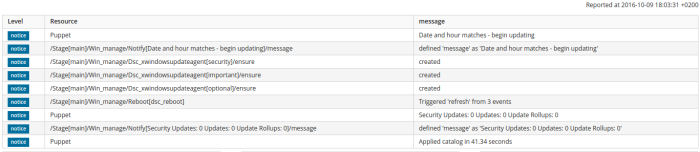
So, we can switch from:
to
in a time needed to get some music 🙂
Written by marcinbojko
9 października, 2016 at 18:36
Napisane w Uncategorized, work
Tagged with dsc, foreman, microsoft, open source, opensource, powershell, puppet, windows
During last few weeks I was able to push and heavy test puppet-dsc code in a lots of environments and setups.
We had sysprepped Windows Server 2012 R2 images (different versions, builds and setups), a lots of Windows 10 Professional Workstations (Original, 1511, 1607 builds), few Windows 8.1 Pro – really great statistic sample.
As for now:
Implemented modules:
More code is coming, but this fine set allows you to deploy and manage a lots of types of servers and workstations.
Written by marcinbojko
7 października, 2016 at 19:47
Napisane w Uncategorized, work
Tagged with dsc, foreman, internet, microsoft, open source, opensource, powershell, puppet, servers, windows, work
Few weeks ago I started a little project – complete Puppet module called: win_manage.
My goal was to manage Windows based machines almost as easy as Linux servers, as little code inside as possible (you know, I am not a developer in any kind). And when I was thinking: KISS is no more possible with this project, I’ve found Puppet Powershell DSC module: https://github.com/puppetlabs/puppetlabs-dsc
Adding another resources it is just a breeze, the biggest part of work was to test almost every setting provided by Microsoft, to have working examples in day-to-day SysAdmin/DevOP job.
And yes, I know – we have plenty of things like this, sold with different price plans, different support plans and so on. But if you cannot afford pricey tools like Puppet Enterprise or System Center 2012 R2 in your environment, this little project comes to help you 🙂
First things first – why?
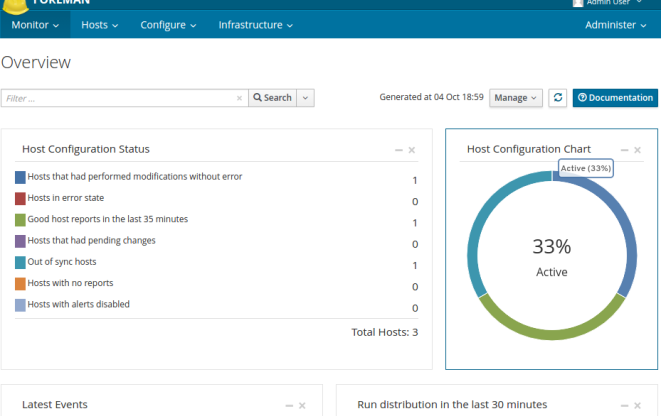
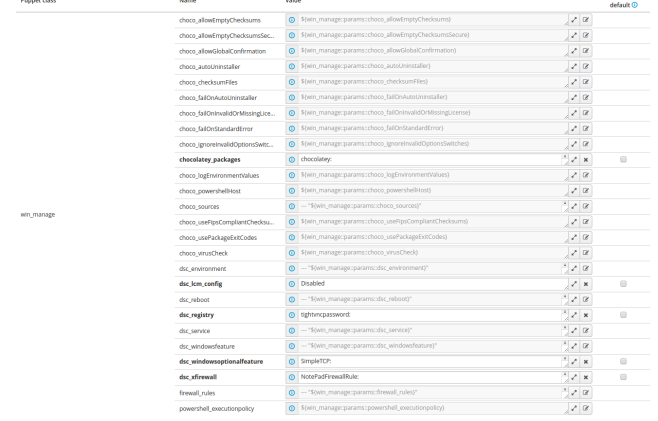
So my work in progress looks just like this:
We love YAML driven configuration: setting users, rules, applications is just as easy as writing very light code:
Setting registry:
tightvncpassword:
 dsc_key: HKEY_LOCAL_MACHINE\SOFTWARE\TightVNC\Server
 dsc_valuename: Password
 dsc_valuedata: af af af af af af af af
 dsc_valuetype: binary
 tightvncpasswordcontrol:
 dsc_key: HKEY_LOCAL_MACHINE\SOFTWARE\TightVNC\Server
 dsc_valuename: ControlPassword
 dsc_valuedata: af af af af af af af af
 dsc_valuetype: binary
Adding features:
Web-Server:
 dsc_ensure: present
 dsc_name: Web-Server
 dsc_includeallsubfeature: true
 DSC-Service:
 dsc_ensure: present
 dsc_name: DSC-Service
Installing and maintaining latest version of packages:
chocolatey:
 ensure: latest
 powershell:
 ensure: latest
 doublecmd:
 ensure: latest
 conemu:
 ensure: latest
So, what to do next? I will be adding additional DSC Resources to module and hopefully will be able to make it public. Stay tuned and keep your fingers crossed 😉
Written by marcinbojko
4 października, 2016 at 19:11
Napisane w Uncategorized, work
Tagged with dsc, foreman, google, internet, linux, microsoft, open source, opensource, powershell, puppet, servers, windows
| Pon | W | Śr | Czw | Pt | S | N |
|---|---|---|---|---|---|---|
| 1 | 2 | 3 | 4 | 5 | 6 | 7 |
| 8 | 9 | 10 | 11 | 12 | 13 | 14 |
| 15 | 16 | 17 | 18 | 19 | 20 | 21 |
| 22 | 23 | 24 | 25 | 26 | 27 | 28 |
| 29 | 30 |