|
VOOZH | about |
|
VOOZH | about |
1010010 01101001 01110100 01101000 01101001 01101011 01100001
Did you understand the above binary code? If yes, then you’re a computer. If no, then you’re a Human. 🙂
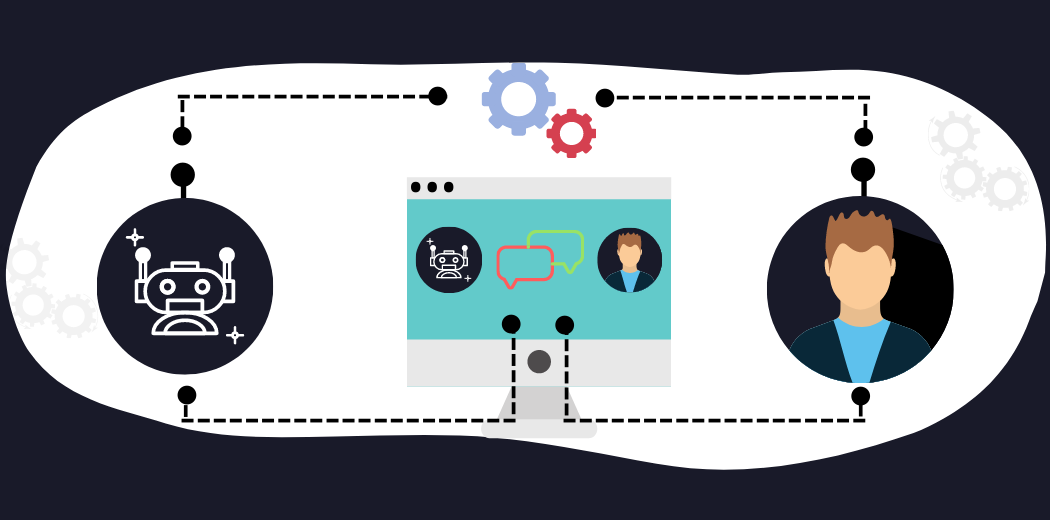
I know it’s a difficult task for us to understand binary code just like computers because binary code is a Machine Understandable Language. Likewise, even computers don’t understand human language. So, how to make computers understand human language? The answer is Natural Language Processing. With the help of NLP, we can teach computers to understand Human Language.
These days NLP is getting a lot of attention, with the launch of Github’s Copilot, which was developed using OpenAI’s GPT-3 language model.
This article covers the basics of NLP and techniques used to process the data using NLP library NLTK.
So, without further ado, let’s get started.
Human language is highly ambiguous … It is also ever changing and evolving. People are great at producing language and understanding language, and are capable of expressing, perceiving, and interpreting very elaborate and nuanced meanings. At the same time, while we humans are great users of language, we are also very poor at formally understanding and describing the rules that govern language.― Page 1, Neural Network Methods in Natural Language Processing, 2017.
Natural Language Processing is an interdisciplinary field of Artificial Intelligence. It is a technique used to teach a computer to understand Human languages and also interpret just like us. It is the art of extracting information, hidden insights from unstructured text. It is a sophisticated field that makes computers process text data on a large scale.
The ultimate goal of NLP is to make computers and computer-controlled bots understand and interpret Human Languages, just as we do.
According to Fortune Business Insights, the NLP is expected to grow from 20 billion dollars in 2021 to 127 billion dollars in 2028.
Natural Language Processing is further classified into:
If you’re looking for an online course to master NLP, then check out Analytics Vidya Course.
Natural Language Processing is powering many industries with its advanced Deep Learning Algorithms like transformers, language models(GPT-3), RNNs, LSTMs, and many more.
NLP is used in,
Here are some of the libraries for leveraging the power of Natural Language Processing.
In this article, I will use the NLTK library to demonstrate Text Data Preprocessing.
NLTK is a standard python library that provides a set of diverse algorithms for NLP. It is one of the most used libraries for NLP and Computational Linguistics.
Now, let us see how to install the NLTK library.
For windows, open a command prompt and run the below command:
pip install nltk
For mac/Linux, open the terminal and run the below command:
sudo pip install -U nltk
sudo pip3 install -U nltk
To install through Anaconda, open Anaconda prompt, run the below command:
conda install -c anaconda nltk
To install in Jupyter Notebook, type the below command in a cell and click on run.
!pip install nltk
The process of cleaning unstructured text data, so that it can be used to predict, analyze, and extract information. Real-world text data is unstructured, inconsistent. So, Data preprocessing becomes a necessary step.
The various Data Preprocessing methods are:
These are some of the methods to process the text data in NLP. The list is not so exhaustive but serves as a great starting point for anyone who wants to get started with NLP.
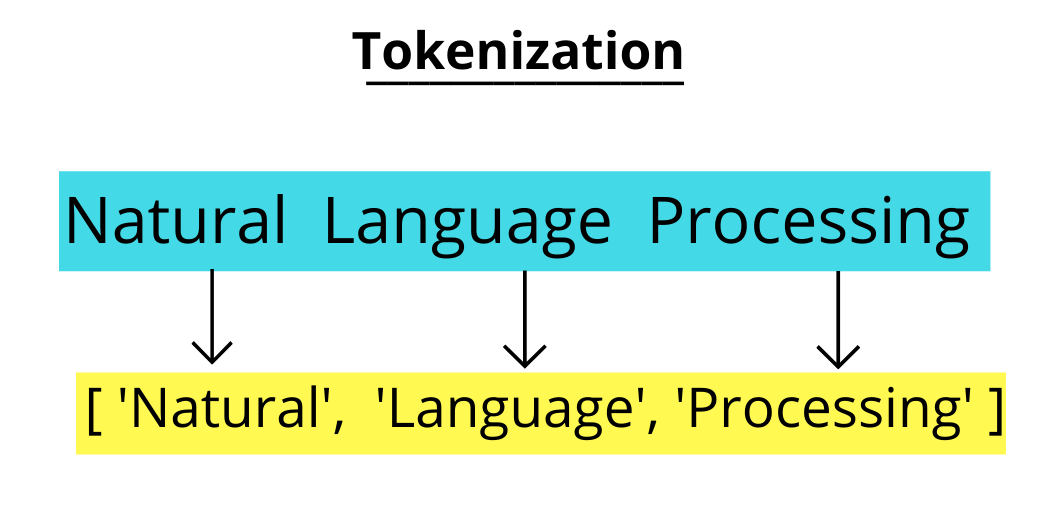
The process of breaking down the text data into individual tokens(words, sentences, characters) is known as Tokenization. It is a foremost step in Text Analytics.
It’s a fundamental and foremost step in methods like Count Vectorizer and also in Deep learning-based architectures like Transformers.
Tokenization is implemented using a class tokenize in NLTK Library.
text = """The voice that navigated was definitely that of a machine, and yet you could tell that the machine was a woman, which hurt my mind a little. How can machines have genders? The machine also had an American accent. How can machines have nationalities? This can't be a good idea, making machines talk like real people, can it? Giving machines humanoid identities?"""
Let’s first split up the above text into sentences using sent_tokenize().
(i) Sentence Tokenization
When text data is split into sentences, then it is sentence tokenization. It helps when text data consists of multiple paragraphs.
from nltk.tokenize import sent_tokenize
text_to_sentence = sent_tokenize(text)
print(text_to_sentence)
Now, the given text is tokenized into sentences.
(ii) Word Tokenization:
When text data is split into individual words, then it is word tokenization. It is implemented using word_tokenize().
from nltk.tokenize import word_tokenize
tokenized_word = word_tokenize(text)
print(tokenized_word)
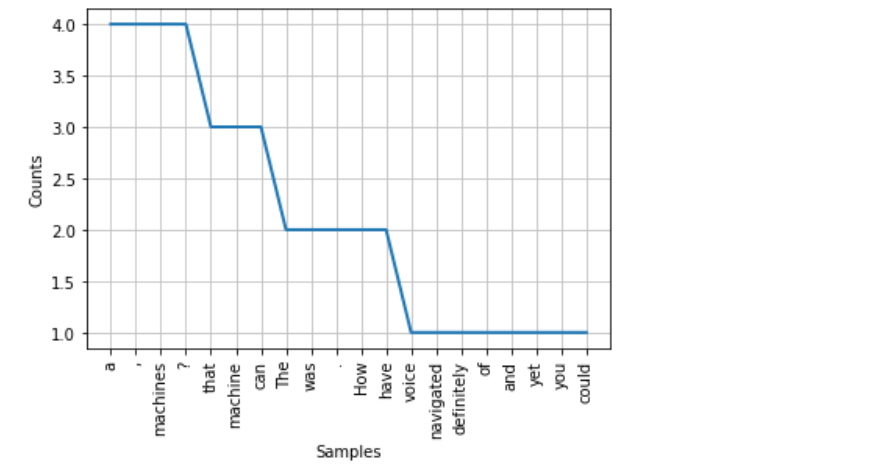
We can generate the frequency distribution of words in a text by using the FreqDist() function in NLTK. Even results can be plotted using the matplotlib plot() function.
from nltk.probability import FreqDist
freq_dist_of_words = FreqDist(tokenized_word)
print(freq_dist_of_words)
most_common() is the function used to print the most frequent words.
freq_dist_of_words.most_common(5)
import matplotlib.pyplot as plt
freq_dist_of_words.plot(30,cumulative=False)
plt.show()
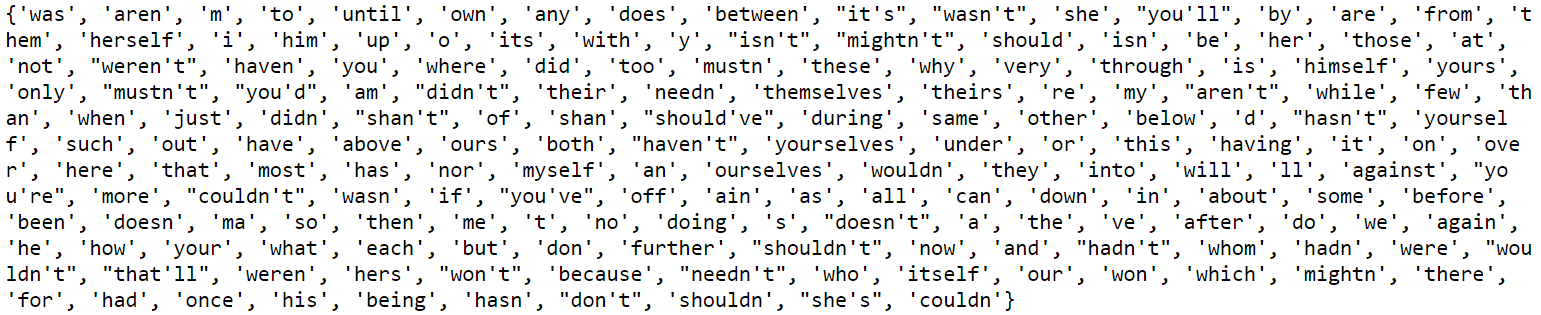
Stop words are used to filter some words which are repetitive and don’t hold any information. For example, words like – {that these, below, is, are, etc.} don’t provide any information, so they need to be removed from the text. Stop Words are considered as Noise. NLTK provides a huge list of stop words.
import nltk
nltk.download('stopwords')
from nltk.corpus import stopwords
stop_words=set(stopwords.words("english"))
print(stop_words)
text = 'Learn to lose your destiny to find where it leads you'
filtered_text = []
tokenized_word = word_tokenize(text)
for each_word in tokenized_word:
 if each_word not in stop_words:
 filtered_text.append(each_word)
print('Toxenized list with stop words: {}'.format(tokenized_word))
print('Toxenized list with out stop words: {}'.format(filtered_text))
Stemming is a process of normalization, in which words are reduced to their root word (or) stem. Spacy doesn’t support stemming, so we need to use the NLTK library.
Types of stemming:
from nltk.stem import PorterStemmer
pstemmer = PorterStemmer()
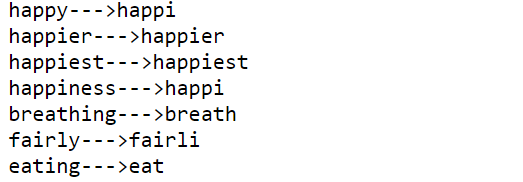
words = ['happy', 'happier', 'happiest', 'happiness', 'breathing','fairly','eating']
for word in words:
 print(word + '--->' + pstemmer.stem(word))
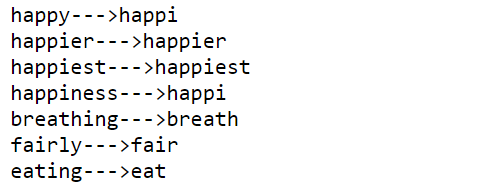
As we can see above, the words are reduced to their stem word, but one thing we can notice is that the porter stemmer is not giving good results. So, we will use the Snowball stemmer, which is better when compared with porter stemmer.
from nltk.stem.snowball import SnowballStemmer
snow_stem = SnowballStemmer(language='english')
words = ['happy', 'happier', 'happiest', 'happiness', 'breathing','fairly','eating']
for word in words:
 print(word + '--->' + snow_stem.stem(word))
Like stemming, lemmatization is also used to reduce the word to their root word. Lemmatizing gives the complete meaning of the word which makes sense. It uses vocabulary and morphological analysis to transform a word into a root word.
from nltk.stem.wordnet import WordNetLemmatizer
lemmatizer = WordNetLemmatizer()
text = "Life will always have problems and pressures."
lemmatized_words_list = []
tokenized_word = word_tokenize(text)
for each_word in tokenized_word:
 lem_word = lemmatizer.lemmatize(each_word)
 lemmatized_words_list.append(lem_word)
print('Text with Stop Words: {}'.format(tokenized_word))
print('Lemmatized Words list {}'.format(lemmatized_words_list))
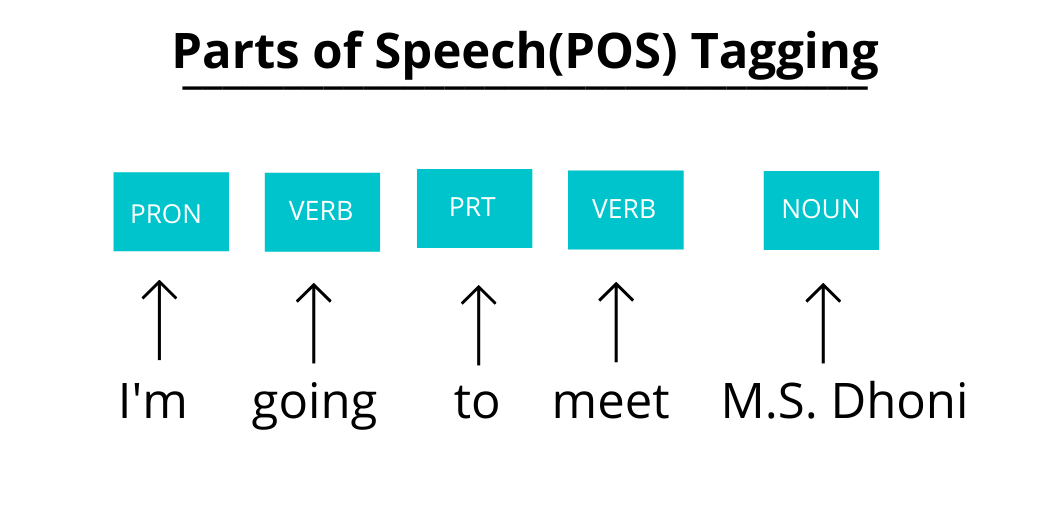
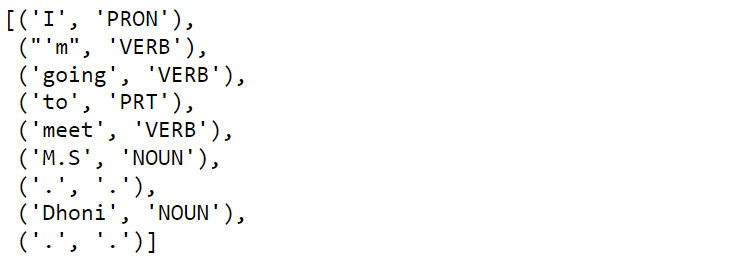
Parts of Speech(POS) tagging is the process of identifying parts of speech of a sentence. It is used to identify nouns, verbs, adjectives, adverbs, etc., and tag each word. There are many tagging sets available in NLTK, but I will be using Universal Tag Set.
import nltk
nltk.download('universal_tagset')
text = "I'm going to meet M.S. Dhoni."
tokenized_word = word_tokenize(text)
nltk.pos_tag(tokenized_word, tagset='universal')
text = "I'm going to meet M.S. Dhoni."
tokenized_word = word_tokenize(text)
nltk.pos_tag(tokenized_word, tagset='universal')
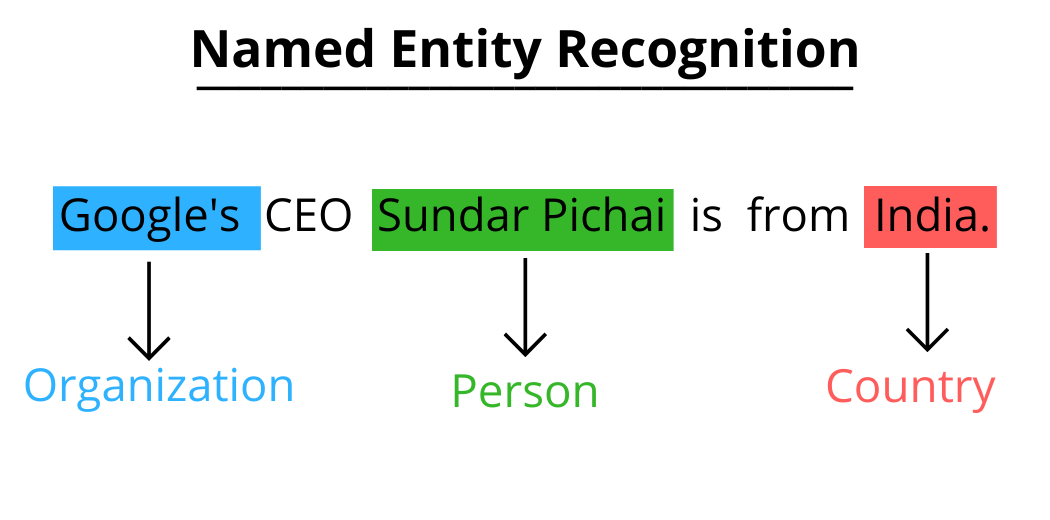
Named Entity Recognition is used to identify names of organizations, people, and geographic locations in the text and tag them to the text.
import nltk
nltk.download('maxent_ne_chunker')
nltk.download('words')
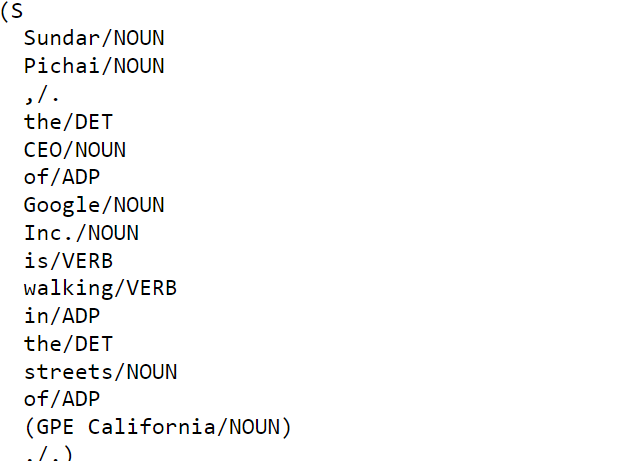
text = "Sundar Pichai, the CEO of Google Inc. is walking in the streets of California."
tokenized_word = word_tokenize(text)
tags = nltk.pos_tag(tokenized_word, tagset='universal')
entities = nltk.chunk.ne_chunk(tags, binary=False)
print(entities)
WordNet is a huge collection of words with meanings just like a traditional dictionary, used to generate synonyms, antonyms of words.
from nltk.corpus import wordnet
synonym = wordnet.synsets("AI")
print(synonym)
Print definition using WordNet:
print(synonym[1].definition())
Print examples using WordNet:
print(synonym[1].examples())
These concepts are good enough for beginners to get started with Natural Language Processing.
Hello, I’m Ajay Vardhan Reddy, pursuing my bachelor’s in Computer Science and Engineering from Vignana Bharathi Institute of Technology, Hyderabad. I’m a Co-founder of the Machine Learning Forum – EpsilonPi, an aspiring Machine Learning Engineer, full-stack web developer, social media marketer, and also a competitive programmer. I’m a content creator on Instagram with the user name @googlers_tech.
You can connect me:
Thank you folks for reading. Happy Learning!
The media shown in this article are not owned by Analytics Vidhya and are used at the Author’s discretion.
GPT-4 vs. Llama 3.1 – Which Model is Better?
Llama-3.1-Storm-8B: The 8B LLM Powerhouse Surpa...
A Comprehensive Guide to Building Agentic RAG S...
Top 10 Machine Learning Algorithms in 2026
45 Questions to Test a Data Scientist on Basics...
90+ Python Interview Questions and Answers (202...
8 Easy Ways to Access ChatGPT for Free
Prompt Engineering: Definition, Examples, Tips ...
What is LangChain?
What is Retrieval-Augmented Generation (RAG)?
Edit
Resend OTP
Resend OTP in 45s