|
VOOZH | about |
|
VOOZH | about |
In the fast-growing area of digital healthcare, medical chatbots are becoming an important tool
for improving patient care and providing quick, reliable information. This article explains how to build a medical chatbot that uses multiple vectorstores. It focuses on creating a chatbot that can understand medical reports uploaded by users and give answers based on the information in these reports.
Additionally, this chatbot uses another vectorstore filled with conversations between doctors and patients about different medical issues. This approach allows the chatbot to have a wide range of medical knowledge and patient interaction examples, helping it give personalized and relevant answers to user questions. The goal of this article is to offer developers and healthcare professionals a clear guide on how to develop a medical chatbot that can be a helpful resource for patients looking for information and advice based on their own health reports and concerns.
This article was published as a part of the Data Science Blogathon.
The construction of a medical chatbot capable of understanding and responding to queries based on medical reports and conversations requires a carefully architected pipeline. This pipeline integrates various services and data sources to process user queries and deliver accurate, context-aware responses. Below, we outline the steps involved in building this sophisticated chatbot pipeline.
Note: The services like logger, vector store, LLM and embeddings has been imported from other modules. You can access them from this repository. Make sure to add all API keys and vector store urls before running the notebook.
We’ll begin by importing necessary Python libraries and modules. The dotenv library loads environment variables, which are essential for managing sensitive information securely. The src.services module contains custom classes for interacting with various services like vector stores, embeddings, and language models. The Ingestion class from src.ingest handles the ingestion of documents into the system. We import various components from LangChain and langchain_core to facilitate the retrieval of information and generation of responses based on the chatbot’s memory and conversation history.
import pandas as pd

from dotenv import load_dotenv
from src.services import LLMFactory, VectorStoreFactory, EmbeddingsFactory
from src.ingest import Ingestion
from langchain_core.prompts import (
 ChatPromptTemplate,
)
from langchain.retrievers.ensemble import EnsembleRetriever
from langchain.chains.history_aware_retriever import create_history_aware_retriever
from langchain.chains.combine_documents import create_stuff_documents_chain
from langchain.chains.retrieval import create_retrieval_chain
from langchain_core.prompts import ChatPromptTemplate
from langchain.memory import ConversationBufferWindowMemory, SQLChatMessageHistory

_ = load_dotenv()We’ll then load the conversation dataset from the data directory. The dataset can be downloaded from this URL. This dataset is essential for providing the LLM with a knowledge base to draw from when answering user queries.
data = pd.read_parquet("data/medqa.parquet", engine="pyarrow")
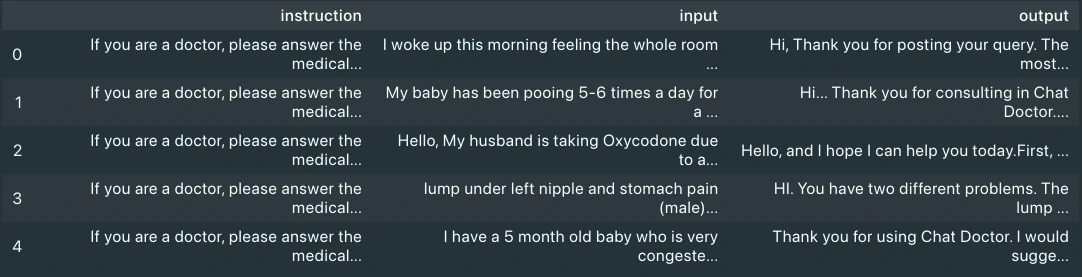
data.head()On visualizing the data, we can see it has three columns: input, output and instructions. We will consider only the input and output columns, as they are the patient’s query and doctor’s response, respectively.
The Ingestion class is instantiated with specific services for embeddings and vector storage. This setup is crucial for processing and storing the medical data in a way that’s accessible and useful for the chatbot. We’ll first ingest the conversation dataset, as this takes time. The ingestion pipeline was tuned to run ingestion in batches every minute for large content, to overcome the rate limit error of embeddings services. You can opt to change the logic in src directory to ingest all the content, if you have any paid service to overcome rate limit error. For this example we will be using an patient report available online. You can download the report from here.
ingestion = Ingestion(
 embeddings_service="cohere",
 vectorstore_service="milvus",
)
ingestion.ingest_document(
 file_path="data/medqa.parquet",
 category="medical",
 sub_category="conversation",
 exclude_columns=["instruction"],
)
ingestion.ingest_document(
 file_path="data/anxiety-patient.pdf",
 category="medical",
 sub_category="document",
)The EmbeddingsFactory, VectorStoreFactory, and LLMFactory classes are used to instantiate the embeddings, vector store, and language model services, respectively. You can download these modules from the repository mentioned in the beginning of this section. It has a logger integrated for observability and has options for choosing embeddings, LLM and vector store services.
embeddings_instance = EmbeddingsFactory.get_embeddings(
 embeddings_service="cohere",
)
vectorstore_instance = VectorStoreFactory.get_vectorstore(
 vectorstore_service="milvus", embeddings=embeddings_instance
)
llm = LLMFactory.get_chat_model(llm_service="cohere")We create two retrievers using the vector store instance: one for conversations (doctor-patient interactions) and another for documents (medical reports). We configure these retrievers to search for information based on similarity, using filters to narrow the search to relevant categories and sub-categories. Then, we use these retrievers to create an ensemble retriever.
conversation_retriever = vectorstore_instance.as_retriever(
 search_type="similarity",
 search_kwargs={
 "k": 6,
 "fetch_k": 12,
 "filter": {
 "category": "medical",
 "sub_category": "conversation",
 },
 },
)
document_retriever = vectorstore_instance.as_retriever(
 search_type="similarity",
 search_kwargs={
 "k": 6,
 "fetch_k": 12,
 "filter": {
 "category": "medical",
 "sub_category": "document",
 },
 },
)
ensambled_retriever = EnsembleRetriever(
 retrievers=[conversation_retriever, document_retriever],
 weights=[0.4, 0.6],
)We set up a SQL-based system to store the chat history, which is crucial for maintaining context throughout a conversation. This setup allows the chatbot to reference previous interactions, ensuring coherent and contextually relevant responses.
history = SQLChatMessageHistory(
 session_id="ghdcfhdxgfx",
 connection_string="sqlite:///.cache/chat_history.db",
 table_name="message_store",
 session_id_field_name="session_id",
)
memory = ConversationBufferWindowMemory(chat_memory=history)The ChatPromptTemplate is used to define the structure and instructions for the chatbot’s responses. This template guides the chatbot in how to use the retrieved information to generate detailed and accurate answers to user queries.
prompt = ChatPromptTemplate.from_messages(
 [
 (
 "system",
 """<INSTRUCTIONS FOR LLM>
 {context}""",
 ),
 ("placeholder", "{chat_history}"),
 ("human", "{input}"),
 ]
)Now that all the components are ready, we stitch them to create a RAG chain.
question_answer_chain = create_stuff_documents_chain(llm, prompt)
history_aware_retriever = create_history_aware_retriever(
 llm, ensambled_retriever, prompt
)
rag_chain = create_retrieval_chain(
 history_aware_retriever, question_answer_chain,
)
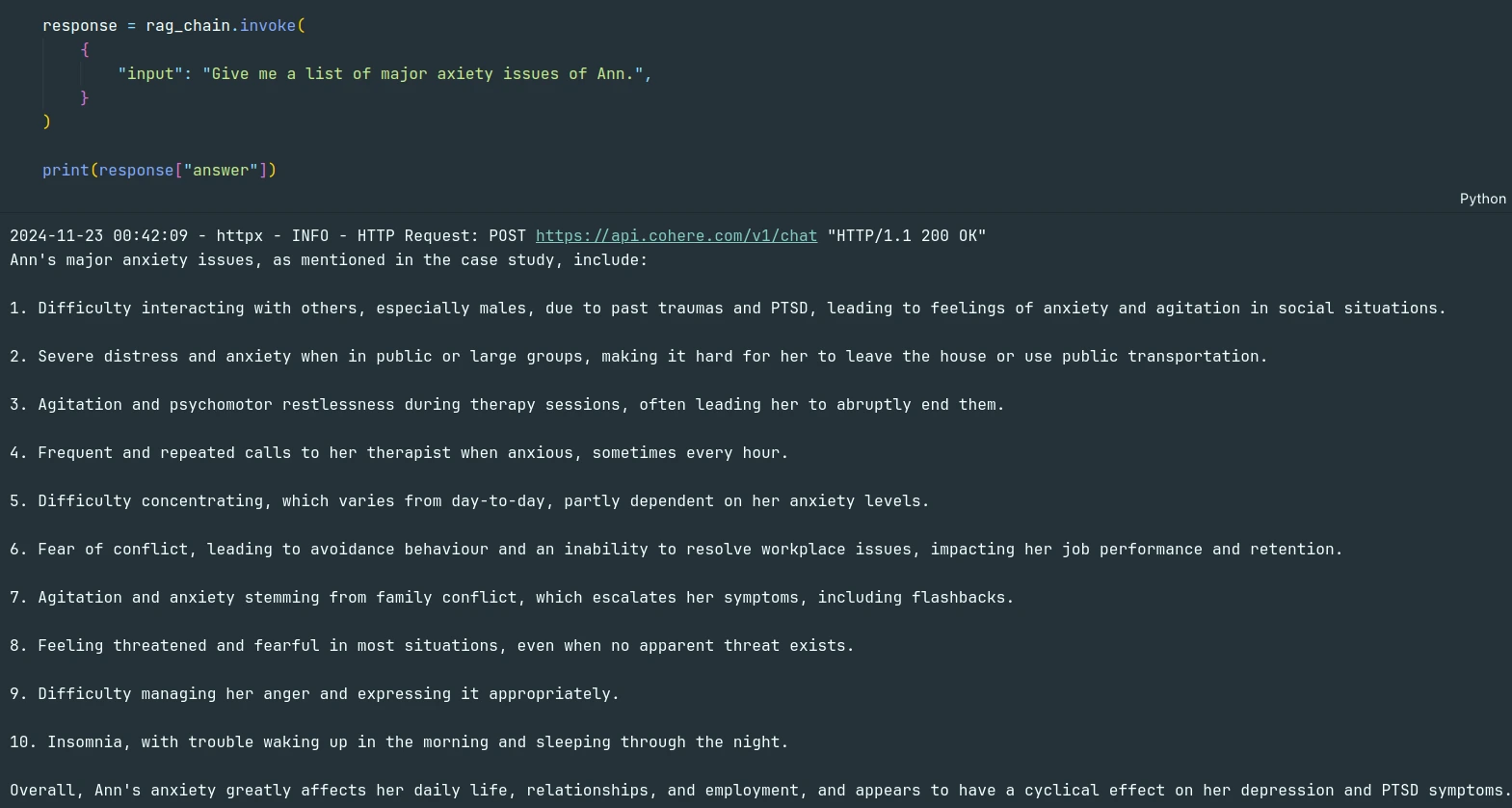
Now the pipeline is ready to take in user queries. The chatbot processes these queries through a retrieval chain, which involves retrieving relevant information and generating a response based on the language model and the provided prompt template. Let’s try the pipeline with some queries.
response = rag_chain.invoke({
	"input": "Give me a list of major axiety issues of Ann.",
 }
)
print(response["answer"])
The model was able to answer the query from the PDF document.
We can verify that using the sources.
Next, let’s utilize the history and the conversation database that we ingested and check if the LLM uses them to answer something not mentioned in the PDF.
response = rag_chain.invoke({
 "input": "Ann seems to have insomnia. What can she do to fix it?",
 }
)
print(response["answer"])
If we verify the answer with the sources, we can see LLM actually uses the conversation database to answer regarding the new query.
The construction of a medical chatbot, as outlined in this guide, represents a significant advancement in the application of AI and machine learning technologies within the healthcare domain. By leveraging a
sophisticated pipeline that integrates vector stores, embeddings, and large language models, we can create a chatbot capable of understanding and responding to complex medical queries with high accuracy and relevance. This chatbot not only enhances access to medical information for patients and healthcare seekers but also demonstrates the potential for AI to support and augment healthcare services. The flexible and scalable architecture of the pipeline ensures that it can evolve to meet future needs, incorporating new data sources, models, and technologies as they become available.
In conclusion, the development of this medical chatbot pipeline is a step forward in the journey
towards more intelligent, accessible, and supportive healthcare tools. It highlights the importance of integrating advanced technologies, managing data effectively, and maintaining conversation context, setting a foundation for future innovations in the field.
A. A medical chatbot provides medical advice, information, and support to users through conversational interfaces using AI technology.
A. It uses large language models (LLMs) and a structured database to process medical data and generate responses to user queries based on trained knowledge.
A. Vectorstores store vector representations of text data, enabling efficient retrieval of relevant information for chatbot responses.
A. Personalization involves tailoring the chatbot’s responses based on user-specific data, like medical history or preferences, for more accurate and relevant assistance.
A. Yes, ensuring the privacy and security of user data is critical, as medical chatbots handle sensitive information that must comply with regulations like HIPAA.
The media shown in this article is not owned by Analytics Vidhya and is used at the Author’s discretion.
A Machine Learning and Deep Learning practitioner with a background in Computer Science Engineering. My work interests include Machine Learning, Deep Learning, Computer Vision and NLP, with expertise in Generative AI and Retrieval Augmented Generation.
GPT-4 vs. Llama 3.1 – Which Model is Better?
Llama-3.1-Storm-8B: The 8B LLM Powerhouse Surpa...
A Comprehensive Guide to Building Agentic RAG S...
Top 10 Machine Learning Algorithms in 2026
45 Questions to Test a Data Scientist on Basics...
90+ Python Interview Questions and Answers (202...
8 Easy Ways to Access ChatGPT for Free
Prompt Engineering: Definition, Examples, Tips ...
What is LangChain?
What is Retrieval-Augmented Generation (RAG)?
Edit
Resend OTP
Resend OTP in 45s