The 8 best Abacus AI alternatives in 2026 (ChatLLM Teams tested)


Last edited June 16, 2026

Table of Contents
- Why teams are leaving Abacus AI (ChatLLM Teams) in 2026
- What we looked for
- The 8 best Abacus AI alternatives
- 1. eesel - best for customer support teams
- 2. ChatGPT Business - best for general team AI
- 3. Claude Teams - best for writing and coding
- 4. Perplexity Enterprise Pro - best for research-heavy teams
- 5. Microsoft 365 Copilot - best for teams deep in Microsoft's ecosystem
- 6. Notion AI - best for teams whose knowledge lives in Notion
- 7. Google Gemini - best for Google Workspace teams
- 8. Glean - best for enterprise AI search
- How the tools stack up
- Try eesel
Why teams are leaving Abacus AI (ChatLLM Teams) in 2026
On paper, Abacus AI's ChatLLM is one of the best-value AI subscriptions available. The $10/month Basic plan unlocks GPT-5.5, Claude Opus 4.8, Gemini 3.1 Pro, Grok 4.3, DeepSeek v4, FLUX image generation, and video generation via Sora 2 - all in a single interface. If you were previously paying $20 each for ChatGPT Plus and Claude Pro, ChatLLM feels like a revelation.
The friction starts when you actually use it.
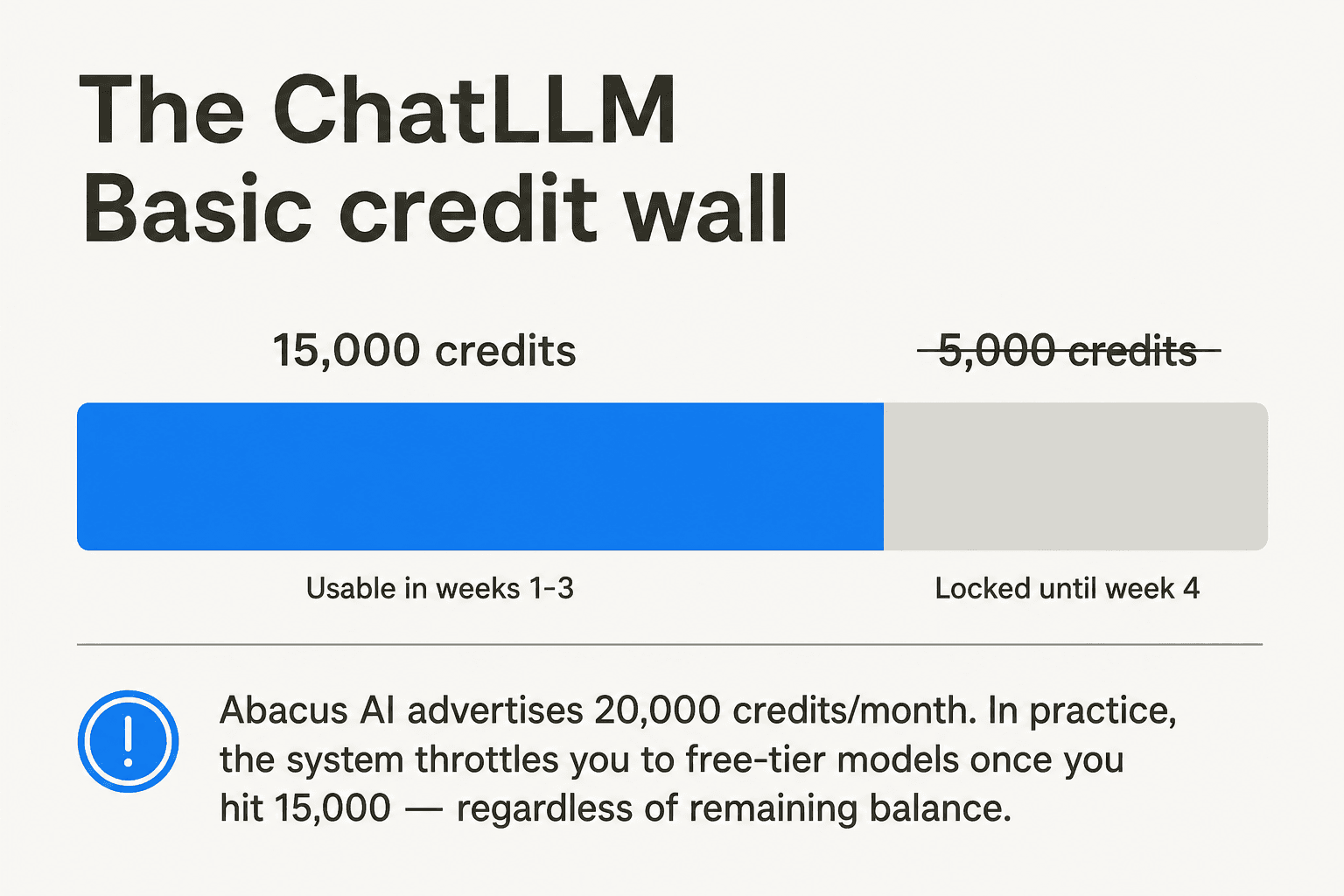
The 75% throttle wall. Abacus AI advertises 20,000 credits per month on the Basic plan. What the ChatLLM FAQ never mentions is that once you hit 15,000 credits - 75% of your allowance - the system forces you onto free models for the remainder of the month, holding the final 5,000 credits in reserve until the last week. In practice, your effective monthly budget is 15,000 credits, not 20,000.
"I have been using ChatLLM for a few months now. Even though I have about 5K more credits left it says 'you have used 75%' and since more than a week is remaining asks me to use free models. Then why don't they advertise it as 15K credits per month?"

Opaque credit consumption. The system doesn't disclose how many credits a given model call costs before you make it. Heavy models and agent conversations burn credits at rates users can't predict, and the credit counter updates with delays of up to an hour. One Reddit comparison put Abacus AI's $10 (20,000 credits) at roughly equivalent to $5 of API usage on OpenRouter, which reframes the value proposition.
The cancellation trap. Most subscription services let you cancel and retain access through the end of the billing period. Abacus AI cuts off access immediately on cancellation, with no pro-rated refund. Cancel mid-month, lose the rest of your paid period.
The OpenClaw incident (March 2026). A documented Reddit report described Abacus's OpenClaw product - accessible to all ChatLLM subscribers - silently consuming credits on every page refresh, exhausting one user's full monthly balance plus purchased top-ups in under a week without building anything. The user got no support response, and the complaint was deleted from the Abacus subreddit.
These aren't edge cases. Abacus AI holds a 3.7/5 rating on Trustpilot from 180 reviews, with credit opacity and support responsiveness as the two most consistent complaints. For the full picture of user feedback, the Abacus AI reviews post covers both sides.
What we looked for
We evaluated each tool against four criteria: pricing transparency (do you know what you're actually paying before the bill arrives?), team features (admin controls, shared workspaces, SSO), knowledge integration (can the AI learn from your company's own docs, tickets, or tools?), and compliance readiness (SOC 2, HIPAA availability). We weighted knowledge integration and pricing transparency heavily, since those are the two areas where Abacus AI falls shortest.
The 8 best Abacus AI alternatives
| Tool | Best for | Monthly price / seat | Free tier | Multi-model | Knowledge integration | SOC 2 | HIPAA |
|---|---|---|---|---|---|---|---|
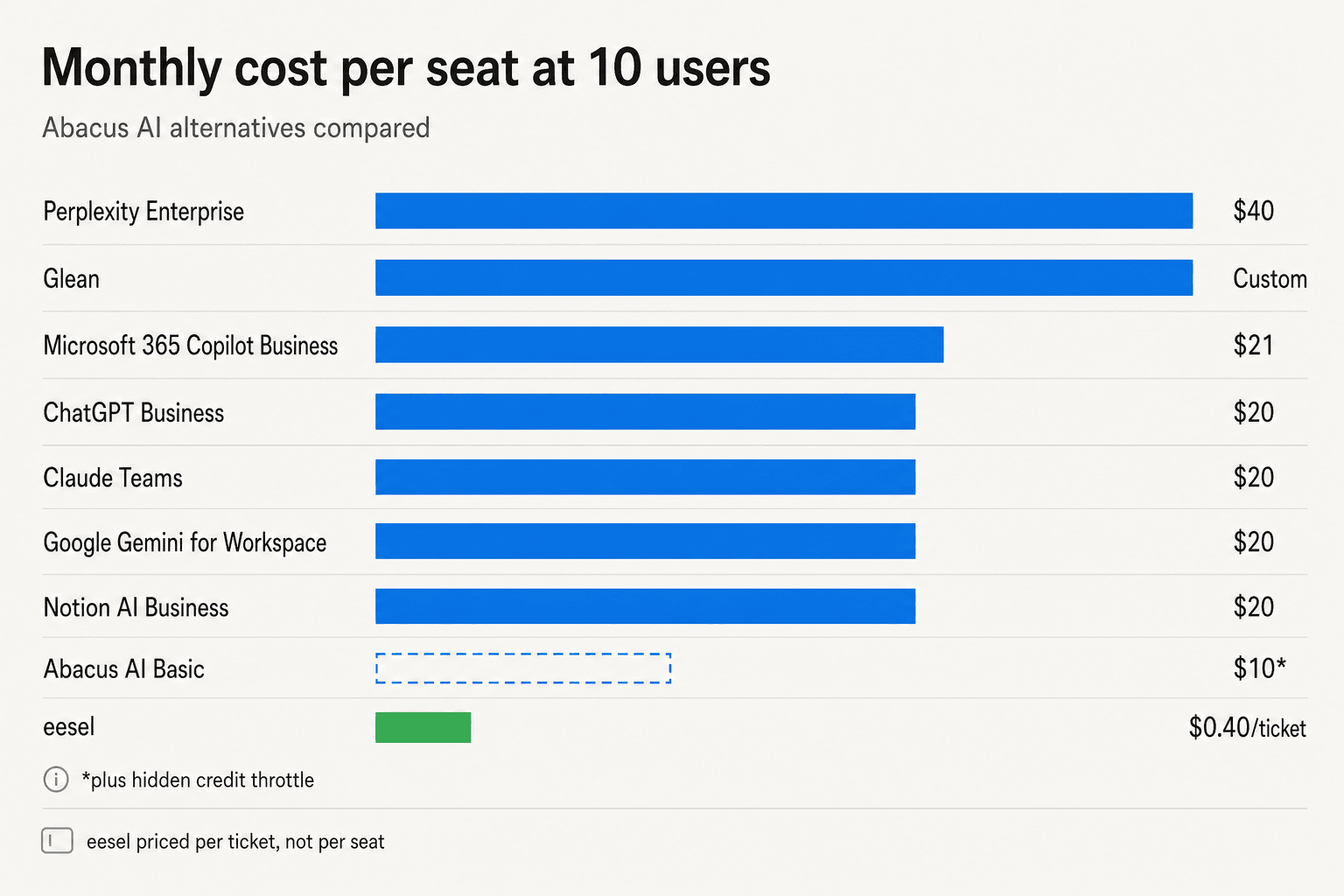
| eesel | Support teams | $0.40/ticket | $50 credit | No (helpdesk AI) | Yes - helpdesks, Slack, docs | In progress | Enterprise |
| ChatGPT Business | General team AI | $20 (annual) | Yes (limited) | Yes (OpenAI family) | Custom GPTs | Yes | Enterprise |
| Claude Teams | Writing & coding | $20 (annual) | Yes | Yes (Haiku/Sonnet/Opus) | Projects + files | Yes | Enterprise |
| Perplexity Enterprise | Research teams | $40 | Yes (5/day) | Yes (multi-model routing) | Spaces + file upload | Yes | Yes |
| Microsoft 365 Copilot | M365 orgs | $18–21 (annual) | Yes (Chat tier) | No (GPT-based) | Deep M365 integration | Yes | Yes |
| Notion AI | Notion-native teams | $20 (annual) | Trial credits | No (Claude + GPT) | Full Notion workspace | Yes | Enterprise |
| Google Gemini | Google Workspace teams | $19.99 (consumer) | Yes | Yes (Gemini family) | Gmail, Docs, Drive | Yes | Enterprise |
| Glean | Enterprise AI search | Custom | No | Yes | 100+ connectors, single-tenant | Yes | Yes |
1. eesel - best for customer support teams
eesel takes a different angle to Abacus AI entirely. Where ChatLLM gives you a chat interface to multiple AI models, eesel gives you an AI helpdesk agent that lives directly inside the tools your support team already uses - Zendesk, Freshdesk, HubSpot, Gorgias, Front, Slack - and handles tickets autonomously.
The distinction matters if your team's AI use case is primarily customer support. ChatLLM requires agents to open a separate tab, paste in ticket context, ask a question, and paste the answer back. eesel eliminates that loop entirely by learning from your actual ticket history, help docs, and macros, then drafting or sending replies directly in the ticket thread.
How eesel learns. The setup is different from most AI tools: eesel ingests your past resolved tickets alongside your help center, Notion docs, Confluence pages, or any connected knowledge source. That means from day one it's answering based on how your team has historically responded - not just on generic AI training data. Simulation mode lets you run the AI against a sample of old tickets to see coverage before you go live, then fill gaps.
The pricing model. This is where eesel most clearly diverges from Abacus AI. There are no seats, no credits, no monthly minimums. You pay $0.40 per resolved support ticket - one ticket, one charge, regardless of how many replies it took to close. Light tasks (dashboard lookups, simple questions) are free. You get $50 in free usage to start, no credit card required.
| Plan | Price | What's included |
|---|---|---|
| Free trial | $0 | $50 in free usage, all features |
| Regular task (ticket/chat) | $0.40 each | Full resolution, unlimited replies per ticket |
| Heavy task (blog post) | $4.00 each | Research + writing + SEO |
| Annual commit | 25% off | ≥$300/month committed annually |
| Enterprise | $1,000/month + usage | SSO, HIPAA, BAA, dedicated SE |
At 500 tickets/month, that's $200 - compare that to 20 seats of Abacus AI Basic at $200/month, where those 20 agents would also be fighting over a shared credit pool.
What real teams see. Gridwise resolved 73% of tier-1 requests in eesel's first month. Design.com runs 50,000+ Freshdesk tickets monthly across a multi-agent setup. Smava handles 100,000+ German-language Zendesk tickets per month - eesel's 80+ language support means it answers in the customer's language automatically.
What it's not. eesel isn't a general-purpose multi-model chat tool. It doesn't give you a blank canvas to ask GPT-5.5 to write a poem or debug code. If your team's primary AI need is knowledge-work tasks beyond support - content creation, coding, analysis - you'll still need something like ChatGPT or Claude alongside it. The helpdesk agent focuses tightly on what it does.
Verdict: If support tickets are why your team subscribed to Abacus AI, eesel is the better-targeted replacement at a fraction of the per-ticket cost. The usage-based model means a slow month is a cheap month, which Abacus AI's per-seat billing can't match. For teams whose AI needs extend beyond the helpdesk, pair eesel with one of the general-purpose alternatives below.
2. ChatGPT Business - best for general team AI
ChatGPT Business is the most natural upgrade path from Abacus AI's ChatLLM for teams that want a general-purpose AI workspace without the credits system. It's priced at $25/user/month (monthly) or $20/user/month (annual), putting it in the same ballpark as Abacus AI Pro ($20/seat) but with no throttle walls.
What you get is full access to OpenAI's model stack: GPT-5.5 Instant, GPT-5.5 Thinking, and Legacy models, all with unlimited messages (subject to abuse guardrails, but no credit-counting). The Business plan adds central billing, admin console, role-based controls, and a dedicated workspace where chats aren't used to train OpenAI models - a meaningful upgrade over using personal Plus plans.
The main limitation versus Abacus AI is model breadth: ChatGPT Business is GPT-centric. You won't get native Claude or Gemini access in the same interface. For teams that were specifically using ChatLLM to run Claude and Gemini queries alongside GPT queries, that's a real loss. Custom GPTs partially fill the gap for specialized use cases.
Context windows on Business tier are 54K (GPT Instant) to 256K (GPT Reasoning) - enough for most document-processing workflows. ChatGPT's agent mode and deep research have improved substantially, but these are GPT-only surfaces.
| Plan | Price | What's included |
|---|---|---|
| Plus (individual) | $20/month | Unlimited messages, GPT-5.5 Thinking, custom GPTs |
| Business | $25/user/month (monthly), $20/user/month (annual) | Central billing, admin console, no model training on content, SOC 2 |
| Enterprise | Contact sales | Custom terms, advanced compliance, dedicated support |
Verdict: ChatGPT Business is the clean, well-supported alternative for teams that mostly use ChatGPT in their existing Abacus AI workflow. The pricing is comparable, the billing is transparent, and OpenAI's enterprise compliance story is mature. If you need multi-provider model access, look at Perplexity or stay on ChatLLM. If you need a free ChatGPT trial before committing, the free tier is functional enough to evaluate.
3. Claude Teams - best for writing and coding
Claude's Team Standard plan at $20/seat annually or $25/seat monthly is the strongest alternative to Abacus AI for teams whose work is heavy on writing, editing, or software development.
Why Claude over ChatGPT for these use cases? The community verdict is consistent: Claude's prose is less formulaic, its instruction-following is tighter across long conversations, and its 200K context window makes it significantly better for document-heavy work - reviewing a full contract, refactoring a large codebase, processing a lengthy research paper. 78% of developers in a 2026 survey preferred Claude over ChatGPT for code tasks specifically, citing multi-file refactoring and code readability as standouts.
The Team Standard plan includes all three Claude models - Haiku 4.5 (fastest), Sonnet 4.6 (balanced), and Opus 4.8 (most powerful) - alongside Claude Code (the coding assistant), Claude Cowork (multi-step task delegation with file access), enterprise search, and SSO. All content is kept off Anthropic's training pipeline.
One honest caveat: Claude's reliability had a rough stretch from March through June 2026, with uptime dropping from 99.50% in January to below 98.93% in February and developer communities flagging quality regressions with the Opus 4.7/4.8 transition. If you're running production workflows that can't tolerate interruptions, factor in the reliability history. If you want to understand the full model stack, claude alternatives breaks down where each tier fits.
| Plan | Price | What's included |
|---|---|---|
| Free | $0 | All basic features, limited usage |
| Pro | $20/month (annual) | Claude Code, Cowork, unlimited projects, more models |
| Team Standard | $20/seat/year, $25/seat/month | All Pro features + central billing, SSO, admin controls, no model training |
| Team Premium | $100/seat/year | 5x more usage than Standard |
Verdict: For writing and coding teams, Claude Teams edges out ChatGPT Business on prose quality and context window size, at the same annual price point. The reliability history is worth watching, but for most day-to-day workflows the output quality is strong. Read the full Claude AI review if you're considering this switch.
4. Perplexity Enterprise Pro - best for research-heavy teams
Perplexity Enterprise Pro costs more than Abacus AI - $40/seat/month vs $10/seat for ChatLLM Basic - but solves a problem ChatLLM never really tackled: research with live web access and verifiable sources.
Where Abacus AI gives you a multi-model chat interface, Perplexity gives you a multi-model search engine. Every answer is grounded in current web content, with clickable inline citations you can verify in seconds. The system automatically routes each query to the best model for the task - GPT-5.4, Gemini 3.1 Pro, Claude Sonnet 4.6, or Perplexity's own Sonar - without requiring you to manually select which AI to use.
The Perplexity Computer feature (Pro/Max plans) adds agentic automation: multi-step web research, browser tasks, data extraction, and integration with Gmail, Slack, Notion, and 100+ other tools. For regulated teams, Enterprise Pro includes SOC 2 Type II compliance, and Pro/Enterprise queries are explicitly not used to train third-party models. Premium data sources - PitchBook, Statista, Crunchbase - are accessible on Enterprise tiers, which makes Perplexity a viable analyst tool.
Where Perplexity isn't the right fit: image generation is weak compared to DALL-E or Midjourney, and the mobile apps have reduced feature parity with the desktop/web experience.
| Plan | Price | Key features |
|---|---|---|
| Free | $0 | ~5 Pro searches/day |
| Pro | $20/month ($17/month annual) | 300+ searches/day, multi-model, Spaces, file uploads |
| Enterprise Pro | $40/seat/month | SOC 2, team SSO, no model training, premium data sources |
| Enterprise Max | $325/seat/month | Unlimited deep research, advanced security |
Verdict: If competitive intelligence, market research, news monitoring, or sourced factual work is what your team used Abacus AI for, Perplexity Enterprise Pro is a direct upgrade. At $40/seat it's pricier, but the citation layer alone eliminates a lot of the fact-checking overhead that uncited AI outputs create. Check out our full Perplexity pricing breakdown for the detailed tier comparison.
5. Microsoft 365 Copilot - best for teams deep in Microsoft's ecosystem
Microsoft 365 Copilot is the strongest argument for teams that are already paying for Microsoft 365. At $18/user/month (annual) - currently on a limited-time discount from $21 through June 2026 - Copilot Business sits below Abacus AI Pro ($20/seat) while embedding AI directly into Word, Excel, PowerPoint, Teams, and Outlook.
The core advantage over Abacus AI is context: Copilot already knows your emails, calendar, Teams meetings, documents, and spreadsheets. When you ask it to summarize last week's customer calls, draft a follow-up based on an email thread, or analyze the Q2 budget spreadsheet, it doesn't need you to paste in the context - it already has it. That embedded context is what standalone AI tools can't replicate.
Copilot Studio lets organizations build custom agents connected to business data and internal workflows without any coding, which is the cleaner enterprise alternative to Abacus AI's agentic features. Pre-built agents (Researcher, Analyst, Facilitator) are included at the Business tier.
The honest limits: Copilot only shines if your team lives in Microsoft 365. Outside the M365 ecosystem, ChatGPT Plus is more capable at the same $20/month price point. Copilot also struggles with datasets over 150 rows in Excel, and session quality degrades after 20–30 exchanges in Teams. And despite Microsoft's 116% ROI claims, only 35.8% of eligible users actually use Copilot after deployment in practice - change management matters as much as the tool itself.
| Tier | Price | Coverage |
|---|---|---|
| M365 Copilot Chat | Free (included with M365) | Web-grounded chat, select app integrations |
| Copilot Business | $18/user/month (annual) | Word, Excel, PowerPoint, Teams, Outlook, Copilot Studio |
| Copilot Enterprise | $30/user/month (annual) | All Business + OneNote, full AI search, voice, no metered agent costs |
Verdict: If your organization is already paying for Microsoft 365, Copilot Business is the most seamless AI upgrade you can make - no context-switching, no new tab. If you're not in the M365 world, the $18–30/seat price is hard to justify against ChatGPT or Claude. Read the Microsoft Copilot overview for the full breakdown.
6. Notion AI - best for teams whose knowledge lives in Notion
Notion AI sits in a different category from Abacus AI entirely - it's not trying to be a general-purpose AI chat tool. It's an AI layer over your own knowledge base, and that contextual focus is its strongest feature.
If your team's wiki, meeting notes, project docs, databases, and company knowledge all live in Notion, Notion AI can query across all of it natively. Ask "what were the outcomes of last month's sprint retros?" and it pulls from actual Notion pages - not web results, not generic training data. The Notion Agent handles multi-step autonomous work across workspace content and connected apps (Slack, GitHub, Google Drive), and AI Autofill can batch-populate database properties across hundreds of rows in one command.
Full Notion AI requires the Business plan at $20/seat/month (billed annually) - $240/year, the same as ChatGPT Plus. There's no standalone AI add-on below Business, and upgrading from Notion Plus ($10/seat) requires a full plan jump. The previously-available $10/month AI add-on was removed when Notion folded AI into Business.
Community reception has improved. A September 2025 Reddit post titled "Notion AI is finally worth the upgrade" marked a turning point - the batch database editing agent was the most-cited killer use case. Meeting Notes (automatic transcription and summary) is consistently the most praised feature. Where Notion AI falls short: the AI doesn't reliably index all database entries in large knowledge bases, and the mobile AI experience is underwhelming.
| Plan | Price | AI included |
|---|---|---|
| Free | $0 | Trial credits only |
| Plus | $10/seat/month (annual) | Trial credits only |
| Business | $20/seat/month (annual) | Full Notion AI + Agent |
| Enterprise | Custom | Full AI + advanced compliance |
Verdict: Notion AI makes sense for teams already on Notion Business or willing to upgrade for the full workspace AI experience. The Notion AI vs ChatGPT comparison is worth reading if you're deciding between a workspace-native AI and a standalone chat tool. Read our full Notion AI review and Notion pricing guide for the complete picture.
7. Google Gemini - best for Google Workspace teams
Google Gemini mirrors Microsoft Copilot's logic: deepest value if you're already in the ecosystem, more limited if you're not. For teams running Gmail, Google Docs, Drive, Meet, and Sheets, Gemini's AI features land where the work actually happens - summarizing email threads, drafting in Docs, analyzing spreadsheet data, and generating meeting summaries in Meet.
The model lineup is strong. Gemini 3.1 Pro's 1M-token context window is the largest available in any mainstream team plan - useful for reviewing long contracts, codebases, or research corpora. Gemini 3.5 Flash leads on agentic benchmarks (76.2% on Terminal-bench 2.1). For Google Workspace users, the AI is included in existing plans rather than adding a separate seat fee, making the effective incremental cost minimal.
The consumer AI Pro plan costs $19.99/month and includes Gemini 3.1 Pro, Google Flow for automation, Deep Research, Jules coding agent, Gemini in Gmail and Docs, and 5TB storage. For Workspace teams, Gemini is now bundled into Workspace Business and Enterprise tiers, so existing Google Workspace customers may already have access.
Where Gemini falls short as an Abacus AI replacement: it's Google-first, meaning it works best as a complement to your existing Google workflows rather than a general-purpose multi-model assistant. Users who specifically valued ChatLLM's one-tab access to Claude, Grok, and DeepSeek alongside GPT won't find that in Gemini's interface.
| Plan | Price | Best for |
|---|---|---|
| Free | $0 | Basic Gemini access, limited features |
| AI Plus | $7.99/month | 2x usage, Gemini 3.1 Pro in apps, family sharing |
| AI Pro | $19.99/month | 4x usage, Deep Research, Jules coding agent, 5TB |
| AI Ultra | $99.99–199.99/month | Power users, Gemini Deep Think, highest limits |
Verdict: The logical choice for teams that live in Google Workspace and want AI woven into Gmail, Docs, and Sheets without installing anything new. As a pure multi-model AI alternative to Abacus AI, it's weaker - the model breadth and tool-switching ability of ChatLLM Teams isn't replicated here. But if you're paying for Google Workspace anyway and want AI on top, the incremental cost is compelling.
8. Glean - best for enterprise AI search
Glean occupies the most distinct position on this list - it's the only tool here that's purely enterprise-grade, custom-quoted, and built around a single-tenant deployment in your own cloud.
Where Abacus AI's ChatLLM Teams is a bring-your-own-context AI chat tool (you copy in documents and ask questions), Glean connects to 100+ enterprise systems - Confluence, Jira, Salesforce, Slack, Google Drive, SharePoint, Zendesk, and more - and builds an Enterprise Graph that maps how your organization's knowledge relates. When an engineer asks "what are the latest API deprecation notices from the platform team?", Glean searches across engineering docs, Slack messages, Jira tickets, and Confluence pages simultaneously, with permission-aware results (users only see content they're authorized to access).
Glean Search, Glean Assistant, and Glean Agents sit on top of this graph. The Assistant handles proactive intelligence - surfacing relevant updates before you ask - content creation, data analysis, and work execution across systems. The agent builder lets teams build reasoning-based agents in natural language. Zillow runs 3,400+ agents through Glean; Ericsson runs 2,700+.
The compliance posture matches enterprise expectations: SOC 2 Type II, ISO 27001, GDPR, TX-RAMP Level 2, all running in your single-tenant cloud. That's a fundamentally different security model from Abacus AI's shared cloud, and it's the reason Glean reviews consistently cite it as the enterprise choice.
The trade-off is everything else. Glean has no public pricing - every deal is a custom enterprise quote, routed through a sales demo. There's no free tier, no self-serve trial. Secondary sources historically cite around $40–50/seat/month at enterprise minimums, but Glean doesn't confirm any number publicly.
| Feature | Glean |
|---|---|
| Pricing | Custom / contact sales (no public pricing) |
| Deployment | Single-tenant cloud (your environment) |
| Connectors | 100+ (native + API + web history) |
| Compliance | SOC 2 Type II, ISO 27001, GDPR, TX-RAMP |
| Free trial | No |
Verdict: Glean is the right choice for organizations that have already outgrown multi-model chat tools and need permission-aware enterprise AI search across their full tool stack. If your team's problem is "we can't find things across Confluence, Jira, Salesforce, and Slack simultaneously," Glean solves it better than anything else on this list. If you're a smaller team looking for a ChatGPT-style replacement, the sales-only model and enterprise pricing make it a poor fit.
How the tools stack up
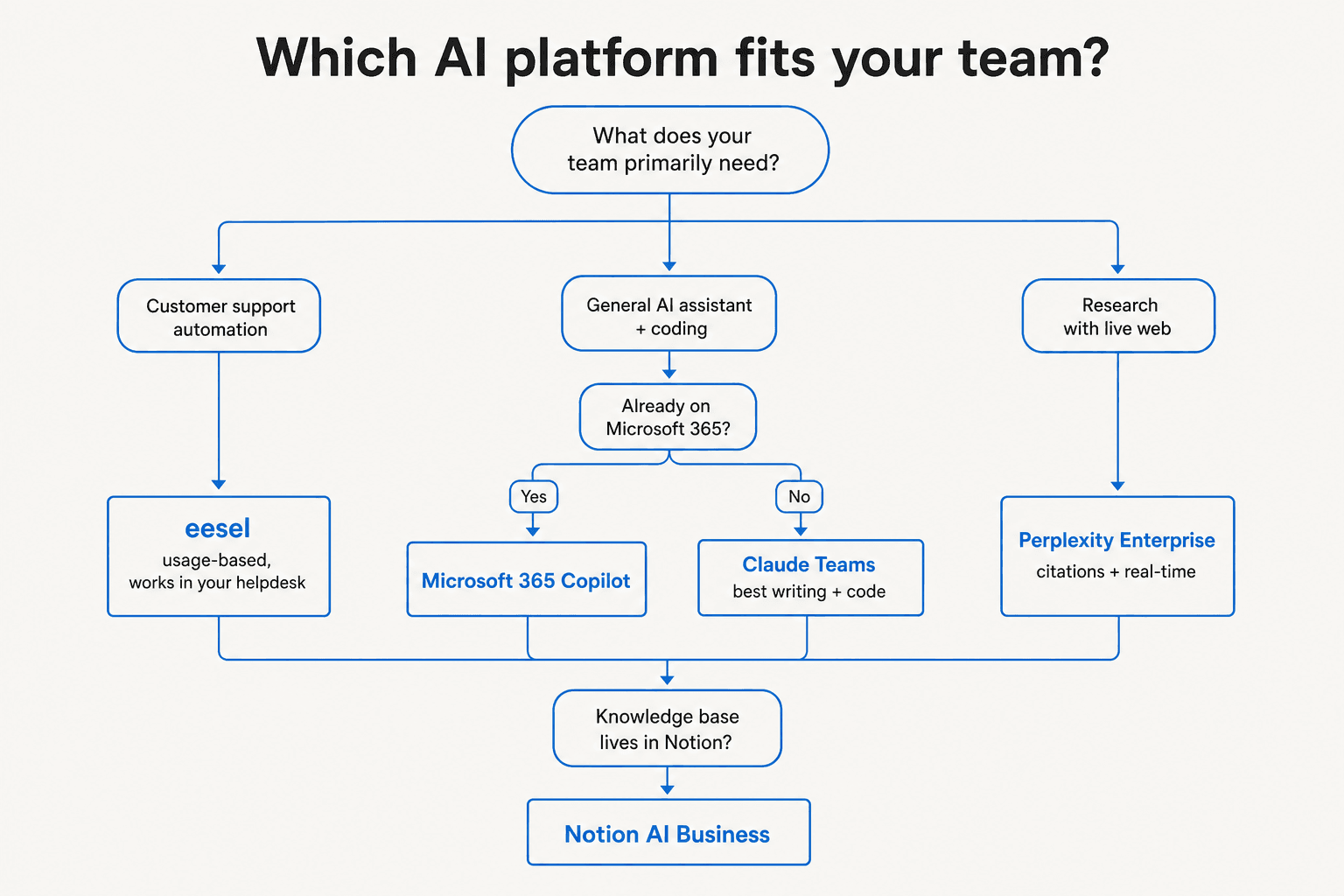
The framing that makes sense for your team depends on what Abacus AI was actually solving for:
- "We need AI in our helpdesk" → eesel. It's built for exactly this, charges per ticket not per seat, and connects to the tools you already use via 100+ integrations.
- "We need general AI chat for the whole team" → ChatGPT Business or Claude Teams, depending on whether your work skews toward reasoning/code (Claude) or document creation/GPT ecosystem compatibility (ChatGPT).
- "We need research with real-time sources" → Perplexity Enterprise Pro. Nothing else on this list gives you the same citation-first, multi-model-routed answer quality for live web queries.
- "Our work lives in Microsoft 365 or Google Workspace" → Copilot Business or Gemini, respectively. Both are harder to justify outside their native ecosystems.
- "We need AI search across all of our company's tools" → Glean, if you have an enterprise budget and a sales appetite.
Try eesel

If your team is using Abacus AI ChatLLM Teams primarily to handle support tickets, eesel is the more direct replacement. It connects to Zendesk, Freshdesk, HubSpot, Gorgias, Front, and Slack, learns from your existing resolved tickets and help docs on day one, and handles conversations autonomously - drafting replies, triaging tickets, flagging escalations - with confidence-based routing that keeps humans in the loop when the AI isn't sure.
The usage-based model means you're not paying for seats that open ChatLLM once a week. You pay $0.40 for each ticket resolved, nothing for slow months, and the $50 free trial is free with no credit card. Try eesel.
Frequently Asked Questions

Share this article

Article by
Riellvriany Indriawan
Riell is a designer and writer at eesel AI with about two years of experience researching CX platforms, AI chatbots, and helpdesk software. She combines her design background with a sharp eye for how these tools actually look and feel in practice — making her comparisons unusually visual and user-focused.