Can AI give you CSAT and support analytics? Yes - here's how


Last edited June 10, 2026

Table of Contents
- The 5% problem your CSAT dashboard isn't showing you
- What AI CSAT actually is
- The full analytics stack: metrics AI surfaces beyond CSAT
- How AI actually moves the CSAT number
- AI CSAT analytics in the major helpdesks
- Reading the metrics together: the trap most teams fall into
- Three things that actually move AI CSAT
- Try eesel
The 5% problem your CSAT dashboard isn't showing you
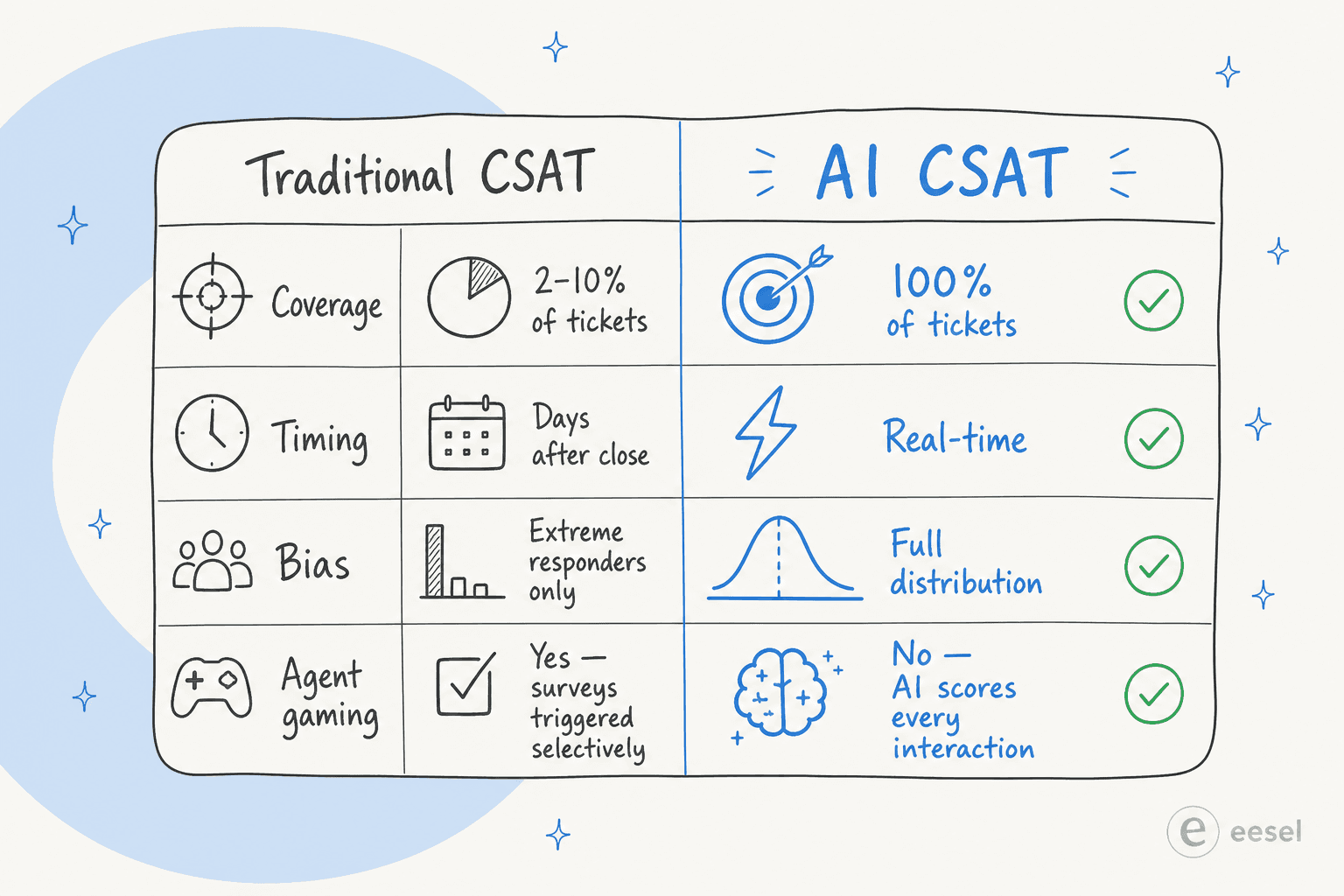
Here's the honest version of how most support CSAT programs work: an agent closes a ticket, an automated email goes out, and somewhere between 2% and 10% of customers actually respond.
That's the entire data set your dashboard is built on.
The customers who respond aren't representative. Delighted advocates respond. Furious detractors respond. The vast, satisfied middle - the people who got their question answered, thought "fine, that was OK," and moved on - almost never respond. So your 82% CSAT is really a snapshot of your loudest customers, weighted toward edges you can't always control.
It gets worse. Research from Cresta documents what practitioners already know: agents often trigger surveys selectively, after they've already gauged that sentiment is positive. The survey isn't measuring the support experience - it's measuring which interactions the agent felt good enough to ask about. That's not a metric; it's a curated highlight reel.
"Agents often trigger surveys at their own discretion, often only after they've gauged that sentiment is positive, ultimately distorting reality."
Cresta, The CSAT Mirage
Survey fatigue compounds the problem. Response rates fall as volume increases. CSAT surveys sent when a conversation closes lose the emotional texture of the interaction - customer memory fades, and incidental mood factors contaminate the rating. And because short surveys lose depth while long surveys lose respondents, there's no clean fix within the traditional format.
The implication is important: when your customer satisfaction score isn't moving, the problem might not be the support experience. It might be the measurement.
What AI CSAT actually is
Predictive CSAT - also called inferred CSAT, model-scored CSAT, or AI CSAT - uses machine learning to generate a satisfaction score for every support interaction, whether or not a customer responds to a survey.
The model is trained on historical conversation data paired with actual survey responses. Once calibrated, it predicts satisfaction with 80-90% accuracy against human-verified ratings. Some deployments reach 95% match rate.
What the model analyzes falls into three categories:
Linguistic and NLP signals:
- Sentiment trajectory across the conversation - does frustration increase or resolve?
- Specific language markers: cancellation intent, repeated phrases, escalation requests ("let me speak to a manager")
- Whether the customer's actual question received a direct answer vs. a deflection
- Tone shifts from opening to closing message
Behavioral and operational signals:
- Number of agent handoffs - each reassignment measurably decreases satisfaction
- Response speed and wait times relative to customer expectations
- Whether the customer contacted support again within 7 days (a strong churn signal)
- Whether the customer abandoned mid-conversation without a resolution
Resolution quality signals:
- Was the issue actually closed, or just marked solved?
- Did the customer restate the problem at any point (context loss during handoff)?
- Did the agent acknowledge the customer's situation before jumping to solutions?
Some platforms score in real time during the conversation - surfacing supervisor alerts when frustration or cancellation intent spikes, enabling intervention before escalation. Others batch-score after closure. Either way, the output is a satisfaction estimate for every single interaction, not a 5% sample.
A concrete example of the scale difference: one enterprise health company went from scoring 5% of support calls to 100% call scoring after deploying AI QA tools - and immediately started surfacing pattern-level insights that individual call reviews had never revealed. Not because support got dramatically better overnight, but because they could finally see all of it.
The full analytics stack: metrics AI surfaces beyond CSAT
CSAT is the headline number. The metrics that explain why CSAT is what it is - and what to actually change - are the ones AI makes visible automatically.
First contact resolution: the strongest CSAT predictor
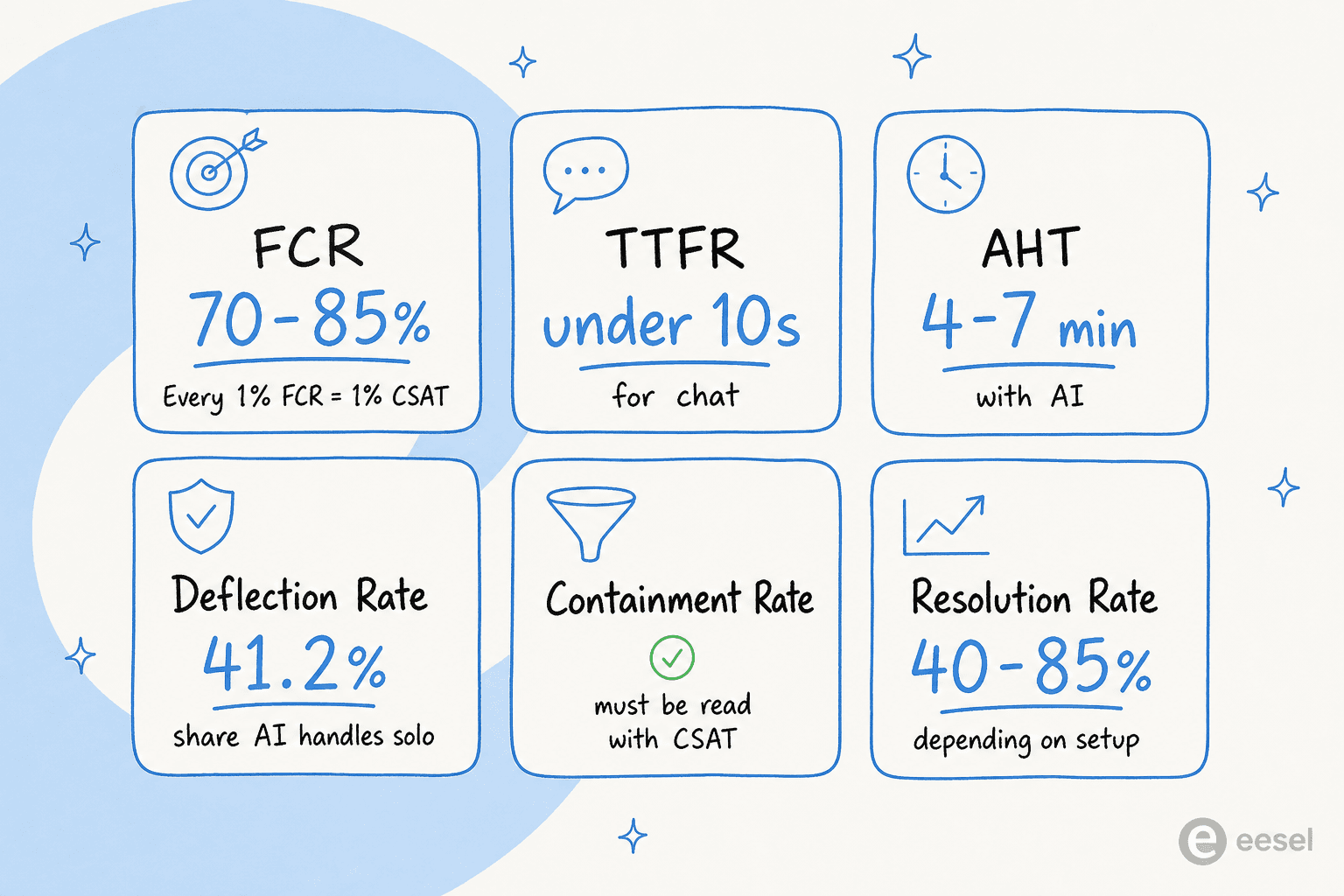
FCR measures whether a customer's issue was resolved on the first attempt, without requiring a follow-up contact. The relationship to CSAT is nearly linear: every 1% FCR improvement yields approximately 1% CSAT improvement - SQM Group's research holds this consistently across industries and verticals.
The industry benchmark for FCR sits at 70-79% for general support, with top performers hitting 85%. AI moves this number by eliminating the root causes of repeat contacts: 24/7 availability removes the "I'll call back during business hours" loop; consistent knowledge-backed answers eliminate the "I got a different answer last time" problem; proper ticket triage ensures the right team gets the ticket first.
Pre-AI FCR typically runs 60-75%. Post-AI FCR runs 70-85%, with some deployments higher depending on ticket complexity and knowledge base quality.
Time to first response
Time to first response (TTFR) is how long a customer waits before hearing anything back. The average email support response time is 12 hours 10 minutes - but customers expect under 4 hours for B2B email, and under 10 seconds for live chat. At 5-10 seconds, live chat CSAT reaches 84.7%. Beyond 30 seconds, it drops sharply.
AI eliminates this gap entirely for automated channels: the first response arrives in seconds. For human-reviewed queues, AI-assisted ticket triage and ticket summarization compress the context-switching time before a human replies.
Average handle time
AHT covers the full resolution window: talk or chat time, hold time, and post-interaction wrap-up. General support benchmarks run 6-10 minutes pre-AI; AI-assisted support typically lands at 4-7 minutes; fully AI-native ticket resolution runs under 3 minutes.
One nuance worth knowing: AHT initially increases when AI first deploys, because AI absorbs easy tickets and leaves humans with the harder ones. Over a 60-90 day ramp, AHT falls as agents receive AI-generated context and draft replies on the remaining complex tickets too. AI-assisted support improves throughput by 13.8% more inquiries per hour; combined front-of-call and back-of-call AI deployment achieves 25-50% AHT reduction at maturity.
Deflection rate
Deflection rate measures the share of support requests handled entirely by AI or self-service that never reach a human agent. Vendor claims tend to headline 70-80% deflection. Independent Zendesk benchmark data is more grounded: the median deflection rate is 41.2%, the top quartile is 58.7%, and the bottom quartile is 22.4%. E-commerce and telecom skew higher; B2B SaaS and fintech skew lower because the tickets are harder.
Deflection rate matters for cost per resolution. AI resolutions cost around $0.62 on average versus $7.40 for human-handled tickets. But read it alongside CSAT - high deflection with declining CSAT means the AI is closing tickets without solving them.
Containment rate
Containment rate is the share of conversations that start with AI and complete without escalating to a human. The target range for AI-powered support is 70-90%.
The trap: containment rate alone is a vanity metric. A bot that deflects confused customers into giving up has 100% containment and catastrophic CSAT. Containment only means something when read alongside resolution quality and CSAT. If containment rises and CSAT rises, the AI is solving problems. If containment rises and CSAT falls, the AI is blocking access to help.
Resolution rate
Resolution rate is the share of tickets the AI resolves correctly - not just closes, but actually solves. A realistic starting point is 40-50% for most deployments; advanced systems with well-organized knowledge bases and tuned escalation rules reach 70-85%.
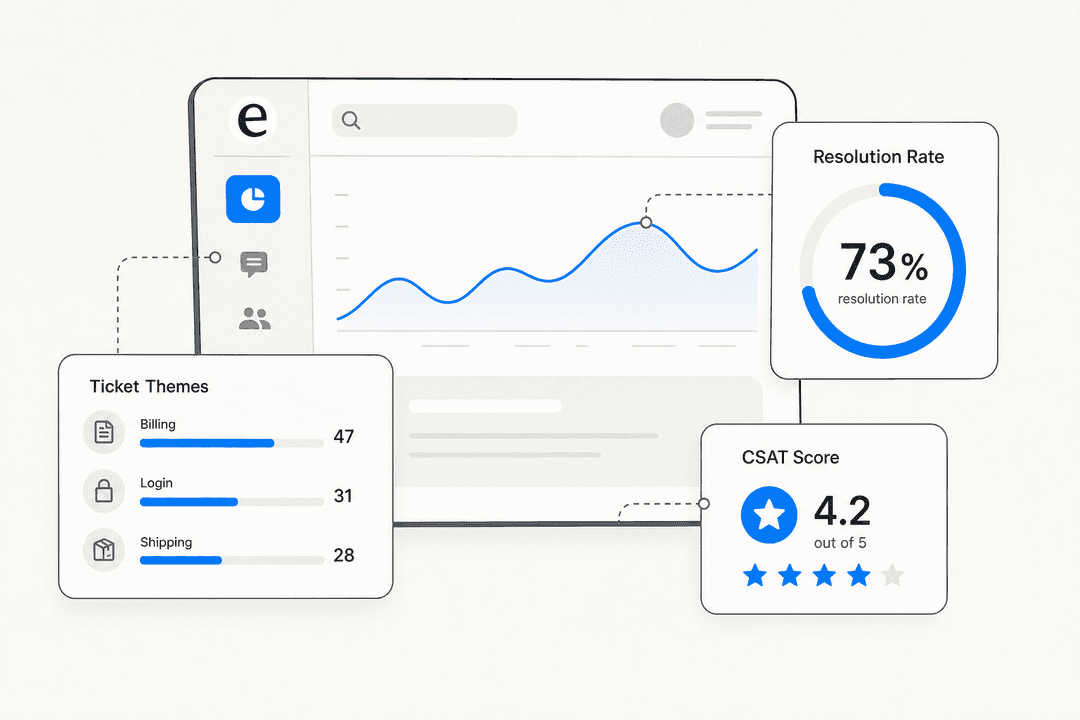
This is the metric that honest AI vendors lead with. Gridwise, a gig-economy driver analytics platform on Zendesk, reported eesel resolving 73% of their tier-1 requests in the first month - results visible within a 7-day trial.
"In the first month, eesel is resolving 73% of our tier 1 requests. Our team implemented and achieved results quickly during our 7-day trial. Responses are simple to fix and adjust. The platform even includes automations for ticket tagging, assignment, and status updates!"
Kim Simpson, Gridwise (G2 review)

How AI actually moves the CSAT number
Measuring CSAT more accurately doesn't inherently improve it. What improves CSAT is what AI does to the support experience itself.
Faster response time is the most direct lever. Customers who wait under 10 seconds for a first response rate their experience 8-14 points higher than customers who wait 30+ seconds. AI-first response eliminates wait time on automated channels, and AI draft replies compress human response time on the rest.
Consistent, accurate answers eliminate the repeat contact cycle that destroys FCR and CSAT simultaneously. When every agent - and every AI - draws from the same knowledge base and applies the same escalation rules, customers stop hearing conflicting information. AI ticket classification and intelligent triage get tickets to the right team faster, reducing the "passed around" experience that tanks satisfaction.
Warm escalations - AI chat escalation that passes the full conversation history, customer context, and AI-generated summary to the human taking over - prevent the most common CSAT-killer in hybrid support: being forced to re-explain the problem to a new person. Research consistently shows that customers who receive a warm handoff rate the human interaction higher than customers who got a cold transfer for the same resolution quality.
Pattern detection at scale is the insight layer traditional CSAT can't provide. When AI is scoring 100% of interactions, you can see that a specific product category generates frustration at 3x the rate of others - that 40% of escalations happen because the AI doesn't know how to handle refund disputes over $100, or which agents close tickets quickly but generate the most reopens. None of this is visible in a 5% sample.
"eesel AI streamlines our workflow, boosts productivity, and ensures a higher level of service consistency."
Melissa Ryan, Zendesk Administrator, Discuss.io (Zendesk Marketplace review)

AI CSAT analytics in the major helpdesks
Zendesk
Zendesk's native analytics live in Zendesk Explore, which surfaces CSAT measurement and reporting, first reply time, ticket volume, and AI agent resolution rates. You can configure scheduled reports and email delivery and build calculated metrics across the dashboard. Zendesk performance metrics - including first reply time and tickets solved - all surface through Explore natively.
Where Explore falls short: it doesn't generate predictive CSAT, doesn't surface escalation quality, and doesn't show resolution quality broken down by ticket type. Zendesk AI agent analytics covers some of this for native Zendesk AI, but third-party integrations extend the picture significantly. Zendesk AI agent metrics to track automated resolutions and escalation rules give you the inputs; eesel's dashboard combines them with resolution quality scoring in a single view.
Freshdesk
Freshdesk's Freddy AI handles basic analytics through its native reports module - CSAT scores, ticket volume, first response time, and resolution time are all available. Freshdesk Freddy AI pricing ties to the Copilot and Autopilot tiers, with analytics depth increasing at higher plan levels.
The limitation is similar to Zendesk: Freddy Analytics shows what happened, not why. Resolution quality scoring and predictive CSAT aren't natively available. Connecting an advanced AI agent to Freshdesk is the path to richer analytics - eesel's resolution tracking layers on top of Freshdesk's native data rather than replacing it.
Gorgias
Gorgias's analytics focus on e-commerce metrics: revenue attributed to support, CSAT from post-interaction surveys, and automation rate - the share of tickets handled without human intervention. Gorgias AI Agent 2.0 added more automated-ticket metrics, but predictive CSAT scoring isn't part of the native suite.
For ecommerce helpdesk teams that want the full analytics stack, eesel's integration carries resolution quality tracking and the containment-rate-plus-CSAT view that Gorgias's native reports don't surface.
Reading the metrics together: the trap most teams fall into
Here's where most AI support deployments go wrong: they optimize for one metric and break another.
High deflection, falling CSAT - the AI is handling tickets but not satisfying customers. Common causes include knowledge gaps (confident but wrong answers), missing escalation triggers (tickets that should reach humans are staying with AI), or chatbot escalation failures where context is lost on handoff.
Improving AHT, flat FCR - the AI is helping agents work faster, but the underlying routing issues mean customers still contact again. Fixing routing and knowledge base completeness matters more than shaving seconds off handle time.
Rising containment, unknown CSAT - the most dangerous combination. If the AI is completing conversations but the customer left frustrated without escalating, you have no signal. This is exactly where AI CSAT scoring fills the gap - it covers the silence that would otherwise register as "no complaint, must have been fine."
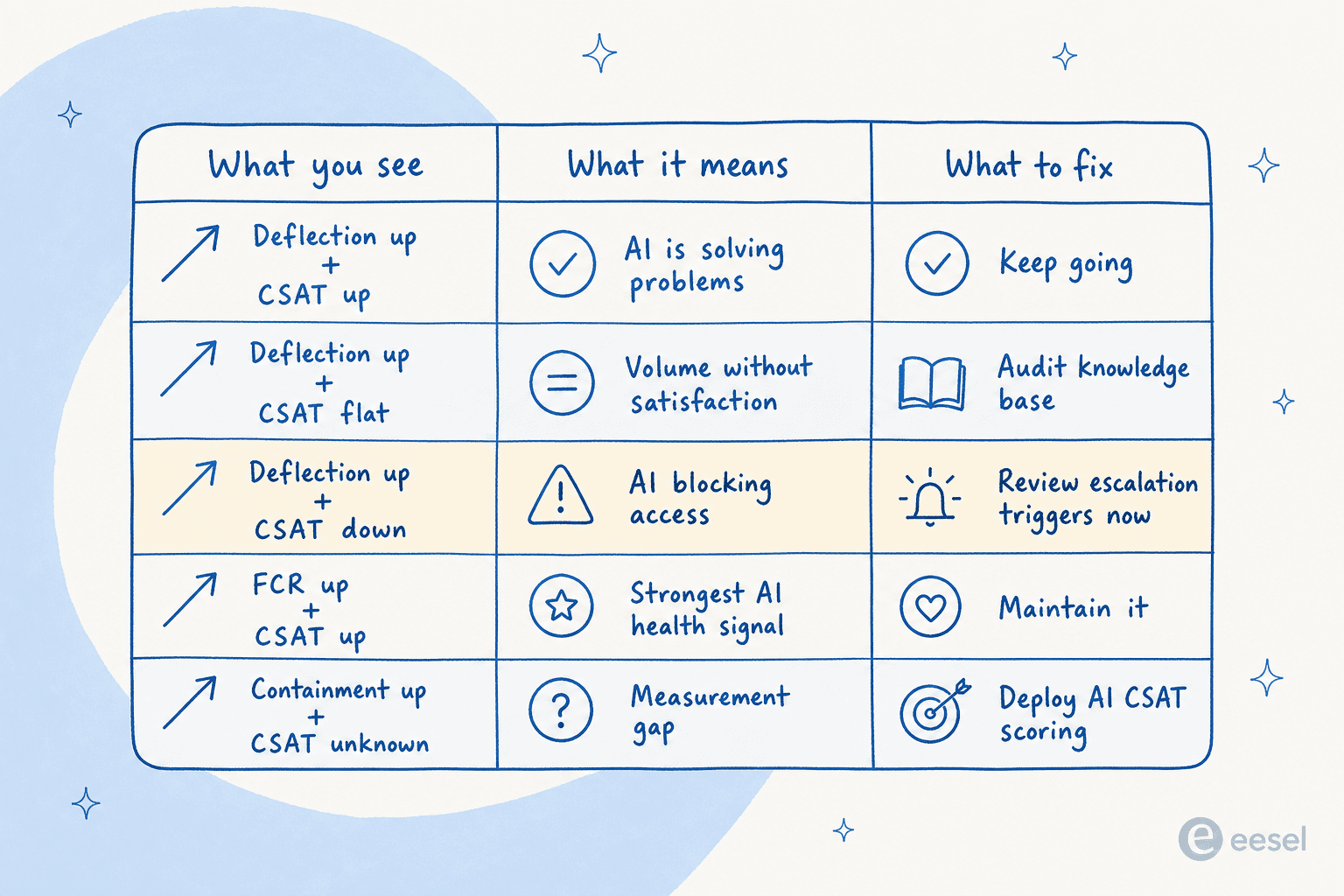
Here's how to read the signals together:
| What you see | What it means | What to fix |
|---|---|---|
| Deflection up + CSAT up | AI is solving problems | Keep going; refine escalation thresholds |
| Deflection up + CSAT flat | AI handles volume, not satisfaction | Audit knowledge base; tune confidence thresholds |
| Deflection up + CSAT down | AI is blocking access to humans | Review escalation triggers immediately |
| FCR up + CSAT up | Strongest signal of AI health | Document what's working; maintain it |
| AHT down + reopens up | Agents closing tickets prematurely | Review closure criteria |
| Containment up + CSAT unknown | Measurement gap | Deploy AI CSAT scoring to fill it |
The cost per resolution comparison only makes sense inside this context. An AI that deflects 60% of tickets at $0.62 per resolution looks excellent until you discover the re-contact rate is 40% - meaning those "resolved" tickets are generating more human-handled work downstream.
The other common trap is reading AI vs. human customer support as an either/or. The best customer service AI platforms use AI to handle volume and maintain consistent baselines, and humans for complex, high-stakes, emotionally loaded tickets - where the AI agent vs. human agent cost comparison breaks down because the human interaction genuinely matters.
Three things that actually move AI CSAT
1. Prioritize FCR over containment.
Every 1% FCR improvement yields 1% CSAT. Containment rate is an input; CSAT is the output. Set your routing rules, knowledge base, and escalation thresholds to maximize correct resolutions on the first attempt - not to keep conversations inside the bot. AI for tier-1 support deflection only works as a CSAT driver when the deflected tickets were genuinely solvable by AI in the first place.
2. Audit escalation quality, not just escalation rate.
AI chat escalation is where CSAT is won or lost in hybrid deployments. A clean escalation with full context recovers customer satisfaction even after a frustrating AI interaction. A cold transfer that loses context multiplies the frustration. Tracking escalation quality separately from escalation rate tells you whether your handoffs are working. The best AI agent assist tools surface this as a dashboard metric, not something you calculate manually.
3. Use AI CSAT to find the tickets you'd never audit manually.
When AI scores 100% of interactions, outliers surface automatically - the ticket category generating 3x average dissatisfaction, the knowledge article producing confident wrong answers, the agent workflow that consistently leads to reopens. Support ticket analysis at this scale is only practical with AI doing the scoring. The best AI customer support chatbots increasingly surface this as automated alerting - when a category's CSAT drops below threshold, the system flags it before it becomes a churn problem.
Try eesel
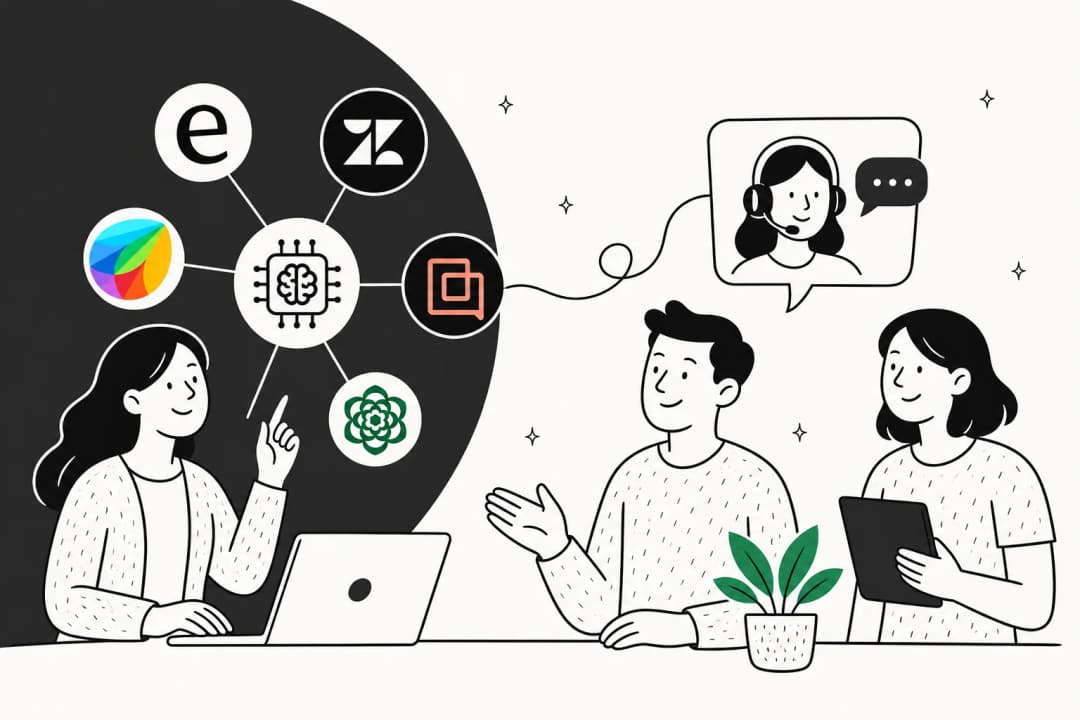
eesel is an AI teammate for customer service that resolves tickets, surfaces analytics, and measures resolution quality - without requiring a separate analytics tool. The built-in reports dashboard shows resolution rate, ticket quality, interaction volume, and activity logs across all connected channels: Zendesk, Freshdesk, Gorgias, Slack, email, Shopify, and 100+ others.
The setup takes minutes rather than months. Alex Capurro, Chief Innovation Officer at Global Pay, reported up to 80% time savings on answers and onboarding after deploying eesel's AI Copilot over Confluence. Gridwise hit 73% tier-1 resolution in the first month. InDebted is at 15% ticket deflection on their internal IT helpdesk with a target of 55%.
The analytics aren't a separate product - they're what the AI generates as it works. Pricing is usage-based at $0.40 per ticket, no platform fee, no per-seat charges. That works out to $40/month for 100 tickets or $400/month for 1,000 - with annual commit discounts of 25% available at $300+/month.

Try eesel free - $50 in usage credit, no credit card required, all features unlocked from day one.
Frequently asked questions

Share this article

Article by
Rama Adi Nugraha
Rama is a software engineer at eesel AI with two years of experience writing about B2B SaaS, AI tools, and customer support technology. Based in Bali, Indonesia, he brings a developer's perspective to product comparisons — cutting through marketing copy to what the integrations and APIs actually do.