AI customer support for Black Friday: a survival playbook


Last edited June 19, 2026
Table of Contents
Why Black Friday breaks a support queue
Here's the thing most "turn on a chatbot" advice misses. Black Friday doesn't just add tickets, it changes their shape. The same five questions arrive over and over: where's my order, can I change my address, why didn't my code apply, when does the sale end, how do I return this. One DTC brand I talked to that does around 7,000 tickets a month described their high season running November through May, and the volume is overwhelmingly where-is-my-order, subscription changes, and basic product questions. Another multi-brand operator handling 500+ tickets a day told me the same thing, plainly: refund requests, unsubscribes, and order tracking dominate everything.
That repetition is the opening. When 70% of your peak volume is a handful of question types, you don't need AI to be clever, you need it to be reliable on the boring stuff so your humans can take the hard tickets, the angry ones, the edge cases, the chargeback that's about to happen. The teams that drown on Black Friday are the ones whose best agents spend the rush copy-pasting tracking links instead of saving the accounts that are actually at risk.
The math is brutal if you only think about it in headcount. You can't hire and train three months of seasonal agents for one weekend, and even if you could, they'd be at their least useful exactly when the queue is at its worst. This is why peak season is the single strongest case for AI ticket deflection, the marginal ticket costs you almost nothing to answer, and the volume is concentrated in precisely the questions a well-trained agent answers best.
The pricing trap that turns your busiest month into your most expensive
Before the setup steps, the one thing that bites teams after the fact: how you're billed.
There are roughly three models out there. Per-seat (you pay per human agent, which AI makes almost irrelevant), per-resolution (you pay each time the AI closes a ticket), and per-ticket usage (you pay for each ticket routed to the AI, full stop). On a normal Tuesday they look similar enough that you don't think about it. On Black Friday they diverge hard.
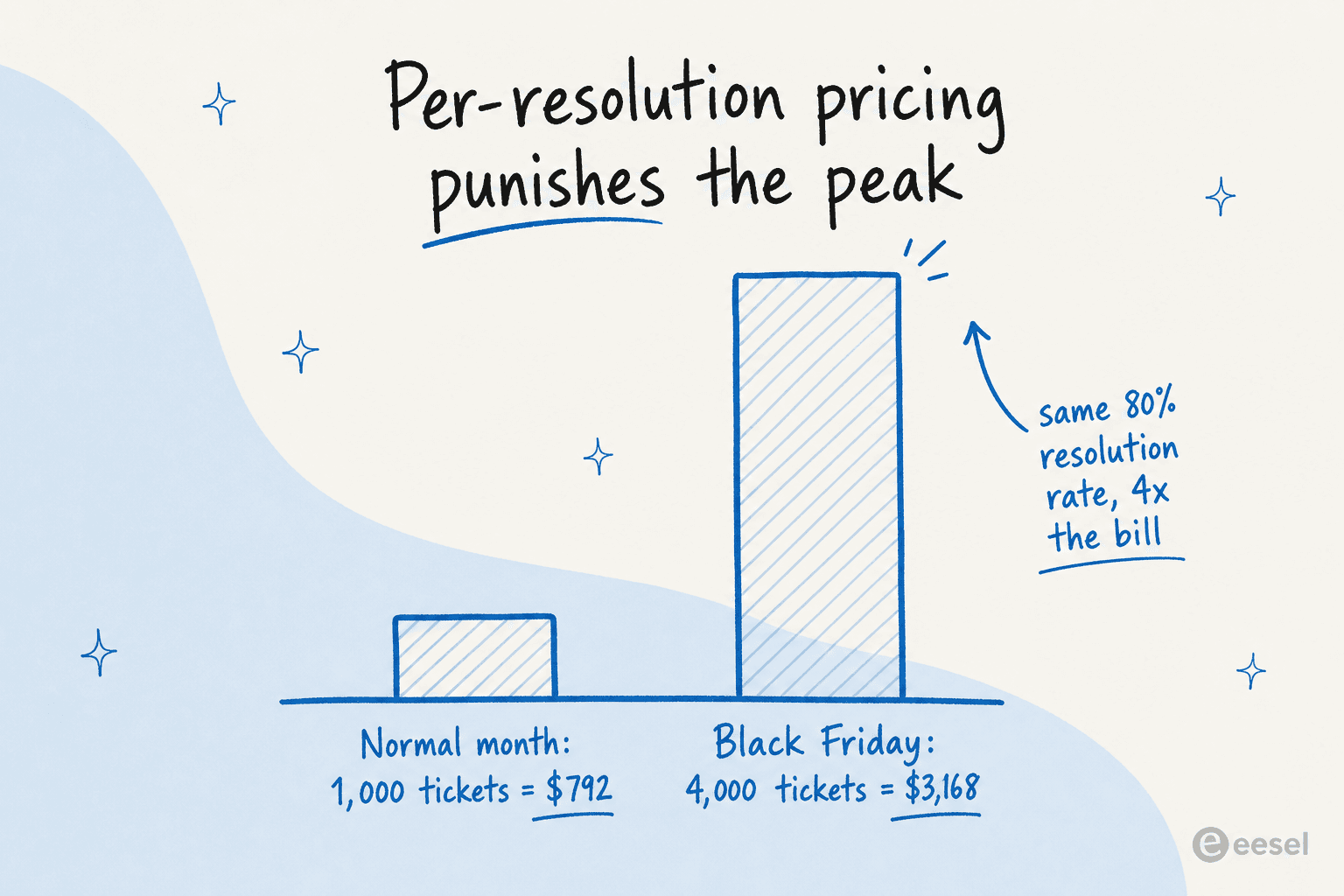
I ran the numbers on this for a jewelry retailer weighing AI vendors. On per-resolution pricing, 1,000 tickets a month at an 80% resolution rate came to about $792. Their Black Friday projection of 4,000 tickets at that same rate? $3,168 for the month. Nothing about the AI got better, the only thing that changed was the calendar, and the model charged them four times more for it. Worse, per-resolution billing quietly rewards the vendor for closing junk: if a fifth of your inbox is spam that auto-closes, you can be paying "resolution" fees on tickets no human would ever have touched.
Per-ticket usage scales too, of course, 4x the tickets is 4x the ticket count. But it doesn't penalize you for a higher resolution rate, and it doesn't turn spam into a revenue line for your vendor. That's why eesel's pricing is a flat $0.40 per ticket with no per-seat fees and no platform minimum, and why I'd push any team to do this one piece of homework: before you sign anything, ask the vendor to model your November, not your March. If they can't tell you what a 4x spike costs, that's the answer. There's a deeper breakdown of AI support costs if you're building the business case.
Set it up before November, not during it
The biggest mistake I see is treating AI support like a switch you flip when the queue gets scary. The tools that read well in a five-minute demo are not the same tools that hold up across a 4,000-ticket weekend, and the difference is entirely in the prep.
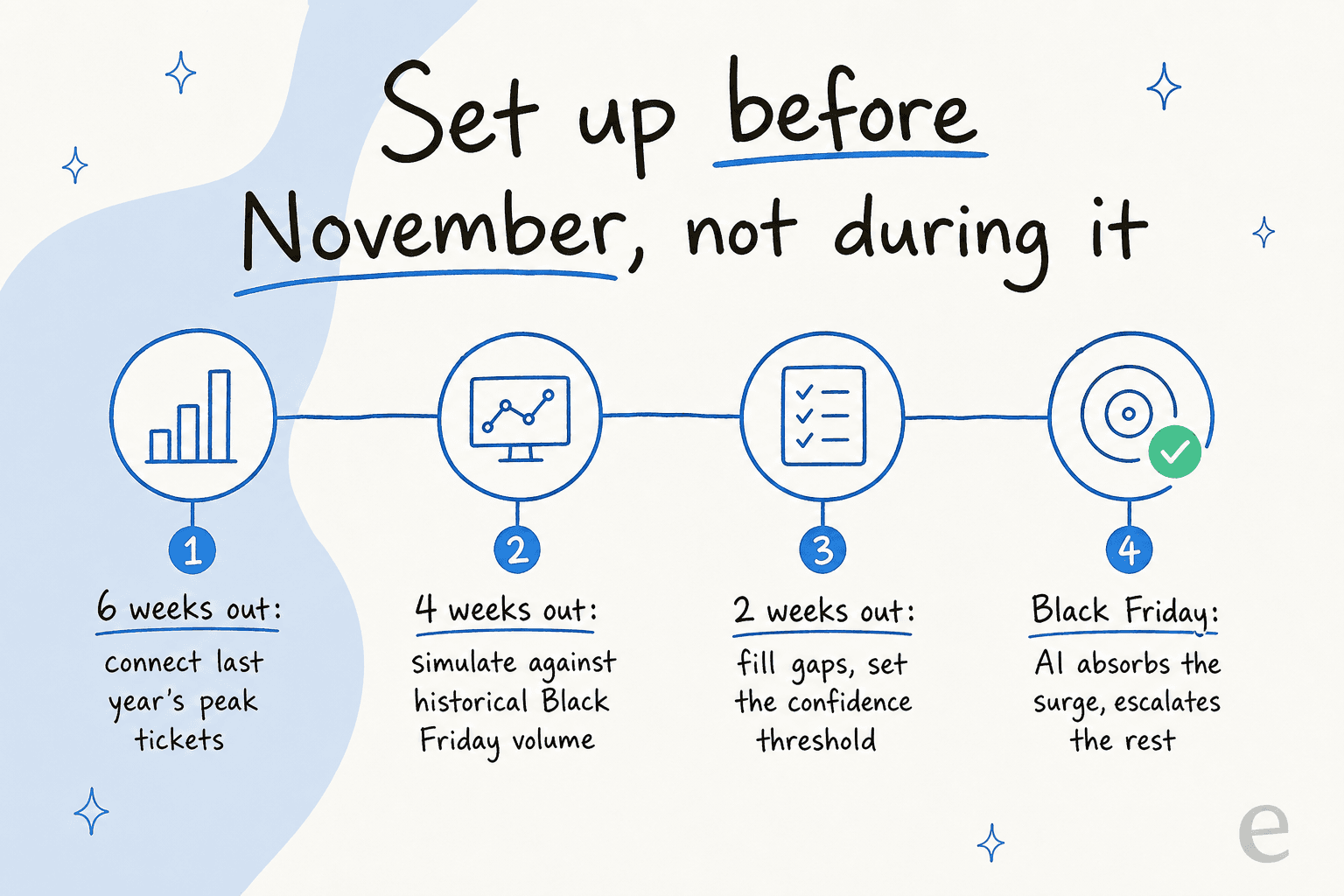
Here's the order I'd run it in.
Six weeks out, connect your real history. Point the AI at last year's Black Friday tickets, your help center, your macros, and your order data. Training on your solved tickets is the part that matters, it's the single most-requested thing I hear from teams evaluating eesel, because a knowledge base written for admins rarely matches the questions real shoppers ask. One UK team got 56 resolved tasks out of just 9 synced macros, the history does a lot of the work for you.
Four weeks out, simulate. This is the step that separates a real rollout from a hope. Run the AI against your actual historical peak tickets and read what it would have replied, before a single customer sees it. You get a coverage number by topic, you see exactly where it's strong (refund status, order tracking) and where it's shaky, and you fix the gaps while there's still time. When I dug into one store's real Zendesk traffic this way, the AI hit 93% triage accuracy and 100% spam detection, but the simulation also showed which categories needed work. That's the point, you find out in a sandbox, not in production on the busiest day of the year.

Two weeks out, set the rules and the ramp. Decide which ticket types go fully automatic (order status is a safe bet), which get an AI-drafted reply a human approves, and which never touch the AI at all. Start the AI in draft mode if you're nervous, then graduate the safe categories to full auto once the simulation has earned your trust. Co-pilot first, then full automation, is the pattern almost every team I've watched lands on, and it's the right one.
This whole arc, connect, simulate, ramp, is why "is it too late?" is the wrong question. It's not about whether the tool installs fast (it does). It's about whether you've given it your history and pressure-tested it before the wall hits.
Keep the AI confident, not chatty
If you take one thing from this, take this. The failure mode that actually hurts on Black Friday isn't the AI being slow, it's the AI being confidently wrong to a stressed customer who's about to dispute a charge.
A CX lead at that 7,000-ticket DTC brand put the problem better than I could. His worry wasn't that AI would miss some questions, every honest person knows it will. It was that a bot trying to answer everything and saying "sorry, I don't know" on the hard ones is worse than useless, because now he has to audit thousands of tickets to find the bad answers. What he wanted was an AI that handles only the tickets it's confident about and silently leaves the rest for a human. That's exactly right, and it's the design principle that should govern your whole peak-season setup.
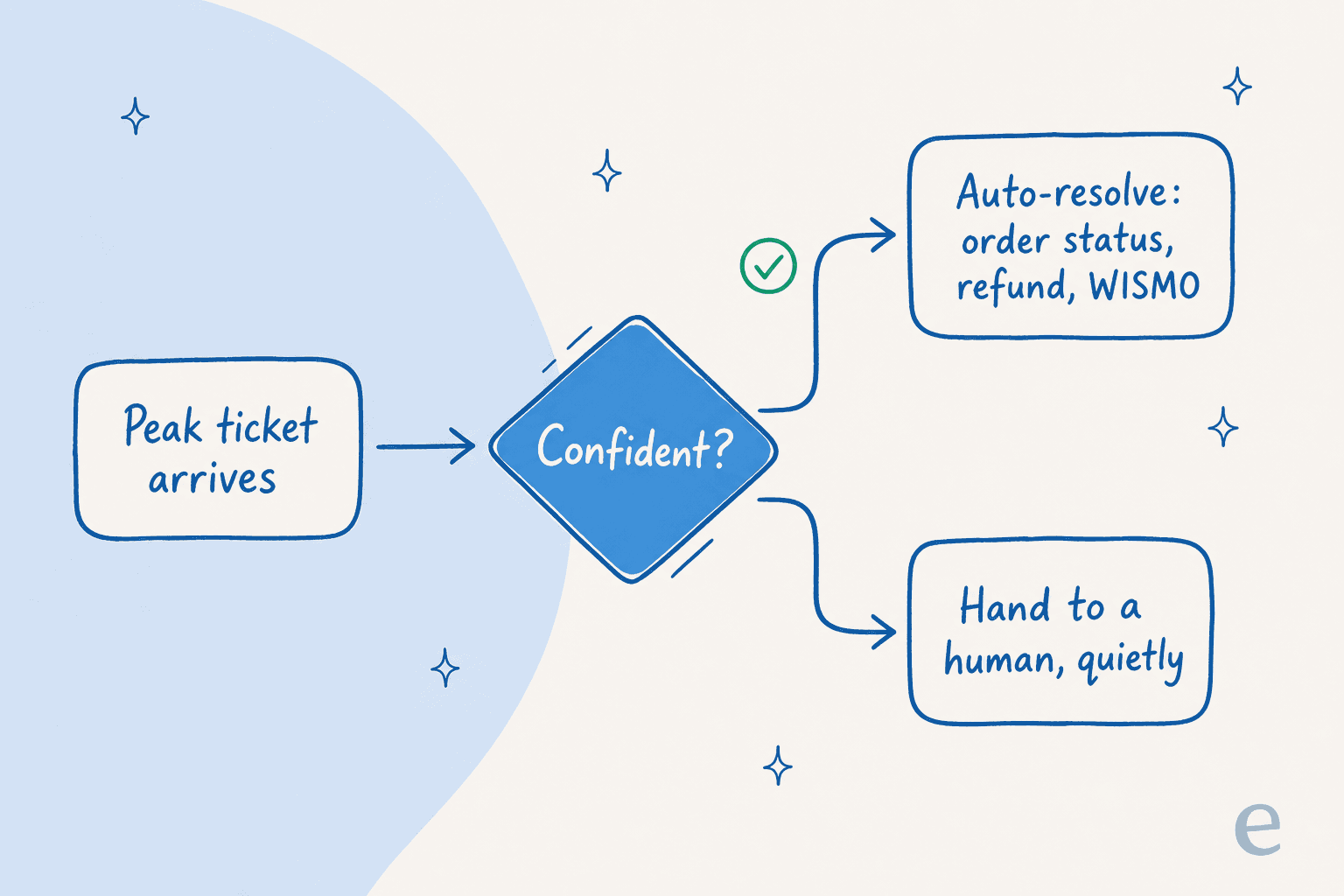
Mechanically, this is a confidence threshold. The AI scores how sure it is on each ticket. Above the line, it answers. Below it, it escalates to a human without ever guessing in front of the customer. Set conservatively, this is what makes AI safe to run on autopilot during a sale, the volume you don't want (the unusual stuff a Black Friday throws up) routes straight to your team, and the volume you do want (the same five questions, ten thousand times) clears itself. It's also your best defense against hallucinations: an AI that won't answer when it isn't sure can't confidently invent a return policy you don't have.
The tickets AI should own on Black Friday
So which tickets do you actually hand over? Lead with the ones that are high-volume, low-judgment, and backed by data the AI can look up rather than reason about:
- Order status and tracking. Pure lookups, the highest-volume question in ecommerce, and the easiest win. Connect your store and the AI answers WISMO questions from live order data instead of a canned "allow 3-5 days."
- Refund and return status. "Where's my refund," "can I return this," "how long does it take." Backed by clear policy, refund automation like this is where AI drafts tend to be most useful.
- Discount and shipping questions. When does the sale end, does my code stack, what's the cutoff for delivery by a date. High volume during a sale, low risk.
- Basic product questions. Sizing, compatibility, materials, anything that lives in your product pages or help center already.
What stays with humans: anything involving an apology, a refund exception, a damaged high-value item, or a customer who's clearly upset. Those are the moments that earn loyalty or lose it, and they're exactly what your team has the bandwidth for once the AI is eating the repetitive load. If you're choosing a tool for this, I compared the main options in a roundup of the best AI helpdesk for ecommerce. For stores on Shopify specifically, there's a separate Shopify chatbot roundup that compares them on exactly these categories.
Don't forget your non-English shoppers
Black Friday isn't a domestic event anymore. If you ship internationally, the spike includes a wave of shoppers asking in their own language, and "we'll get to those Monday" is how you lose a sale to a competitor who answered in German at 2am.
This is where AI quietly outperforms a human night shift you can't staff. eesel handles 80+ languages out of the box and learns tone from your existing multilingual ticket history. In one trial, a store's agent answered shoppers in eight languages without being prompted to, German, English, French, Dutch, Spanish, Polish, Croatian, and Turkish, because it had learned from the tickets the team had already handled. For a peak weekend, that means every market gets a fast, fluent first response instead of a queue that only moves during your home timezone's daylight hours.
Try eesel for your Black Friday queue
If you're staring down a peak season, here's what eesel does that's built for exactly this: it's an AI agent for your helpdesk that learns from your past tickets and help center on day one, plugs into Zendesk, Freshdesk, Gorgias, and Shopify so order data is already in context, and lets you simulate against past tickets before it ever replies to a customer. You set the confidence threshold and the ramp, so it stays conservative through the rush.
The reason I'd reach for it for Black Friday specifically: the pricing is flat at $0.40 a ticket with no per-seat or platform fee, so a 4x surge is just more tickets handled, not a budget surprise, and one gig-economy app on Zendesk saw eesel resolve a real chunk of its frontline volume fast:
"In the first month, eesel is resolving 73% of our tier 1 requests. Our team implemented and achieved results quickly during our 7-day trial."
Kim Simpson, Gridwise (eesel helpdesk agent)
It's free to start with $50 of usage and no credit card, which is enough to run a simulation against last year's peak and see your real coverage number before you commit. If you only do one thing before November, do that.
Frequently Asked Questions

Share this article

Article by
Riellvriany Indriawan
Riell is a designer and writer at eesel AI with about two years of experience researching CX platforms, AI chatbots, and helpdesk software. She combines her design background with a sharp eye for how these tools actually look and feel in practice — making her comparisons unusually visual and user-focused.