How to improve self-service with AI


Last edited June 19, 2026

What "good" self-service actually means
Most self-service projects start from the wrong number. Someone gets a target like "deflect 40% of tickets," ships a chatbot, and the dashboard duly reports 40%. The problem is that deflection and resolution are not the same thing. Deflection just means a ticket never reached a human. A customer who gives up and closes the chat counts as deflected. So does one who actually got their answer. One of those is a win and one is churn wearing a win's clothes.
Good self-service is measured by resolution: did the customer get the right answer and leave satisfied, without a person touching it? That reframe changes what you build. You stop optimizing for "make the chat hard to escape" and start optimizing for "answer correctly, then get out of the way when you can't."
The other half of "good" is honesty about scope. The sharpest thing a customer ever said to me on a sales call stuck: "The AI will never be able to answer 100% of the questions. I need an AI who is only handling the tickets that it's confident to handle, and all the other ones, leave them alone." That's the whole game. A self-service agent that knows what it doesn't know beats one that confidently makes things up every single time. I learned that the hard way, watching confident-sounding bots quietly give wrong answers in early rollouts, which is why eesel now simulates every deployment against historical tickets before it goes near a real customer.
Why most self-service quietly fails
Before the how-to, it's worth naming why the help center you already have isn't carrying its weight. In my experience it's almost never one big thing, it's three small ones stacked.
The knowledge is scattered. The answer exists, but it's split across your help center, a few Notion pages, some Slack threads, and a graveyard of outdated macros. A static FAQ can only point at articles; it can't reason across all of that. This is the most common pain I hear, and it's exactly what one customer meant when they told me their "vast documentation needed to be organised."
The docs were written for the wrong reader. A lot of knowledge bases are written for admins or internal staff, but the tickets come from end users. One transit-tech team I worked with had docs that targeted system administrators while their actual questions came from riders, so even a perfect search returned answers nobody could use.
Nobody closes the loop. Self-service decays. New features ship, articles go stale, and no one's job is to notice which questions keep failing. A static page can't tell you what it failed to answer; it just silently underperforms.
Here's the thing AI changes: a good agent doesn't just read your messy knowledge, it tells you where the holes are. The questions it can't answer become your content backlog. That feedback loop is the actual upgrade, more than the chat widget itself.
"As a fast-growing startup with a small team, our customers far outnumber our employees. It's crucial that we have robust self-service solutions as well as tools to supercharge the efficiency of our client-facing teams."
Jon Miron, Director of Support & Operations, Yellowdig
How to improve self-service with AI, step by step
This is the sequence I'd actually follow. It works whether you're on Zendesk, Freshdesk, Front, or HubSpot Service Hub, and it's deliberately ordered so you build trust before you hand over control.
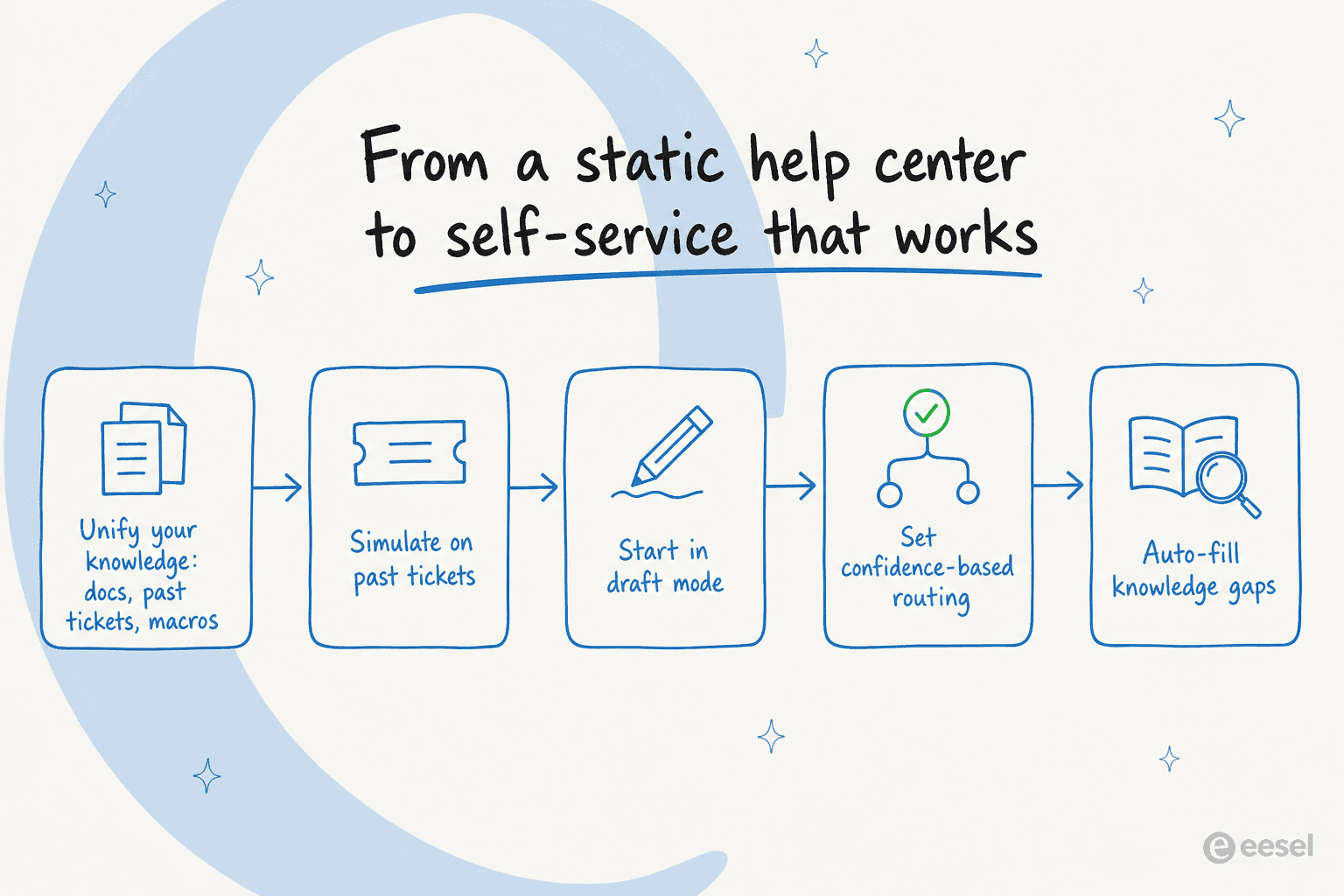
1. Unify your knowledge, including past tickets
The single biggest lever, and the one teams skip, is feeding the AI more than your help center. Connect your knowledge base, your internal docs in Notion or Confluence, and crucially, your resolved tickets. Past tickets are where the real answers live: the exact phrasing your team uses, the edge cases, the policies that never made it into an article.
Training on your own ticket history is the most-requested capability I see, by a wide margin. It's what lets the agent answer in your voice and resolve what your team already resolves, instead of parroting a generic doc. If you're choosing a tool, this is the question to lead with: can it learn from solved tickets, not just published articles?
2. Simulate on real past tickets before launch
Do not launch blind. Before a single customer sees the agent, run it against a few hundred of your historical tickets and read the output. This is the step that turns "I hope it's accurate" into a number you can act on.
A simulation tells you coverage by topic, where the agent is confident, and where it's guessing. In eesel's own pre-launch runs across a sample of real chats, around 96% answered correctly with sources, but the value isn't the headline percentage, it's seeing which 4% failed and why. You'll find topics with no documentation, articles written for the wrong audience, and questions you didn't know were common. Fix those before launch, not after an angry customer finds them.
3. Start in draft mode, not full autopilot
Resist the urge to flip everything to auto-reply on day one. Run the agent as a copilot first: it drafts replies for your human agents to review and send. Your team gets faster, customers still get a human-checked answer, and you build a track record of "would this draft have been right?" before you let it answer alone.
This is also how you win over a skeptical support team. They watch the drafts, correct the misses, and every correction makes the next answer better. By the time you turn on autonomous replies, it's a decision backed by data, not a leap of faith.
4. Route by confidence, escalate cleanly
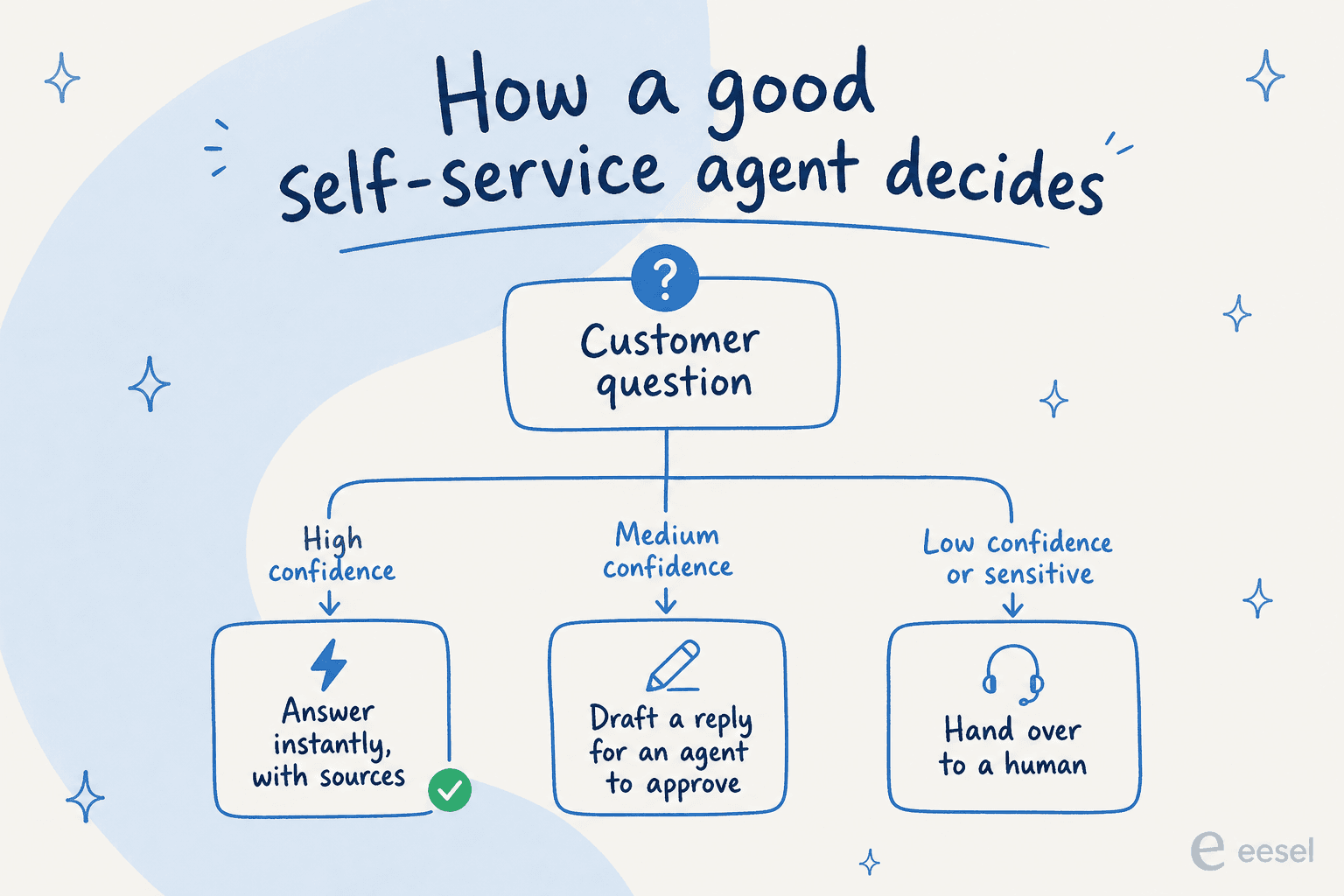
Once you trust it on the easy stuff, set up confidence-based routing. High-confidence questions get answered instantly, with citations the customer can check. Medium-confidence ones become a draft for an agent. Anything low-confidence or sensitive (billing disputes, anything legal or medical) hands straight over to a human, with the full conversation attached so the customer never repeats themselves.
A clean handover matters as much as a good answer. The best self-service interaction I've seen in the logs was almost boring: a customer asked two how-to questions, got instant doc-backed answers, then typed "can I talk to a human?" and was handed over the same second. No loop, no "did that solve your issue? (yes/no)" dead end. That's the bar.
5. Close the loop with auto-filled knowledge gaps
This is where self-service compounds. Every question the agent couldn't answer is a knowledge gap it just found for you. A good AI helpdesk agent will surface those gaps and even draft the missing articles, so your help center gets better every week instead of rotting. One team I worked with wanted exactly this: cross-reference the user guide, Slack, internal KB and past tickets, then auto-draft new articles from the gaps it found.
Set a recurring rhythm: review the gaps the agent surfaced, approve or edit its draft articles, re-simulate, and watch resolution climb. Self-service stops being a one-off project and becomes a system that maintains itself.
Deflection vs resolution: measure the right thing
I keep coming back to this because it's where most self-service goes wrong on paper. Here's the distinction laid out plainly.
| Deflection | Resolution | |
|---|---|---|
| What it counts | Ticket didn't reach a human | Customer got the right answer |
| Gameable? | Yes, by hiding the "contact us" button | Much harder to fake |
| Reflects satisfaction? | No | Yes |
| What to track alongside | CSAT after self-service, re-open rate | Same, plus first-contact resolution |
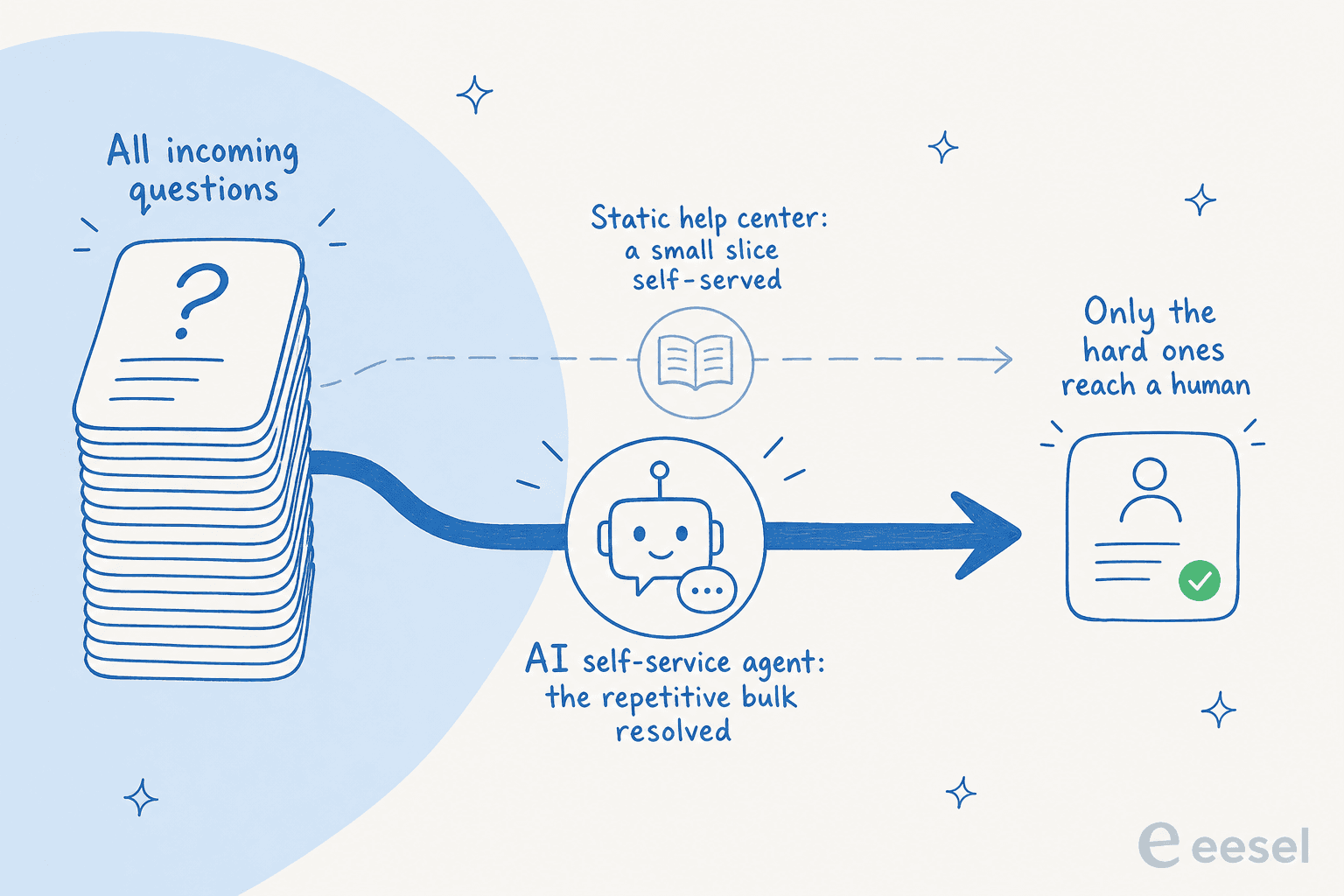
If you only watch deflection, you'll optimize for a number that can go up while your customers get angrier. Pair it with CSAT on self-served conversations and your re-open rate, and you'll know whether the agent is actually resolving or just deflecting. I've written up a fuller method for measuring AI support ROI, and the deployments that get this right see real numbers, like an internal IT helpdesk that went from 15% deflection toward a 55% target once it started learning from resolved tickets.
"We use it to be the first responder to our Helpdesk tickets in Jira. It essentially acts just like an agent would."
Jason Loyola, Head of IT, InDebted
Common mistakes that quietly sink self-service
A few pitfalls I'd actively steer you away from, because I see them often:
- Launching on autopilot before simulating. This is how you get the confident-wrong-answer horror story. Always grade against past tickets first.
- Optimizing deflection at the expense of trust. Burying the human handover spikes your deflection rate and your churn at the same time.
- Treating the help center as static. If nothing closes the loop on failed questions, resolution plateaus. The gap-filling step isn't optional.
- Picking a tool that only reads published articles. If it can't learn from your resolved tickets, it'll be generic forever. This is the most important capability to check, and it's worth reading why an AI chatbot answers incorrectly before you blame your docs.
- Ignoring channels. Self-service isn't just a help center widget; it's the AI live chat on your site, the bot in your ecommerce helpdesk, and the answers inside your customer service automation. Meet customers where they already are.
Try eesel for self-service
This is the loop eesel was built for. It connects to your existing helpdesk and learns from your help center, past tickets, and internal docs on day one, so self-service isn't limited to the handful of articles someone remembered to write. You simulate it on your own historical tickets to see exact coverage before launch, start it in draft mode, then grant autonomy topic by topic with confidence-based routing, the same trust-building sequence I walked through above. It works across Zendesk, Freshdesk, Front, HubSpot, and over 100 other tools, and answers in 80+ languages out of the box.

"In the first month, eesel is resolving 73% of our tier 1 requests. eesel offers easy Zendesk implementation and setup. Our team implemented and achieved results quickly during our 7-day trial."
Kim Simpson, Gridwise
If you're weighing options, my roundups of the best AI helpdesk software and the best customer service AI are a fair place to compare. Either way, the principles hold: unify your knowledge, simulate before you launch, route by confidence, and grade yourself on resolution. Self-service done right is the rare support project that gets easier the longer it runs. You can try eesel free and run the simulation against your own tickets to see where you'd land.
Frequently Asked Questions

Share this article

Article by
Riellvriany Indriawan
Riell is a designer and writer at eesel AI with about two years of experience researching CX platforms, AI chatbots, and helpdesk software. She combines her design background with a sharp eye for how these tools actually look and feel in practice — making her comparisons unusually visual and user-focused.