Cognition AI pricing explained: Is Devin the future of coding?


Last edited October 1, 2025
It’s impossible to miss the buzz around Cognition AI and its autonomous AI software engineer, Devin. With a sky-high valuation and hundreds of millions in funding, it's been hyped up as a tool that could completely change how we develop software. But once you get past the slick demos, what does it actually cost to "hire" the world’s first AI engineer?
Let’s cut through the noise and get you a clear, no-fluff breakdown of the Cognition AI pricing model. We’ll walk through the different plans, figure out what an "Agent Compute Unit" (ACU) actually is, and talk about whether the price tag makes sense for what you get.
What is Cognition AI's Devin?
Cognition AI is an applied AI lab, and Devin is their big new thing, which they're calling the "first fully autonomous AI software engineer." Simply put, Devin is built to take on complex engineering tasks all by itself. It can supposedly build and deploy apps, hunt down and fix bugs in codebases, and even train other AI models.
This isn't just a fancy code-completion tool. Devin works in its own secure environment with a shell, code editor, and browser, basically the same setup a human developer uses. After its initial launch went viral, the company rolled out Devin 2.0. This newer version focuses more on having human developers and the AI work together, adding features for planning, digging through codebases, and documentation.
A deep dive into Cognition AI pricing plans
Devin's pricing comes in three main flavors, aimed at everyone from a solo developer messing around with the tech to huge companies needing a secure, large-scale setup.
Here’s a look at the official plans, straight from Devin's pricing page:
| Feature | Core | Team | Enterprise |
|---|---|---|---|
| Pricing | Pay-as-you-go, starting at $20 | $500/month | Custom Pricing |
| Included ACUs | Pay-as-you-go | 250 ACUs included monthly | Custom |
| ACU Cost | $2.25 per ACU | $2.00 per ACU | Custom |
| Key Capabilities | Autonomous tasks, Devin IDE, Ask Devin, Devin Wiki | Everything in Core, plus Devin API, early feature access | Everything in Team, plus Devin Enterprise, Custom Devins |
| Concurrent Sessions | Up to 10 | Unlimited | Unlimited |
| Support | Standard | Dedicated Slack channel, optional onboarding | Dedicated account team, custom terms |
| Security | Standard | Standard | VPC deployment, SAML/OIDC SSO, admin controls |
The differences are pretty clear. The Core plan is your way in, letting you pay for what you use. The Team plan is a big jump up, giving you API access and better support for a flat monthly fee that includes a chunk of compute units. The Enterprise plan is for the big players who need custom models and serious security features, like deploying in a private cloud.
Breaking down Cognition AI pricing: What is an Agent Compute Unit (ACU)?
Probably the most confusing part of Cognition AI pricing is this thing called the Agent Compute Unit, or ACU. According to Cognition, an ACU is "a normalized measure of the computing resources Devin uses to complete a task, such as virtual machine time, model inference, and networking bandwidth."
Okay, let's translate that into actual money. Based on what outlets like TechCrunch are reporting and what Cognition has said, 1 ACU works out to about 15 minutes of Devin actively working.
Here’s what that means for your wallet:
-
On the Core plan ($2.25/ACU), one hour of Devin's time will set you back about $9.00.
-
On the Team plan ($2.00/ACU), one hour costs $8.00.
This pay-as-you-go model can be tricky. A simple bug fix that takes Devin 15 minutes? That’s a steal. But a complicated, multi-hour job, like migrating an old system or building a new feature from the ground up, could chew through your credits like there’s no tomorrow. It makes predicting your monthly bill a real guessing game, which is a nightmare for anyone trying to manage a budget.
Key features of Devin 2.0
With a price that high, the value has to be there. Devin 2.0 is loaded with features meant to make the cost worthwhile and show it’s more than just an AI that writes code.
A collaborative cloud IDE
Devin 2.0 brings an interactive, cloud-based Integrated Development Environment (IDE) to the table. This isn't just a command line; it’s a full workspace where you can run multiple versions of Devin at the same time. You can give Devin several jobs to do at once, and a human developer can pop in anytime to check on things, give feedback, or nudge the AI in the right direction.
Interactive planning and task scoping
One of the coolest improvements is Devin's ability to help with project planning. You can toss it a vague idea, and Devin will sift through the entire codebase, pick out the relevant files, and map out a detailed, step-by-step plan to get it done. This changes Devin from just being a coder to being a partner that helps you figure out the work before anyone writes a single line.
Devin Search and Wiki for codebase exploration
To handle the headache of getting familiar with huge, complex codebases, Devin 2.0 has two handy tools. Devin Search lets you ask plain-English questions about your code (like, "Where do we handle user logins?") and get back clear answers with the code snippets to prove it.
At the same time, Devin Wiki automatically creates and updates documentation for your code. It can generate architecture diagrams and keep a knowledge base tidy and current, which is a huge time-saver for any team drowning in technical debt.
The hidden costs: Is Devin worth it?
The features sound great on paper, but it’s important to look at the whole picture. The price and the ACU model are just one part of the story. There are other things to think about before you decide if Devin is the right move for your team.
The reality of Devin's performance
Early feedback and reviews, like some mentioned by SiliconAngle, have pointed out that Devin can sometimes get stuck on really complex tasks, create new bugs, or write code that’s just plain clunky. You could argue these are just growing pains for a new technology, but it's something to consider if you need code that’s ready for production. Don’t expect a flawless AI engineer right out of the gate.
The need for human supervision
Devin isn't a "set it and forget it" replacement for a developer. It's an incredibly powerful assistant that still needs a lot of supervision, code review, and direction from experienced (and expensive) senior engineers to be truly useful. That "management" time is a hidden cost that won't show up on your monthly bill. You're not just paying for Devin; you're also paying for your best engineers to babysit it.
From coding assistants to support automation
The excitement around Devin shows how much people want to automate complicated, expensive work. Just like Devin is trying to free up developers from boring tasks, other AI platforms are already delivering real results right now by automating another huge business cost: customer support.
This is where a platform like eesel AI fits in. While Devin is a complex tool for a technical crowd, eesel AI is built to be incredibly simple and self-serve. It lets support teams get their frontline support automated in minutes, not months.
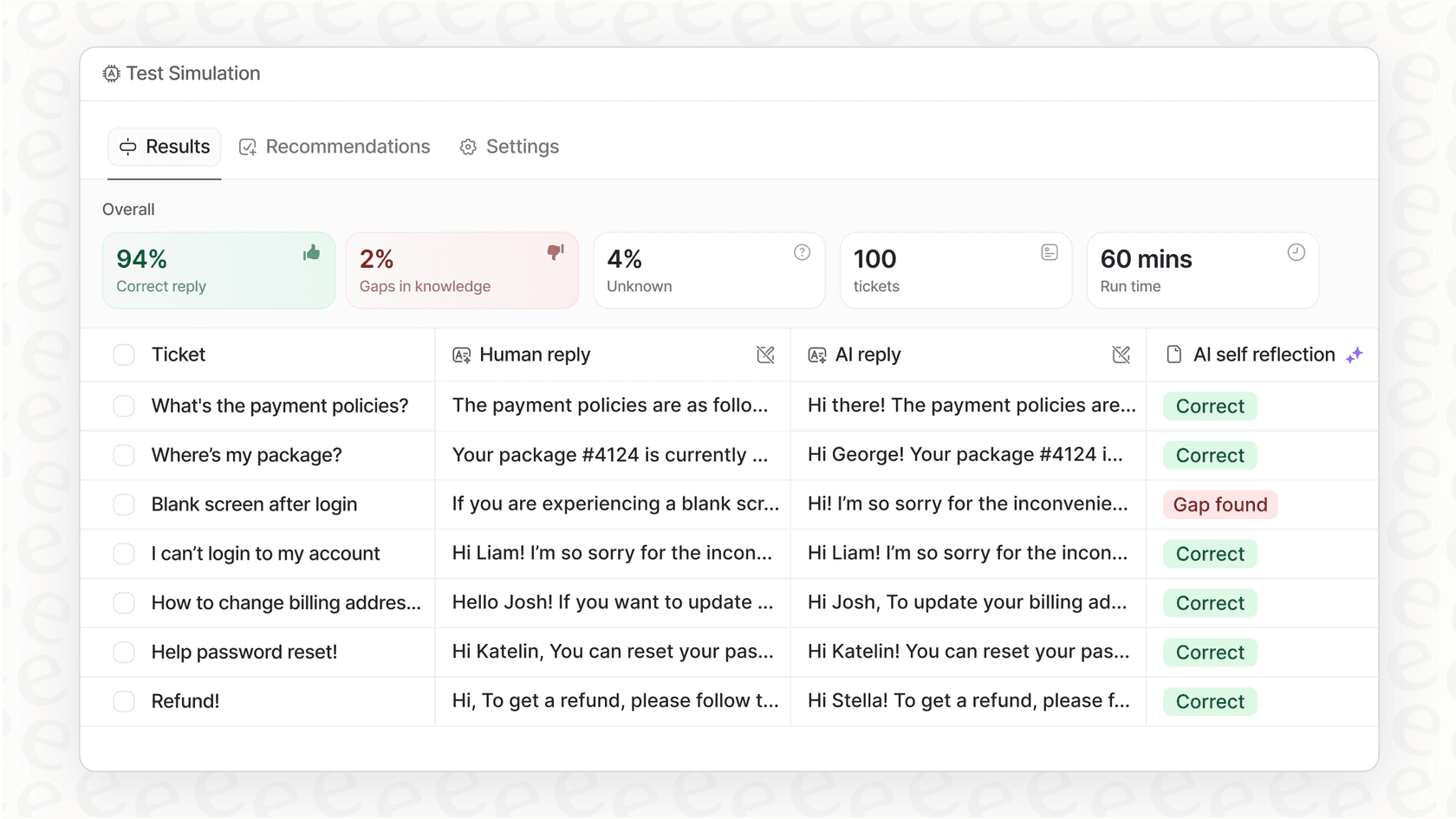
One of its best features is a simulation mode that lets you test your AI agent on thousands of your past tickets. You can see exactly how it would have answered, get solid predictions on how many issues it can solve, and calculate your cost savings before it ever talks to a real customer. That gives you a level of confidence that’s still a work in progress in the AI coding world.
The challenge of unpredictable Cognition AI pricing
Going back to that ACU model, its unpredictability is a big problem for businesses. Usage-based pricing sounds fair, but it makes it nearly impossible to budget for something as important as software development. One tough project could make your costs balloon without any warning.
In contrast, platforms like eesel AI offer clear and predictable pricing based on features and overall use, not per ticket resolved. This keeps your costs stable and prevents them from spiraling out of control as your support volume grows. For any leader looking at AI tools, that kind of financial stability is a must-have.

What's the verdict on Cognition AI pricing?
Devin is, without a doubt, a fascinating piece of technology. But the Cognition AI pricing reflects a powerful tool that's still finding its footing and requires a serious investment of both money and human oversight.
The bigger takeaway here is that the real value of AI automation comes from solving actual business problems in a way that's efficient, reliable, and predictable. If the idea of automating expert work gets you excited, but you need a solution for your support team that’s proven, easy to set up, and won't give your finance department a heart attack, it might be time to look at other options.
Ready to see what mature AI automation looks like for customer service? Get started with eesel AI and you can have an AI agent you can trust up and running in minutes.
Frequently asked questions

Share this article

Article by
Kenneth Pangan
Writer and marketer for over ten years, Kenneth Pangan splits his time between history, politics, and art with plenty of interruptions from his dogs demanding attention.