How to automate refunds with AI without giving money away


Last edited June 25, 2026

Why refunds are the right place to start
I build the AI agents that do this at eesel, and I'll tell you where I'd point one first: refunds and returns. Not because they're hard, but because they're repetitive. It's the same order lookup, the same policy check, the same copy-paste reply, a few hundred times a week, and during a sale or a post-holiday return wave it balloons until the trickiest tickets get buried under routine ones anyone could close.
That makes refunds the cleanest ticket-volume win available to an ecommerce support team. It's the same logic behind automating order tracking and WISMO replies: high volume, low variation, clear rules. Refunds are the highest-volume support task with the clearest rules, which is exactly what makes them automatable.
But before you switch anything on, here's the thing I'd want you to hear, because I've watched it sink rollouts. The hard part of refund automation isn't the refund. It's teaching the AI when not to touch one.
How automating refunds with AI actually works
Under the hood it's less magical than it sounds. An AI agent connects to two systems: your store (Shopify, WooCommerce, Magento) and your helpdesk (Gorgias, Zendesk, Freshdesk). When a refund request lands, it runs a short pipeline.
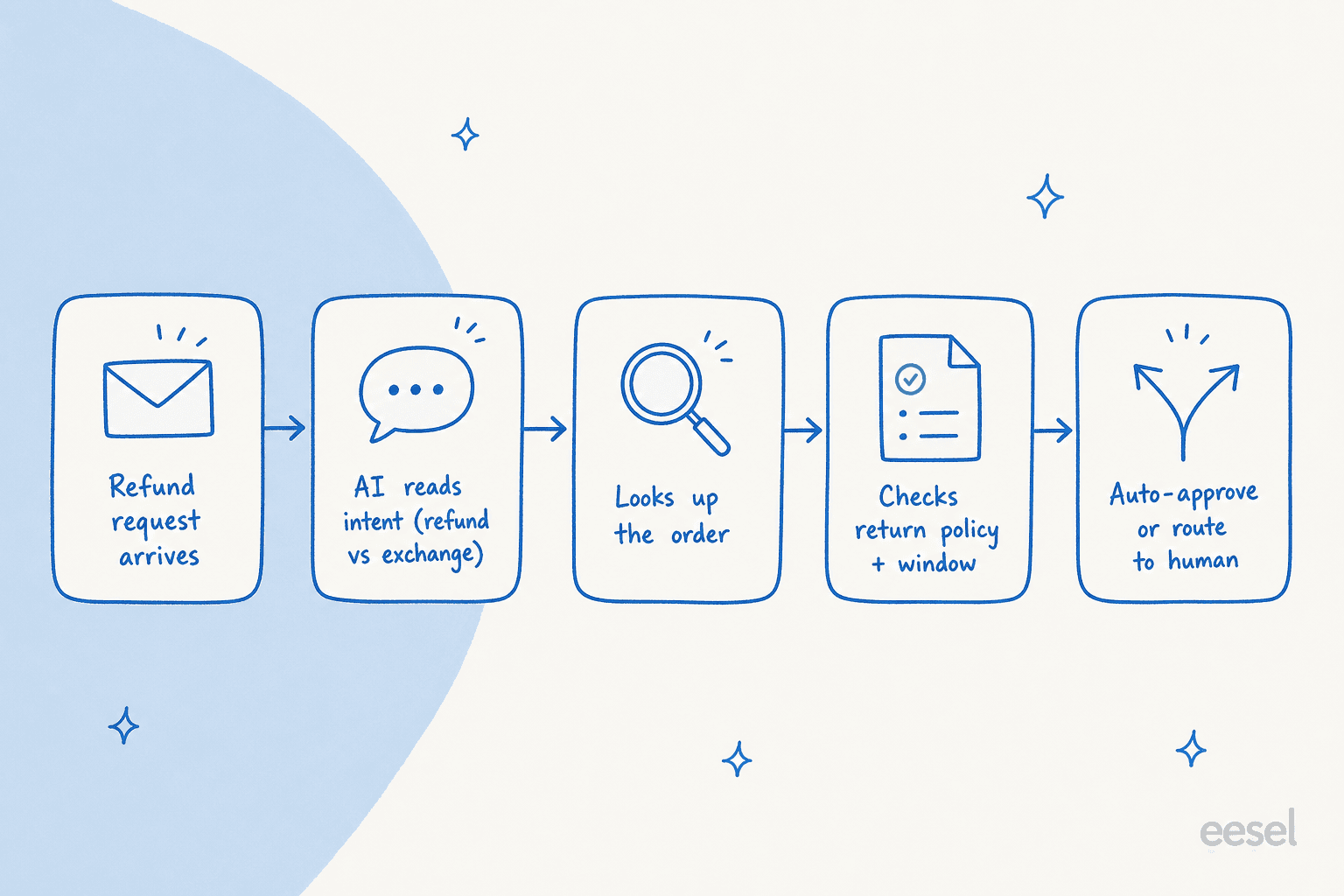
It reads the message to work out the intent (a refund is not the same as an exchange or a shipping issue), looks up the order in your store, checks it against your return policy and window, and then decides: approve, draft a reply for an agent, or hand off to a human. The whole thing is just support ticket automation with an order lookup and a refund action bolted on. The intelligence lives in that last step, the decision, which is where most setups go wrong.
The one rule that decides everything: auto-approve vs route
Here's the design brief for refund automation, and it comes straight from a sales call I think about a lot. A CX lead at a DTC supplements brand running about 7,000 tickets a month on Gorgias and Shopify put it perfectly: she said the AI will never answer 100% of questions, and if it just replies "sorry, I don't know" she can't go re-check 7,000 tickets by hand, so she needs an AI that handles only the tickets it's confident about and leaves the rest alone.
That one requirement is the system. The goal isn't an AI that touches every refund. It's an AI that touches only the refunds it should, and knows when to back off. Get it wrong and you've built either a fraud hole or a pile of "sorry I don't know" replies you now have to re-check by hand. Get it right and you've handed your team back hours a day.
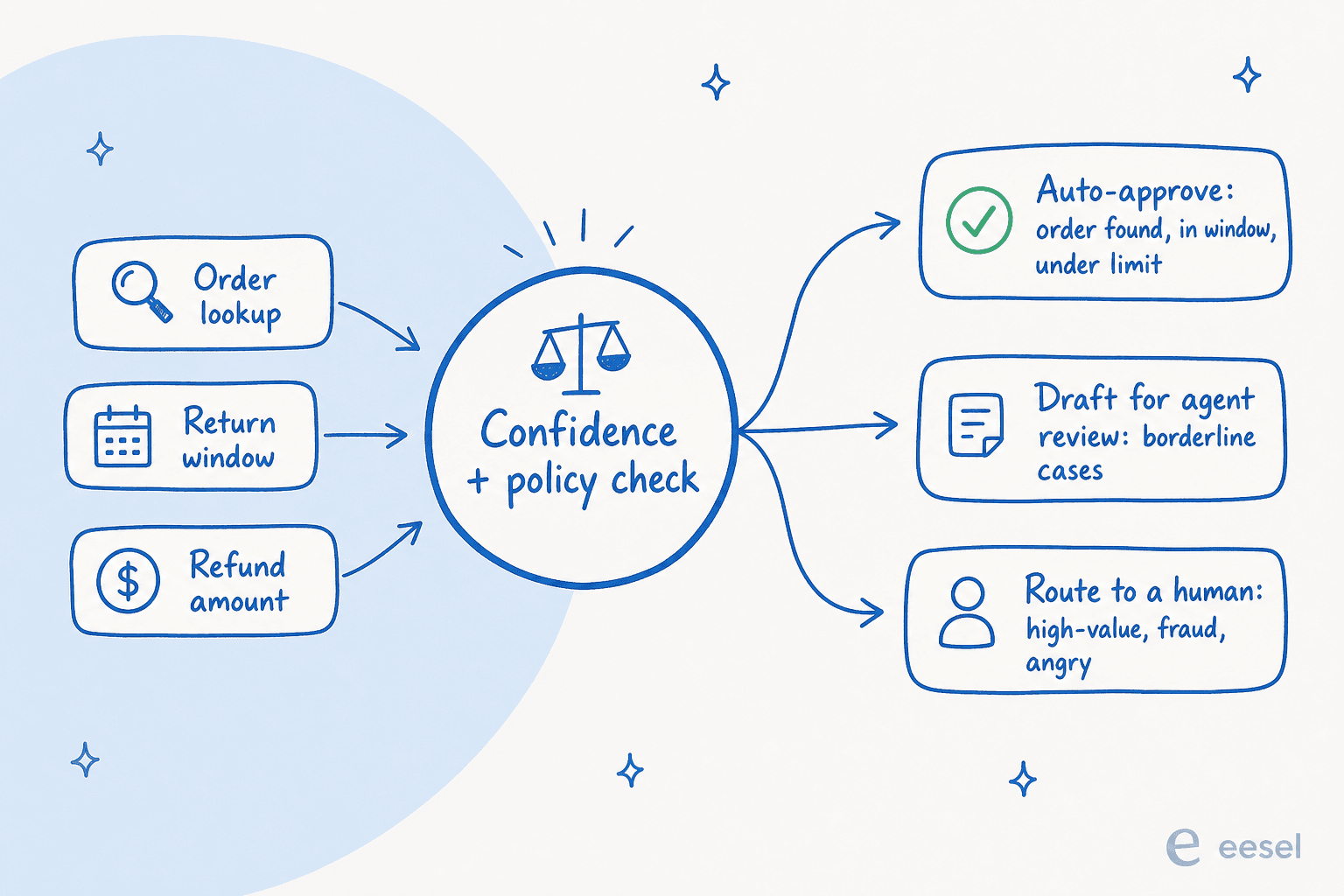
In practice that means three lanes. Auto-approve the refunds that clearly pass every rule: order found, inside the window, under your approval amount, no fraud signal. Draft for review the borderline ones, where the AI writes the reply but a human hits send. And route to a human the high-value orders, the out-of-window requests, the suspected serial refunders, and anyone who's clearly upset, because those are the cases where a confident-but-wrong answer costs the most. This is confidence-based ticket classification, and it's the difference between automation that helps and automation that scares you.
How to automate refunds with AI, step by step
Here's the actual playbook. You don't need a developer for any of it, no code required, and most teams get a first version live in an afternoon.
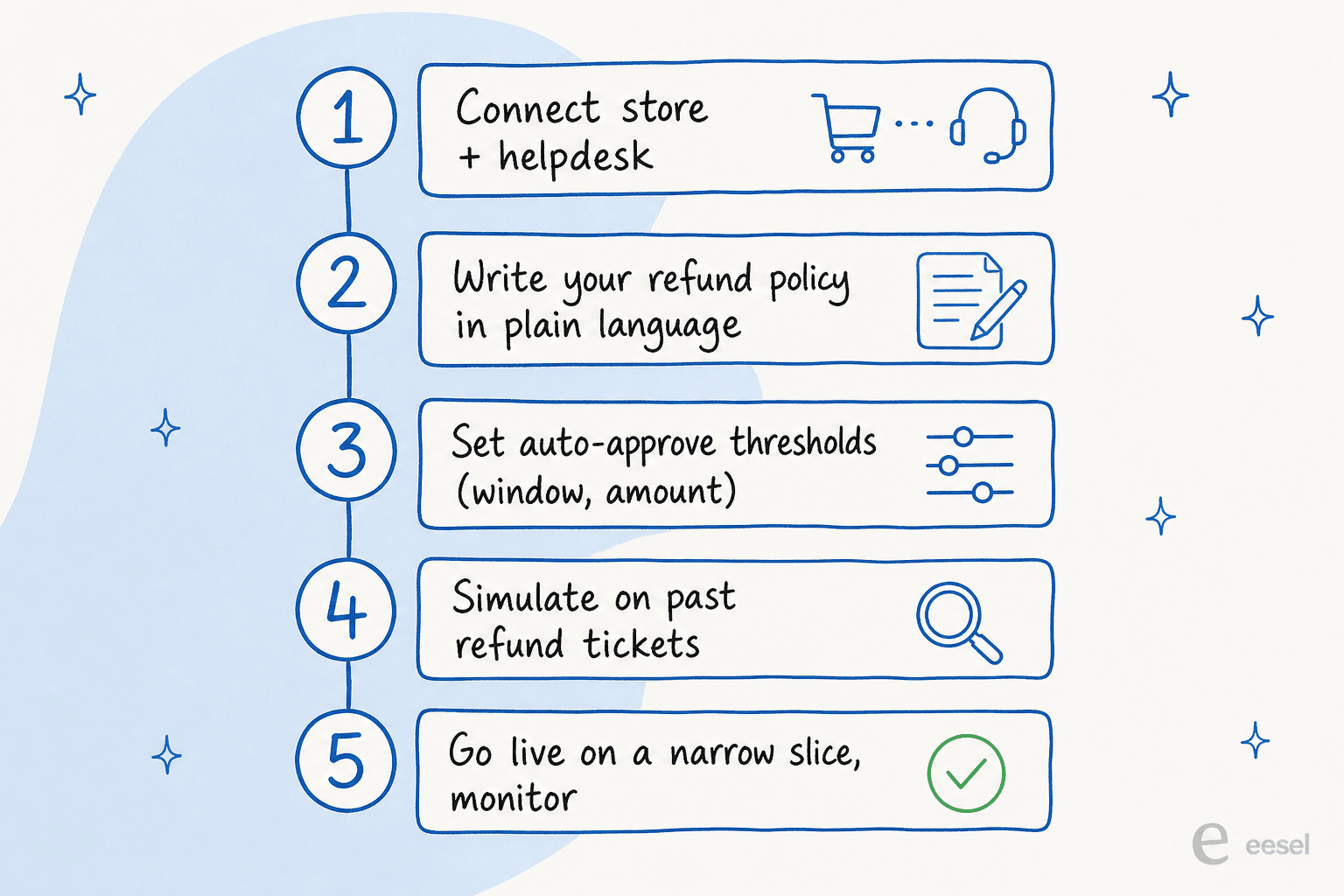
Step 1: Connect your store and your helpdesk
The AI needs to see two things to handle a refund: the conversation (in your helpdesk) and the order (in your store). So the first step is wiring both up. With eesel that's a one-click connection to Shopify, Gorgias, or Zendesk, no migration and no rip-and-replace. You're adding a layer on top of the stack you already run.

Step 2: Write your refund policy as plain-language rules
This is the part that does the heavy lifting, and it's where I'd spend my time. Don't think of it as "training an AI." Think of it as writing down the refund policy you already follow, the one currently living in a few agents' heads and a stack of macros. Things like: full refund inside 30 days with proof of purchase; store credit between 30 and 60 days; nothing past 60; anything over $200 goes to a human. If a new hire could follow your policy from the written version, the AI can too. If they couldn't, that's a policy gap to fix first, not an AI problem.
Step 3: Set your auto-approve thresholds
Now turn that policy into the guardrails for the auto-approve lane. Two dials matter most: the return window (how recent an order has to be) and the approval ceiling (the dollar amount above which a human always decides). Start conservative. I'd rather have the AI escalate too much in week one and tighten the leash later than have it approve a $400 refund it shouldn't have. You can also keep whole ticket types out of automation entirely, which is the right move for anything legal, fraud-flagged, or VIP.
Step 4: Simulate on your past tickets before going live
This is the step people skip, and it's the one that earns trust. We simulate every rollout against a customer's own historical tickets before it ever touches a live conversation, because that's the only way to know how the AI will behave on your refunds, not on a demo. Run it over a few thousand of your closed refund tickets and you get a real number: how many it would have auto-approved, how many it would have escalated, and where it would have been wrong.
That dry run is also how you catch the embarrassing stuff before a customer does. In one cross-validation we ran on a German jewelry retailer's real Zendesk and Shopify traffic (around 1,000 tickets a month), the AI hit 93% triage accuracy and 100% spam detection before anyone trusted it with a live reply, per our trial data. Simulate first, then you're tuning against evidence instead of hoping.
Step 5: Go live on a narrow slice, then widen
Don't flip it on for everything. Start with the safest, highest-volume slice (refund-status questions, say, or sub-$50 in-window refunds) in draft mode so an agent still approves each send. Watch it for a week, check the approve/reject pattern, then graduate the cases you trust to full auto-approve and widen from there. The same monitoring habit applies to every workflow you automate afterwards.

Will it actually save you money?
The honest answer is "it depends on your volume and your costs," so rather than wave my hands, here's a calculator. Plug in your own numbers and see what automating the routine refunds is actually worth per month.
The labour number is only half of it. The other half is what you don't spend on a per-resolution tool that bills you for every ticket the AI closes, exactly when your refund volume spikes. eesel charges per ticket on usage-based pricing with no per-seat fees, so a heavy return season doesn't come with a surprise invoice.
Common mistakes to avoid
A few traps I see teams fall into, all of them avoidable:
- Auto-approving everything from day one. The fraud hole. Start in draft mode, widen as you earn trust. The confidence gate exists for a reason.
- Skipping the simulation. Going live without a dry run on past tickets means your customers become the test. Don't.
- A vague refund policy. If the policy is fuzzy, the AI inherits the fuzziness. Tighten the rules first.
- No clean handoff. When the AI escalates, the human needs full context, not a cold ticket. Good agent handoff is part of the design, not an afterthought.
- Forgetting the angry-customer case. A refund request wrapped in a complaint is a retention moment, not a transaction. Route those to a person every time.
Do those five things and refund automation goes from "scary" to "the most boring, reliable part of your queue," which is exactly what you want it to be. It also frees your team to work the billing and subscription questions that actually need a human, and feeds cleaner data into your customer feedback analysis.
Try eesel for refund automation
If you want to automate refunds with AI without giving money away, this is exactly what eesel is built for. It plugs into the helpdesk and store you already run, learns your refund policy, and lets you simulate the whole thing on your past tickets before a single live customer sees an AI reply, so you go live on evidence instead of hope. It's no-code, it routes by confidence so the risky cases stay human, and the pricing stays usage-based per ticket through your busiest return season. Free to try.
Frequently Asked Questions


Automate refunds with AI on Shopify
Connect your store, set your policy, and let eesel clear the routine refunds.
Share this article

Article by
Alicia Kirana Utomo
Kira is a writer at eesel AI with a Computer Science background and over a year of hands-on experience evaluating AI-powered customer service tools. She focuses on breaking down how helpdesk platforms and AI agents actually work so that support teams can make better buying decisions.