VOOZH about

URL: https://www.geeksforgeeks.org/angular-js/angular-10-formatnumber-method/

⇱ Angular 10 formatNumber() Method - GeeksforGeeks


  • Courses
  • Tutorials
  • Interview Prep

Angular 10 formatNumber() Method

Last Updated : 23 Jul, 2025

In this article, we are going to see what is formatNumber in Angular 10 and how to use it.

formatNumber is used to format a number based on our requirement in decimal form.

Syntax:

formatNumber(value, locale, digitsInfo)

Parameters:

  • value: The number to format.
  • locale: A locale code for the locale format.
  • digitsInfo: Decimal representation options.
 

Return Value:

  • string: the formatted text string.

NgModule: Module used by formatNumber is:

  • CommonModule

Approach: 

  • Create the Angular app to be used.
  • In app.module.ts import LOCALE_ID because we need locale to be imported for using get formatNumber.
    import { LOCALE_ID, NgModule } from '@angular/core';
  • In app.component.ts import formatNumber and LOCALE_ID
  • inject LOCALE_ID as a public variable.
  • In app.component.html show the local variable using string interpolation
  • Serve the angular app using ng serve to see the output.

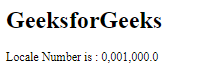
Example 1:

Output:

👁 Image

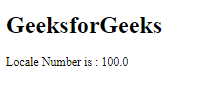
Example 2:

Output:

👁 Image

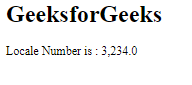
Example 3:

Output:

👁 Image

Reference: https://v17.angular.io/api/common/formatNumber

Comment

Explore