|
VOOZH | about |
|
VOOZH | about |
Angular Material is a UI component library that is developed by Google so that Angular developers can develop modern applications in a structured and responsive way. By making use of this library, we can greatly increase the user experience of an end-user thereby gaining popularity for our application. This library contains modern ready-to-use elements which can be directly used with minimum or no extra code.
The Chips in angular material are used to represent or show information, make selections, filter content, and enter data. For creating Chips we use the <mat-chip> directive. Angular Material provides different types of chips, which are described below:
Note: If we want to display the chips in disabled form or if we want to prevent user interaction with the chips disabled keyword can be used with <mat-chip>,<mat-chip-option>, and <mat-chip-row>.
We can change the theme of the chips by using the color property. In angular we have 3 themes, they are primary, accent, and warn.
Syntax:
<mat-chip-list >
 <mat-chip>Chip 1</mat-chip>
 <mat-chip>Chip 2</mat-chip>
 <mat-chip color="primary" selected>Primary</mat-chip>
 <mat-chip color="accent" selected>Accent</mat-chip>
</mat-chip-list>
Installation Syntax: The basic pre-requisite is that we must have Angular CLI installed on the system in order to add and configure the Angular material library. The following command is executed on the Angular CLI to install the angular material library:
ng add @angular/material
Make sure the path should be opened in the terminal before executing the above command.
Please refer to the Adding Angular Material Component to Angular Application article for the detailed installation procedure.
Adding Chips Component: To use the Chips Component, we need to import the below module into the app.module.ts file:
import { MatChipsModule } from "@angular/material/chips";To use the Chips component in our code we have to import MatChipsModule into the imports array.
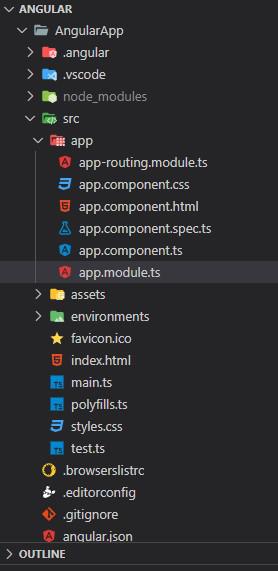
Project Structure: After successful installation, the project structure will look like the following image:
Example 1: This example describes the basic usage of the Angular Material Chips.
Output:
Example 2: This example illustrates the usage of the Angular Material Chips by implementing the Avatar Chips.
Output:
Reference: https://material.angular.dev/components/chips/overview