|
VOOZH | about |
|
VOOZH | about |
Angular Material is a UI component library that is developed by Google so that Angular developers can develop modern applications in a structured and responsive way. By making use of this library, we can greatly increase the user experience of an end-user thereby gaining popularity for our application. This library contains modern ready-to-use elements which can be directly used with minimum or no extra code.
The Stepper Component in the Angular material allows the user to create a wizard-like a workflow by dividing the content into logical steps. In order to utilize the Stepper in Angular Material, the Angular <mat-stepper> directive is used, which is responsible for the logic that drives a stepped workflow. Angular Material provides various components that are described below:
Syntax:
<mat-stepper [linear]="isLinear" #stepper>
 <mat-step>
 </mat-step>
</mat-stepper>
<mat-horizontal-stepper labelPosition="bottom" linear>
 <mat-step label="Label">
 </mat-step>
</mat-horizontal-stepper>
<mat-vertical-stepper labelPosition="bottom" linear>
 <mat-step label="Label">
 </mat-step>
</mat-vertical-stepper>
Installation Syntax: The basic pre-requisite is that we must have Angular CLI installed on the system in order to add and configure the Angular material library. The following command is executed on the Angular CLI to install the angular material library:
ng add @angular/materialMake sure the path should be opened in the terminal before executing the above command.
Please refer to the Adding Angular Material Component to Angular Application article for the detailed installation procedure.
Adding Stepper Component: To use the Stepper Component, we need to import it into the app.module.ts file:
import {MatStepperModule} from '@angular/material/stepper';To use the toggle button component in our code we have to import MatStepperModule into the imports array.
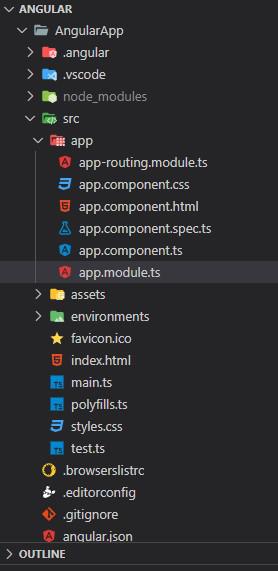
Project Structure: After successful installation, the project structure will look like the following image:
Example 1: The below example illustrates the implementation of the Angular Material Stepper.
Output:
Example 2: This is another example that describes the implementation of the Angular Material Stepper by specifying the different input fields in Horizontal & Vertical Stepper.
Output:
Reference: https://material.angular.dev/components/stepper/overview