|
VOOZH | about |
|
VOOZH | about |
Angular's dependency injection enables modular and reusable components across applications. At the core of dependency injection lies the root injector, a powerful mechanism responsible for managing dependencies and providing instances of services, components, directives, and more throughout the application. In this article, we'll see more about the role and significance of the root injector in Angular, exploring its functionalities, responsibilities, etc.
Table of Content
In Angular, the root injector serves as the primary entry point for the dependency injection system, acting as a centralized hub that is responsible for creating and managing instances of injectable entities such as services, components, and directives throughout the application. It sits at the top of the hierarchical injection system, that serves as the primary provider of dependencies for the entire application.
The root injector offers several key features:
Here's an example of how to create an Angular application and use the root injector to provide a service:
Step 1: Generate a new Angular application using the Angular CLI
ng new my-appStep 2: Generate a service using the Angular CLI:
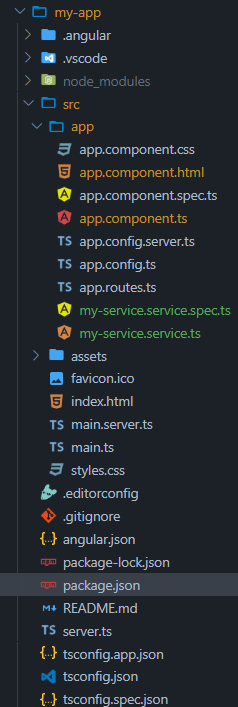
ng generate service my-serviceFolder Structure:
👁 Screenshot-2024-04-15-122250
The updated dependencies in the package.json file
 "dependencies": {
 "@angular/animations": "^17.2.0",
 "@angular/common": "^17.2.0",
 "@angular/compiler": "^17.2.0",
 "@angular/core": "^17.2.0",
 "@angular/forms": "^17.2.0",
 "@angular/platform-browser": "^17.2.0",
 "@angular/platform-browser-dynamic": "^17.2.0",
 "@angular/platform-server": "^17.2.0",
 "@angular/router": "^17.2.0",
 "@angular/ssr": "^17.2.3",
 "express": "^4.18.2",
 "rxjs": "~7.8.0",
 "tslib": "^2.3.0",
 "zone.js": "~0.14.3"
 }
Example: Add the following codes in the required files.
Step 3: Run the application using the Angular CLI:
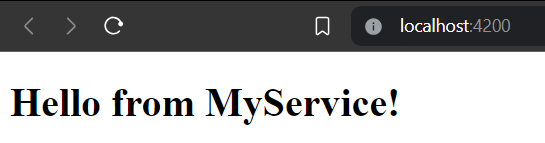
ng serve --openOutput: When you open the application in your browser, you should see the message "Hello from MyService!" displayed on the page. Something like this.
In this example, the MyServiceService is registered as a singleton service in the root injector of the Angular application by utilizing the providedIn: 'root' metadata. This configuration ensures that a single instance of MyServiceService is created and shared across the entire application hierarchy, promoting efficient resource utilization and consistent behavior. The root injector acts as the central authority, creating and managing this shared instance during the application's bootstrap process, allowing any component, directive, or service to access and interact with the same instance of MyServiceService.