|
VOOZH | about |
|
VOOZH | about |
When developing web applications with Angular, you might encounter situations where you need to include special characters in URLs. Special characters such as spaces, ampersands, question marks, and others often need to be encoded correctly to ensure the URL is valid and functions as expected. In this article, we'll explore how to add special characters in URLs in Angular, ensuring they are properly encoded.
URLs can only be sent over the Internet using the ASCII character-set. Since URLs often contain characters outside the ASCII set, the URL has to be converted into a valid ASCII format. URL encoding involves replacing unsafe ASCII characters with a "%" followed by two hexadecimal digits.
For example:
%20%26%3FStep 1: Install Angular CLI
npm install -g @angular/cliStep 2: Create a Angular application using the following command
ng new my-angular-app
cd my-angular-app
Step 3: Run the Application
ng serve"dependencies": {
"@angular/animations": "^17.3.0",
"@angular/common": "^17.3.0",
"@angular/compiler": "^17.3.0",
"@angular/core": "^17.3.0",
"@angular/forms": "^17.3.0",
"@angular/platform-browser": "^17.3.0",
"@angular/platform-browser-dynamic": "^17.3.0",
"@angular/router": "^17.3.0",
"rxjs": "~7.8.0",
"tslib": "^2.3.0",
"zone.js": "~0.14.3"
}
If we use special character in URLs directly, they can lead to unexpected behavior. Instead of using them directly we will use encodeURIComponent function which is used to encode special characters so that they can be used in URL's without any issues. Let's start with Angular's Router for Navigation.
Create a new file named special-chars-navigation.component.ts and add the following code:
Update the app-routing.module.ts as well. It should look like this:
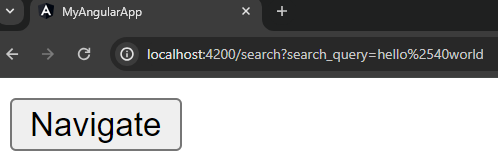
Output: When you click on the navigate button, you can see the character encoded URL in the browser.
Create a new file named manual-encoding.component.ts and add the following code:
Update the app-routing.module.ts as well. The routes should look like this:
Output: When you click on the External Link it will redirect you to the respective url with the special character encoded.
Create a new file named http-client-example.component.ts and add the following code:
Update the app-routing.module.ts as well. The routes should look like this:
Make sure to import HttpClientModule in app.module.ts
Output: When you will click on the Make API Request button you can see the API call in the console. It will give error as expected, I don't have any API in the backend.