|
VOOZH | about |
|
VOOZH | about |
ngx-toastr is a popular npm package that allows the developers to show and configure toast messages easily in an angular web application. In this article, we will learn how to position a specific toast message in angular 18.
First, we will set up an angular project, and install the ngx-toastr dependencies.
ng new angular-toastr --standalone
cd angular-toastr
npm install ngx-toastr
npm install @angular/animations
Dependencies
"dependencies": {
 "@angular/animations": "^18.1.1",
 "@angular/common": "^18.0.0",
 "@angular/compiler": "^18.0.0",
 "@angular/core": "^18.0.0",
 "@angular/forms": "^18.0.0",
 "@angular/platform-browser": "^18.0.0",
 "@angular/platform-browser-dynamic": "^18.0.0",
 "@angular/router": "^18.0.0",
 "ngx-toastr": "^19.0.0",
 "rxjs": "~7.8.0",
 "tslib": "^2.3.0",
 "zone.js": "~0.14.3"
 },
 "devDependencies": {
 "@angular-devkit/build-angular": "^18.0.7",
 "@angular/cli": "^18.0.7",
 "@angular/compiler-cli": "^18.0.0",
 "@types/jasmine": "~5.1.0",
 "jasmine-core": "~5.1.0",
 "karma": "~6.4.0",
 "karma-chrome-launcher": "~3.2.0",
 "karma-coverage": "~2.2.0",
 "karma-jasmine": "~5.1.0",
 "karma-jasmine-html-reporter": "~2.1.0",
 "typescript": "~5.4.2"
 }
In this step, we will add the ngx-toastr and browser animations to our app config file.
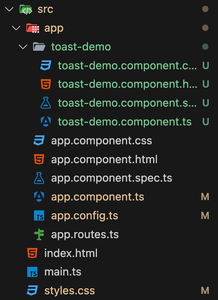
Create a standalone toastr notifications components that we will use in our main app component to render the notifications. Use the below command to create a standalone component.
ng generate component toast-demo --standaloneNow, update the toast-demo.component.ts file to include the toast notifications.
Use the newly created toast-demo component inside the app component.
Add the below CSS for showing the toastr notifications animations.
Start the application using the below command:
ng serve