|
VOOZH | about |
|
VOOZH | about |
In Angular, managing data streams effectively is important, especially when dealing with asynchronous operations. Observables, a core part of the RxJS library used in Angular, are powerful tools for handling these data streams. In this article, we will explore how to subscribe to Observables in Angular.
An Observable is a mechanism in RxJS used to handle asynchronous data streams, like HTTP requests, user input, etc. Observables are lazy, which means they won’t start emitting data until you subscribe to them.
Subscribing to an Observable means starting to listen to the stream it provides. When you subscribe, you provide functions that will be executed when the Observable emits a value, an error, or completes. Let's see how this is done with a basic example.
Step 1: Create a new angular project by using the following command.
ng new project-nameStep 2: Go inside the project
cd project-nameStep 3: Use the following command to start the application.
ng serveImport HttpClientModule in the app.module.ts like below.
imports: [BrowserModule, AppRoutingModule, HttpClientModule]And remove the auto generated HTML code form app.compoent.html
Step 4: Create a new service file inside app component using the following command.
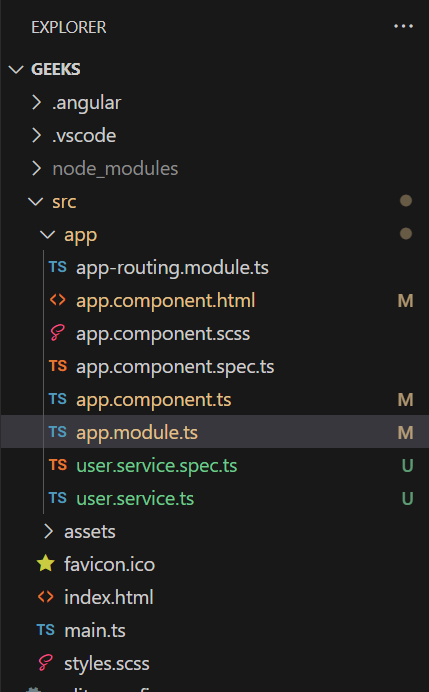
ng g s userServiceFolder Structure:
👁 Screenshot-2024-04-26-071434Dependencies:
"dependencies": {
 "@angular/animations": "^16.1.0",
 "@angular/common": "^16.1.0",
 "@angular/compiler": "^16.1.0",
 "@angular/core": "^16.1.0",
 "@angular/forms": "^16.1.0",
 "@angular/platform-browser": "^16.1.0",
 "@angular/platform-browser-dynamic": "^16.1.0",
 "@angular/router": "^16.1.0",
 "rxjs": "~7.8.0",
 "tslib": "^2.3.0",
 "zone.js": "~0.13.0"
 }
Example 1: Fetching Data with HTTP
Imagine you have a service in Angular that fetches users data from an API using the HttpClient module. In this example I am using a dummy API service to fetch the User data.
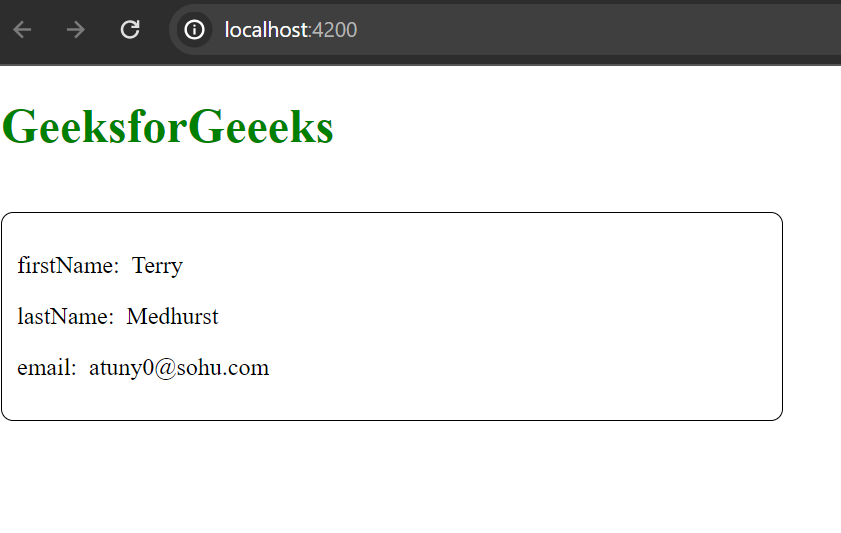
This component subscribes to the Observable returned by getUserData() and updates the userData variable with the data received.
The subscription is set up with an object containing next and error handlers:
Output:
👁 Screenshot-2024-04-21-145727
Example 2: Subscriptions with RxJS Operators
RxJS operators allow you to manipulate data streams. For example, you might want to filter or map data as it comes through the stream before it reaches the subscription. Let's see an example to include some operators:
Output: