The AWS Simple Storage Service (S3) is a cloud service provided by Amazon Web Services (AWS) to store your data securely. You can access this service through your IAM role or root user account.
Principle of Least Privilege
The principle of least privilege states a concept of security that advises granting users a minimum level of permissions and access to resources.
By adhering to this principle, one can limit the risk of potentially compromised accounts and unauthorized access.
This entails carefully defining and assigning permissions and access to users, roles, and groups depending on the task they are required to perform without providing any additional authorization over any resource.
Identity Access Management (IAM) is a service provided by AWS that helps in centralised control and access management to users through IAM users, groups and roles.
Admin can create custom IAM policies or select from the existing IAM policies which can be attached to particular users, groups or roles thus implementing the principle of least privilege.
Using IAM user instead of the root user to perform all actions on the AWS is advisable unless any service is accessible only to the root user.
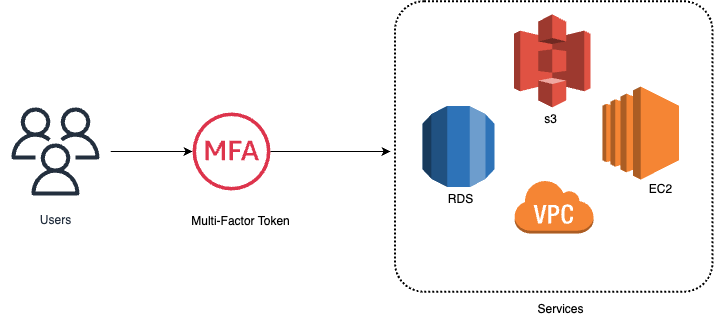
Multi-Factor Authentication is an extra layer of access on top of the username and the password for an IAM user.
With MFA enabled, users are require to authenticate their identity by providing an extra input, typically a time based one time passcode which can be generated via virtual devices, hardware or a software token.
Admin can enable MFA for individual IAM users or to perform specific operations or actions.
IAM service supports MFA for both console and API access providing enhanced security.
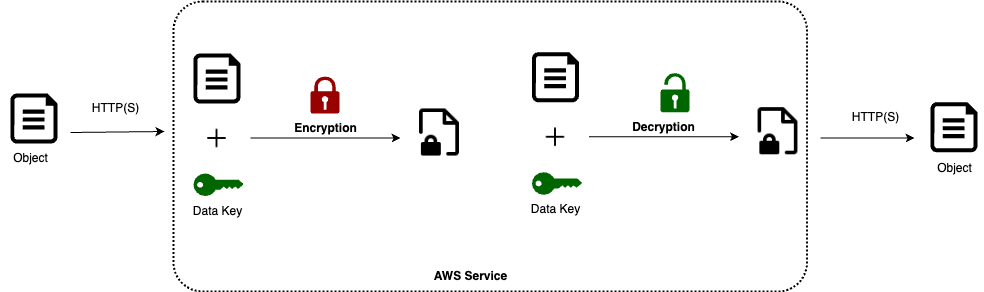
TLS and SSL are widely used in AWS to encrypt data during transmission, ensuring secure communication between clients and AWS services.
This encryption process guarantees that data is encrypted before leaving the client's environment and decrypted upon arrival at the intended AWS service.
Encrypting data in transit with TLS/SSL helps AWS customers minimize the risk of interception and tampering by unauthorized parties, thereby protecting the confidentiality and integrity of their data.
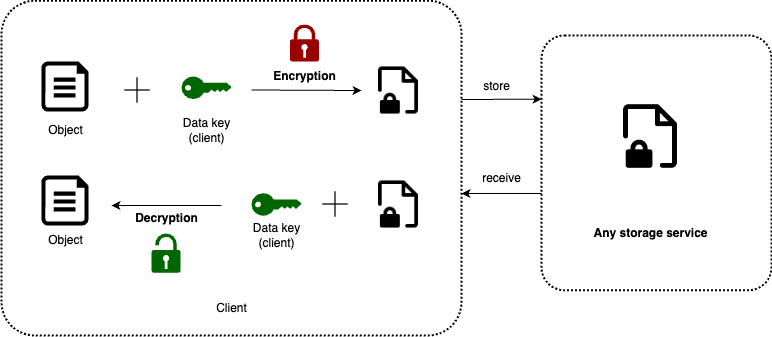
Users have the option to encrypt data before uploading it to any AWS service through client-side encryption.
In this process, users retain control over the encryption keys responsible for encrypting and decrypting data before it is transmitted to or from AWS services.
Use separate VPCs for different environments (like development, testing, and production) to keep resources isolated and minimise potential security issues.
Connect VPCs securely using VPC peering or AWS Direct Connect for communication between them or with on-premises networks.
Split your VPC into subnets based on security needs and the type of resources they contain.
Keep sensitive resources like databases or internal applications in private subnets to block internet access.
For resources that need internet connectivity, like web servers, use public subnets, but apply access controls to limit who can reach them.
Network Access Control Lists (ACLs) and Security Groups
Use Network ACLs to control traffic in and out of subnets based on IP addresses, ports, and protocols.
Only allow necessary traffic and block everything else by default.
Regularly review and adjust ACL rules to match security needs.
Use Security Groups to manage traffic for individual instances based on their roles.
Give each instance only the permissions it needs to do its job.
Keep security group rules updated as security needs change to reduce risks.
Patch Management
Importance of Regular Patching
Make sure to regularly patch your systems to reduce vulnerabilities and security risks.
Use automated patch management with AWS services to ensure updates happen on time.
AWS Backup is a fully managed central service which can be used to manage and automate backups across AWS services. There is no need to create custom scripts or manual processes. Set up lifecycle policies known as Backup plan based on below aspects.
Transition to cold storage: Never, Days, Weeks, Months, Years
Retention period: Always, Days, Weeks, Months, Years
AWS Backup supports services including EC2/EBS, S3, RDS, DynamoDB, Aurora, DocumentDB/Neptune, EFS and Amazon Storage Gateway.
Disaster Recovery Planning
Set up replication and failover systems to keep your services running if something goes wrong. Use AWS services to automate recovery processes, minimising downtime and keeping your data safe. Here are disaster recovery approaches:
Backup and Restore: This is like making a copy of your data and putting it somewhere safe. If something bad happens, you can bring your system back to life using that copy.Imagine it's like taking a photo of your important documents. If the originals get lost or damaged, you still have the photo to use.
Pilot Light: This is a bit like having a small flame always burning. It's not doing much, but it's ready to quickly light up the whole system if needed. Think of it as having the essential parts of your system ready to go. When a disaster strikes, you just need to add fuel to the fire to get everything running smoothly again.
Warm Standby: In this setup, you have a partially active backup system ready to take over if the main system fails. It's not as quick as Pilot Light, but it's faster than starting from scratch. It's like having a backup car that's almost ready to go. You just need to warm up the engine a bit before you can drive it.
Multi-site active: This is like having two or more fully working systems running at the same time in different locations. If one system goes down, the other one can immediately take over without any interruption. It's similar to having duplicate keys for your house. If you lose one set, you can still get into your house using the spare key.


.png)