Phishing is a cyberattack where attackers use fake messages or websites to trick victims into giving away sensitive information. It works like “fishing,” using bait to lure targets into clicking harmful links or entering confidential data.
Goal: steal sensitive info (passwords, credit card details, SSNs, DOB).
Attackers impersonate trusted brands or services.
Most phishing happens through emails that look genuine.
Fake websites often mimic real ones but have suspicious URLs.
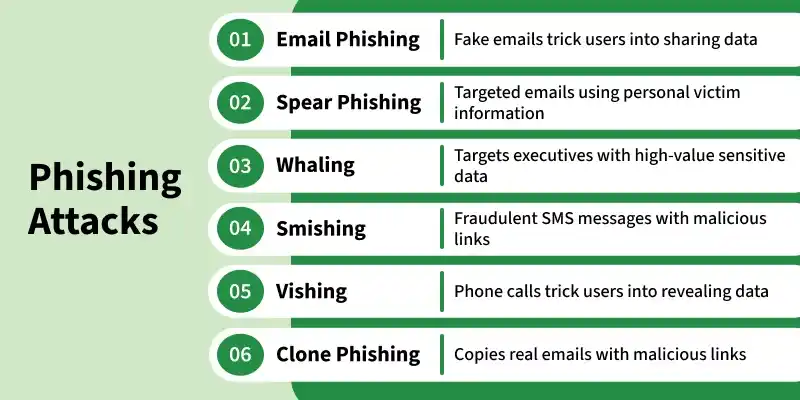
Methods Used to Carry Out Phishing
Phishing can occur in several ways. Any of the methods below can lead a user into a phishing attack:
Distinguishing Between a Fake Website and a Real Website
Here are ways to identify legitimate websites:
1. Check the URL of the Website
A good and legal website always uses a secure medium to protect yourself from online threats.
So, when you first see a website link, always check the beginning of the website.
That means if a website is started with https:// then the website is secure because https:// "s" denotes secure, which means the website uses encryption to transfer data, protecting it from hackers.
If a website uses http:// then the website is not guaranteed to be safe.
So, it is advised not to visit HTTP websites as they are not secure.
2. Check the Domain Name
The attackers generally create a website whose address mimics large brands or companies like www.amazon.com/order_id=23.
If we look closely, we can see that it's a fake website as the spelling of Amazon is wrong, that is amazon is written.
So it's a phished website.
So be careful with such types of websites.
3. Analyze the Site Design
If you open a website from the link, then pay attention to the design of the site.
Although the attacker tries to imitate the original one as much as possible, they still lack in some places.
So, if you see something off, then that might be a sign of a fake website.
For example, www.sugarcube.com/facebook, when we open this URL the page open is cloned to the actual Facebook page but it is a fake website. The original link to Facebook is www.facebook.com.
4. Check Available Web Pages
A fake website does not contain the entire web pages that are present in the original website.
So when you encounter fake websites, then open the option(links) present on that website.
If they only display a login page, then the website is fake.
Anti-Phishing Tools
These tools help detect phishing attacks:
Anti-Phishing Domain Advisor (APDA): Warns users about phishing websites with real-time alerts.
PhishTank: A community-driven database of reported phishing sites.
Webroot Anti-Phishing: Uses machine learning to detect suspicious websites.
Malwarebytes Anti-Phishing: Blocks malicious websites using real-time detection.
Kaspersky Anti-Phishing:Provides integrated protection using known phishing database lists.
Note: Anti-phishing tools help add protection but are not a complete solution. Users must remain cautious and practice safe browsing habits to avoid falling victim.