|
VOOZH | about |
|
VOOZH | about |
Nmap scan results reveal active hosts, port states, running services and service versions on a target system. Security professionals use this information to identify exposed services, analyze the attack surface and assess potential security risks during network reconnaissance and penetration testing.
Nmap scan results help to:
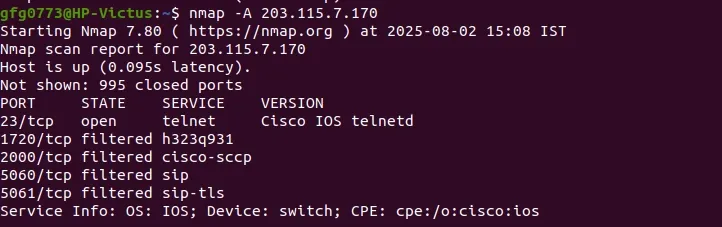
Here is the basic structure of Nmap results when you enter the IP address (203.115.7.170)
Starting Nmap 7.80 ( https://nmap.org ) at 2025-08-02 15:08 IST
Nmap scan report for 203.115.7.170
Host is up (0.095s latency).
Not shown: 995 closed ports
PORT STATE SERVICE VERSION
23/tcp open telnet Cisco IOS telnetd
1720/tcp filtered h323q931
2000/tcp filtered cisco-sccp
5060/tcp filtered sip
5061/tcp filtered sip-tls
Service Info: OS: IOS; Device: switch; CPE: cpe:/o:cisco:ios
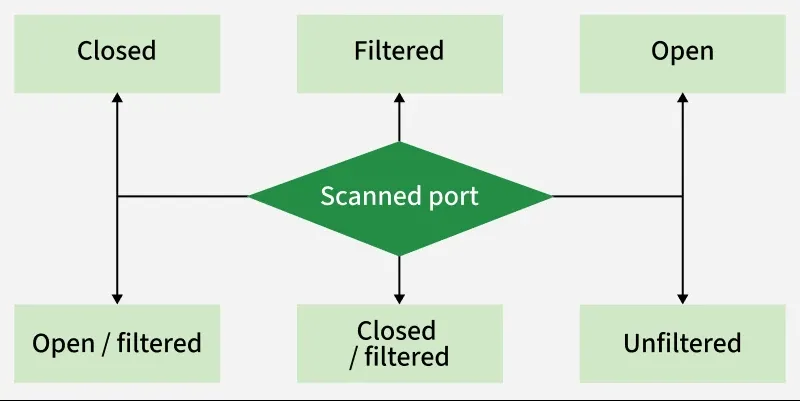
Nmap Port States describe the accessibility and status of network ports during a scan. Nmap classifies ports into six main states:
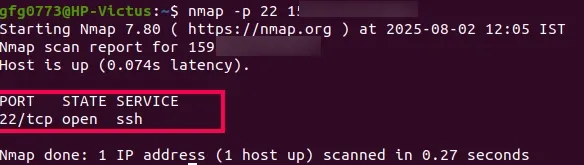
A port is marked as open when a service is actively listening and accepting connections on it, such as SSH, HTTP or FTP. While necessary for normal operations, open ports can also increase the attack surface if not properly secured.
Syntax:
nmap -p 22 <target IP>Example:
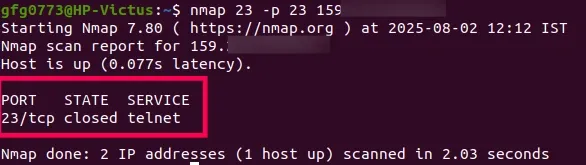
nmap -p 23 159.168........A port is marked as closed when the host is reachable, but no application is listening on that port. It indicates the system is online and responding, even though the service is not running.
Syntax:
nmap -p 23 <target IP>Example:
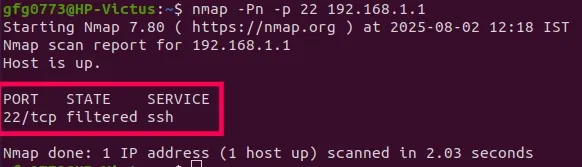
nmap -p 23 159.168........A port is marked as filtered when Nmap cannot determine whether it is open or closed because a firewall or security device blocks the probe. This usually indicates that the target system is protected against reconnaissance attempts.
Syntax:
nmap -Pn -p 22 <target IP>Example:
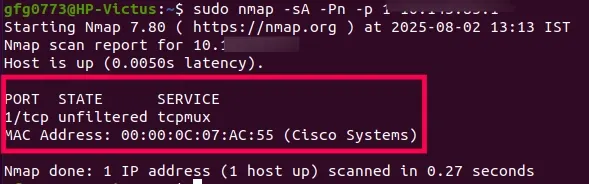
nmap -Pn -p 22 192.168.1.1A port is marked as unfiltered when it is reachable and not blocked by a firewall, but Nmap cannot determine whether it is open or closed. This is commonly observed during ACK scans, where the firewall allows packets but does not reveal the port state.
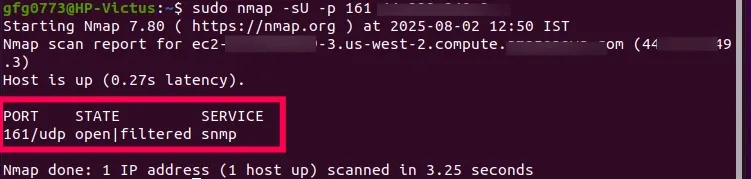
nmap -sA -Pn -p 80 <target IP>nmap -sA -Pn -p 80 159.168.1.10When Nmap reports a port as open|filtered, it means the port is either open or being blocked by a firewall, but its exact state cannot be determined. This is commonly seen during UDP scans where responses are not always returned.
sudo nmap -sU -p 161 <target IP>sudo nmap -sU -p 161 192.161.1.1When Nmap reports a port as closed|filtered, it means it cannot determine whether the port is closed or being filtered by a firewall. This state is uncommon and typically appears in special scan types like IP protocol scans.
Syntax:
sudo nmap -sO -p 1 <target IP>Example:
sudo nmap -sO -p 1 44.228.249.3Here is a brief summary table of Nmap port states and their meanings for easier understanding.
| State | Meaning | Implication |
|---|---|---|
| open | Accepts connections | Service actively running |
| closed | Reachable, no service listening | Host is up, but port not in use |
| filtered | Status unknown | Firewall or device blocking probes |
| unfiltered | Reachable, status unclear | Accessible but open/closed unknown |
| open|filtered | Open or filtered | Cannot determine exact state |
| closed|filtered | Closed or filtered | Cannot determine exact state |
Here are some basic Nmap port commands to help you quickly understand and use port scanning options effectively:
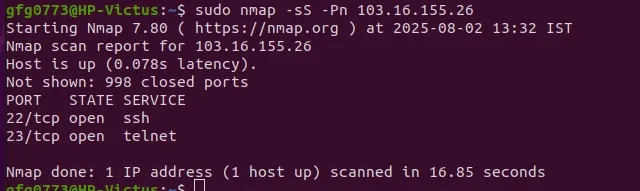
A TCP SYN stealth scan is one of the most commonly used Nmap scan types for fast and efficient port discovery. It is called a “half-open” scan because it sends a SYN packet but does not complete the full TCP handshake, helping reduce detection.
Example:
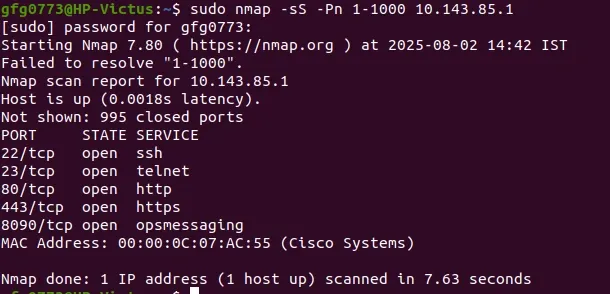
sudo nmap -sS -Pn 103.16.155.26Scanning a range of ports means checking multiple consecutive ports (e.g., 1 to 1000) on a target system to find which ones are open, closed or filtered. This is useful to discover running services that may not use standard ports.
Example:
sudo nmap -sS -Pn 1-1000 10.143.85.1Scanning all ports helps identify hidden or non-standard services and detect weak firewall configurations. It is commonly used in deep vulnerability assessments and penetration testing to uncover the full attack surface.
Example:
nmap -p- 10.143.85.1A UDP port scan identifies open UDP ports (1–65535) on a target system that may be running services such as DNS or DHCP. Since UDP is connectionless, results are slower and less reliable compared to TCP scans.
Example (UDP-only scan):
sudo nmap -sU -p 53,67,68,161 10.143.85.102Example(TCP + UDP combined scan):
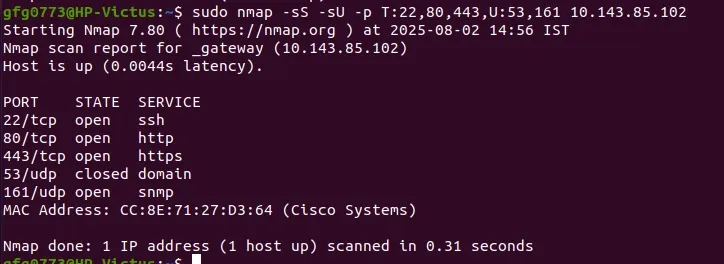
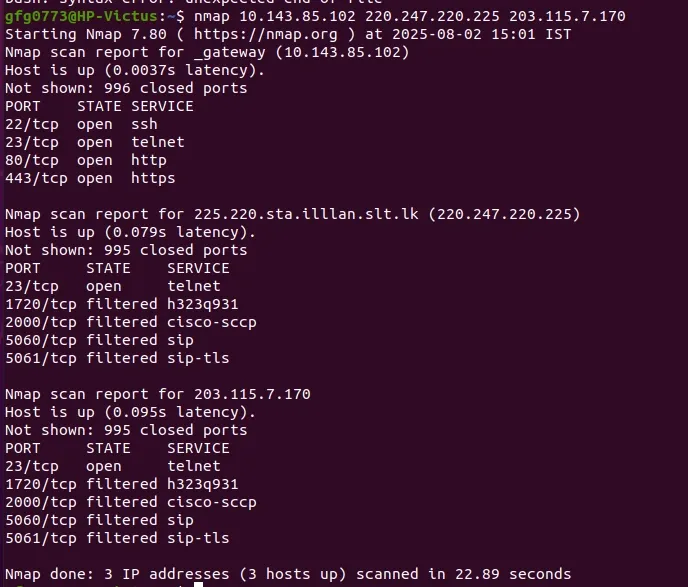
sudo nmap -sS -sU -p T:22,80,443,U:53,161 10.143.85.102Scanning multiple IPs or subnets helps identify vulnerabilities, detect running services and audit firewall configurations across several hosts. Nmap supports scanning individual IPs, IP ranges and entire subnets in a single command.
Example:
nmap 10.143.85.102 220.247.220.225 203.115.7.170An Aggressive Scan in Nmap enables a set of features that gather detailed information about a target system. It’s triggered using the -A option and combines several scan types into one command.
Example:
nmap -A 203.115.7.170