VOOZH about

URL: https://www.geeksforgeeks.org/data-science/building-a-rag-application/

⇱ Building a RAG Application - GeeksforGeeks


  • Courses
  • Tutorials
  • Interview Prep

Building a RAG Application

Last Updated : 21 Jun, 2025

Retrieval-Augmented Generation (RAG) is a framework that combines the strengths of information retrieval and generative models:

  • Retriever: The retriever component fetches relevant documents from a large corpus or knowledge base based on the input query.
  • Generator: The generator then takes the retrieved documents and the query to generate a coherent and contextually relevant response.

It allows a model to retrieve relevant documents from a knowledge base and use those documents to augment the generation process, resulting in more accurate, context-aware and insightful responses. This approach has shown promising results in various applications such as question answering, dialogue systems and content generation. In this article we will build a RAG Application.

Building a Customer Help Bot

Before building the model lets see how RAG Works in customer-support Help Bot:

  • Query Input: A customer submits a query like "How do I return an item?"
  • Document Retrieval: The retriever searches knowledge base, pulling relevant documents that can answer the query. These documents can include FAQs, return policies and product information.
  • Response Generation: The generator processes the retrieved documents and the customer’s query to generate a response that integrates information from the documents, providing an accurate and helpful answer.

Lets build a Amazon Help Bot which can answer to the queries of customers.

Step 1: Install the required Libraries

Install required libraries for generating embeddings, similarity search, text generation and deep learning by running the following command.

Step 2: importing Libraries

  • sentence-transformers: Used for generating sentence embeddings which are vector representations of text for similarity comparison.
  • faiss-cpu: A library for efficient similarity search, used to index and search document embeddings based on cosine similarity.
  • transformers: A library for accessing pre-trained models such as FLAN-T5, for text generation and other NLP tasks.
  • torch: A deep learning framework used to run models and perform tensor computations necessary for NLP tasks.

Step 3: Documentation Setup

A list of documents i.e knowledge base will be used to retrieve relevant context for answering customer queries. The documents might include return policies, troubleshooting guides and FAQs.

Step 4: Embedding Generation

We will use SentenceTransformer to generate vector embeddings for the documents which represent each document numerically for similarity comparison.

Step 5: FAISS Index Setup

Create a FAISS index for performing efficient similarity searches using the document embeddings and normalizes the embeddings for cosine similarity.

Step 6: Text Generation Pipeline

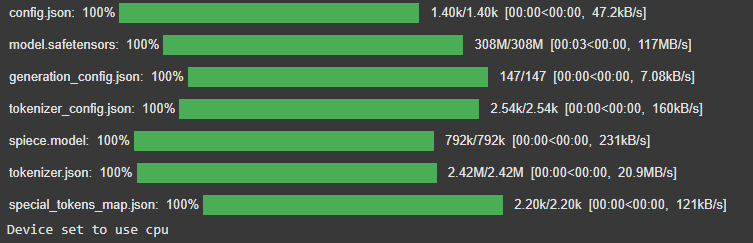
Loads the FLAN-T5 model and tokenizer from Hugging Face for generating text-based responses based on input prompts.

Output:

👁 Screenshot-2025-06-21-121531
Training

Step 7: RAG Answer Function

Retrieves the top-k most relevant documents for the query, generates a prompt and uses FLAN-T5 to generate a response based on the retrieved context.

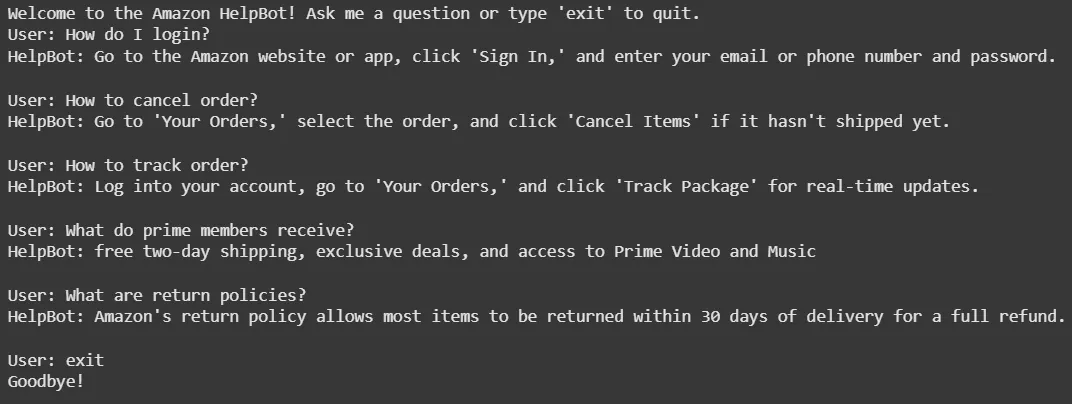
Step 8: Interactive Q&A Bot Loop

Continuously takes user input, processes the query using the rag_answer function and displays the relevant context and generated response. Ends when the user types 'exit'.

Output:

👁 ragapp_result

Use Cases for Help Bot:

  1. Customer Support: Provide real-time support for order inquiries, shipping issues and returns.
  2. Product Recommendations: Help customers with product suggestions based on preferences or previous purchases.
  3. Troubleshooting: Assist with product troubleshooting by retrieving relevant instructions or FAQ entries.
  4. Order Tracking: Answer queries related to order status and tracking.

Advantages

  • Improved Accuracy: Access to an external knowledge base improves answer quality especially for complex topics.
  • Scalability: Can easily scale by updating the knowledge base without retraining the entire model.
  • Flexibility: RAG can adapt to various applications like from customer service to technical support.
  • Faster Specialized Systems: Enables rapid deployment and maintenance by updating the knowledge base without retraining.

Challenges

  • Computational Resources: RAG-based systems can be resource-intensive, especially for large-scale retrieval and text generation.
  • Handling Ambiguity: RAG models may struggle with vague or ambiguous queries leading to irrelevant results.
  • Response Length Control: Generating concise, relevant responses can be difficult leading to overly detailed answers.
  • Document Retrieval Precision: Incorrect documents may be retrieved leading to inaccurate responses.
Comment
Article Tags:
Article Tags:

Explore