|
VOOZH | about |
|
VOOZH | about |
AWS VPC (Amazon Virtual Private Cloud) is a service that allows you to create a private network in the cloud. It gives you full access over your networking environment allowing you to define your IP address range also to create subnets and manage routing tables. With VPC you can securely connect your resources to the internet or keep them isolated from external traffic depending on your needs. It’s like building your own private data center within AWS.
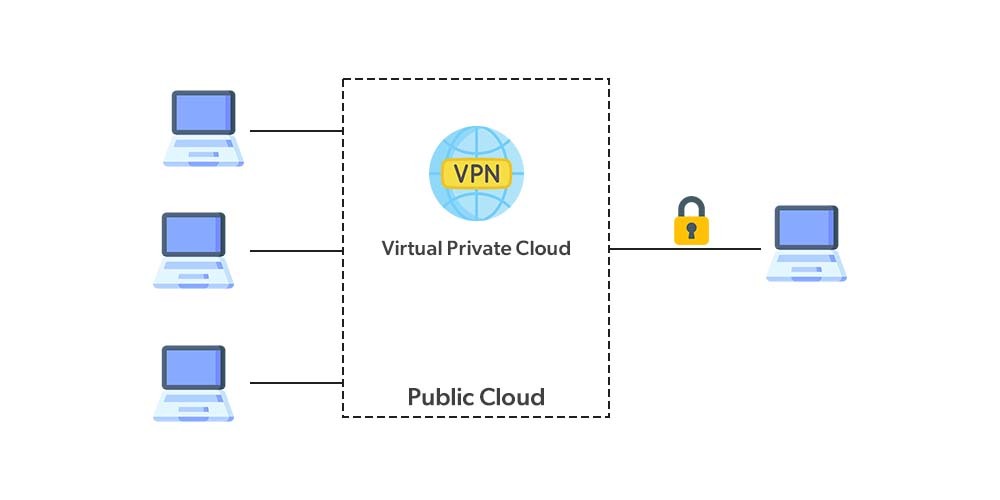
For example, Office is a public place (consider it as the public cloud) and you have your own chamber(consider it as VPC). This picture will help you understand it clearly.
Table of Content
Amazon web service(AWS) is designed to help organizations and application providers to easily and securely host their applications. The Basic Security level that every organization follows is to form their own network, which is Virtual Network or also termed as Virtual Private Cloud(VPC).
VPC helps to create a private-cloud like computing environment inside the shared public cloud infrastructure. It basically provides an organization authorization and control over a virtual network that is customized by them which basically isolates them from all other public cloud tenants, creating a private, secure place on the public cloud. The reason for this being so widely used is that it uniquely identifies your business, as it isolates your database, the application won’t share or mix with other customers of the cloud.
👁 ImageFor More Information Please Refer to this Article: AWS Virtual Private Cloud
In AWS a VPC spans a specific IP address range using CIDR (Classless Inter-Domain Routing) blocks. The CIDR block defines the range of IP addresses that can be assigned to resources within the VPC such as EC2 instances also load balancers and databases. Here’s a breakdown of how AWS handles IP addresses and CIDR blocks
The IP address range for a VPC is determined when the VPC is created. An IP address range defines the available addresses within a network. In any given range, the IP addresses are split into two essential parts:
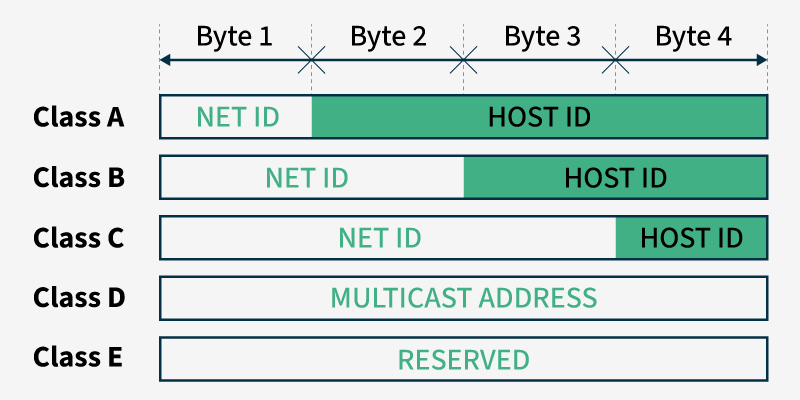
This is also known as supernetting while creating VPC we need to specify a range of IP addresses for your private network in the form of a CIDR block. In a VPC CIDR blocks are assigned to divide IP addresses into smaller more manageable groups like we it divided into IP address classes (A to E). Each VPC gets a CIDR block upon creation and you can create subnets by breaking this block down into smaller sub-ranges.
Point to Note: The following 5 IP addresses are reserved by AWS:
10.0.0.0 for Network address, 10.0.0.1 for VPC router, 10.0.0.2 for DNS server,
10.0.0.3 for future use, 10.0.0.255 for Network broadcast address
In the Given image IP addresses are divided into different classes (A to E) with each class having a different structure for identifying the Network ID and Host ID.
CIDR blocks work by allowing network administrators to define their own subnet masks which provide more flexibility than fixed class-based addressing. For example a CIDR block of 192.168.1.0/24 means the first 24 bits are used for the network and the remaining bits are for host identification.
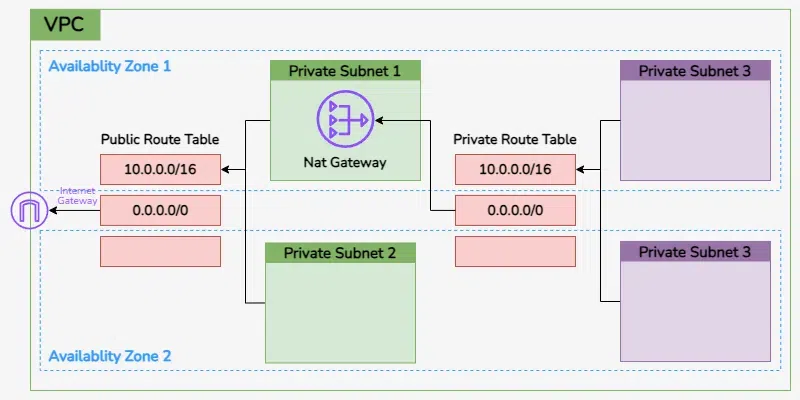
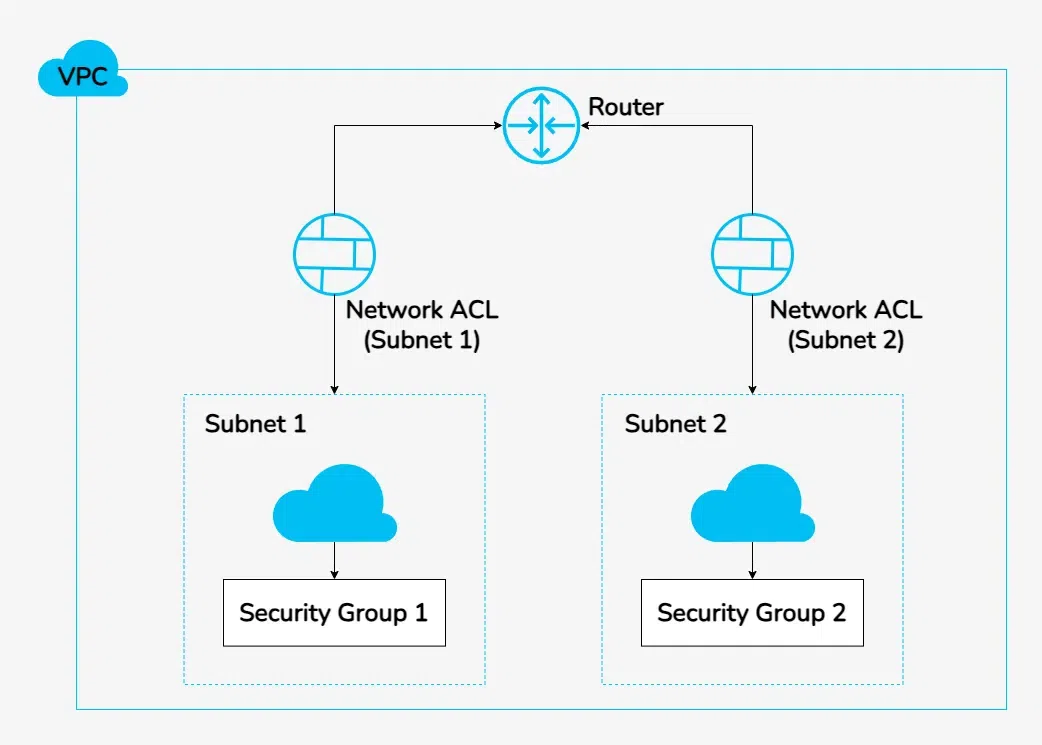
Subnets are smaller subdivisions of your VPC Allowing for easier resource organization and network segmentation. Each subnet resides entirely within one Availability Zone (AZ) and can either be private or public depending on its configuration and use case. In AWS a subnet is a segment of a Virtual Private Cloud where you can place resources such as EC2 instances. A VPC is divided into multiple subnets Each of which Resides in a specific Availability Zone . This ensures better availability and fault tolerance across your applications.
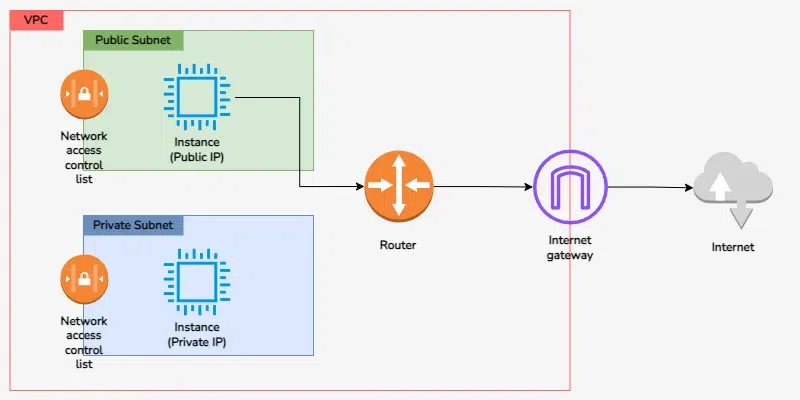
In the image provided we see two types of subnets Public Subnet and Private Subnet each serving different purposes in a VPC.
In The Above Figure we see how public and private subnets connect to the Internet Gateway via a Router. The Router Directs traffic between subnets and the external world Ensuring that instances in the public subnet are exposed to the internet while keeping private subnet instances secure and isolated
A subnet mask defines the size of a network and a 32-bit address. It determines how much of the IP address is reserved for the subnet and how much is available for the host. In the CIDR notation the number after the slash represents how many bits are dedicated to the network.
When a device connects to a network it receives an IPv4 address which is represented as a 32-bit numeric value. This address is divided into four sections called octets separated by periods. Each octet can hold a value between 0 and 255. Understanding the distinction between the network and host portions of an IP address is essential for effective network management. For example consider the IP address 192.168.112.121. In binary this address is represented as 11000000.10101000.01110000.01111001. To help determine which part of the address identifies the network and which part identifies the host a subnet mask is used.
For the given IP address a common subnet mask would be 255.255.255.0. In binary this translates to 11111111.11111111.11111111.00000000. The subnet mask informs us that the first three octets are used for the network identification while the last octet is reserved for the host identification. In practical terms this configuration allows for 254 usable IP addresses within that network. Thus in a typical home network setting you could connect up to 254 devices like smartphones laptops and smart home devices to access the internet efficiently. This structure ensures clear communication within the network and facilitates resource management.
When setting up the routing for your subnets the type of subnet you create will be influenced by the decisions you make. It is essential to assess how you want each subnet to connect to the internet when designing your VPC subnets.
AWS provides the flexibility of different subnet types to control the traffic flow between resources within your VPC. These types include
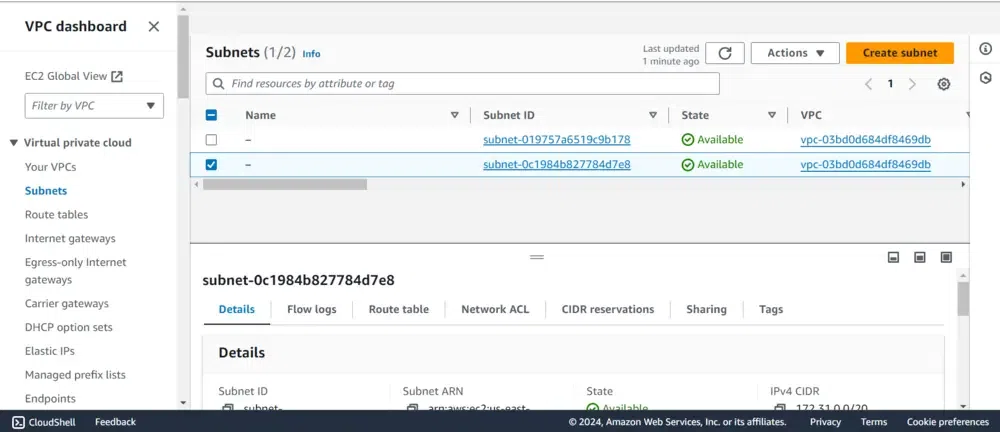
Every subnet is linked to a route table that defines the outbound traffic routes it can take. By default, all subnets are connected to the main route table of the VPC. However, you have the flexibility to modify this association and customize the main route table as needed.
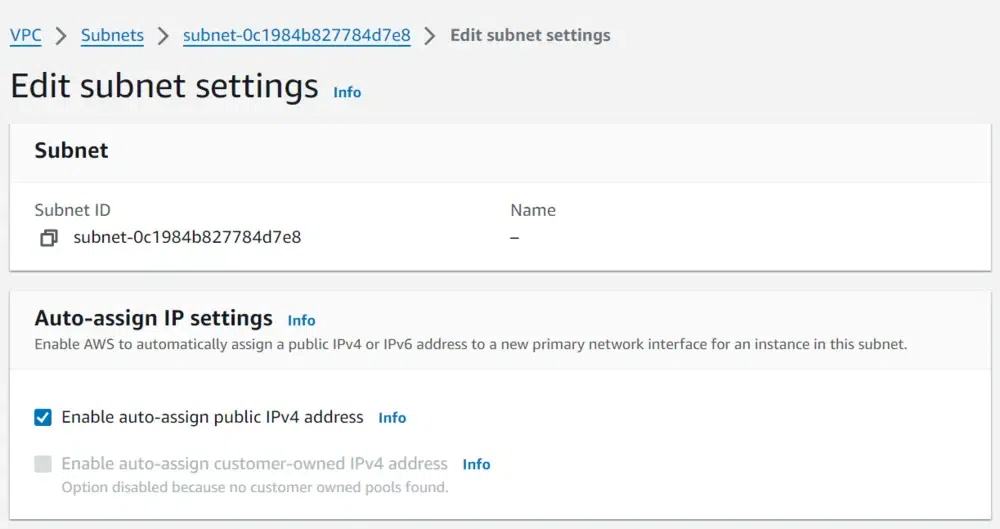
Each subnet has a configurable setting that determines whether a network interface created within it will receive a public IPv4 address or an IPv6 address. This applies to the primary network interface (eth0) that is automatically generated when you launch an instance in that subnet. It's important to remember that this default configuration can be modified for individual instances during their launch process.
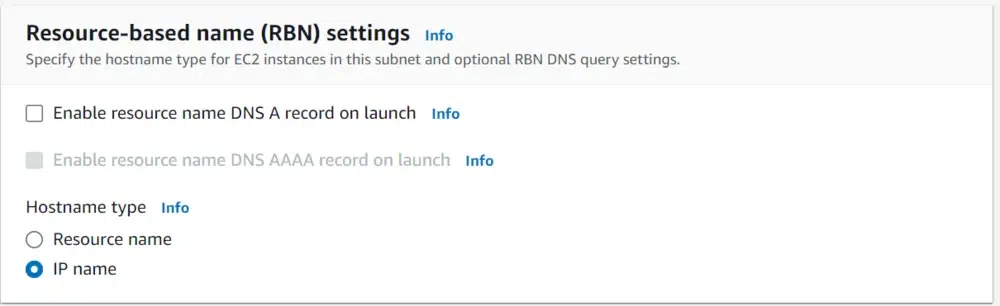
To Auto Assign IP Address we have two ways to do that
1. Enable Auto Assign Public IPv4 Address
2.Resource-Based Name (RBN) Settings
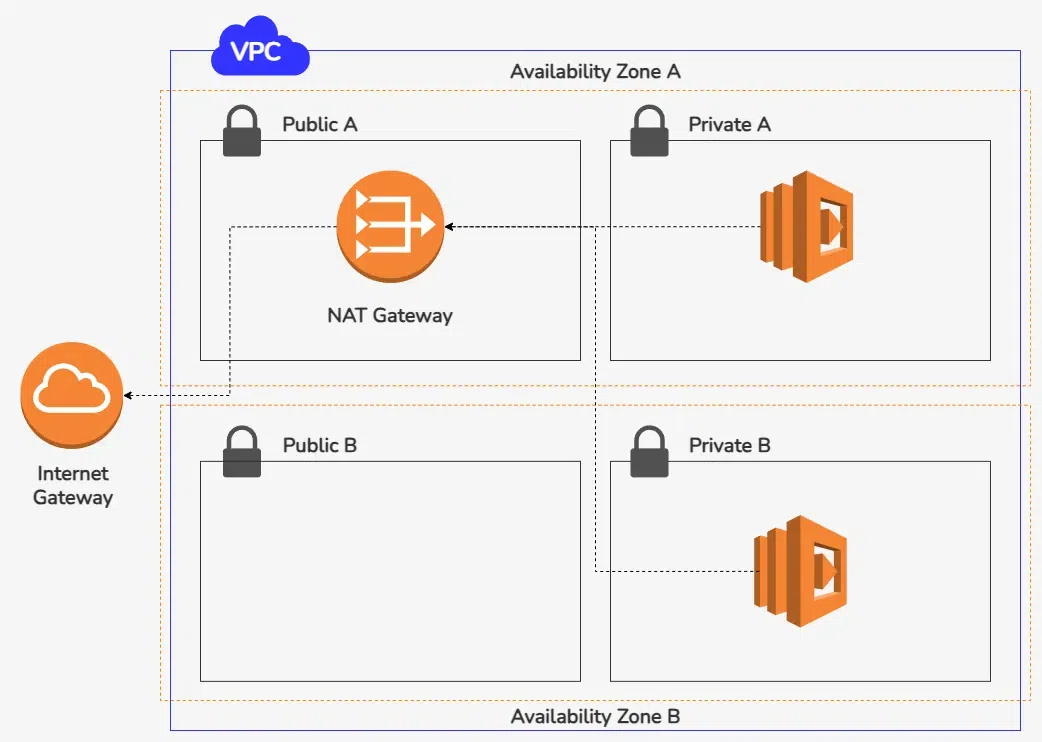
To enhance the security of your AWS VPC and Subnet resources, utilizing private subnets is advisable. For resources located within these private subnets such as EC2 instances you can employ a bastion host or a NAT device. These solutions facilitate internet access while maintaining the security of your private network, ensuring that your resources remain protected from direct exposure to the public internet.
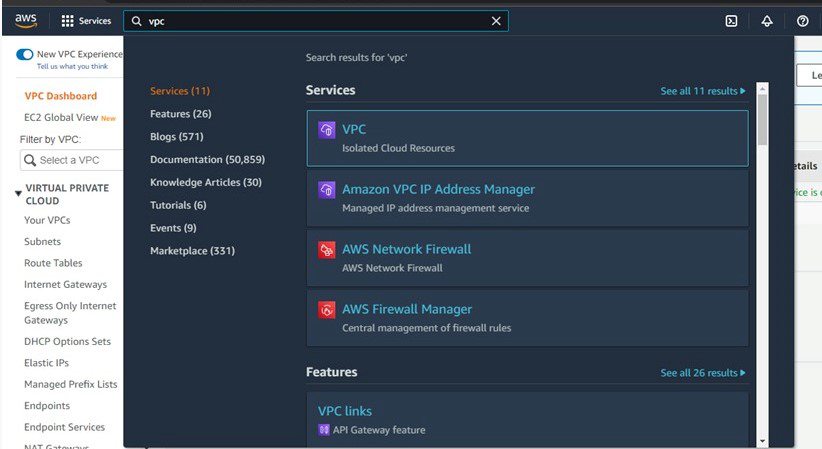
Step 1: Log in to your AWS account>>In your AWS console search VPC in the search bar.
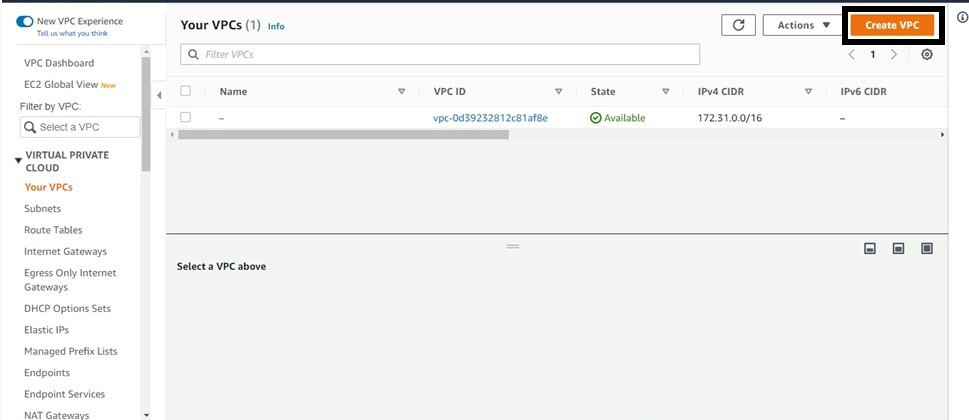
👁 ImageStep 2: On the VPC page click on "Create VPC".
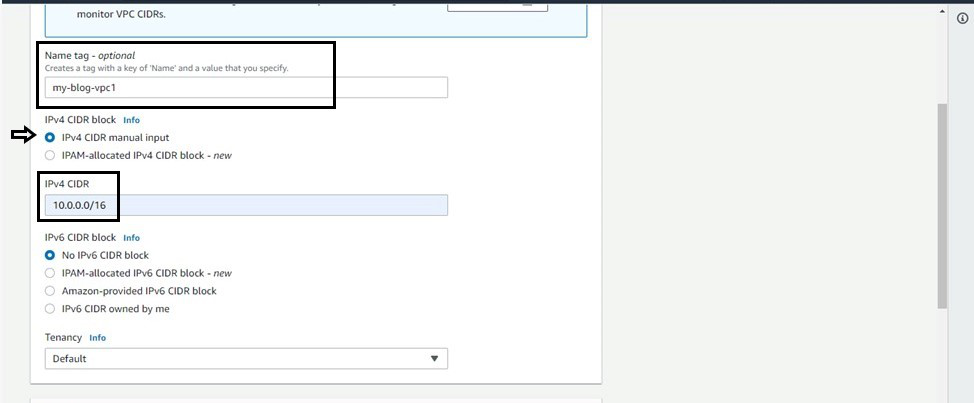
👁 ImageStep 3: Give a name>>Choose "IPv4 CIDR manual input">>give a IP value like here-"10.0.0.0/16">>Select No IPv6 CIDR block>>Give Tenancy as Default>>Click on "Create VPC".
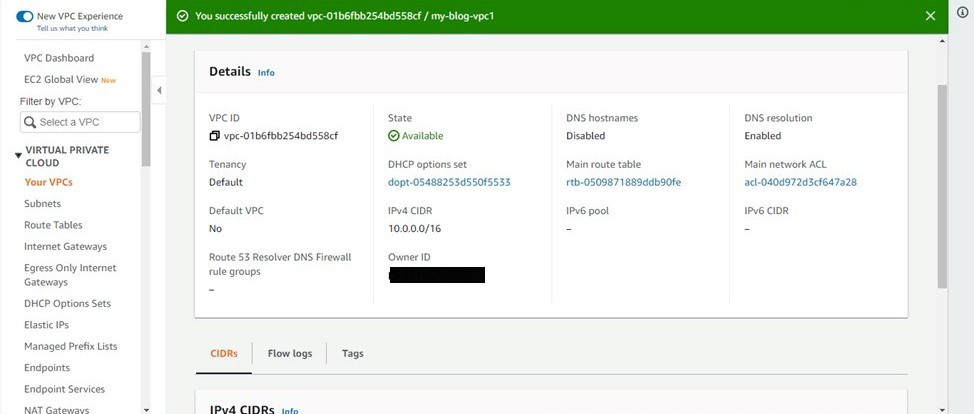
👁 ImageAfter creation this will be your result:
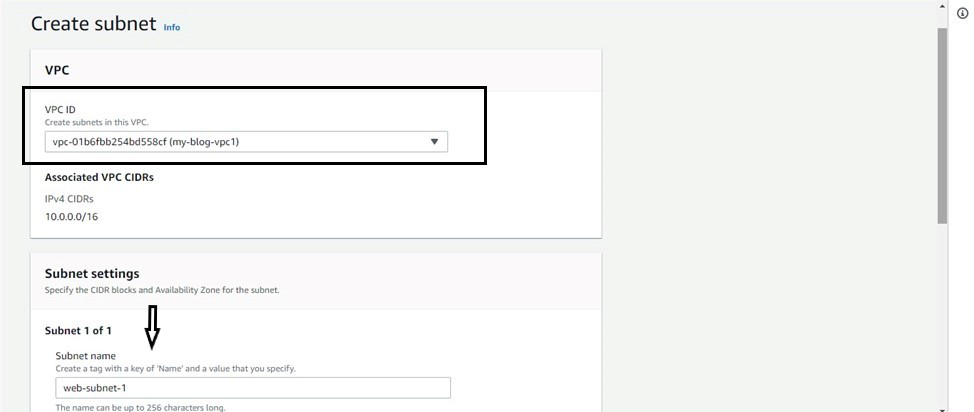
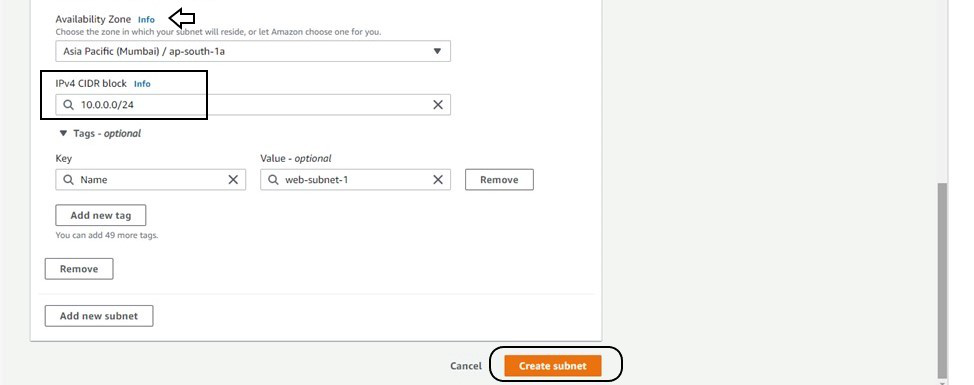
👁 ImageStep 4: Now go to subnet present on the left side of the screen>>Click on create subnet>>In VPC id bar give the VPC ID with whom you want to attach the subnet>>give subnet a name>>Choose availability zone of your choice>>Give it a CIDR range>>Click on create subnet.
👁 ImageThis creates a VPC of IPv4 CIDR 10.0.0.0/16 within that it forms a subnet of IPv4 CIDR 10.0.0.0/24.
People also Search For | |
|---|---|
Amazon VPC offers a powerful and flexible way to design and manage your cloud resources. By understanding the key components such as subnets IP addressing and routing you can create a secure and efficient network environment tailored to your specific needs. With the ability to customize your VPC settings and integrate various AWS services you can optimize your applications for performance and security. Whether you're deploying a simple application or a complex multi-tier architecture AWS VPC provides the tools and features necessary to ensure your workloads run smoothly in the cloud.