|
VOOZH | about |
|
VOOZH | about |
Podman is an innovative container management solution providing a secure and lightweight alternative to standard containers such as Docker. Libpod, a container lifecycle management library included in this repository, serves as the foundation for Podman. APIs for managing containers, pods, container images, and volumes are available through the libpod library.
Systemd is a widely used service manager that manages and monitors system operations. It mainly ensures it operates smoothly and sequentially, critical for system stability and efficiency. An infra container exists throughout the lifespan of a pod and is thus required by systems to control the life cycle of the pod's main unit. By combining Podman with Systemd, one can effectively handle container lifecycles in a variety of scenarios by bridging the gap between native system service administration and container management. Starting a container has a lot of similarities to generating units for a pod. Every pod container has its Systemd unit, and all of the units rely on the main systemd unit of the pod.
Here is the step-by-step implementation to automate Podman with systemd integration:
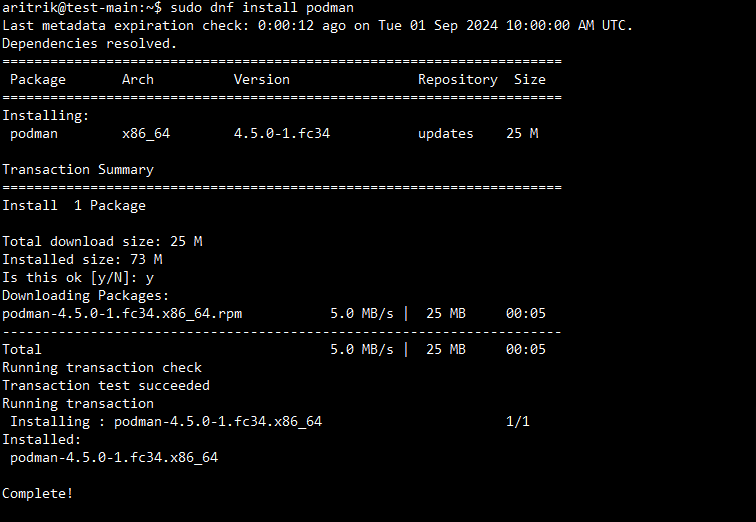
To get started, you need to make sure your system has Podman installed. The following command will validate the process for installing Podman.
$ sudo dnf install podmanOutput:
For a container, Podman can create a systemd service unit file automatically. The below command is used to create this file.
$ podman generate systemd --name my-web-server --files --newOutput:
Then, you need to make the service begin automatically when the computer boots up.
$ sudo systemctl enable container-my-web-server.serviceOutput:
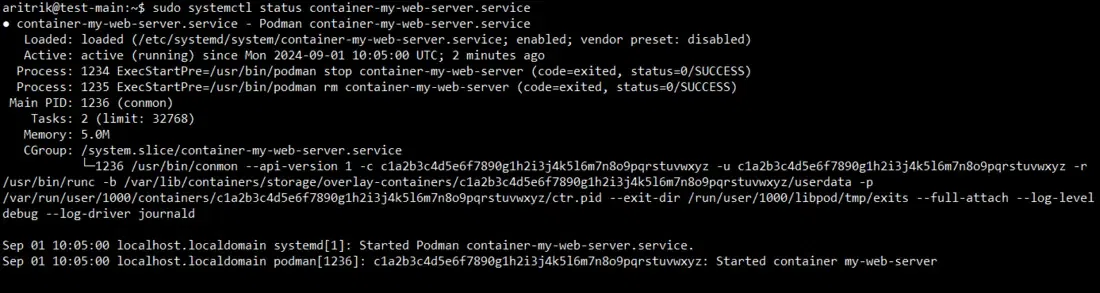
Use the systemctl status command with the service name to find out a systemd service's current state. The following command offers comprehensive details about the service, such as its status and duration.
$ sudo systemctl status container-my-web-server.serviceOutput:
Finally, Systemd manages the containers logs, which are accessible through.
$ journalctl -u container-my-web-server.serviceOutput:
Below are some best practices for automating Podman with systemd integration:
In this article, we have learned about how to automate Podman with systemd integration. Podman systemd integration generates a systemd unit file capable of controlling a container or pod. By default, the program outputs the contents of the unit files to stdout.