|
VOOZH | about |
|
VOOZH | about |
AWS Trusted Advisor is an automated service that provides proactive recommendations to help customers optimize their cloud environments based on AWS best practices. The service provides actionable guidance to help users stay ahead of risks related to availability, security, and infrastructure costs.
AWS Trusted Advisor operates as a centralized advisory engine that continuously evaluates your AWS account against AWS best practices. It integrates natively with AWS internal control planes and service metadata to analyze resource configurations, usage patterns, and account-level settings.
At a high level, AWS Trusted Advisor consists of:
Trusted Advisor does not modify resources directly. Instead, it provides insights and recommendations that customers can review or automate remediation for.
Step 1: Data Collection
Trusted Advisor continuously gathers metadata from supported AWS services such as EC2, S3, IAM, RDS, and VPC. This data includes configuration details, usage metrics, and account-level limits. No application code or customer data is accessed.
Step 2: Best Practice Evaluation
The collected data is evaluated against a predefined set of AWS best-practice rules. Each rule represents a specific check, such as identifying idle resources, insecure configurations, or single points of failure.
Step 3: Check Execution and Status
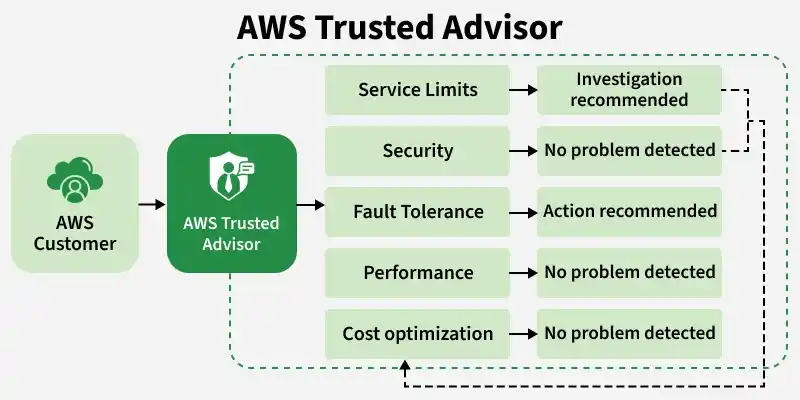
Each check is evaluated and marked with a status:
Step 4: Recommendation Generation
For checks that fail or require attention, Trusted Advisor generates actionable recommendations. These include a description of the issue, affected resources, potential risks, and suggested remediation steps.
Step 5: Presentation and Access
Results are presented through:
Step 6: Refresh and Update Cycle
The frequency at which checks are refreshed depends on the AWS Support Plan. Business and Enterprise plans provide more frequent refreshes and access to a broader set of checks.
A typical Trusted Advisor workflow look like this:
Cost Optimization
Trusted Advisor identifies opportunities to reduce unnecessary spending by highlighting idle or underutilized resources.
Examples include:
These recommendations help organizations eliminate waste and improve overall cost efficiency.
Security
Security checks focus on identifying configurations that may expose AWS resources to potential threats.
Examples include:
These checks help enforce the principle of least privilege and strengthen the security posture.
Fault Tolerance
Fault tolerance checks ensure that applications are designed to remain available during failures.
Examples include:
By addressing these findings, systems become more resilient to outages and infrastructure failures.
Performance
Performance checks analyze whether resources are configured optimally to meet workload demands.
Examples include:
These insights help maintain consistent performance and responsiveness.
Service Limits
AWS enforces service quotas to protect system stability. Trusted Advisor monitors usage against these limits.
Examples include:
Proactive monitoring helps prevent deployment failures caused by hitting service limits.
The number and depth of Trusted Advisor checks depend on your AWS Support Plan:
Basic & Developer Support
Business & Enterprise Support
This makes Trusted Advisor particularly powerful for production and enterprise workloads.
While powerful, Trusted Advisor has some limitations: