Kubernetes, the open-supply box orchestration platform, has emerged as the solution for dealing with containerized applications. When deploying Kubernetes in the cloud, Amazon Web Services (AWS) gives a robust and scalable environment. In this manual, we can walk you through the manner of deploying Kubernetes on AWS step by step.
Kubernetes is an open-source box orchestration platform designed to automate deploying, scaling, and operating utility boxes. Developed through Google, and now maintained by the Cloud Native Computing Foundation (CNCF), Kubernetes offers a sturdy and flexible framework for coping with containerized programs in various environments, such as on-premises information facilities and public cloud providers like AWS,Azure, and Google Cloud Platform.
Key Features of Kubernetes
The following are the key features of kubernetes:
Container Orchestration: Kubernetes automates the deployment, scaling, and control of containerized applications. It abstracts the underlying infrastructure, permitting developers to focus on the application logic.
Scalability: Kubernetes can scale programs horizontally with the aid of including or removing off instances based on its utilization. This guarantees the most efficient overall performance and resource usage.
Self-recuperation: Kubernetes monitors the state of applications and automatically restarts or replaces failed packing containers. It also can stabilize the burden and distribute community site visitors to healthy pods.
Service Discovery and Load Balancing: Kubernetes provides DNS-based totally service discovery for containers, permitting seamless communication between services. It additionally offers built-in load balancing to distribute site visitors throughout a couple of pods.
How To Deploy Kubernetes on AWS?
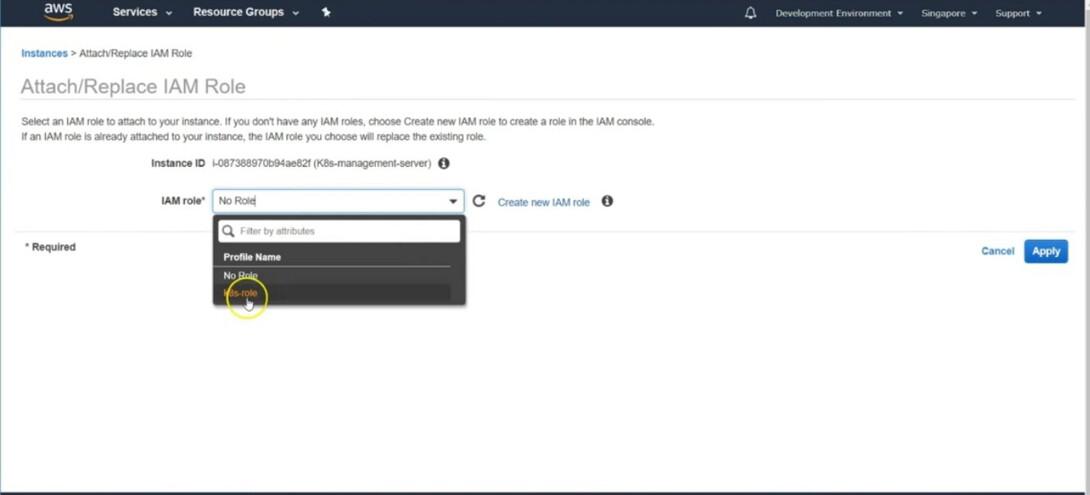
The following are the steps that guides you on how to deploy the kubernetes on AWS:
Step 1: Create Ubuntu EC2 Instance
Navigate to AWS Console and click on the launch instance
Choose an Instance type: Amazon Ec2 Provides different types of Instances choose according to your usage. They are the Virtual server that can be run on application.
Run the following command to validate the kubernetes cluster:
kops validate cluster
Troubleshooting Common Kubernetes Issues
The following are the some of the trouble shooting issues of kubernetes:
Pod Scheduling Issues: Check resource requests/limits, node ability, and taints/tolerations.
Networking Problems: Verify community regulations, carrier definitions, and DNS configurations.
Persistent Storage Problems: Validate storage training, quantity permissions, and mount points.
Cluster Unavailability: Check control plane, node health, and network connectivity.
Performance Degradation: Analyze useful resource utilization, optimize software code, and scale resources if wanted.
Best Practices for Kubernetes
The following are the best practices of kubernetes:
Resource Management: Define appropriate resource requests and boundaries for pods to prevent resource contention and make certain truthful useful resource allocation.
Health Probes: Implement readiness and liveness probes to improve the reliability of applications. This facilitates Kubernetes know when a field is ready to serve visitors and whilst it need to be restarted.
Labels and Annotations: Use labels and annotations efficiently to organize and categorize sources. Labels are used for identification, while annotations provide additional information of objects.
Configurations and Secrets: Store configurations and sensitive records as ConfigMaps and Secrets respectively. Avoid hardcoding sensitive data in manifest files.
Regular Updates and Backups: Keep Kubernetes and its additives updated with the contemporary solid releases. Regularly again up essential information and configurations to save you data loss.
Difference between ECS and EKS
The following are the difference between Amazon ECS and AWS EKS:
Feature
Amazon ECS (Elastic Container Service)
Amazon EKS (Elastic Kubernetes Service)
Orchestration
Managed container orchestration service by AWS
Managed Kubernetes service by AWS
Control Plane
Fully managed by AWS
Fully managed Kubernetes control plane
Compatibility
Integrates with AWS-specific tools and services
Kubernetes-native, compatible with Kubernetes ecosystem
Configuration Complexity
Easier setup and configuration due to AWS-native integrations
More complex setup, requires understanding of Kubernetes concepts
Customizability
Limited to features provided by AWS
Highly customizable with access to the Kubernetes ecosystem
Conclusion
Deploying Kubernetes on AWS requires cautious making plans and configuration, however with the right steps, you could create a pretty available, scalable, and stable field orchestration platform. By following this guide, you may harness the power of Kubernetes on AWS to manage your applications successfully and efficaciously. Remember to continuously monitor and optimize your cluster to make certain it meets your organization’s evolving requirements.