|
VOOZH | about |
|
VOOZH | about |
Automation is now absolutely necessary for the effective management of software deployment and infrastructure in IT landscape. Ansible emerges as a main automation tool, eminent for its effortlessness, simplicity, and flexibility. Software installation, configuration management, and application deployment are all simple to automate and streamline with Ansible. Python, a broadly utilized programming language known for its readability and flexibility, fills in as an essential structure block in numerous automation work processes.
This guide focuses on harnessing the power of Ansible to automate the installation of Python, a basic part in numerous applications and system-level cycles. Users can define the desired state of their infrastructure and execute out consistent and repeatable tasks across multiple servers by utilizing Ansible playbooks. This saves time and exertion as well as ensure consistency and unwavering quality in programming provisioning.
Understanding how to install Python utilizing Ansible playbooks is beneficial for system administrators, DevOps engineers, and anybody associated with managing IT infrastructure. Using Ansible to automate the installation of Python for web development, data analysis, or automation tasks expedites software deployment cycles, reduces human error, and streamlines operations.
Python is a well-known high-level, interpreted programming language that is known for being to simplicity, readability, and versatility. Its clean syntax and easy-to-understand structure make it an ideal decision for beginners and experienced developers. Because variables do not need to be explicitly declared, Python's dynamic typing system makes it possible to develop and prototype quickly. It supports different programming paradigms, including procedural, object-oriented, and utilitarian programming, giving adaptability in coding styles.
By providing a wide range of modules and functions for data manipulation, networking, and file handling, Python's extensive standard library reduces the need for external dependencies. Its cross-platform similarity empowers code to run seamlessly on different operating systems, improving portability.
Now Install Ansible on your control node (local machine). By using following command
sudo amazon-linux-extras install ansible2
Now create a playbook with .yml extension
sudo vi <filename.yml>Here is the playbook script to install PYTHON in slave node
- name: Install Python
 hosts: slave # here give your instance name
 become: yes
 tasks:
 - name: Install Python
 package:
 name: python
 state: present
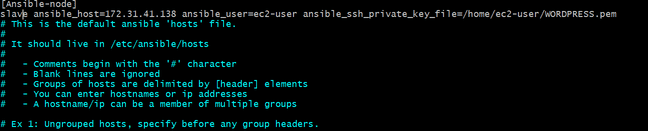
Now move to ansible directory path. In that ansible directory there is a file for HOST. In that host file we can provide host details. Following command navigate to ansible path
cd /etc/ansible/
sudo vi host
scp -i keyapir.pem keypair.pem ec2-user@public-IP-address:/home/ec2-user(path to download)sudo chmod 400 <keypair.pem>
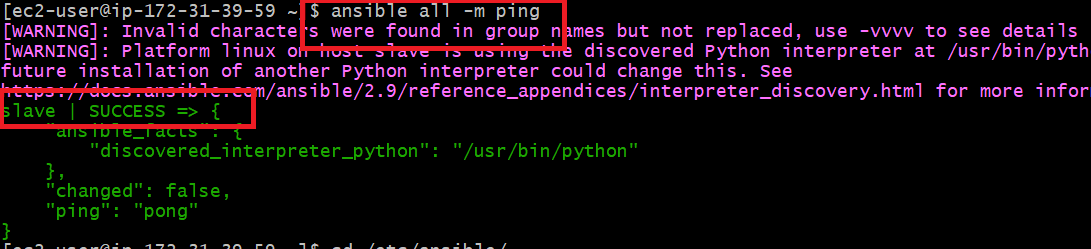
ansible ping -m all
Now run ansible-playbook command to run your playbook, specifying the playbook file and target hosts. By using following command
ansible-playbook <filename.yml>
To verify whether python installed or not by using following command. Check in slave node because we installed in slave node.
python --version
Python stands out as a powerful and adaptable programming language that is widely used in a wide range of domains and industries. Its simplicity, readability, and extensive ecosystem of libraries and structures go with it a excellent choice for a great many applications, from web improvement and data analysis to scientific computing and artificial intelligence.
All through this guide, we've featured Python's vital features and strengths, including its easy to learn syntax, platform independence, and dynamic local area support. We've also looked at how Python's automatic memory management and dynamic typing make it flexible and easy to use.
Python powers everything from small scripts and automation tasks to large-scale software systems and machine learning models, putting it at the forefront of technological model. Its prominence keeps on developing, with a thriving community of developers adding to its turn of events, sharing information, and offering help to newcomers.