|
VOOZH | about |
|
VOOZH | about |
Docker allows you to create dedicated channels between multiple Docker Containers to create a network of Containers that can share files and other resources. This is called Docker Networking. You can create Docker Networks with various kinds of Network Drivers which include Bridge drivers, McVLAN drivers, etc. By default, if you do not mention a driver while creating a network, it automatically chooses the default bridge driver. Bridge drivers are single-host networking drivers and hence their scope is limited to local.
In this article, we are going to discuss how to create, manage, and use Docker Bridge Networks. For this, you would need a Linux-based Host machine with access to Docker. Without any further ado, let's dive deep into Docker Bridged Networking.
Table of Content
The bridge is a default network where containers will be created by default if you are not mentioned any network while creating. The containers which are deployed in the same network can talk to each other the containers which are not in the same network can't communicate with each other without proper mentions and permissions. While creating a docker network if you are not going to create or mention any network while creating a container. To list the networks in docker you can use the following command.
docker network ls
There are three main default networks as mentioned following and also to know more about Docker networking refer to Docker Networking.
If containers are created in a default bridge network. Communication will happen only with the IP Address of the container. Communication will not happen using containerName(hostName). To Check Go inside java web app container and ping maven web app container using name & IP. When we ping using ip it will work it will not be able to communicate using the name.Developers should not code the connectivity based on the IP in case of containers. Since the IP address of containers will be dynamic.IP will keep changing.
To create a Custom Bridge Network, we can use docker network command, the syntax of this as follows:
docker network create -d <driver> <networkName>The following are the steps that guides you in creating a custom bridge network:
Step 1: Ensure Docker is Running
sudo systemctl status docker sudo systemctl enable docker --nowStep 2: Create Bridge Network
docker network ls👁 docker network lsdocker network create --driver bridge mynetwork👁 Creating custom bridge networkStep 3: Verify the Network Creation
docker network ls👁 network listStep 4: Inspect the Bridge Network
docker network inspect mynetwork👁 Inspecting docker networkIf containers are created in custom bridge network. Each container can access other using containerName/ContainerIP.Delete Containers which are running in default bridge or create container with different name.
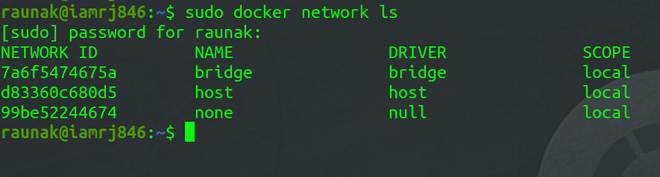
Every installation of Docker provides a pre-built default Bridge Network with a Bridge driver scoped locally. You can verify the same using the network ls to know more commands refer to command.Docker – Instruction Commands.
sudo docker network ls👁 default Bridge NetworkNote that the Bridge Network we saw in the previous step is the default network for Docker Containers. If you don't specify any other network, all new Containers will be joined to this default network. To connect an Ubuntu Container to the default bridge network, use this command.
sudo docker run -dt ubuntu👁 Connecting a Docker Container
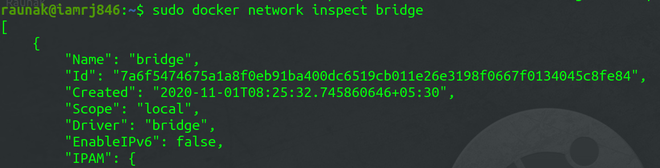
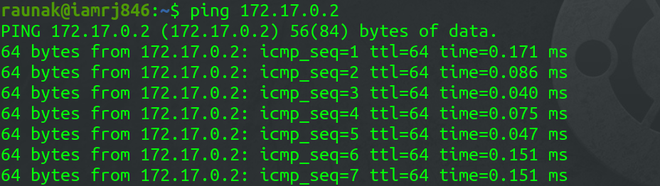
sudo docker container ls👁 Inspecting the Bridge Networksudo docker network inspect bridge👁 network inspect bridgeTo test the network connectivity, note down the IP address of the Container. In this example, the IP address is "172.17.0.2/16".We will ping this address from the Docker Host to check the connectivity.
ping 172.17.0.2👁 Testing the Network ConnectivityIt shows that the host is able to ping the Docker Container in the network.
Default Bridge Network | User Defined Bridges Network |
|---|---|
The default bridge network will it will acts as an basic network isolation for the containers which are deployed in this network. | user defined network will allows you to create a custom network with more configuration policies. |
The containers which are deployed in default bridge network will able to communicate with each other by using the IP addresses. | The containers which are deployed in the custom bridge network will able to communicate with each other by using the name of the containers. |
Communication with the host system is done by using the host IP addresses. | Communication with the host system is done by using the host IP addresses. |
Containers use the embedded DNS to commutation to the internet by the DNS resolution. | Containers use the embedded DNS to commutation to the internet by the DNS resolution. |
The following are the difference between docker network host and bridge:
| Feature | Host Network | Bridge Network |
|---|---|---|
| Network Isolation | It shares the host's network stack with providing no network isolation | it provides a private internal network, isolating containers from the host network |
| Performance | It offers better network performance due to direct use of the host's network | It slightly lower performance due to the overhead of network bridging |
| Use Case | It is suitable for applications that needing direct access to host network, like monitoring tools | It is ideal for typical containerized applications needing isolation and controlled communication |
| IP Addressing | Containers use the host’s IP address and ports, leading to potential conflicts | Containers get their own IP addresses within the bridge network, avoiding conflicts with the host |
The following are the between docker network bridge and overlay:
| Aspect | Bridge Network | Overlay Network |
|---|---|---|
| Scope | Limited to a single host | Spans multiple hosts |
| Use Case | Ideal for simple, local container communication | Suitable for distributed, multi-host environments |
| Configuration | Easy to set up with minimal configuration | Requires more complex setup, often involving a key-value store (like etcd) |
| Performance | It generally faster due to local scope | It is slightly slower due to cross-host communication overhead |