 |
VOOZH | about |
|
VOOZH | about |
In Kubernetes, both Deployment and ReplicaSet are used to manage the lifecycle of pods. In order to Manage the life cycle of applications in a Kubernetes cluster, it relies on both ReplicaSets and Deployments, which are two important components.
Kubernetes ReplicaSet makes sure that a specified count of Pod replicas is always running without interruption. Kubernetes ReplicaSet is accountable for handling the lifecycle of pods and offers a means to scale and uphold the application. Kubernetes ReplicaSet plays a very important role in developing and executing pods based on a specification.
Kubernetes ReplicaSet can also be said a lower-level abstraction that gives us a basic scaling mechanism. ReplicaSets makes sure that a fixed number of pod replicas are operating.
The ReplicaSet make sure that the expected number of replicas is always maintained by creating or deleting Pods as required. With the help of the "metadata.ownerReferences", Pods can establish a clear request link with their individual ReplicaSet. ReplicaSet can get Pods that meet its selector benchmarks and either do not have an OwnerReference.
Now let's see an example of ReplicaSet in YAML file:
👁 Example of Kubernetes Replicaset
ReplicaSet is named "replicasetName", this is configured to maintain 3 replicas of a pod, pods are identified by the label "role: backend", In every single pod, there will be single container called as backend-container, and its main aim is to run "nodejs-backend:1.0" and each pod will expose port 3000.
we can deploy the ReplicaSet to our Kubernetes cluster by the help of following command:
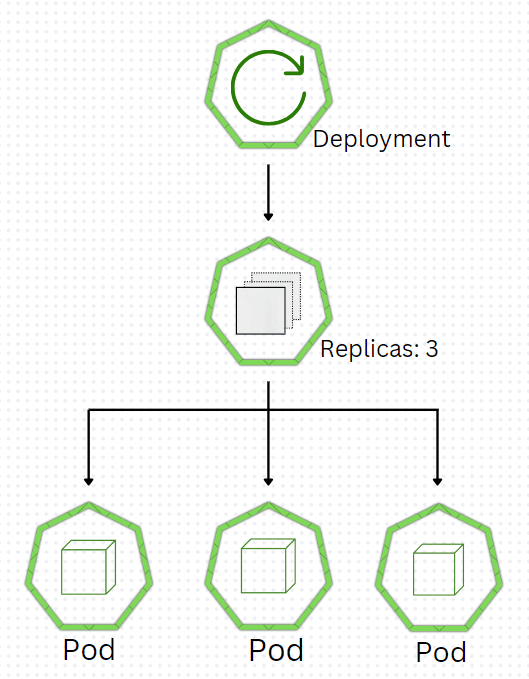
$ kubectl apply -f replicasetName.yamlThe Kubernetes Deployment is an higher-level concept that oversees(manages) ReplicaSets and offers a way to efficiently update applications. Kubernetes Deployment main aim is to maintain a reliable set of replica Pods that are always active. This is commonly employed to make sure that a fixed number of identical Pods are always there. In Deployment, we can define the state we wish to achieve, and the Deployment Controller will slowly adjust the current state to match the expected condition.
Deployment managing the deployment process for a new application version.It also provides the capability to effortlessly switch back to a previous version by creating a replica set and updating with the new configuration. if any pod dies, Deployment makes a new one to keep the desired state balanced.
Now let's see an example of Deployment in YAML file:
👁 Kubernetes Deployment
Deployment is named "deploymentName" and it is set to maintain 3 replicas of a pod, "app: frontend" is pods identifiers, container within individually pod will expose port 8080, fit for a web frontend service, and as far as update is concern strategy is set to "RollingUpdate", which make sure zero downtime during updates by slowly replacing old with new pods.
After saving "deploymentName.yaml", we can deploy the Deployment to our Kubernetes cluster by the help of following command:
$ kubectl apply -f deploymentName.yamlParameter | ReplicaSet | Deployment |
|---|---|---|
Main Aim | Make sure that fixed number of Pods are always running | Manages the lifecycle. |
Level of Abstraction | Low | High |
Uses when | Controls on Pods is required | General used in application deployment and management. |
Complexity | Simple | More complex |
Configuration management | manual updates to Pod | Automatically manages Pod |
Management of State | Not designed for management of state | best for stateless application |
Rollbacks | do not manage rollbacks or update | It manages the rollbacks and updates |


-(1).jpg)