|
VOOZH | about |
|
VOOZH | about |
Containerization has redefined how applications are built, transported to the target environment, and subsequently deployed. Docker is one of the primary tools that has embraced this transition, while Podman, which is considered Docker’s fork, is rapidly gaining in popularity because of its daemonless setup and rootless container orchestration. To make container management even more convenient, Podman participants upgraded to the fourth power – Quadlet which works with systems and uses service unit files.
In this article, we will explain in more detail what Podman Quadlet is, and how it can be used by developers and system administrators to optimize their workflows. In this guide, we will describe the setup and basic functioning of Quadlet in detail and offer an example and screenshots for every term and concept we will use.
Before diving into Quadlet, it’s essential to understand some key terminologies:
Quadlet is a feature that helps convert simplified Podman configuration files to systemd service unit files. This integration enables you to operate containers as the systemd services as if using the power of systemd including auto-restart of service, service dependencies, and resource limits all at your disposal.
Quadlet provides an easier to use and more reliable means of handling containers, particularly in large scale production where systemd will already be used for service management. By using Quadlet, you can:
First, ensure that Podman is installed on your system. You can install it using your package manager. Here’s how to do it on Ubuntu:
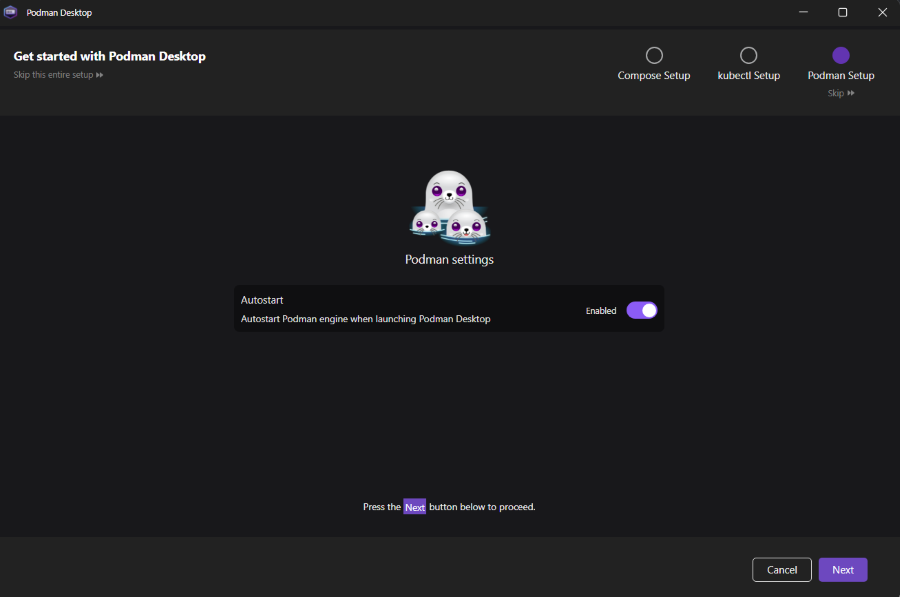
sudo apt-get install podmanYou can also install podman for windows. Download the latest release of the Podman Desktop from the official Github releases page.
Quadlet is supported in Podman versions 4.0 and above. Ensure you have the correct version installed:
podman --versionQuadlet configuration files are used to define containers, volumes, or networks. These files are stored in ~/.config/containers/systemd/ for user-level configurations or /etc/containers/systemd/ for system-wide configurations.
Let's create a simple container configuration for an Nginx container.
mkdir -p ~/.config/containers/systemd/
cd ~/.config/containers/systemd/
Create a file named nginx.container:
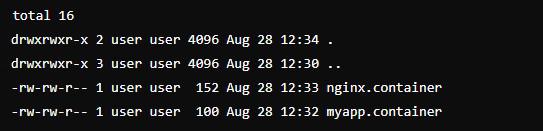
nano nginx.containerList the contents of the directory to show the structure:
ls -la ~/.config/containers/systemd/Add the following content:
[Container]
Image=nginx:latest
Environment=MY_ENV=production
Volume=/host/path:/container/path
Image=nginx:latest: Specifies the Docker image to be used.
Environment=MY_ENV=production: Sets an environment variable inside the container.
Volume=/host/path:/container/path: Binds a host directory to a directory inside the container.
After creating the Quadlet configuration file, you need to reload systemd and start the service:
systemctl --user daemon-reloadsystemctl --user start nginxsystemctl --user enable nginxQuadlet allows you to define dependencies between containers or between containers and other services. For example, if your application relies on a database container, you can ensure that the application container only starts after the database container is up.
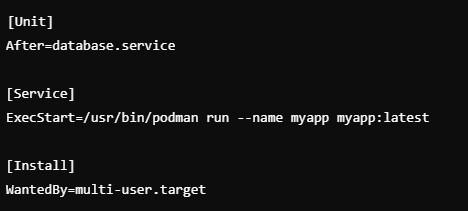
Example:
[Unit]
After=database.service

[Service]ExecStart=/usr/bin/podman run --name myapp myapp:latest

[Install]
WantedBy=multi-user.target
[Unit]: Specifies the dependency, in this case, the database.service. The After=database.service directive ensures that the myapp container only starts after the database service is up and running.
[Service]: Contains the command to start the container. The ExecStart=/usr/bin/podman run --name myapp myapp:latest line specifies that the myapp container should be started using the myapp:latest image.
[Install]: Ensures that the service is started in the appropriate systemd target (e.g., multi-user.target).
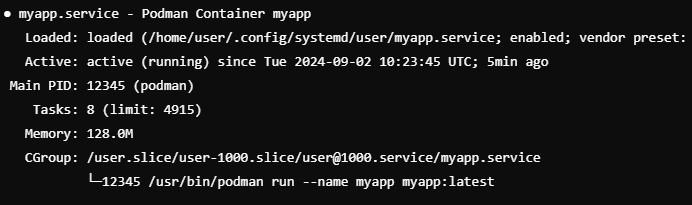
After starting the service, you can check its status with the following command:
systemctl --user status myappWith systemd, you can limit the resources allocated to a container using cgroups. This is particularly useful in multi-tenant environments.
Example:
[Service]
MemoryLimit=512M

[Container]
Image=resource-hungry-app:latest
[Service]: The MemoryLimit=512M directive limits the container to use a maximum of 512 MB of memory, ensuring that it doesn't consume excessive system resources.
[Container]: Specifies the Docker image to be used, in this case, resource-hungry-app:latest.
Podman Quadlet is a powerful tool that leverages systemd to simplify container management. By translating straightforward configuration files into systemd service units, it enables seamless and automated management of containers. Whether you're running a simple web server or a complex multi-container application, Quadlet provides a robust, consistent, and efficient solution for container management.