VOOZH about

URL: https://www.geeksforgeeks.org/html/html-caption-tag/

⇱ HTML caption Tag - GeeksforGeeks


  • Courses
  • Tutorials
  • Interview Prep

HTML caption Tag

Last Updated : 3 Apr, 2026

The <caption> tag in HTML is used to provide a title or description for a <table> element. It helps give context or additional information about the content of the table.

  • The <caption> tag must be placed immediately after the opening <table> tag.
  • Useful for summarizing table data, especially in large datasets
  • The <caption> tag provides a title for the table, which in this case is "Student Information".
  • The table contains rows of data with roll no, names, and ages.

Syntax:

<caption> . . . . </caption>

Note: The <caption> tag also supports the Global Attributes and Event Attributes in HTML.

Example 1: Implementation of an Employee table with a caption tag.

  • The <caption> tag provides a title for the employee details table.
  • It helps to clarify the purpose of the table for screen readers and users.

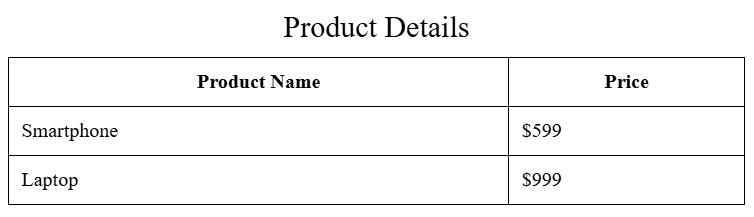
Example 2: We see a styled Product table with a caption tag.

Output:

👁 Screenshot-2025-11-18-104700
  • The <caption> tag is used to label the table as Product Details, making the content easily identifiable.
  • Custom styles such as border and padding are applied to enhance readability and table structure.

Best Practices

Follow structured practices to improve table clarity, accessibility, and maintainability.

  • Use <caption> to provide a clear and accessible table title.
  • Place <caption> immediately after the opening <table> tag.
  • Keep captions short, descriptive, and relevant to the table content.
  • Use <th> elements to properly define headers for better structure.
  • Maintain consistent formatting and alignment across table content.
  • Avoid overly complex tables; keep layout simple and readable.
Comment
Article Tags: