VOOZH about

URL: https://www.geeksforgeeks.org/html/html-table-colspan-and-rowspan/

⇱ HTML Table Colspan and Rowspan - GeeksforGeeks


  • Courses
  • Tutorials
  • Interview Prep

HTML Table Colspan and Rowspan

Last Updated : 1 Dec, 2025

Rowspan and colspan are powerful HTML table attributes that let you merge cells vertically and horizontally. They make complex table structures cleaner, more flexible, and easier to understand.

  • rowspan controls how many rows a cell spans vertically.
  • colspan defines how many columns a cell spans horizontally.
  • Widely used in complex tables, about 80–90% rely on them for better layout and readability.

HTML Table with Colspan

HTML Table with colspan allows you to merge or combine adjacent table cells horizontally, creating a single, wider cell that spans across multiple columns.

Note: The colspan is defined as the <th> element.

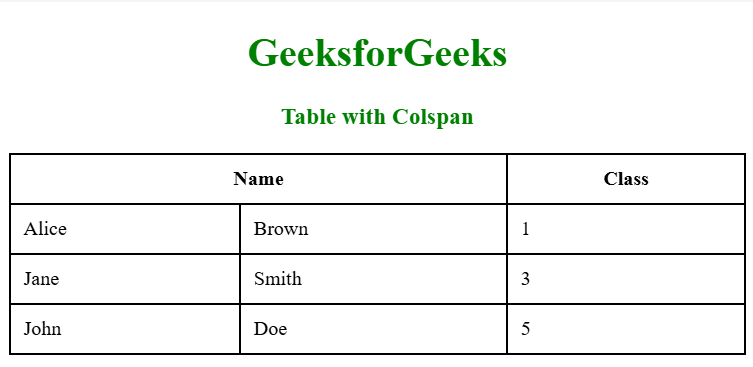
Example: The element illustrates the HTML Table with colspan.

Output:

👁 Screenshot-2025-12-01-103906
  • colspan="2" merges two columns under the “Name” header.
  • The rows then place first and last names under this merged heading.

HTML Table with Rowspan

The HTML attribute rowspan determines how many rows a specific cell in a table should cover. When a cell spans multiple rows, it occupies the space of those rows within the table.

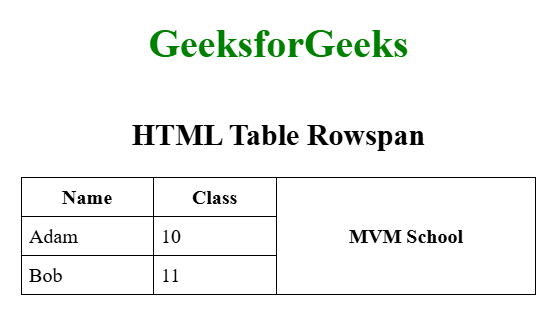
Example: The element illustrates a HTML Table with rowspan.

Output:

👁 Screenshot-2025-12-01-104706
  • rowspan="3" merges the “MVM School” cell across three rows.
  • Name and Class values fill the remaining cells beside the vertically merged column.

Note: Applied within a <td> or <th> element.

Table with Rowspan and Colspan Together

The table with rowspan and colspan together helps in creating the table more complex and structured. The table utilizes rowspan and colspan attributes to merge cells, creating a structured layout.

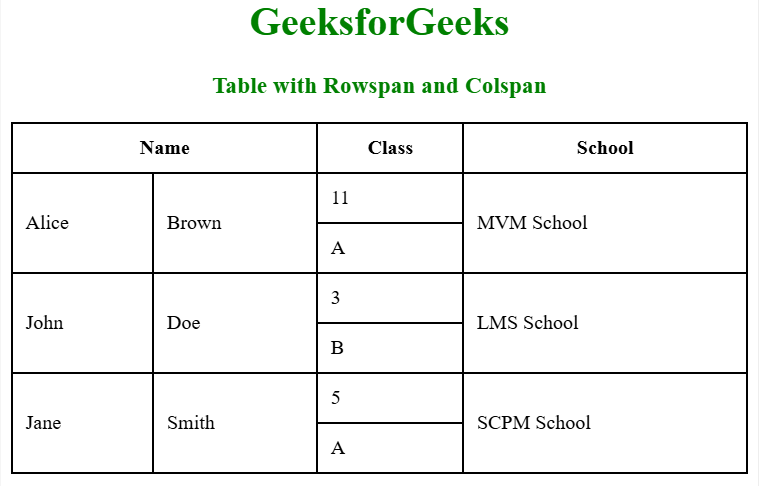
Example: The element illustrates the HTML Table with colspan and rowspan.

Output:

👁 Screenshot-2025-12-01-105114
  • colspan="2" merges two columns under the “Name” header.
  • rowspan="2" merges each student’s name and school cells vertically.
  • Class values fill the adjacent cells for each row pair.
Comment
Article Tags:
Article Tags: