HTML stands for Hypertext Markup Language, the standard language for creating web pages and web applications. HTML5, the 5th version of HTML, introduces several new features that enhance the creation of both static and dynamic websites.
Let's explore the top 10 new features of HTML5 that make it a significant improvement over previous versions:
1. Introduction to Audio and Video
The <audio> and <video> tags are the two major addition to HTML5. It allows developers to embed a video or audio on their website. HTML5 video can use CSS and CSS3 to style the video tag.
You can change the border, opacity, reflections, gradients, transitions, transformations, and even animations.
HTML5 makes adding video super-fast and without having to build a video player.
This saves time for the developer and offers the client a superior and more affordable solution.
<video> and <audio> tags embed media with controls and autoplay support.
Multiple <source> elements ensure compatibility across different browsers and formats.
2. Vector Graphics
A major update in modern web standards significantly reduced the use of Adobe Flash on websites. This new feature enables drawing graphics directly in the browser using JavaScript.
Supports scalable vector graphics that are easy to create, edit, and animate.
Allows interactivity and smooth animations through scripting.
Smaller file sizes result in faster loading and efficient web performance.
Uses <svg> to draw scalable vector graphics directly in the browser.
Creates a red circle using the <circle> element with defined position and radius.
3. Header and Footer
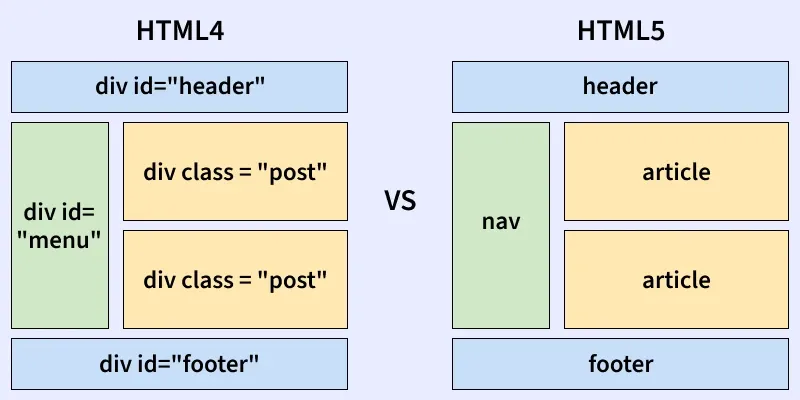
HTML5’s <header> and <footer> replace generic <div> elements by clearly marking the top and bottom sections of a webpage. This improves the semantic structure and helps browsers interpret content order.
<header> appears at the beginning, while <footer> sits at the end of the page.
Enhances readability, accessibility, and proper content loading flow.
Header can include headings (<h1>–<h6>), logos/icons, and authorship details.
Footer can contain authorship info, copyright notes, contact details, and "back to top" links.
They both have the same default CSS property as a display block.
Example: Below examples illustrate the <header> element in HTML:
<header> groups the title, subtitle, and metadata of the article.
Improves document structure and readability with semantic elements.
Example: Below examples illustrate the <footer> Tag in HTML elements:
<footer> contains navigation links and site info typically placed at the bottom of a page.
<nav> organizes important links, improving usability and semantic structure.
4. Figure and Figcaption
HTML5 introduces the <figure> element to semantically group media or self-contained content within a document. The <figcaption> element is used to provide an accessible caption for that content.
Used to pair captions with images, code blocks, or other standalone content.
Improves clarity and accessibility by linking content with its description.
<figure> groups the image with its descriptive caption.
<figcaption> provides a clear label, improving clarity and accessibility.
5. HTML Nav Tag
The <nav> tag is used to define a section of navigation links within a website. It helps structure areas that connect to different pages or sections.
Commonly used for menus, tables of contents, and indexes.
Helps create clean, organized navigation layouts.
Improves accessibility by allowing screen readers to identify primary navigation areas.
<nav> groups a set of navigation links for easy site movement.
Provides clear, structured menus for users and screen readers.
6. HTML Progress Tag
The <progress> tag is used to check the progress of a task during the execution. Progress tag can be used with the conjunction of JavaScript.
<progress> visually represents task completion, showing current value toward a maximum.
Useful for displaying download, upload, or processing status in a simple bar.
7. Form Enhancements
New input types (email, date, time, url, number, etc.), new attributes (placeholder, autofocus, required, etc.), and new form elements (<datalist>, <output>, <progress>, <meter>) improve form handling and user input validation.
Placeholder Attribute
The placeholder attribute specifies a short hint that describes the expected value of an input field/text area. The short hint is displayed in the field before the user enters a value.
placeholder shows hint text inside input fields until the user types.
Helps guide users by indicating the expected input format or content.
Email Attribute
When the input type in the form set as email, then the browser gets the instruction from the code to write a valid format email. The input email id is automatically validated to check the format of the email id is correct or not.
type="email" ensures the input follows a valid email format during entry and submission.
Provides built-in browser validation, reducing incorrect or malformed email inputs.
8. Web Storage
Web Storage provides localStorage and sessionStorage to store data directly in the browser. It offers a safer and more efficient alternative to cookies.
Stores key–value data on the client side.
localStorage persists; sessionStorage clears on tab close.
Useful for saving preferences and temporary data.
9. Offline Web Applications
The Application Cache (AppCache) enables web apps to function offline by storing essential files locally. This improves availability and allows apps to load even without internet access.
Caches HTML, CSS, JS, and other assets for offline use.
Speeds up loading by reducing repeated downloads.
Ensures the app remains usable during network outages.
10. WebSockets
WebSockets allow real-time, bidirectional communication between the client and server. They work with far less overhead compared to traditional HTTP.
Ideal for chat apps, live updates, and interactive data streams.
Maintains a continuous connection for instant messaging.
HTML5 also introduces many new tags like <nav>, <aside>, <section>, <summary>, <article>, and <meter>.