|
VOOZH | about |
|
VOOZH | about |
HTML attributes are the entities that provide the extra information about the tags. Attributes are specified using name and value pair. Some HTML tags are used without attributes while for some tags it's important to specify attributes along with them. In paired tags attributes are specified in the opening tag. The value of the attribute is specified between the quotes. They are used to add extra effects to the element.
<tag_name attribute_name='attribute value'> Content of the tag </tag_name>Meta tags provide important meta information about HTML documents. They are self-closing tags. Attributes of the meta tag are crucial for browser functionality, including search engine optimization, character set declaration, and viewport control.
Attribute | Description |
|---|---|
charset | Specifies the character encoding for the HTML document. |
name | Specifies the name of the metadata attribute. |
content | Provides information associated with the specified name. |
http-equiv | Defines an HTTP header for the information in the content. |
scheme | Specifies the format used to interpret the content value. |
Example:
Output:
👁 Screenshot-2024-02-02-104248
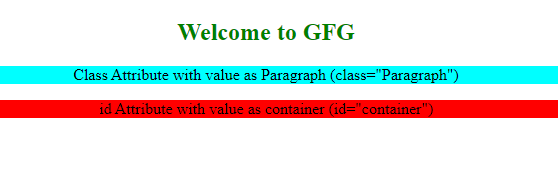
This type of attribute are applied on all types of HTML tags.Some of the commonly used global attributes are class ,id,style. "class" attribute is used to group elements and to style the grouped element and "id" attribute must be unique. It is used to apply functionality or styles to unique element.
Example:
Output:
👁 Screenshot-2024-02-02-105851
Event handling attributes are used to add the functionality to the HTML document.The Value of the event handler attribute is the javascript function.The function gets executed as the event occurs.Some of the commonly used event handler attributes are onclick,onchange,onsubmit,ondblclick.
Example:
Output
Boolean attributes in HTML are attributes that, when present, are considered "true" and don't require a value. They are commonly used for toggling certain behaviors or states, such as the `disabled` attribute for form elements.
Example:
Output: