|
VOOZH | about |
|
VOOZH | about |
Java Hello World Program is the first and simplest program that beginners learn. It demonstrates the basic structure of a Java program and how to display output on the console using Java syntax.
The below-given program is the most simple program of Java printing "Hello World" to the screen. Let us try to understand every bit of code step by step.
Hello, World
1. Class Definition
Every Java program must have at least one class. Here, the class is defined using the class keyword:
public class HelloWorld {
// Statements go here
}
Note:
If the class is public, the filename must match the class name HelloWorld.java
2. main Method
In the Java programming language, every application must contain a main method as it is the entry point of the application:
public static void main(String[] args)
3. System.out.println()
This prints output to the console.
System.out.println("Hello, World");
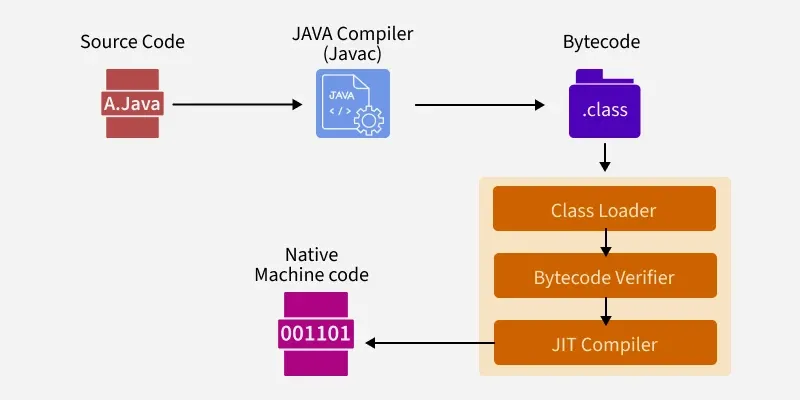
Java is a platform-independent language that follows a two-step execution process:
Java source code (.java files) is compiled by the Java Compiler (javac) into Bytecode, stored in .class files. This bytecode is platform-independent and ready to run on any system with a JVM.
The .class files are executed by the Java Virtual Machine (JVM), which includes the following stages:
Class Loader
Loads the main class and other dependencies into memory.
Class r = loadClass(String className, boolean resolveIt);
Bytecode Verifier
Checks that the loaded bytecode is safe to execute. It ensures:
Just-In-Time (JIT) Compiler
Converts bytecode into native machine code at runtime for faster execution.
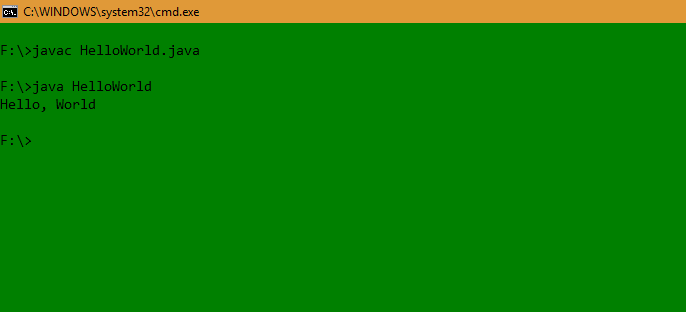
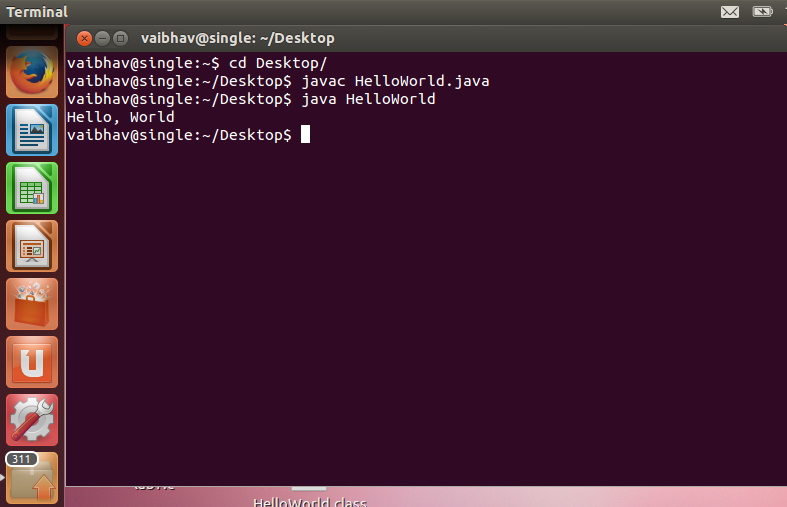
1. Create File: Save the file as HelloWorld.java.
2. Open Terminal: Navigate to the folder containing the file.
3. Compile:
javac HelloWorld.java
4. Run:
java HelloWorld
Output
Hello, World
1. In Windows
2. In Linux
Note: If you get ClassNotFoundException, ensure the .class file is in the correct directory or check your CLASSPATH.