Android penetration testing is a systematic security assessment process used to evaluate Android applications, APIs, devices and backend services for vulnerabilities. Security professionals simulate real-world cyberattacks to discover flaws, test defenses and improve the overall security posture of Android apps.
Detect security vulnerabilities before attackers do
Protect sensitive user and business data
Improve application resilience against cyberattacks
Validate compliance with security standards and regulations
Prevent unauthorized access and data leakage
Strengthen authentication and encryption mechanisms
Architecture of an Android App
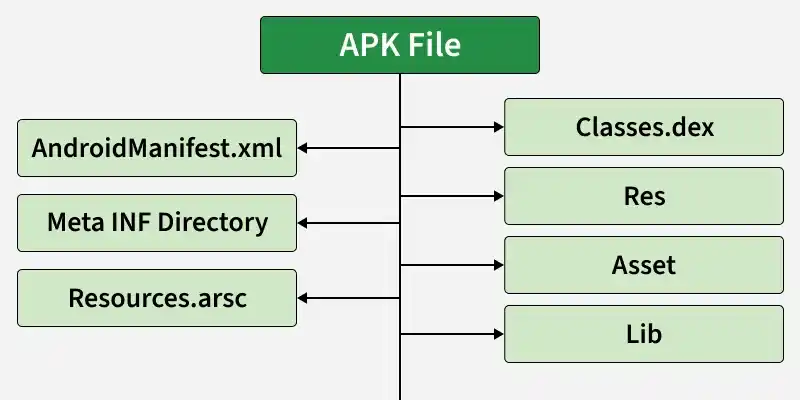
Android applications are packaged in APK (Android Package Kit) format. An APK contains all components required to install and run the application.
Data Storage: Data stored insecurely on the device can be accessed by malicious apps. Check caches, logs and temporary files for sensitive information.
Data Transmission Security: Analyze the security of data transmitted over the network and ensure encryption is properly implemented.
Network Traffic: Test for vulnerabilities that could allow an attacker to intercept and manipulate network traffic.
Business Logic: Identify weaknesses in business logic, such as bypassing workflows or manipulating transactions, that could be exploited.
File Permissions: Verify that the application adheres to the principle of least privilege when accessing files and resources.
Encryption Algorithms: Evaluate the encryption algorithms and key management practices in use to ensure data protection.
Logs: Check logs for any sensitive information that should not be recorded.
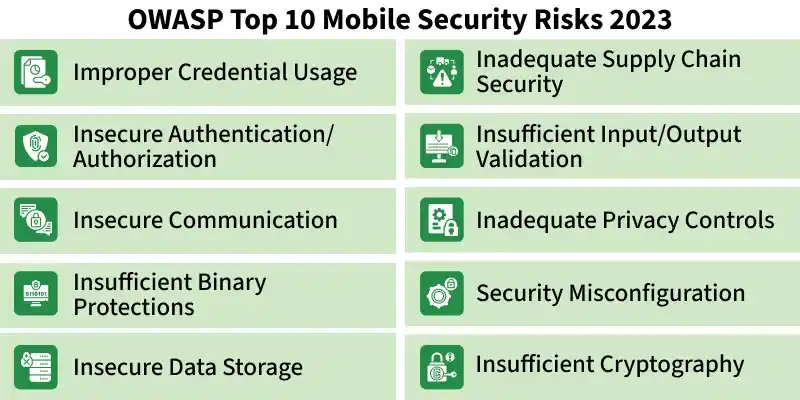
OWASP Top 10 Security Risks
Below is the list of the Top Ten security risks associated with mobile application development:
Improper Credential Usage: This risk involves attackers locating and exploiting hardcoded credentials within the mobile application, leading to unauthorized access.
Inadequate Supply Chain Security: Attackers can insert malicious code into the app's codebase or modify code during the build process to introduce spyware or backdoors, thereby manipulating application functionality via supply-chain vulnerabilities.
Insecure Authentication/Authorization: Attackers may use automated tools to exploit authentication and authorization flaws in a mobile application, gaining unauthorized access.
Insufficient Input/Output Validation: Insufficient validation of inputs or network data can lead to vulnerabilities such as data corruption and injection attacks.
Insecure Communication: Data transmitted between mobile applications and remote servers traverses carrier networks and the internet. An attacker can intercept and modify this data if it is sent in plaintext or using weak or deprecated encryption.
Inadequate Privacy Controls: Inadequate privacy controls can expose sensitive data that attackers may use for fraud, identity theft, payment misuse and other crimes.
Insufficient Binary Protections: Binaries may contain sensitive information such as API keys. Weak binary protections against reverse engineering and tampering can give attackers insight into backend vulnerabilities that can be exploited.
Security Misconfiguration: Security misconfiguration occurs when settings, permissions or controls are improperly configured, leading to vulnerabilities and unauthorized access.
Insecure Data Storage: This risk involves storing sensitive data insecurely on the device, making it accessible to attackers who can exploit vulnerabilities to gain unauthorized access.
Insufficient Cryptography: This risk arises from weak or improperly implemented cryptographic algorithms and poor key management, allowing attackers to compromise confidentiality, integrity and authenticity.
Android Penetration Methodology
1. Static Analysis
Static analysis is the process of examining an Android application's source code, APK structure, configurations and resources without executing the application.
Detect hardcoded API keys, tokens and credentials
Identify insecure APIs and vulnerable libraries
Review Android permissions and exported components
Analyze source code for insecure coding practices
Discover hidden endpoints, URLs and sensitive strings
2. Dynamic Analysis
Dynamic analysis evaluates how an Android application behaves during execution on a real device or emulator. This testing method helps identify runtime vulnerabilities, insecure communications, weak session handling and improper authentication mechanisms.
Intercept and analyze network traffic
Monitor runtime application behavior
Test authentication and session management
Detect insecure communications
Manipulate API requests and responses
3. Reverse Engineering
Reverse engineering involves decompiling and analyzing Android applications to understand their internal logic, security mechanisms and hidden functionalities.
APK decompilation and decoding
Resource and asset extraction
Small code inspection
Secret and credential discovery
Business logic analysis
4. Physical Testing
Physical device testing evaluates the security of Android devices, firmware, hardware interfaces and operating system protections.
Root detection bypass mechanisms
Bootloader security weaknesses
Firmware exploitation risks
USB debugging exposure
Hardware tampering vulnerabilities
5. Social Engineering
Social engineering assessments evaluate how attackers manipulate users into compromising Android application security. Human error remains one of the most exploited attack vectors in cybersecurity.
Phishing simulations
Fake application distribution
Credential harvesting attacks
SMS spoofing campaigns
User manipulation testing
Stages of Android Penetration Testing
Android penetration testing follows multiple stages to ensure complete vulnerability assessment and accurate reporting.
1. Discovery
The discovery phase focuses on gathering information about the Android application, infrastructure, APIs and backend systems. This stage helps penetration testers understand the application's architecture and identify potential attack surfaces.
Application architecture mapping
API endpoint enumeration
Backend infrastructure analysis
Third-party integration review
Data flow analysis
2. Assessment
The assessment phase involves detailed security testing to identify vulnerabilities, insecure configurations and exploitable weaknesses within the Android application.
Static analysis
Dynamic testing
Reverse engineering
Traffic interception
Configuration review
3. Exploitation
During the exploitation phase, identified vulnerabilities are safely exploited to determine their real-world impact. This stage helps organizations understand the severity and business risks associated with discovered security flaws.
Authentication bypass
emote code execution
Privilege escalation
Sensitive data extraction
Session hijacking
4. Reporting
The reporting phase is the final stage of Android penetration testing. Security testers prepare a comprehensive report detailing all discovered vulnerabilities, exploitation methods, associated risks and remediation recommendations.
Vulnerability descriptions
Risk severity ratings
Proof-of-concept evidence
Business impact analysis
Remediation recommendations
Secure Coding Practices for Android Developers
Threat Modelling: Threat modeling is a proactive security approach used to identify potential threats, attack vectors and weaknesses during application design and development. It helps developers prioritize security risks before deployment.
Vulnerability Scanning: Vulnerability scanning uses automated tools to identify known security weaknesses, outdated dependencies and insecure configurations within Android applications and infrastructure.
Encryption of Sensitive Data: Sensitive data should always be encrypted to protect confidentiality and integrity. Proper encryption ensures that unauthorized users cannot access stored or transmitted information even if the device or communication channel is compromised.
HTTPS Communication: All communications between Android applications and backend servers should use secure HTTPS/TLS protocols. Weak or improperly configured communications can expose sensitive data to interception attacks.
Error Messages: Improper error handling can unintentionally expose sensitive technical information that attackers may use for exploitation. Secure error management helps prevent information disclosure and improves application resilience.
Tools Used for Android Penetration Testing
The tools mentioned below are Open Source
Frida: Frida is a dynamic instrumentation toolkit used by developers, reverse engineers and security researchers. See the official documentation for usage details.
MobSF: Mobile Security Framework (MobSF) is an automated platform for mobile application security testing that supports static and dynamic analysis. See the MobSF documentation to learn more.
Apktool: Apktool is a tool for decoding and rebuilding Android application resources. It reconstructs resources nearly as packaged and provides a project-like structure and automation for repetitive tasks such as rebuilding APKs.
App-Ray: App-Ray is a security scanner that evaluates applications from unknown sources and assigns a security rating, helping prevent installation of potentially dangerous apps.
Network Discovery: It is used for device discovery and as a port scanner for local area network.
Port Scanner: A port scanner identifies open ports on a computer or network by scanning ports for a given IP address or domain name.