|
VOOZH | about |
|
VOOZH | about |
22 min
read
Compare web apps and native apps to understand their key differences, pros, cons, performance, costs, and which option fits your project best
By
Jesus Vargas
Updated on
May 29, 2026
.
Reviewed by
Real-World Experience with No-Code Tools: With over 320 apps built, we know firsthand what works—and what doesn't—when using no-code platforms like Glide, Bubble, FlutterFlow and Webflow.
Expert Team with 40+ Years of Combined Experience: Our team has deep technical knowledge, with experts who use no-code tools to solve real-world problems for clients every day, ensuring our advice is actionable and reliable.
Detailed Guides Based on Actual Projects: We don’t just talk about no-code; we use it daily to solve real business problems for our clients, from MVPs to complex automations.
Take a deeper look at our editorial guidelines
When you plan to build an app, one of the first questions you face is choosing between a native app and a web app. This decision affects performance, cost, user experience, maintenance, and long-term scalability. Many founders and businesses compare native app vs web app because both solve different problems and fit different goals.
In this guide, we clearly explain the difference between native apps and web apps, how they work, where each one performs better, and how to decide which option fits your project. By the end, you will know exactly which approach makes sense for your product, users, and budget.
Mobile App Development Services
Apps Built to Be Downloaded
We create mobile experiences that go beyond downloads—built for usability, retention, and real results.
A web app is an application that runs inside a web browser instead of being installed on a device. Users access web apps through a URL, just like a website, without downloading anything from an app store.
Web apps are built using standard web technologies and work across multiple devices and operating systems. Updates are applied centrally, which means users always see the latest version without manual updates.
Key characteristics of web apps
Read more | Best No-code Web App Builders
A native app is an application built specifically for a particular operating system, such as Android or iOS. These apps are developed using platform-specific programming languages and tools and are installed directly on the user’s device through app stores.
Native apps can fully access device features like the camera, GPS, contacts, sensors, and offline storage. Because they are built for one platform, they usually deliver smoother performance and a more polished user experience.
Key characteristics of native apps
Read more | Best No-code Mobile App Builders
Understanding the fundamental differences between web apps and native apps will help you make an informed decision for your project. Each approach has distinct characteristics that affect everything from development time to user satisfaction.
Let's explore the key areas where these approaches differ significantly.
Read more | Native Mobile App Development
Native apps usually deliver faster and smoother performance because they are built specifically for one platform like Android or iOS. This allows them to use the device’s full power and hardware features more directly.
Web apps, on the other hand, rely on internet speed and browser support, which can sometimes make them slower—especially for large or complex apps.
However, no-code platforms now offer better performance for web apps too, especially when using Progressive Web Apps (PWAs).
Native app performance strengths:
Web app performance notes:
Native apps generally provide a smoother and more responsive experience. They follow platform-specific design rules, which makes the interface feel natural for users. Native apps also support mobile gestures, animations, and device settings better.
In contrast, web apps offer a more unified look across platforms and are easier to build and maintain using no-code tools.
Why native apps often feel better to use:
How web apps handle user experience:
Choosing the right type depends on your app goals. If you need a sleek, mobile-first feel with advanced interactions, go native. If your focus is quick access, wide reach, and easier updates, a web app may be the better fit.
Read more | Cross-Platform Mobile App Development Guide
Web apps are built to work across all devices with a web browser. Whether someone is using a laptop, tablet, or smartphone, they can access the app by simply opening a link.
This makes web apps very flexible and easy to share. You don’t need to worry about platform-specific versions. One app works for everyone.
Native apps, however, are platform-specific. If you want to reach both Android and iOS users, you’ll need to build and maintain two versions of the app. Some no-code tools like FlutterFlow help by letting you build for both platforms from a single project. But you still need to go through app store rules and testing.
In short:
Native apps have a clear advantage when it comes to offline use. Because they are installed on the device, they can store data locally and keep working even when there’s no internet. This makes them a good fit for apps like note-takers, maps, or tools that need real-time access without Wi-Fi.
Web apps usually require an internet connection to function. However, Progressive Web Apps (PWAs), built with tools like Glide, now offer offline capabilities too. They allow users to load the app, save limited data, and even use the app while offline, though not as fully as native apps.
Key differences in offline and storage support:
Choosing the right option depends on how critical offline access is for your app’s purpose.
Web apps generally need an internet connection to work. They load content through the browser and often connect to online databases in real time. This works well when users are always online, like in offices or at home. But it can be a problem in areas with poor connectivity.
Native apps, on the other hand, can store key parts of the app and its data on the user’s phone. This means users can still open and use the app even without internet. For example, a native note-taking or fitness app can save your input offline and sync it later.
What to know about internet needs:
When building with no-code, think about your users’ environment—are they always online, or do they need access anywhere, anytime?
Read more | Glide Mobile App
Native apps have strong access to a phone’s hardware. This includes the camera, GPS, microphone, Bluetooth, and other sensors. Because native apps are built specifically for the device’s operating system, they can use these features smoothly and with fewer restrictions. This is why apps like maps, ride-sharing, or health trackers are usually built as native apps.
Web apps have limited access to hardware. In most browsers, you can use the camera or location services with permission, but it’s not as fast or reliable. Web apps also can’t access features like background Bluetooth or some motion sensors.
Key points:
If your app needs deep hardware control, native is the way to go.
The way users install web and native apps is very different. Web apps don’t require any installation. You just visit the URL and start using it. This makes them light and easy to access. Some platforms like Glide even let users “add to home screen,” giving the app a native-like feel without downloading anything from an app store.
Native apps must be downloaded from app stores. This adds a few extra steps, like searching the store, downloading, and waiting for installation. Native apps also tend to be larger in file size because they include extra code for offline features, animations, and platform support.
Things to consider:
So, if your goal is quick access and lightweight use, web apps may be a better choice.
Push notifications are a powerful way to keep users engaged. Native apps have strong support for push notifications. You can send alerts directly to a user’s phone, even when the app is not open. This helps with updates, reminders, or promotions and is great for apps that need regular interaction.
Web apps traditionally did not support push notifications, but that has changed with the rise of Progressive Web Apps (PWAs). PWAs can now send push notifications on Android and some desktop browsers, but support is still limited on iOS. Native apps remain the most reliable option for full notification features.
Summary of push notification access:
If staying in touch with users is key, native apps give you more control and reach.
Read more | Mobile App MVP Development Guide
Web apps are usually more affordable to build. You only need to create one version, and it works across all devices. Many no-code platforms like Bubble and Glide make this even easier by offering templates and built-in tools.
Native apps often cost more. You may need to hire two developers or teams—one for iOS and one for Android. While tools like FlutterFlow let you create both versions in one project, the testing and store requirements still add to the cost.
Key cost differences:
If you’re starting with a small budget, web apps are the more cost-effective choice.
Web apps can be launched quickly. Once the app is ready, you can share the URL and users can start using it right away. There is no approval process or waiting time. This makes web apps ideal for testing early versions and getting user feedback fast.
Native apps take longer to launch. After development, you must submit the app to the Google Play or Apple App Store. These stores review the app, which may take a few days. If changes are needed, it can delay your launch.
Time comparison:
If speed is important for your business, web apps help you move faster.
Keeping your app up to date is easier with web apps. When you make a change, it goes live for everyone right away. Users always see the latest version without needing to download anything. This makes bug fixes and new features simple to manage.
Native apps need more work to update. You have to submit each update to the app stores, wait for approval, and hope users download the new version. Some users may keep using an older version, which can cause problems with performance or features.
Maintenance insights:
For teams that need flexibility and fast changes, web apps are easier to maintain over time.
Read more | Bubble MVP App Development
Web apps are platform-independent. You build one version, and it works on any device with a browser, including Windows, Mac, Android, or iOS. This gives you a wide reach without needing to change your app for each device. You can also skip app store rules and launch directly by sharing a link.
Native apps are platform-dependent. You must follow the rules of each app store, like Apple’s App Store or Google Play. You also need to build separate versions for each system, or use tools like FlutterFlow to handle both. App store approval can slow things down, but it also adds some credibility.
What to remember:
Choosing the right approach depends on your audience and how you plan to distribute the app.
Read more | Mobile App Development Guide
Security matters in every app, but how you protect it depends on the type. Web apps are always exposed to the internet, which means they face more common threats like data leaks, phishing, or browser-based attacks. You must secure both the server and the app itself. Using HTTPS, user authentication, and proper data storage are essential.
Native apps are less exposed because much of the code runs on the device. But they’re not risk-free. If the app stores sensitive data or connects to a server, it must be protected from hacking or unauthorized access. You also need to secure APIs and follow the platform rules for data use.
Security basics to consider:
No matter which path you choose, using trusted no-code tools with built-in security features can help reduce risks.
Read more | No-code Mobile App Development Guide
Native apps have more built-in ways to earn money. You can charge for app downloads, offer in-app purchases, and use subscriptions through Google Play or the App Store. These stores also allow ad integration and paid upgrades. However, they take a percentage of your earnings, usually around 15 to 30 percent.
Web apps give you full control over pricing and payments. You can sell subscriptions, memberships, or products directly without sharing a cut with any app store. But you must handle payments securely, usually through services like Stripe or PayPal. Web apps don’t support in-app purchases through app stores, which may limit exposure.
Key monetization points:
The best option depends on your business model and how you plan to collect payments.
Read more | eCommerce Mobile App Development Guide
User engagement tends to be higher in native apps. These apps support push notifications, smoother animations, and better integration with the device, which helps keep users coming back. Native apps also stay on the user’s home screen, making them more visible and easier to re-open.
Web apps often rely on email or SMS reminders to re-engage users. While effective, these methods may not work as well as native push notifications. Web apps can still provide good user experiences, especially when optimized for mobile use.
What the numbers say:
If your goal is long-term user retention, native apps often perform better due to better re-engagement tools.
Read more | How to Hire Web App Developers
To help you decide between web and native apps, it’s important to weigh their strengths and weaknesses side by side.
Web apps are popular for startups and small businesses because they are quick to build and easy to maintain. You only need one version, and it works on any device with a browser. Web apps also skip the app store process, so you can launch and update faster.
However, web apps can’t use all device features. They may have slower performance compared to native apps and limited offline support. Push notifications are also restricted, especially on iOS.
Pros of web apps:
Cons of web apps:
Web apps are best when speed, budget, and broad access matter most.
Read more | Best No-code Website Builders
Native apps give a smooth, high-quality user experience. They are faster, more responsive, and can use all hardware features like camera, GPS, and Bluetooth. Native apps also support strong user engagement through push notifications and app store presence.
But native apps are more expensive to build and maintain. You often need two separate versions—one for iOS and one for Android. Updates take longer due to app store reviews, and not all users install them right away.
Pros of native apps:
Cons of native apps:
Native apps are ideal when performance, user experience, and hardware access are top priorities.
Read more | Rapid Web App Development
Web apps are a strong choice in many real-life situations. Let’s look at when they make the most sense for your project.
For startups, speed and budget are everything. Web apps let you build a working product without spending too much time or money. You can launch faster, test your idea with users, and make changes quickly—all without app store delays or approval steps.
Why startups love web apps:
If your goal is to test fast, save money, and learn from users, web apps are the perfect first step.
Web apps work on any device with a browser. You don’t have to build one version for iOS and another for Android. Whether your user is on a phone, tablet, or desktop, the same app works for everyone—no downloads needed.
Best use cases for cross-device apps:
With web apps, your product becomes instantly available to more people without the hassle of installation.
Web apps are flexible and affordable, but they aren’t perfect. They may feel slower than native apps on mobile, especially for animations or heavy tasks. They also don’t always work well offline or connect deeply with device hardware.
Key limits to be aware of:
If your app depends on deep mobile features or offline use, a web app may fall short. But for most business tools or MVPs, these trade-offs are often worth it.
Native apps are a strong fit when your project demands performance, deep device access, and long-term user engagement.
Native apps are built to run directly on a specific operating system. This means they load faster, offer smoother animations, and respond more quickly to touch or gesture inputs. For apps where user experience is key, this performance difference matters a lot.
They also support powerful engagement tools like push notifications, app badges, and home screen presence. These features keep users involved and help drive regular use.
Use cases where native shines:
When speed and user interaction are core to your app’s success, native is often the better choice.
Some apps rely heavily on hardware features like the camera, GPS, or sensors. Native apps are better suited for this because they have full access to the device’s functions. They also support background tasks and offline features more effectively than web apps.
If your app needs to capture photos, scan barcodes, track movement, or work in real time, a native build offers more control and reliability.
Best fits for hardware-heavy apps:
When hardware is part of the core user experience, native apps provide a smoother and more dependable solution.
While native apps are powerful, they also come with challenges. You may need to build and maintain two separate versions—one for Android and one for iOS. This increases development time, testing work, and long-term costs.
App store approval can also slow things down. Each update must be reviewed, and rollout delays may affect your users. Plus, updates depend on users downloading them, so not everyone gets the latest version right away.
Common challenges with native apps:
If your team has the time, budget, and technical support, these trade-offs can be managed. But it’s important to plan ahead.
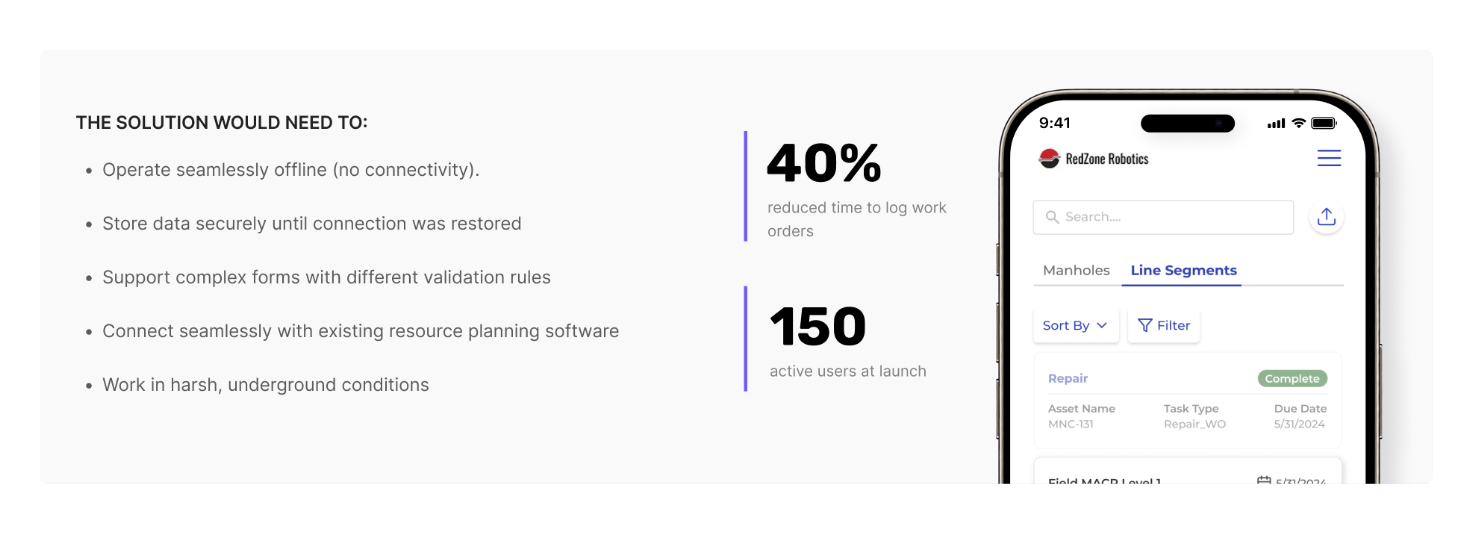
Take RedZone, a FlutterFlow-built native app we created for sewer inspection teams. The challenge was building an app that works offline underground where there's no connectivity. Our solution reduced work order processing time by 40% and increased data accuracy by 80%, serving 150 active users who can now focus on their actual tasks instead of paperwork.
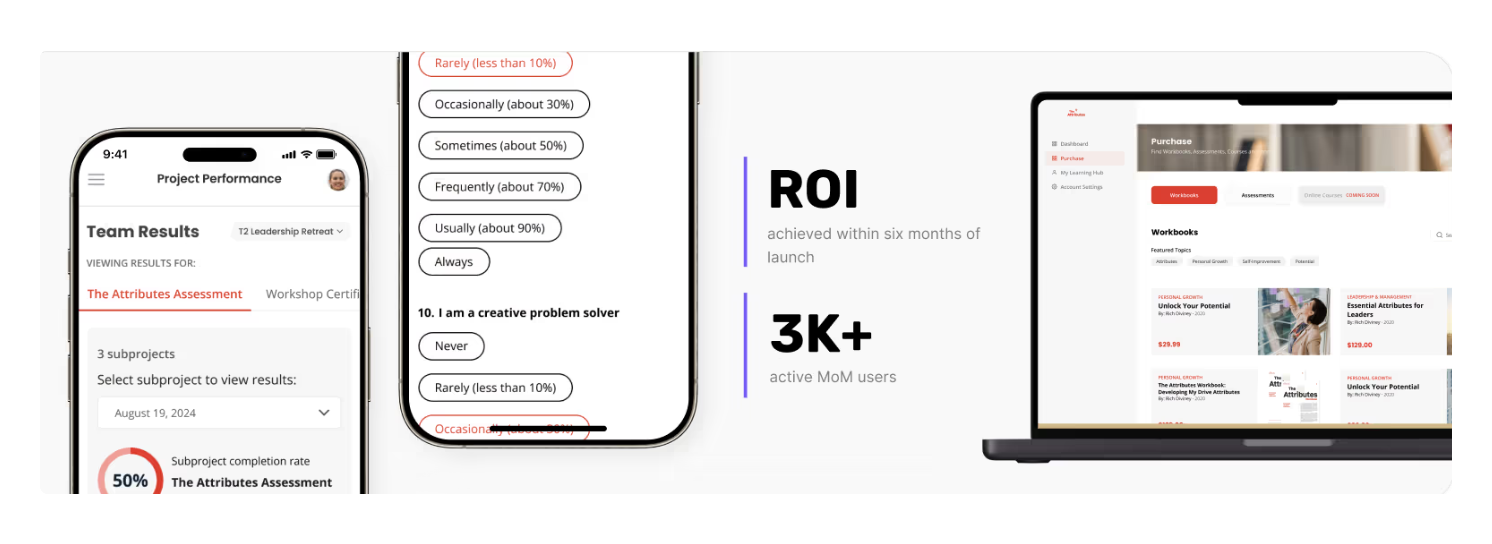
The Attributes showcases our expertise in building scalable web platforms. This Bubble-powered leadership assessment platform transformed from a simple tool into an enterprise-ready system serving Fortune 500 companies. The platform achieved complete ROI within six months and now handles over 1,300 users simultaneously, proving how web apps can scale effectively for business growth.
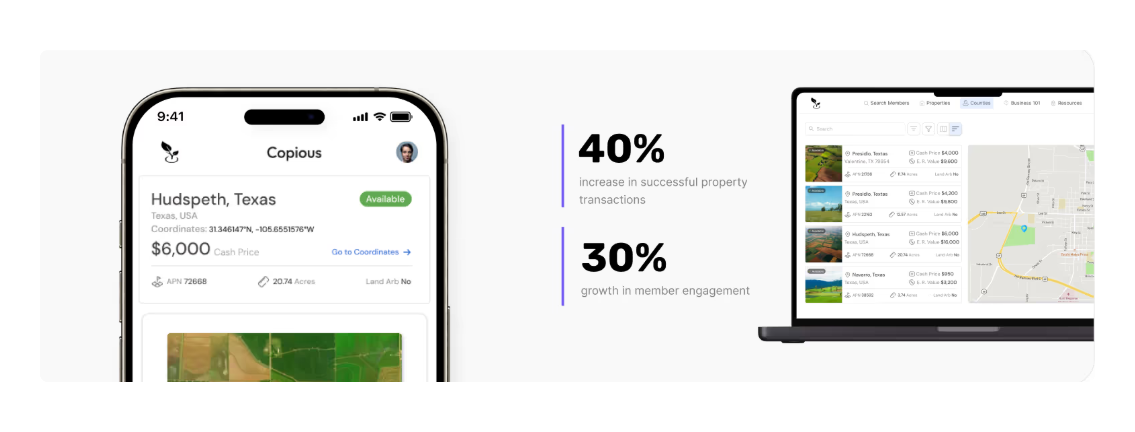
Copious.Land demonstrates our expertise in building specialized marketplaces. This Bubble-based land investment platform features location-based search and satellite integration, increasing successful property transactions by 40% and member engagement by 30%.
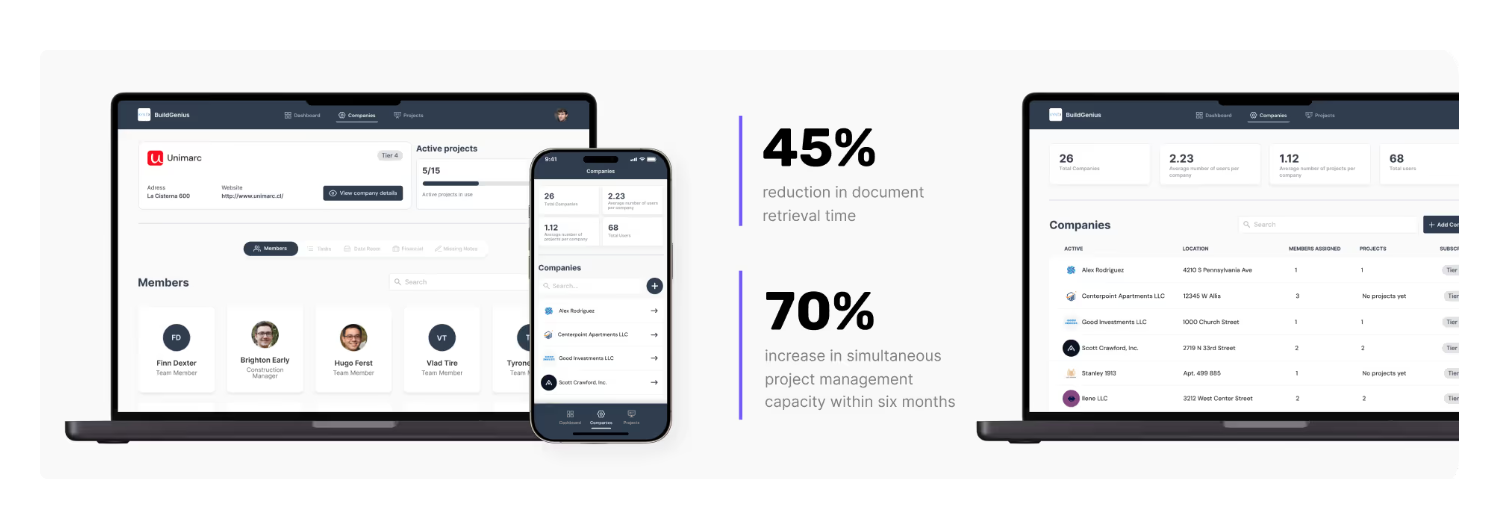
BuildGenius represents our AI-enhanced capabilities, combining Glide's data management with intelligent document processing for real estate development. This solution reduced document retrieval time by 45% and increased project management capacity by 70%, showing how modern web apps can integrate cutting-edge AI functionality.
As technology improves, the line between web and native apps is getting thinner. New tools and methods make it easier to build flexible, high-quality apps without writing code.
Hybrid apps combine web and native features in one build. Tools like FlutterFlow let you design once and launch on both Android and iOS. This saves time and cost without losing too much performance. Progressive Web Apps (PWAs) are also growing. They act like native apps but run in a browser and can be installed on a home screen.
These options work well for many businesses that want mobile reach without building from scratch twice.
Native apps generally perform best on the latest versions of Android or iOS. But they may have issues on older devices. Web apps are more stable across devices since they run in browsers, but can still lag on outdated systems or slow internet.
Choosing the right approach depends on your target audience’s devices and tech habits.
The mobile app market continues to grow, but user expectations are higher than ever. Native apps will stay strong for apps that need speed, rich design, or full hardware use. At the same time, web apps and PWAs are becoming more popular because they are cheaper, faster to build, and easier to update.
Many businesses now use both: a native app for top users and a web app for broad reach. No-code tools will make this even easier in the future.
Mobile App Development Services
Apps Built to Be Downloaded
We create mobile experiences that go beyond downloads—built for usability, retention, and real results.
At LowCode Agency, we specialize in transforming your ideas into fully functional applications using no-code and low-code platforms. Our expert team has built over 330 apps across various industries, helping entrepreneurs and businesses bring their visions to life quickly and cost-effectively.
We use leading no-code platforms to build both web and native mobile apps quickly and efficiently. Our streamlined process usually delivers MVPs in 4–8 weeks, helping you test your idea and start seeing results fast.
We use leading no-code platforms to build both web and native mobile apps, including
Whether you need a web app for cross-platform reach or a native app for advanced functionality, our team at LowCode Agency can help you choose the right approach and build a solution that grows with your business.
Reach out today and let's discuss how we can bring your vision to life in weeks, not months.
Last updated on
May 29, 2026
.
Jesus Vargas
-
Founder
Jesus is a visionary entrepreneur and tech expert. After nearly a decade working in web development, he founded LowCode Agency to help businesses optimize their operations through custom software solutions.
Custom Automation Solutions
Save Hours Every Week
We automate your daily operations, save you 100+ hours a month, and position your business to scale effortlessly.
Our AI — trained on 300+ shipped products — tells you what to build, what to skip, and what it'll actually cost. No fluff.
Assess My Idea"Working with LowCode Agency was the best decision I made in 2025"
Franklin Frith
CEO at HRM
Web apps run in browsers and are accessed through URLs, working on any device with internet connectivity. Native apps are downloaded from app stores and installed directly on devices, built specifically for iOS or Android platforms. Web apps offer cross-platform compatibility, while native apps provide deeper system integration and hardware access.
Native apps typically deliver superior performance due to direct system integration and optimized code execution. They handle complex animations, large datasets, and intensive processing more efficiently. However, modern web technologies have significantly narrowed this gap, making web apps perfectly adequate for most business applications and everyday use cases.
Yes, web apps work on any device with a web browser and internet connection. They provide consistent experiences across Windows, Mac, iOS, Android, and other platforms without requiring separate development. This universal accessibility makes web apps ideal for businesses targeting diverse user bases with varying device preferences and operating systems.
Web apps cost significantly less because you build one application that works everywhere. Native apps traditionally require separate development for iOS and Android, roughly doubling costs. However, no-code platforms like FlutterFlow can generate both versions from single designs, reducing this difference while still requiring platform-specific testing and optimization.
Web apps have limited offline capabilities compared to native apps. Progressive Web Apps (PWAs) can cache essential data and provide basic offline functionality, but they're more dependent on internet connectivity. Native apps excel at offline operation, storing substantial data locally and syncing when connectivity returns, making them better for field work.
PWAs combine the best of both approaches, offering app-like experiences through browsers with home screen installation, offline functionality, and push notifications. They maintain web app advantages like instant updates and cross-platform compatibility while providing native-like user experiences. Hybrid platforms enable single codebase development for multiple platforms, reducing costs and complexity.
Comparison
Webflow
Webflow vs. Framer: Key differences and which one to choose in 2026
A comprehensive comparison of Webflow and Framer to help you make an informed decision on the right no-code platform for your project.
Comparison
Glide
Glide vs Softr | 10 Factors Compared (2026)
Glide vs Softr compared across 10 key factors including ease of use, scalability, integrations, pricing, and flexibility. Discover which no-code platform fits your 2026 app goals.
Airtable
Comparison
Airtable vs ClickUp | 10 Factors to Decide the Best One
Compare Airtable vs ClickUp across tasks, databases, automations, and team features. Learn which no-code tool suits your project, team, and workflow best in 2025
Comparison
Webflow
Webflow vs Tilda | 14 Factors to Decide the Best One
Compare Webflow vs Tilda across 14 key factors including design, SEO, CMS, and pricing to choose the best no-code website builder for your needs
Comparison
Bubble
Bubble vs WeWeb | 12 Factors to Decide the Best One
Compare Bubble vs WeWeb across 12 key factors, including use cases, flexibility, backend needs, scalability, pricing, and which platform fits your app goals.
Comparison
Airtable
Airtable vs AppSheet | 10 Factors to Decide the Best One
Airtable excels at flexible databases and collaboration; AppSheet wins on mobile-first apps and Google Workspace integration. Here's exactly when to pick each one.








.avif)
.avif)