
"Bottleneck" really has become one of the scariest words in PC hardware, and it gets thrown around with rather reckless abandon. Every dropped frame, every stutter, and every slightly longer load time somehow gets blamed on a mythical bottleneck lurking in your system. Most of the time, it's nonsense. But when a bottleneck is real, it absolutely does hold your performance back.
In a time when every piece of hardware is either hard to find, painfully expensive, or both, it only makes sense to want every ounce of performance you've paid for. The uncomfortable truth is that you might already be leaving some of it on the table, and it's not because of your GPU. Instead, some other quieter, less-talked-about limitations inside your PC case could be the culprits. These don't always tank frame rates outright, but they can cause inconsistent performance, stutters, and sluggishness that's hard to pin down. That's where the real bottlenecks live.
Your CPU model actually matters
Blowing the entire budget on a GPU is never the best idea
CPUs bottlenecking the GPU are the first thing every PC gamer worries about, and ironically, they're often the least dramatic. At higher resolutions, the GPU does most of the heavy lifting, which is why CPU limitations are easy to ignore until you drop the resolution. At 1080p, especially with a modern GPU, your graphics card is often waiting around while the CPU scrambles to keep up with draw calls, physics, AI, and game logic. That's where CPU limits show up as lower frame rates or uneven frame pacing.
The interesting part is how graphics settings play into this. Increasing GPU-heavy settings can reduce CPU pressure by shifting more work to the GPU, but CPU-heavy settings like crowd density, simulation detail, or view distance can undo that balance instantly. You can't just crank every slider to the max and call it a day. The real-world performance impact is about 10–25% in CPU-limited scenarios, and that's enough to make a powerful GPU feel underwhelming if your CPU is simply out of its depth.
Your motherboard could be holding everything back
The silent enabler (or limiter)
Motherboards don't get enough blame, and mostly because they're not flashy. PCIe generation is a great example here. Yes, running a modern GPU on PCIe 3.0 can technically bottleneck it, but the difference is only significant in specific edge cases. At higher resolutions, when a card hits its VRAM limit, bandwidth can matter, and even then the performance difference rarely exceeds 5–10%. That's not disastrous, but you did pay for all of that performance, so it stings to leave some of it unused.
Then, there's Resizable BAR or Smart Access Memory. If your motherboard is old enough to lack proper support for these features, then your CPU can't access GPU VRAM efficiently in one go, which can shave off measurable gains in modern titles. Add memory support into the mix — DDR4 versus DDR5 — and things get messier.
DDR5 RAM became the standard for a couple of years there (just long enough to matter) before RAM prices went off the rails, but higher memory clocks and bandwidth do help in CPU-bound workloads. None of this is night-and-day, but combined, motherboard limitations can quietly chip away at the performance you expected.
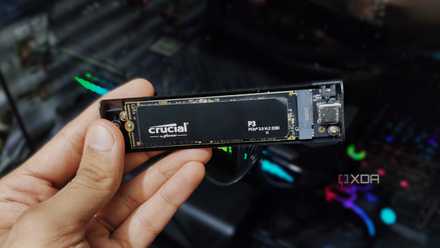
PCIe 3.0 might be "outdated," but it's still more than fast enough
If you look far, far behind, we left the point of diminishing returns there.
The memory controller inside your CPU
No point paying for flashy new RAM with an outdated CPU
This is the bottleneck that not a lot of folks talk about. You can buy the fastest RAM kit your motherboard supports according to the brochure, but if your CPU's memory controller can't keep up, you're paying for performance you'll never see. Older memory controllers struggle with high transfer speeds, forcing looser timings or downclocked RAM just to maintain stability. The result is increased latency.
Latency is what turns otherwise high frame rates into stuttery, inconsistent experiences. Games that stream assets aggressively or rely heavily on fast CPU-to-RAM communication feel this the most. You might see average FPS stay roughly the same while 1% and 0.1% lows quietly suffer. That's the kind of bottleneck that's hard to benchmark but easy to feel.
Realistically, the performance impact of this varies wildly. It can go from negligible to 10–15% in worst-case scenarios. However, the biggest issue here is wasted money. Faster RAM doesn't fix a weak memory controller, and no amount of tuning can fully overcome that architectural limit.
Your monitor can actively affect your experience
The bottleneck you're literally staring at
If your games feel sluggish despite decent frame rates, your monitor might be the one to blame here. Older panels with slow response times can introduce ghosting and blur that make motion feel muddy, even when performance is technically fine. Low refresh rates are even worse. V-sync on a 60Hz display actively caps what your system can output, forcing your GPU and CPU to idle while you wonder why everything feels "off."
Resolution matters, too, and incredibly so. Running a modern GPU like an RTX 3070 (or anything with 8GB VRAM or more) on a 1080p display doesn't always make sense anymore. At lower resolutions, the CPU becomes the limiting factor far sooner, preventing your GPU from stretching its legs. A card like an RTX 3070 or above can feel oddly underutilized at 1080p, especially in CPU-heavy games.
1440p hits the sweet spot with sharper visuals, better GPU utilization, and reduced pressure on the CPU. The performance difference is both measurable and perceptual. Sometimes, the bottleneck isn't inside your PC. Instead, it could be bolted to your desk.
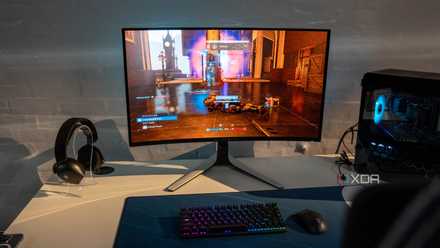
My 1440p monitor was a better upgrade than a 4K one at the same price
Resolution isn't my top priority anymore
SATA SSDs versus NVMe
The real quality-of-life killer
PCIe generations get way too much attention when it comes to storage. PCIe 3.0 SSDs are still perfectly fine for gaming (and they come cheaper, too), and PCIe 5.0 drives are still massively overkill. Load time differences between generations are usually measured in seconds, not miracles. But if you're still on a SATA SSD, even one in an M.2 form factor, you're dealing with a genuinely outdated bottleneck.
Modern games stream assets constantly, and SATA simply doesn't have the bandwidth to keep up as smoothly. That shows up as longer load times, delayed texture pop-in, and occasional stutters during traversal-heavy sections in games. Moving to any NVMe drive, even an entry-level one, is one of the most noticeable upgrades you can make today. The gains won't show dramatically in average FPS charts, but your overall experience improves immediately. If there's one bottleneck here that actually feels like a leap forward when fixed, this is it.
XPG GAMMIX S70 Blade
The XPG GAMMIX S70 Blade PS5 compatible SSD is discounted for Black Friday on Amazon. It uses PCIe 4.0 interface and offers impressive transfer speeds.

I wanted to buy more NVMe storage in 2026, but I'm doing this instead
Crazy SSD prices have made me realize the importance of HDDs
Bottlenecks you don't know about will quietly erode performance
It's as necessary as it is smart to extract full value from your hardware in today's PC landscape.
Hardware bottlenecks are not the monsters the internet can often make them out to be. Still, they're not imaginary, either. Most of the time, they do not destroy performance outright. Instead, they erode it quietly, shaving off smoothness, consistency, and responsiveness in ways that are easy to misdiagnose. The goal isn't perfection or some mythical "zero bottleneck" system, but balance.
Understanding where your system may be held back lets you make smarter upgrades, avoid pointless spending, and actually enjoy the performance you've already paid for. Because in today's PC landscape, extracting full value from your hardware is just as necessary as it is smart.