
If you're planning to build a home lab, you probably have the core components in mind. You're probably considering a 5-year-old consumer CPU or maybe even an old Xeon chip as the foundation of your home lab. A capable consumer-grade graphics card or a workstation GPU, 64GB of RAM, and several TBs of HDD or SSD storage might also be on your mind. That said, one of the most important performance levers in a home lab is the networking stack. Even if you already have a home lab up and running, upgrading your home network can bring massive improvements to your setup. And it goes beyond switching to a faster NIC.

6 home network upgrades I made that were better than a new router
Unless it's ancient, you will probably get more mileage from a few simple fixes than replacing your router
Your network is the biggest bottleneck in your home lab
Not your RAM or SSD
You don't build a home lab for gaming or lightweight workloads. Most home labs are geared toward specialized use cases, such as NAS access, media streaming, backup jobs, and remote access. These workloads move vast amounts of data across your network, making it one of the most important aspects of your home lab. More RAM and faster storage can temporarily mask networking issues, but they're no replacement for multi-gig Ethernet, which injects more headroom into your setup. A 5GbE or 10GbE NIC can avoid your network speeds becoming a bottleneck long before your storage or memory comes into the picture.
A Gigabit connection sounds sufficient before you realize it only translates to around 120MB/s transfer speeds, and that's if everything works perfectly. Even if your SSDs are capable of moving data at faster speeds, your network simply isn't equipped for it. Even an upgrade from 1GbE to 2.5GbE can feel significant enough to make it worth the hassle. Home labs are meant for seamless productivity, and a bottlenecked network can shatter that ideal instantly. Before you start planning RAM or storage upgrades, ensure your home network is up to snuff, especially if your home lab juggles between multiple network-heavy workloads daily.
Why a 2.5GbE home network makes sense (and isn’t overkill at all)
Is this the key that lets you finally enjoy your home network
Network segmentation is an underrated upgrade
You need to see it to believe it
Switching to multi-gig Ethernet isn't the be-all and end-all of network upgrades. You also need to realize the importance of separating your main network from your home lab network. A home network with VLANs (virtual local area networks) can have multiple network segments running on the same underlying hardware. This segmentation allows you to tag individual devices to use different networks, so that they don't affect your main network. This comes in handy when you don't want your NAS, containers, virtual machines, media sync jobs, and backup jobs to saturate a single network with broadcast data, slowing everything else down. An unsegmented network is also bad news for experimenting with DHCP or routing inside containers, since the entire network is exposed to potential downtime.
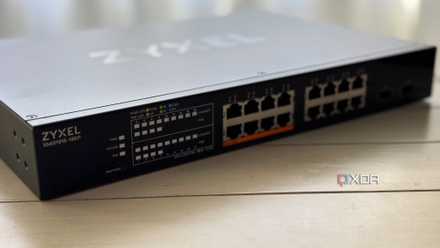
The good news is that you don't need expensive equipment or elaborate processes to introduce network segmentation to your home network. A $20 managed switch is one of the smartest network upgrades for any home lab user. For this price, you can get an 8-port managed switch that not only supports 802.1Q VLANs, but also enables port tagging, QoS, and easy web-based configuration. You can use your router to create VLANs, but most consumer routers make it more complex than it needs to be. Plus, they aren't equipped to handle vast amounts of data and aren't as feature-rich as an inexpensive managed switch, denying you the control you'd like to have over your VLANs.
Network segmentation will bring instant benefits to your entire network, not just the one tagged to your home lab. Your main network will be free from random spikes from backup jobs and discovery packets from containers, delivering a far more stable experience. Most importantly, your home lab experience will be elevated, since you'll be able to test whatever you want without worrying about disrupting your main network.
5 home-lab network mistakes that kill your performance (and how to fix them)
Your home-lab network performance might be much worse than it could be
Don't trust the existing cabling inside the walls
Be suspicious, be very suspicious
While you're focusing on faster Ethernet and VLANs for your home lab, don't ignore your cables, especially if you've been dealing with unexplained networking problems for a while. Most homes these days have some sort of Ethernet cabling that is passable for regular networks, but not in cases where you value peak performance. The Ethernet cables are home to half of your network problems, so ignoring them isn't really an option. Some homes might have coaxial cabling, which is fine for low-speed home networks, but terrible for high-speed internet and home lab use. Even if your house has Ethernet cabling, it might be one of the older standards, such as Cat 5, that tops out at 100Mbps. It's best to check your cables and upgrade to Cat 6 at least.
Suppose your house has modern Ethernet cables running through the walls, but there's still the possibility of cable damage due to tight bends over long runs. It's hard to diagnose why your network is acting out if the fault lies with the cable. You might be blaming everything from your router and ISP to your home lab configuration, but it might just be an outdated or faulty cable. Home lab users need to be especially paranoid about their network's physical layer, especially if they weren't the ones to install it. If you've moved into a new house and aren't getting the network performance promised as per the listing, it's time to confirm whether a cable fault is at play.

Your Ethernet is slow because of cables, not the switch
An often-forgotten backbone of the home network
Advanced networking is your home lab's superpower, not powerful hardware
While you obviously need capable specs in your home lab to power serious workloads, the bottleneck in most setups is the network. Whether it's limited by Gigabit speeds, poor configuration, or outdated cables, the result is a suboptimal experience that's not worthy of a home lab. Instead of contemplating storage or memory upgrades for your home lab, first ensure its networking stack is up to the mark. Only then is it worth upgrading other hardware if you wish to see tangible performance gains.