
My existing PC is almost 3 years old now. It's not remotely outdated — Ryzen 7 5700X and RTX 3080 have long lives — but I'm still daydreaming about what I'd do if I were building a new PC today. The PC hardware market is quite different from what it used to be 3 to 5 years ago, and yet, in some respects, it's pretty much the same. That said, I believe my approach toward a new build will be quite different in 2025.
For instance, I wouldn't go with one of the latest-gen CPUs this time, considering the disappointing showing by the Ryzen 9000 as well as Core Ultra series CPUs. On the GPU front, I would finally switch from Nvidia to AMD, thanks to the new RX 90 series GPUs. And, if the price premium isn't too much, I would be willing to buy a Gen5 SSD and an X870 motherboard over a Gen4 drive and B650 motherboard, respectively.
5 Consider a Gen5 SSD if the price is right
I'm warming up to the idea
Gen5 SSDs are still not worth it for gaming, but we're getting there. DirectStorage hasn't become as popular as some might have hoped, but once developers are confident about the rising adoption of PCIe 5.0 drives, the pace of progress is sure to accelerate. Future-proofing is well and good, but even if you disregard that, Gen5 NVMe SSDs have come down in price considerably compared to a few years ago.
The Gen5 drives worth buying (not the 10,000MB/s models) still cost roughly double that of Gen4 SSDs (for both 1TB and 2TB models), but on a $2,000 build, a premium of around $100-$125 isn't too much. The benefits of a blazing-fast Gen5 drive while copying large files or multitasking between productivity programs are impressive, and if I were shopping for an SSD today, I would surely pay extra for one of the 14,000MB/s drives.
Crucial T705 Gen5 SSD
- Storage capacity
- 1 TB, 2 TB, 4 TB
- Hardware Interface
- PCIe 5.0, NVMe 2.0
- TBW
- 1,200 - 2,400 TBW
- DRAM
- 1 GB LPDDR4, 2 GB LPDDR4, 4 GB LPDDR4
- Warranty
- 5 years
- Controller
- Phison E26
Crucial T705 claims to be the fastest SSD, with read and write speeds up to 14,500 MB/s and 12,700 MB/, respectively. it also supports Microsoft DirectStorage, offering you faster gameplay and sharper graphics.

Crucial T705 SSD review: The new king of SSDs, but it'll cost a prince's ransom
This PCIe 5.0 SSD promises the fastest speeds around, but does it live up to those claims?
4 Buy an X870 motherboard instead of B650
They might cost the same
I'm always of the opinion that expensive motherboards aren't worth it for most people, especially if you're only concerned with gaming performance and connectivity options. That's why I picked a lower mid-range B550 motherboard for my existing PC. The market has moved on to B650 (and B850) now, but I might go in a different direction this time, preferring a higher-end chipset like X870 instead of B650.
In most areas, I would be fine with a decent B650 motherboard, such as the Gigabyte B650 Aorus Elite AX Ice, since it has everything I need in terms of design, connectivity, and expansion slots. However, I could get my hands on the equally good-looking ASRock X870 Pro RS WiFi for the same price, with the bonus of Wi-Fi 7 instead of Wi-Fi 6E, and two USB4 ports (missing entirely on the B650 motherboard).
X870 chipsets also have PCIe 5.0 lanes across the board compared to PCIe 4.0 lanes on B650 chipsets. You might say that B650E chipsets are similar to X870 in this regard, but then they don't have USB4 ports as standard. Overall, my thinking is that if I can get a more forward-looking motherboard for the same price, I'll be open to moving from the tried-and-tested B650 chipset.
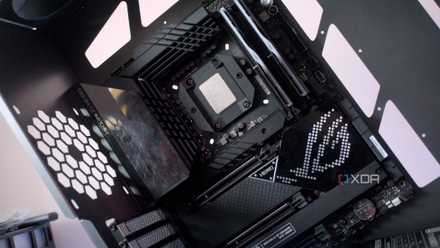
Why a motherboard might be the most important part to future-proof in your PC
Stop ignoring your motherboard.
3 Give equal weightage to esthetics
Mending the mistakes made last time
When it was time to choose the components for my current PC that I won in a competition, my hands were a bit tied, since I had to allocate the fixed prize money to the components. The GPU and SSD were already frozen as part of the rules, so I could only work my magic on the rest of the build. Working with a strict theme wasn't possible, so I ended up with a white case and CPU cooler, but a black motherboard and memory kit.
It all ended up in a decent dual-tone build, but I wish I could have crafted an all-white PC. This time around, I would make it a point to choose a unique case or at least a beautiful white fish tank model alongside a string white motherboard and AIO cooler. I'd pair them with one of the best white GPU models and memory kits to bring everything together.
I would also pay more attention to the overall setup this time, not just the PC. This would include things like desk accessories, wall art, room lighting, and more to create a uniform vibe for the entire room.
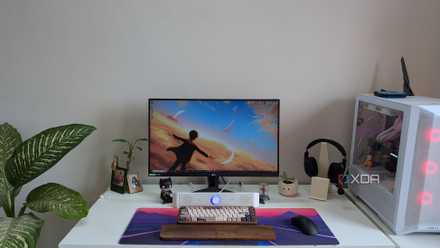
My 5 favorite things in my gaming PC setup (not the PC or monitor)
Some of my favorite parts of my desk setup have nothing to do with my PC or gaming monitor
2 Pick a Ryzen 7000 CPU over Ryzen 9000
Not trusting the latest generation this time
Choosing the Ryzen 7 5700X around 3 years ago was part impulse and part compromise. Since I wanted an 8-core CPU for the first time, and Ryzen 7000 CPUs were launching after the competition deadline to pick the components, the 5700X remained my only option (the 5800X would have overshot the allowed budget). If I were building a PC today, I would actually pick an older-generation CPU instead of the latest one.
The popular Ryzen 5 7600 would be my top choice. The Ryzen 9000 CPUs have mostly been a refresh of the Ryzen 7000 series, except for the Ryzen 7 9800X3D, whereas the Ryzen 5 7600 is plenty powerful for any high-end GPU, and costs under $200 right now. Other parts like the Ryzen 7 7700, Ryzen 5 9600X, and Ryzen 7 9700X are just not worth the extra money. And the Ryzen 7 7800X3D and 9800X3D are simply too pricey ($400+) for what I'm comfortable spending on a gaming CPU.
It's always worth analyzing whether a previous-gen component would net you the same performance (and longevity) as a current-gen part. In the case of the Ryzen 5 7600, it absolutely does, and I can always upgrade to something more powerful down the line on the AM5 platform.
AMD Ryzen 5 7600
- Brand
- AMD
- Cores
- 6
- Threads
- 12
- Architecture
- Zen 4
- Process
- 5nm
- Socket
- AM5
The Ryzen 5 7600 is a fantastic 6-core Zen 4 CPU, ideal for gaming PCs of all budgets. Its 65W TDP is easily handled by the bundled cooler, and the price-to-performance ratio is unbeatable.

3 major reasons Ryzen 7000 beats Ryzen 9000 for gaming
It came, it flopped, it was forgotten. Here's why Ryzen 7000 trumps Ryzen 9000 for gaming.
1 Buy an AMD GPU instead of Nvidia
How the turntables...
I've been an Nvidia user since 2017, going from the humble GTX 1050 Ti to the surprisingly powerful GTX 1660 Ti, and then to the RTX 3080. Nvidia has remained on the top for a long time — it dominates consumer GPUs with a 90% market share. Leading in ray tracing, AI-powered upscaling and frame generation, and the cutting-edge of GPU technology has been Nvidia's track record. However, with the launch of the RX 9070 and RX 9070 XT, AMD has finally leveled the playing field (more or less).
AMD's ray tracing performance has seen a tremendous leap from the days of RDNA 3, and FSR 4 now stands between DLSS 3 and DLSS 4 in terms of image quality. While Nvidia is busy being stingy about VRAM and pricing GPUs as high as it can, AMD has brought native 4K 60 FPS gaming to the $500–$600 segment. The current GPU pricing shenanigans aside, gamers now have genuine competition in the mid-range segment.
My concerns about owning an AMD GPU — driver issues, ray tracing performance, upscaling quality, and value for money — are all ancient history now. If I were building a $1,300–$1,500 gaming PC today, I would pick the RX 9070 XT over anything else. For 4K gamers who are only mildly interested in ray tracing, AMD's RX 90 series is the best choice right now.
ASRock Radeon RX 9070 XT Steel Legend
- Memory Clock Speed
- 2518 MHz
- Architecture
- RDNA 4
- Process
- 5 nm
- Shader Units
- 128
- Ray Accelerators/Cores
- 64
- AI Accelerators/Cores
- 64
The RX 9070 XT is the best 4K gaming GPU under $600 right now, and deserves to be on the radar of every PC gamer. It features advanced ray tracing, upscaling, and frame generation capabilities, and offers great value for money, if you can can find one at MSRP.
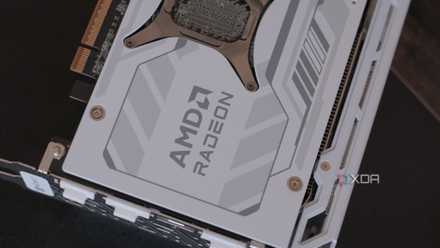
5 things to note when swapping GPUs from NVIDIA to AMD
There are important factors to consider when swapping to the Red Team.
It's a new age for PC builders
The PC hardware market is going through some rough developments right now. Generational gains have stagnated for most components, defective hardware is making its way to consumers, prices have been skyrocketing, and availability is non-existent. Someone building a new gaming PC today needs to carefully assess current and previous-gen components, and make choices where they can get the most value. Currently, that happens to be the mid-range segment; high-end components are losing their sheen every year.