The 8 best support automation tools in 2026


Last edited June 15, 2026
Table of Contents
What we mean by "support automation tools"
A support automation tool is anything that takes the repetitive, high-volume parts of customer support off your team's plate: answering the same questions, triaging and tagging tickets, drafting replies, and increasingly, taking actions like looking up an order or processing a refund. In 2026, "automation" almost always means AI doing the reasoning, not a decision tree you hand-build rule by rule.
That pain is universal, and it shows up the same way everywhere. As one director of support at a fast-growing EdTech startup put it, "As a fast-growing startup with a small team, our customers far outnumber our employees." A DTC supplements brand we spoke with was running roughly 7,000 tickets a month and simply couldn't keep up; they came in looking for a copilot and realised they actually needed an agent to auto-resolve at least half of their email. That gap, between volume and headcount, is the whole reason this category exists.
The tools that close it fall into two camps, and knowing which you want saves you a lot of time:
- All-in-one helpdesks with automation built in (Zendesk, Freshdesk, Zoho Desk, Gorgias, Help Scout). You get ticketing, an agent workspace, and AI in one subscription, but the AI only works inside that vendor's walls.
- Standalone AI agents (eesel, Ada) that sit on top of whatever helpdesk you already run. You keep your stack and bolt the automation on.
How support automation actually works
Under the hood, almost every modern tool follows the same loop: a request comes in, the AI checks it against your knowledge and past tickets, and then it makes a confidence-based call about what to do next. High confidence gets an instant answer; medium confidence becomes a drafted reply for a human to approve; low confidence gets escalated, untouched, to a person.
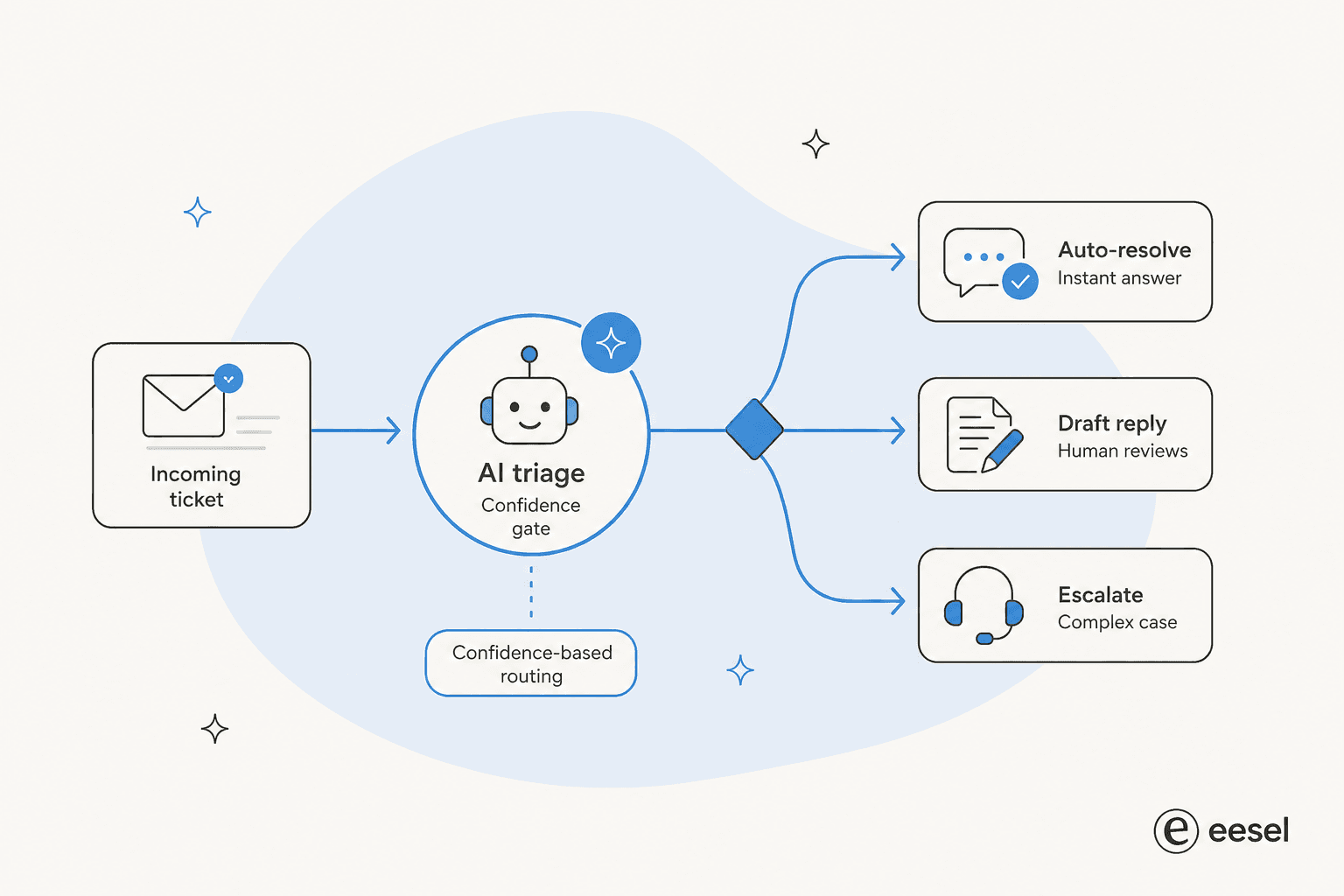
That confidence gate is the single most important feature to get right, and it's the one buyers care about most. One CX lead at a DTC supplements brand summed up the whole philosophy: "The AI will never be able to answer 100% of the questions. I need an AI who is only handling the tickets that it's confident to handle and all the other ones, leave them alone." A tool that lets you set that line, by topic, by confidence, by ticket type, is a tool you can actually trust to automate ticket resolution.
The best support automation tools at a glance
Here's how the eight stack up. Prices are entry-level monthly rates; "AI billing" is the unit you actually get charged on once automation kicks in.
| Tool | Best for | Entry price | AI billing unit | Free tier | Security highlights | Standout strength |
|---|---|---|---|---|---|---|
| eesel | Automating any existing helpdesk | Usage-based, no seat fee | Per AI action (from ~$0.40) | $50 trial credit | SOC 2, GDPR, EU residency | Trains on past tickets, runs anywhere |
| Zendesk | Large omnichannel enterprises | $55/agent/mo (AI tier) | Per automated resolution | 14-day trial | SOC 2, ISO 27001, HIPAA | Most complete platform |
| Freshdesk | Mid-market value | $19/agent/mo | $49 / 100 sessions | Yes, up to 2 agents | SOC 2, ISO 27001, GDPR | Agentic AI at a fair price |
| Zoho Desk | Budget and Zoho users | $7/agent/mo | Zia included | Yes, 3 users | GDPR, HIPAA, CCPA | Cheapest serious helpdesk |
| Gorgias | Shopify and ecommerce | $10/mo (50 tickets) | $0.90 / resolution | 14-day trial | GDPR, CCPA, SSO | Native Shopify actions |
| Ada | High-volume enterprise | Custom (sales only) | Per conversation (est.) | No | SOC 2, HIPAA, AIUC-1 | Multi-LLM reasoning engine |
| Tidio | Small ecommerce and SMBs | $24.17/mo | $0.50 / conversation | Yes, 50 convos | GDPR (Premium adds more) | Claude-powered Lyro agent |
| Help Scout | Relationship-first small teams | $25/user/mo | $0.75 / resolution | Yes, up to 5 users | GDPR, Pro adds security | Clean, email-like inbox |
Now let's get into each one, what it's actually good at, where it bites, and who should pick it.
1. eesel
Best for: teams that want fully autonomous AI support without ripping out the helpdesk they already use.

We're putting our own tool first, so read this with the appropriate amount of salt, then go check the G2 reviews yourself. eesel is an AI teammate platform: instead of being a helpdesk, it drops autonomous AI agents directly into the tools you already run, like Zendesk, Freshdesk, Slack, email, Shopify, and over 100 others. The agents read tickets, draft and send replies, take actions, and escalate the edge cases they aren't confident about.
The pitch we keep coming back to is that briefing an eesel agent feels like onboarding a new hire, not configuring software. It learns from your existing knowledge and past tickets, and it lets you simulate on real historical tickets before it ever touches a live customer, so you see the resolution rate before you commit.
Key features
- Runs inside your existing helpdesk and chat tools; no migration, no new interface to learn.
- Trains on your past tickets, help center, and docs to match your tone and policies.
- Confidence-based control: you decide exactly what the AI handles and what it leaves alone.
- Works as a customer-facing chatbot, a reply-drafting copilot, or a behind-the-scenes triage agent.
Pros
- No per-seat pricing, so cost tracks usage, not headcount.
- Truly helpdesk-agnostic; you keep your current stack.
- Fast to value, teams report results inside the 7-day trial.
Cons
- It layers on top of a helpdesk rather than replacing it, so if you don't have one yet, you'll still need ticketing somewhere.
- Usage-based pricing means very high, low-deflection volumes need a quick sanity check (which the simulation gives you).
Pricing
Usage-based, starting around $0.40 per regular AI action, with a free trial that includes $50 of credit and no credit card. There are no seat fees and no per-resolution surcharge that punishes you for being good at deflection. Annual commitments above $300/month get a 25% discount.
"In the first month, eesel is resolving 73% of our tier 1 requests. eesel offers easy Zendesk implementation and setup. Our team implemented and achieved results quickly during our 7-day trial."
Kim Simpson, Gridwise, via eesel's Yellowdig and customer case studies
Our take: eesel is the strongest pick if you like your helpdesk and just want the repetitive work gone. If you need to buy a helpdesk from scratch, pair it with one of the platforms below. See the full eesel and Zendesk workflow for how the layering works in practice.
2. Zendesk
Best for: large, omnichannel support orgs that want everything in one platform and can budget for it.
Zendesk is the heavyweight, and it has leaned hard into AI with what it now calls the Resolution Platform. It's a unified system combining AI agents, human agents, ticketing, omnichannel messaging, voice, and analytics. The scale is real: Zendesk cites 22,000+ AI service teams and 4.8 billion resolutions delivered, and it was named a Leader in the 2025 Gartner Magic Quadrant for the CRM Customer Engagement Center.
If you want breadth, nothing here beats it. The catch is cost and complexity, which is consistently the thing buyers underestimate.
Key features
- Self-improving AI agents that resolve across channels.
- Copilot for agents, plus automatic QA scoring across 100% of interactions.
- Workforce management, voice, and a marketplace of 1,800+ apps.
Pros
- The most complete platform in the category, full stop.
- Deep omnichannel and enterprise governance features.
- Huge integration ecosystem and partner network.
Cons
- Layered pricing: a seat price, plus per-resolution AI billing, plus $50/agent/month add-ons like Copilot.
- The entry $19 plan includes no AI at all; AI starts at the $55 Suite tier.
- Enterprise pricing is sales-gated, so the real cost is hard to predict.
Pricing
Support Team is $19/agent/month (no AI). Suite Team, where AI agents first appear, is $55/agent/month, and Suite Professional is $115. AI agents are billed separately per automated resolution on top of the seat price. Check Zendesk's pricing page before committing.
Our take: Zendesk is the right call for enterprises that need one platform to rule everything and have the budget to match. Smaller teams almost always find it heavier and pricier than they need, which is why we wrote up the best Zendesk AI alternatives.
3. Freshdesk
Best for: mid-market teams that want agentic AI without enterprise pricing.
Freshdesk (from Freshworks) is the friendlier, better-value cousin to Zendesk. It's built around a central agent workspace it calls the Command Center, and its 2026 story is a hard pivot to agentic AI: its Freddy AI Agent ships with 50+ prebuilt agentic workflows that take action, not just suggest. It's trusted by 74,000+ businesses including Bridgestone and Klarna.
The standout is the actually-free tier, which makes it a favourite for bootstrapped startups.
Key features
- Freddy AI Agent and Copilot for resolution and agent assist.
- Omnichannel inbox with AI-driven routing and SLAs.
- No-code AI Agent Studio for building workflows.
Pros
- Free tier for 1-2 agents for 6 months, no card required.
- Cleaner, more approachable UI than Zendesk.
- Strong marketed outcomes (up to 80% resolution with Freddy).
Cons
- Freddy AI is a usage-based add-on that scales in cost at high volume.
- Advanced features and Freddy Copilot/Insights pricing aren't fully transparent.
- Freshdesk Omni is a separate, pricier SKU than base Freshdesk.
Pricing
Growth is $19/agent/month, Pro $55, and Enterprise $89 (annual). The Email AI Agent includes the first 500 sessions, then runs $49 per 100 sessions. See our full Freddy AI pricing breakdown for the gotchas.
Our take: Freshdesk hits a sweet spot for mid-market teams who want real agentic AI without Zendesk's bill. If you're already on it and just want better automation, you can also automate Freshdesk with eesel instead of paying per Freddy session.
4. Zoho Desk
Best for: budget-conscious teams, especially those already in the Zoho ecosystem.
Zoho Desk is the value champion. It's a full omnichannel ticketing platform with a real Free Forever plan and paid tiers starting at just $7/agent/month, which is why it's so often recommended on Reddit as the cheaper Zendesk alternative. Its AI assistant, Zia, spans self-service chatbots, in-ticket assist, and admin automation.
"Zoho Desk... why is it the best alternative to Zendesk? Almost everything that Zendesk does at like half the cost."

The price is the draw. The AI is where it gets weaker.
Key features
- Zia AI for sentiment analysis, auto-tagging, and an Answer Bot.
- Blueprint drag-and-drop process automation.
- Deep native integration across the Zoho suite (360+ apps).
Pros
- The cheapest serious helpdesk here, with a true free plan.
- Strong, reviewer-praised automation and SLA tooling.
- Excellent value if you already live in Zoho.
Cons
- Zia is widely seen as underwhelming; some Reddit users call it "a trainwreck of unhelpful responses."
- The best AI features (Answer Bot, sentiment) are gated to the Enterprise tier.
- A steep learning curve and cluttered UI come up constantly in reviews.
Pricing
Free Forever (3 users), then Express $7, Standard $14, Professional $23, and Enterprise $40 per agent/month (annual). Full detail on the Zoho Desk pricing page and our Zoho Desk AI pricing explainer.
Our take: Zoho Desk wins on price and loses on AI quality. If budget is the deciding factor, it's hard to beat; if the AI matters most, many teams pair it with a stronger agent or check the Zoho Desk alternatives.
5. Gorgias
Best for: Shopify and ecommerce brands that need support tied to store actions.
Gorgias is purpose-built for online retail, and it shows. It powers customer conversations for a claimed 40% of Shopify brands, with native Shopify data living right inside the ticket view. Its AI Agent is pre-trained on over a billion ecommerce conversations and can handle returns, edit orders, generate discounts, and recommend products, not just answer FAQs.
"At 6pm on the second day of Black Friday week, our CX agent said: 'I'll see you tomorrow. We're at inbox zero.'"
For a Shopify store, that depth is the whole point. For everyone else, the price is steep.
Key features
- Native Shopify, BigCommerce, and Magento actions inside conversations.
- Revenue attribution and conversational, non-pushy upsell.
- Omnichannel inbox across email, chat, SMS, and social.
Pros
- The deepest ecommerce and Shopify integration in the category.
- Ticket-based pricing instead of per-seat, so users are unlimited on most tiers.
- Strong, documented automation at peak season (Orthofeet hit 56% automation in under two months).
Cons
- Roughly 3x the price of Zendesk for similar ticket volumes, per community consensus.
- The AI Agent is a usage add-on at $0.90 per resolved conversation, and each one also counts as a billable ticket.
- Overkill if you're not running an online store.
Pricing
Starter from $10/month (50 tickets), Basic $50, Pro $300, Advanced $750, plus the AI Agent at $0.90/resolution (annual). Details on the Gorgias pricing page. If the bill looks heavy, weigh the Gorgias alternatives first.
Our take: For Shopify brands where 40%+ of tickets need real store actions, Gorgias pays for itself. For lighter support needs or non-ecommerce teams, it's more than you need. Many stores keep Gorgias and add eesel for AI on Shopify support at a flatter cost.
6. Ada
Best for: large enterprises doing serious conversation volume that want a standalone AI layer.
Ada is the enterprise specialist. Like eesel, it's a standalone AI layer that sits on top of helpdesks like Zendesk and Salesforce rather than being one. It brands its category as Agentic Customer Experience, built on a multi-LLM Reasoning Engine and a developer toolkit that's notably MCP-native. The Toronto company has raised around $190M, and customers skew large: Monday.com, Pinterest, and Cebu Pacific among them.
The differentiator is that Ada starts at the top of the market, by design.
Key features
- Multi-LLM orchestration via the Reasoning Engine with safeguards.
- Playbooks (multi-step SOPs) and Coaching (review-and-it-learns).
- Strong voice agents and rare AIUC-1 AI compliance certification.
Pros
- Built for very high volume and complex enterprise workflows.
- Helpdesk-agnostic, so you keep your existing stack.
- Leading-edge compliance (SOC 2, HIPAA, GDPR, AIUC-1, zero data retention).
Cons
- Enterprise-only: Ada states a floor of 300,000 annual conversations.
- No public pricing, no free trial, no self-serve signup.
- Overkill, and out of reach, for SMB and most mid-market teams.
Pricing
Not published. The /pricing page is a sales-qualification form gated by that 300k-conversation floor, and pricing is widely assumed to scale per conversation. If you're below that bar, look at the Ada alternatives.
Our take: Ada is excellent for the enterprise it's built for and simply unavailable to everyone else. If you do millions of conversations and want a sophisticated standalone agent, it belongs on your shortlist. Otherwise, a self-serve tool will get you there faster.
7. Tidio
Best for: small ecommerce stores and SMBs that want live chat plus an affordable AI agent.
Tidio is the SMB-friendly option, combining live chat, ticketing, and an AI agent called Lyro into one tool. A nice detail: Lyro is powered by Anthropic's Claude, and Tidio claims a 67% average resolution rate, which it presents as the market's highest. It's trusted by 300,000+ businesses and rates 4.8/5 on the Shopify App Store.
It's easy to start with, which is most of its appeal.
Key features
- Lyro AI Agent grounded in your own content, with guardrails against hallucination.
- Flows: a no-code visual builder for proactive automations.
- Native Shopify actions and a money-back guarantee if Lyro resolves under 50%.
Pros
- Very easy setup, no engineering required.
- Affordable entry point and a usable free plan.
- Claude-powered AI that's praised for staying on-script.
Cons
- Usage-based pricing layers up (billable conversations and Lyro conversations and Flows visitors).
- The jump from Growth to the $749/month Plus plan is a big step.
- Lower tiers are email-support only.
Pricing
Free (50 Lyro conversations), Starter $24.17/month, Growth from $49.17, and Plus from $749. Standalone Lyro starts at $32.50/month and runs about $0.50 per conversation. See the Tidio review for the full picture.
Our take: Tidio is a great starting point for small stores that want chat and AI in one box. As volume grows, the stacked usage pricing is worth watching, and bigger teams often graduate to the Tidio alternatives.
8. Help Scout
Best for: relationship-driven small businesses that want a clean, human, email-like inbox.
Help Scout takes the opposite approach to Zendesk: instead of a heavyweight ticketing system, it gives you a shared inbox that feels like email, plus a knowledge base, the Beacon help widget, and a layer of AI. It's used by 12,000+ companies and its AI Answers agent resolves a claimed 73% of interactions. The whole thing is famously fast to learn, "a power user in less than a day."
The trade-off is depth, and a bumpy pricing history.
Key features
- Clean shared inbox with collision detection and saved replies.
- AI Answers agent plus an Inbox Assistant for drafts and summaries.
- Docs knowledge base that feeds the AI.
Pros
- The easiest tool here to adopt; new agents are productive in under an hour.
- A pleasant, low-clutter interface.
- Free tier for up to 5 users.
Cons
- AI Answers costs $0.75/resolution on top of seats, which reviewers flag as a hidden scaling cost.
- Thinner reporting and fewer advanced features than the incumbents.
- A 2025 switch from per-seat to per-interaction pricing (later reverted) burned some trust.
Pricing
Free (up to 5 users), then Standard $25, Plus $45, and Pro $75 per user/month, with AI Answers at $0.75/resolution. Full detail on the Help Scout pricing page and our Help Scout review.
Our take: Help Scout is the pick for small teams who value a human touch over enterprise features. As you scale, the per-resolution AI cost and thinner reporting push some teams toward the Help Scout alternatives.
What support automation actually costs
Here's the part that catches people out. Two tools can look identically priced and bill you wildly differently, because they charge on different units.
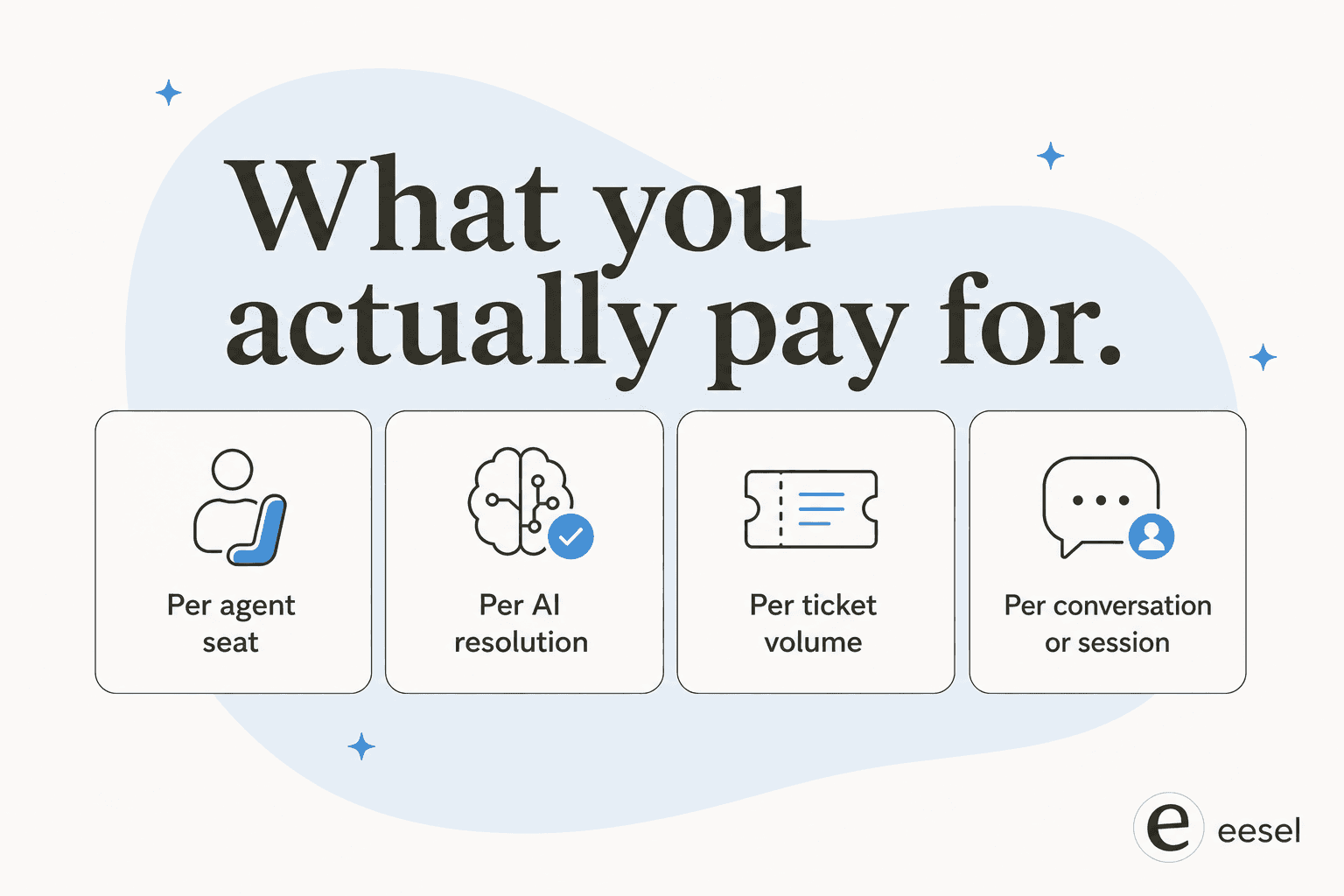
The trap is per-resolution pricing during a volume spike. We ran the numbers for an ecommerce inbox doing 1,000 tickets a month: at an 80% resolution rate on a typical ~$0.99-per-resolution model, that's about $792/month. Fine. But come Black Friday, the same inbox hits 4,000 tickets, and the bill jumps to roughly $3,168 for the month, for the exact same automation. Per-resolution pricing quietly penalizes you for two things you want: a higher resolution rate, and busy seasons. One more thing worth asking any vendor: does their quoted "resolution rate" count auto-closing spam? For one team we looked at, spam was 22% of the inbox.
This is the logic behind eesel's flat, usage-based model and why the build-versus-buy math usually favours buying:
"We could try to write our own LLM application but we didn't want to invest our time into that. We wanted something that we would not have to maintain."
Karel, GENERAL BYTES, from eesel's case study
Before you sign anything, model your real volume, including your worst month, against each tool's billing unit. Our cost savings guide and how much AI can save in support walk through the full math.
How to choose the right support automation tool
Strip away the feature lists and the decision comes down to two questions: how big are you, and do you want to keep your current helpdesk?
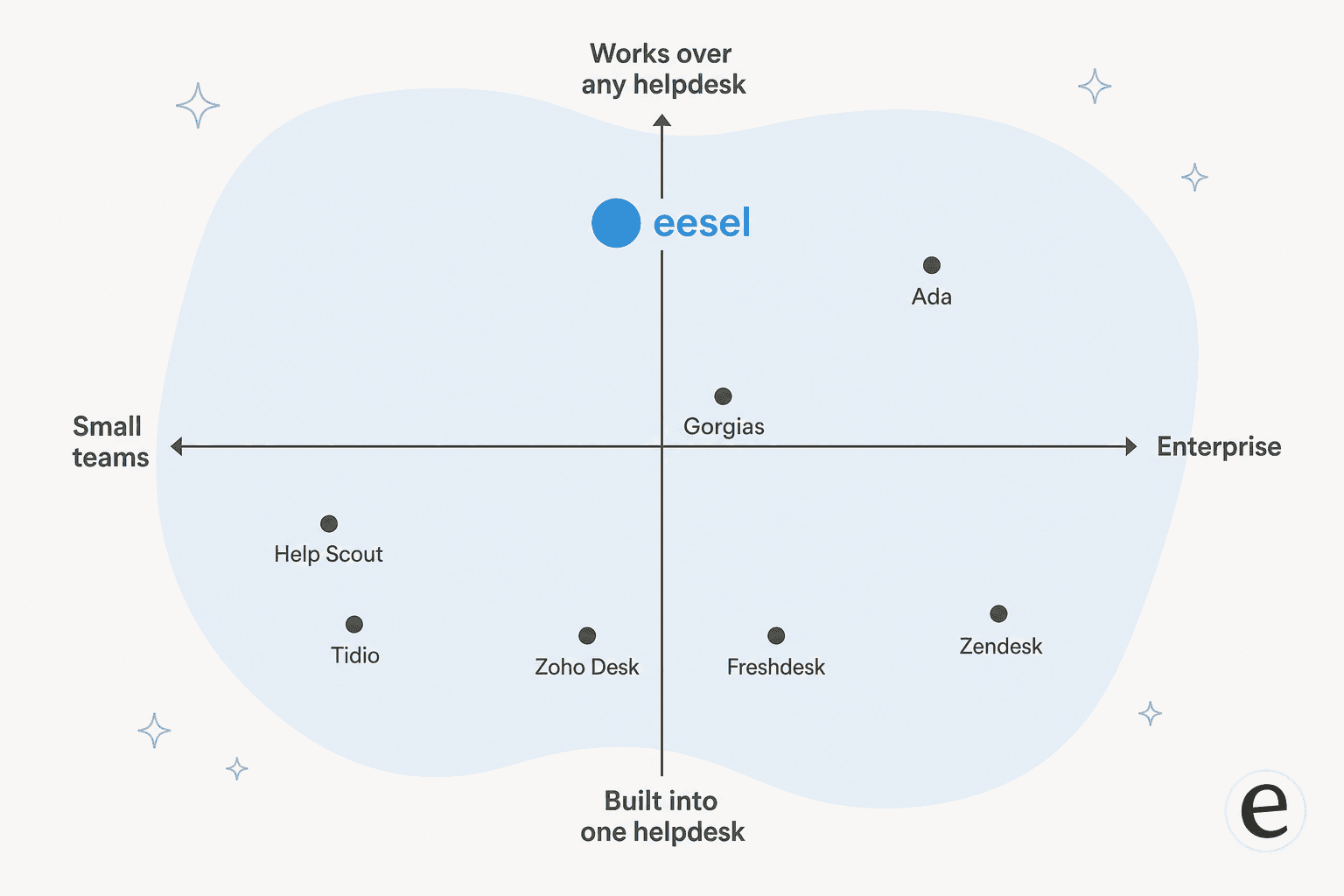
- You want one all-in-one platform and have the budget: Zendesk for enterprise, Freshdesk for mid-market, Zoho Desk for tight budgets.
- You sell on Shopify: Gorgias for deep store actions, Tidio for smaller stores.
- You're a small, high-touch team: Help Scout.
- You do enormous volume and want a standalone enterprise agent: Ada.
- You like your helpdesk and just want the repetitive work automated: eesel, because it doesn't ask you to switch anything.
Whatever you pick, insist on two things: the ability to test on your real past tickets before going live, and confidence-based control so the AI only handles what it should. Those two features separate a tool you trust from a tool you babysit.
Try eesel
If your goal is to automate support without a months-long migration, eesel is built for exactly that. It plugs into Zendesk, Freshdesk, Slack, and 100+ other tools, learns from your past tickets and help center, and lets you simulate on real historical tickets so you can see your resolution rate before going live, no per-seat fees, no per-resolution surprises.
The one differentiator we'd point to: because eesel runs on top of your existing stack and trains on your own tickets, you can go from sign-up to a measurable deflection rate inside a 7-day trial, while keeping full control over what the AI is allowed to touch. Try eesel free with $50 of credit and no card required.
Frequently Asked Questions

Share this article

Article by
Alicia Kirana Utomo
Kira is a writer at eesel AI with a Computer Science background and over a year of hands-on experience evaluating AI-powered customer service tools. She focuses on breaking down how helpdesk platforms and AI agents actually work so that support teams can make better buying decisions.