|
VOOZH | about |
|
VOOZH | about |
Angular has become one of the most popular frameworks for building dynamic web applications. In this project, we build a simple yet entertaining Joke generator app using Angular. The app will fetch random jokes from a public API and display them to the user.
This project will help us understand how to work with Angular components, services and HTTP clients as well as how to integrate Angular Material for a polished user interface. We will explain the New Angular Project creation and creating necessary services and components, Fetching data from an API.
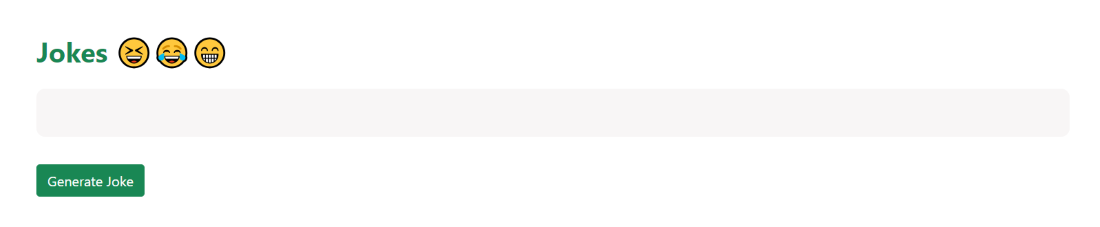
Project Preview
npm install -g @angular/cling new jokes
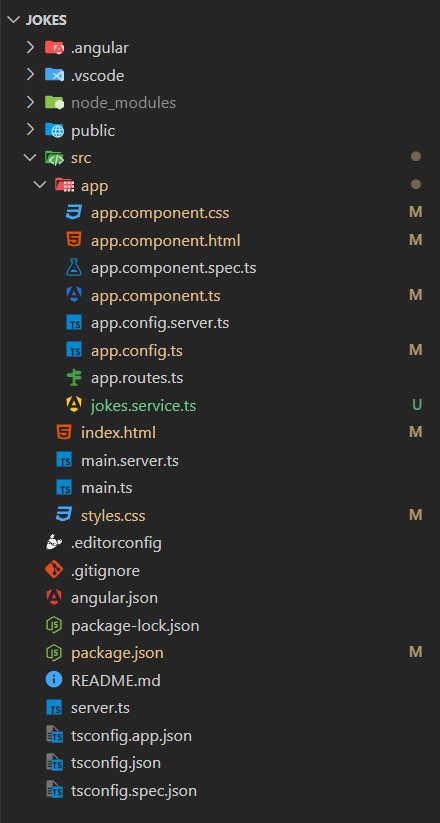
Folder Structure:
"dependencies": {
 "@angular/animations": "^18.0.0",
 "@angular/common": "^18.0.0",
 "@angular/compiler": "^18.0.0",
 "@angular/core": "^18.0.0",
 "@angular/forms": "^18.0.0",
 "@angular/platform-browser": "^18.0.0",
 "@angular/platform-browser-dynamic": "^18.0.0",
 "@angular/platform-server": "^18.0.0",
 "@angular/router": "^18.0.0",
 "@angular/ssr": "^18.0.7",
 "express": "^4.18.2",
 "rxjs": "~7.8.0",
 "tslib": "^2.3.0",
 "zone.js": "~0.14.3"
}
Once required User Interface is created, Now we need integrate Joke generator API to display the random jokes on the web application while click on the Generate Joke button. Here we use a third party API for random joke generator below we provide that API information for your reference.
API Name : Dad Joke API
API URL : https://icanhazdadjoke.com/
Method : GET
Response Format : application/json
To integrate this API into our application open jokes.service.ts file in the project. And import the HttpClient to communicate with the API. Below we provide that source code for your reference.
jokes.service.ts file is generated when run the below command in the project.
ng g s --skip-tests jokes
Once development is completed. Now run the Angular project by using below command. And if project is successfully ran then by default the application run on localhost with port number 4200 in your system.
ng serve
Output