|
VOOZH | about |
|
VOOZH | about |
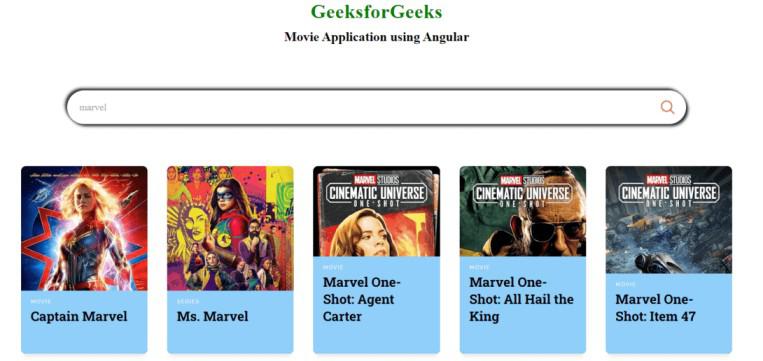
We will be creating a Movie Search Engine using Angular. This application allows users to search for movies by entering keywords and fetching and displaying a list of movie results in card format.
The search engine initially loads a default set of movies to showcase the functionality. Through this project, you'll see how to build a responsive and interactive movie search feature using Angular.
If you haven’t installed Angular CLI yet, install it using the following command
npm install -g @angular/cling new movie-app
cd movie-app
Install Angular Material for better UI components:
ng add @angular/material "dependencies": {
"@angular/animations": "^16.2.0",
"@angular/cdk": "^16.2.14",
"@angular/common": "^16.2.0",
"@angular/compiler": "^16.2.0",
"@angular/core": "^16.2.0",
"@angular/forms": "^16.2.0",
"@angular/material": "^16.2.14",
"@angular/platform-browser": "^16.2.0",
"@angular/platform-browser-dynamic": "^16.2.0",
"@angular/router": "^16.2.0",
"rxjs": "~7.8.0",
"tslib": "^2.3.0",
"zone.js": "~0.13.0"
}
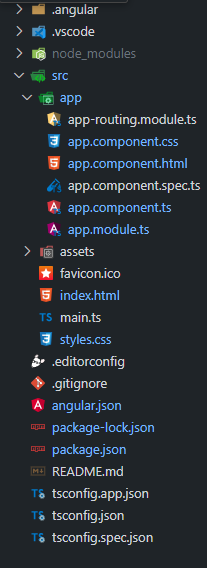
Example: Create the required files as seen in the Folder Structure and add the following codes. We will be using Open Movie Database Api for generating the list of movies.
Open the terminal, run this command from your root directory to start the application
ng serve --openOpen your browser and navigate to http://localhost:4200