|
VOOZH | about |
|
VOOZH | about |
We will be creating a weather application using the Angular framework. This app will allow users to check the current weather conditions by entering a city name. It will provide detailed information including temperature, weather description, wind speed, and humidity. With responsive design and interactive features, the app will offer a user-friendly experience across various devices.
If you haven’t installed Angular CLI yet, install it using the following command
npm install -g @angular/cling new weather-app --no-standalone
cd weather-app
Create a component. You can generate a component using the Angular CLI:
ng generate component weather-appInstall moment library for real-time date fetching:
ng install moment --save"dependencies": {
"@angular/animations": "^18.2.1",
"@angular/common": "^18.2.1",
"@angular/compiler": "^18.2.1",
"@angular/core": "^18.2.1",
"@angular/forms": "^18.2.1",
"@angular/platform-browser": "^18.2.1",
"@angular/platform-browser-dynamic": "^18.2.1",
"@angular/router": "^18.2.1",
"moment": "^2.30.1",
"rxjs": "~7.8.0",
"tslib": "^2.3.0",
"zone.js": "~0.14.10"
}
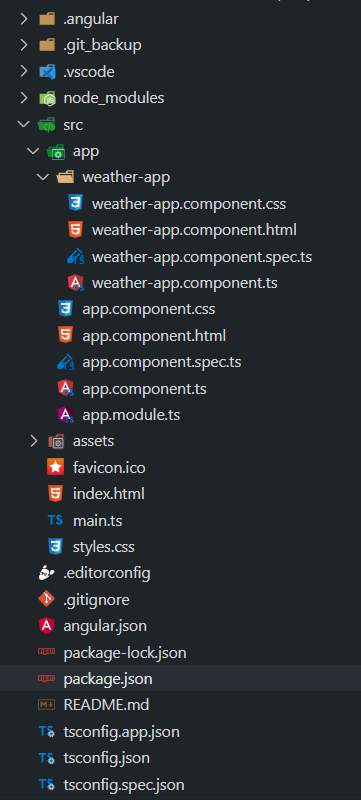
Example: Create the required files as seen in the folder structure and add the following codes.
Weather Component
Below mentioned is Weather Component having HTML, CSS and JavaScript code having an input field to add state name and a Get Weather Button to show the weather update along with humidity and wind speed.
App Component
Below mentioned is the App Component having app.component.html, app.module.ts and app.component.ts file. Having selector of weather component in HTML file and necessary imports in app.module.ts file.
Complete Code:
Open the terminal, run this command from your root directory to start the application
ng serve --openOpen your browser and navigate to http://localhost:4200
Output