|
VOOZH | about |
|
VOOZH | about |
In Angular, a router-outlet is a directive that acts as a placeholder in a component's template. It's used to dynamically load different components based on the current URL route. Router-outlet is a crucial part of Angular's routing system, enabling you to build single-page applications where different parts of the app can change without reloading the entire page. In this article, we will learn more about Router-outlet.
Router Outlet is a directive provided by the Angular Router module. It acts as a viewport within the application layout where routed components are rendered dynamically. This allows Angular applications to have multiple views or pages without the need for full-page reloads.
Step 1: Create a new Angular project
ng new router-outlet-egStep 2: Navigate to the project directory
cd router-outlet-egStep 4: Type Yes when prompted if you want to add router in you app
Step 3: Serve the application
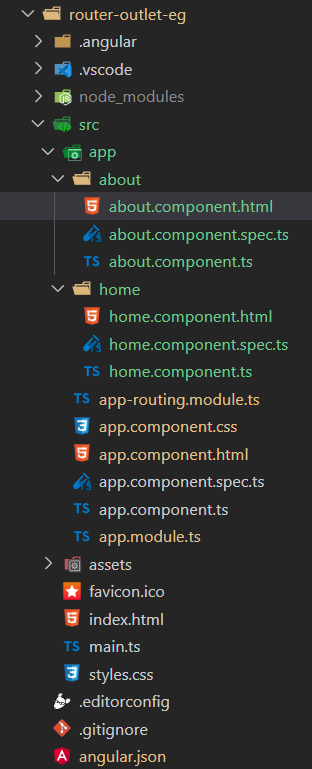
ng serveProject Structure:
👁 Screenshot-2024-04-13-135725
The updated dependencies in package.json file
 "dependencies": {
 "@angular/animations": "^16.0.0",
 "@angular/common": "^16.0.0",
 "@angular/compiler": "^16.0.0",
 "@angular/core": "^16.0.0",
 "@angular/forms": "^16.0.0",
 "@angular/platform-browser": "^16.0.0",
 "@angular/platform-browser-dynamic": "^16.0.0",
 "@angular/router": "^16.0.0",
 "rxjs": "~7.8.0",
 "tslib": "^2.3.0",
 "zone.js": "~0.13.0"
 },
Example: Create the required files as seen on the folder structure and add the following codes.
Output: