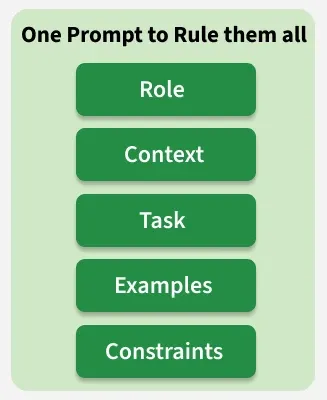
A fundamental advancement in prompt engineering is the realization that a prompt is not a monolithic question but a structured document composed of distinct components. Let's talk about a unified framework that allows you to create effective prompts.
The role defines the character or persona the model should adopt, helping control the tone, style, and domain of expertise in the response.
Guides the model’s behavior, tone and level of detail
Influences vocabulary and style based on the assigned role
Biases the model toward using information and language patterns associated with that role
Impact on Output
Tone and Style: Determines if the response is formal, casual, witty, technical, academic, or empathetic.
Vocabulary: Influences the choice of words (e.g., a "legal expert" will use precise legal terminology, while a "5th-grade teacher" will use simplified language).
Complexity: Sets the level of detail and sophistication of the explanation.
Examples of Use
Technical: "You are a senior database administrator specializing in PostgreSQL."
Creative: "You are a 1920s noir detective narrating a case."
Educational: "You are a physics professor explaining quantum mechanics to a first-year university student."
Context
Context provides the necessary background and situational information that helps the model generate more accurate and relevant responses. Without proper context, the model may produce vague or incorrect outputs.
Helps ground the response with relevant information
Reduces the chances of hallucination by providing clear input
The model tends to rely on prompt context, but may still use its training knowledge or produce incorrect outputs if the context is unclear
Types of Context
Conversation History: Including previous user queries and model responses to maintain a coherent dialogue.
Documents: Pasting in text from articles, research papers, product manuals, or legal documents for the model to analyze or summarize.
User Data: Providing user profiles, preferences, or past behavior to generate personalized recommendations.
Real-time Information: Supplying data from an external API call (e.g., current weather, stock prices) to ensure the response is timely and accurate.
Task
Sometimes also called the Instruction or Directive, this is the core imperative of the prompt. It must be a clear, specific, and actionable command detailing what the model should do.
1. Clarity is Key: Ambiguous instructions lead to generic or incorrect outputs. "Tell me about marketing" is a poor task, whereas "Generate a 5-step marketing plan for a new vegan cafe targeting millennials" is a strong one.
2. Use of Direct Action Verbs: Starting the task with a precise verb removes ambiguity.
3. Task Decomposition: For complex requests, you can break down the task into a sequence of numbered steps within the same prompt (e.g., "1. Summarize the provided article. 2. Identify the three key arguments. 3. Write a counter-argument for each point.").
Examples
These demonstrate the desired input-output pattern, enabling a powerful form of in-context learning. This is often the most effective way to control the fine-grained details of the output. They are sometimes also called Shots. Hence, the terms One-Shot Prompting, or Few-Shot Prompting.
What Examples Teach
Structure and Format: Showing the model an example in JSON teaches it to respond in JSON.
Reasoning Process: For complex tasks like chain-of-thought, an example can show the model how to break down a problem step-by-step.
Nuance & Style: Examples can demonstrate a specific tone or stylistic choice more effectively than a verbal description.
Best Practices: Examples should be consistent, high-quality, and representative of the desired output. They should mirror the structure of the actual task, and cover as many cases as possible.
Constraints
These are the "guardrails" that define the rules or warnings for the boundaries of the response. They specify what the model should not do and are critical for safety, consistency, and brand alignment. Common Constraints are:
Length: Limit response size (e.g., “Do not exceed 300 words,” “Use exactly three sentences”)
Content: Restrict certain topics or outputs (e.g., avoid medical advice, competitors, or profanity)
Style: Control tone and clarity (e.g., use active voice, avoid jargon, explain simply)
Information Sourcing: Specify what knowledge to use (e.g., only use provided context, avoid outdated information)
Output Format: Define structure (e.g., JSON, table, list) to make responses more structured and easier to integrate into applications, though it does not guarantee reliability
Delimiters
To help the model distinguish between these different components, it is a best practice to use clear delimiters. Structuring the prompt with markers like Markdown headers (e.g., ###Instruction), XML-like tags (e.g., <CONTEXT>...</CONTEXT>), or simple labels ensures the model understands the role of each piece of information you provide, dramatically increasing the reliability and quality of the final output.
How to use the framework
To help you create prompts that abide by this powerful framework, we have created a prompt that generates prompts.
Describe your requirements in 2-3 sentences to receive a production-ready prompt for your next prompt engineering project. We encourage you to experiment with the output and share your findings in the comments below.