Alpha-Beta pruning in Adversarial Search Algorithms
Last Updated : 6 Jan, 2026
Adversarial search applies to two-player games where each player aims to maximize their own outcome while minimizing the opponent’s, assuming optimal play. The Minimax algorithm evaluates alternating MAX and MIN moves to choose the best guaranteed action but is slow for large game trees. Alpha–Beta Pruning improves efficiency by skipping branches that do not affect the final decision.
Alpha-Beta Pruning
Alpha-Beta Pruning is an optimisation technique that significantly improves the efficiency of Minimax. It removes (prunes) branches that cannot possibly affect the final decision, avoiding unnecessary computations.
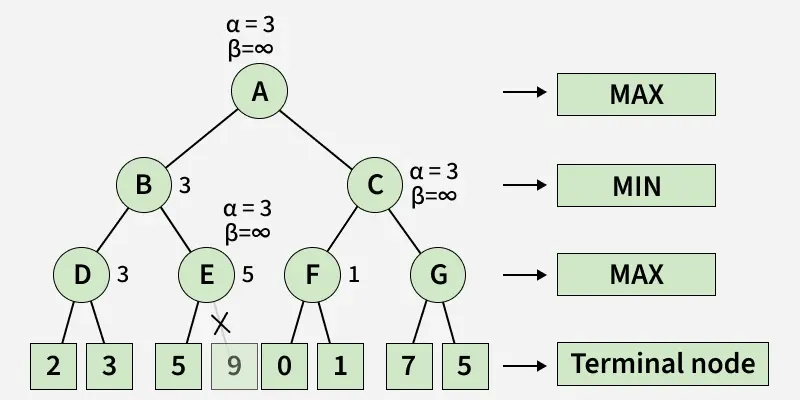
The image shows a Minimax game tree with Alpha–Beta pruning, where MAX and MIN levels evaluate child nodes to compute the optimal value. Branches that cannot affect the final outcome like the one under node E are pruned, reducing unnecessary exploration.
Pruning is the process of cutting off branches in the search tree that cannot influence the final outcome, saving time and computation.
During Minimax traversal, two values are maintained:
Alpha (): The best score the Maximizer can guarantee so far.
Beta (): The best score the Minimizer can guarantee so far.
Pruning Condition: If the branch is cut off because it cannot affect the final decision.
How Alpha-Beta Pruning Works
Step 1: Initialization
Set initial values:
These represent the worst possible scores for Maximizer and Minimizer
Step 2: Max Node Evaluation
For each child of a Max node recursively evaluate using Minimax with Alpha-Beta pruning. Update alpha:
If stop evaluating remaining children (-cutoff)
Step 3:Min Node Evaluation
For each child of a Min node Recursively evaluate using Minimax with Alpha-Beta pruning Update Beta:
If stop evaluating remaining children (-cutoff)
Implementation of Alpha-Beta pruning in Adversarial Search Algorithms
Here in this code we builds a game tree applies Alpha–Beta pruning to find the optimal minimax value and visualizes the traversal by marking visited edges in green and pruned edges in red.
Step 1: Install and import required libraries
Importing essential libraries for graph visualization and manipulation.
networkx is used to create and manage graph structures.
matplotlib helps plot and display the generated graphs.
pydot enables converting graph data into DOT format for clearer visual representations.
Step 2: Define the Node class
Node class is created to represent each state or node in a game/search tree.
name stores the label or identifier of the node.
children holds the list of child nodes, defaulting to an empty list if none are provided.
value stores the evaluation score of the node, used in algorithms like Minimax.
Step 3: Utility functions for evaluation and tree checks
evaluate(node) returns the numeric value of a node, used for scoring terminal states.
is_terminal(node) checks whether the node is a terminal state by verifying if it has an assigned value.
get_children(node) retrieves all child nodes connected to the current node.
These helper functions support tree traversal in algorithms like Minimax and Alpha-Beta pruning.
Step 4: Alpha–Beta pruning implementation with visit tracking
Implements the Alpha-Beta pruning algorithm, recursively evaluating nodes while tracking visited and pruned edges.
For Maximizing Player, it updates the best value found so far and raises alpha; pruning occurs when beta <= alpha.
For Minimizing Player, it updates the minimum value and lowers beta; similarly prunes unnecessary branches.
The visited_edges list stores both visited and cut edges, helping visualize the pruning process in a tree graph.
Step 5: Build an example game tree
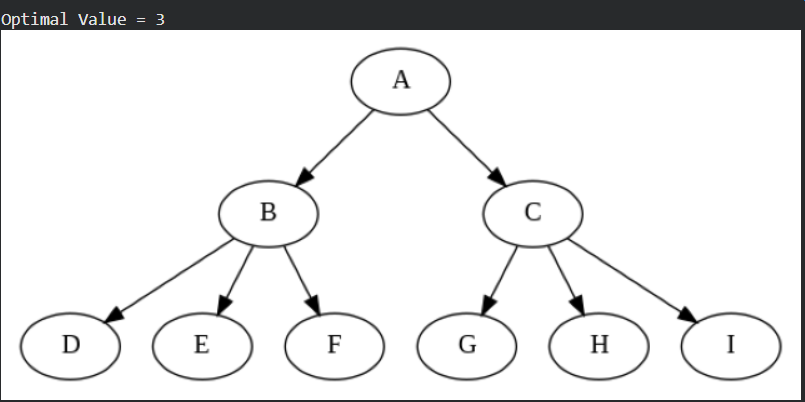
Leaf nodes D, E, F, G, H, I are created with fixed evaluation values, representing terminal states in the game tree.
Nodes B and C group these leaves as their children and A becomes the root node, forming a complete multi-level game tree structure.
Step 6: Visualizing the Game Tree with Alpha-Beta Output
Alpha-Beta pruning is executed to compute the optimal value from the root node.
A directed graph of the game tree is built by linking each node with its children.
The graph is converted to DOT format using pydot for clean visualization.
Matplotlib displays the final tree image, showing the full game structure.
The image represents a game tree for Alpha–Beta Pruning with root node A. The algorithm computes the optimal value as 3 by pruning irrelevant branches.
Step 7: Visited and Pruned Edges in the Game Tree
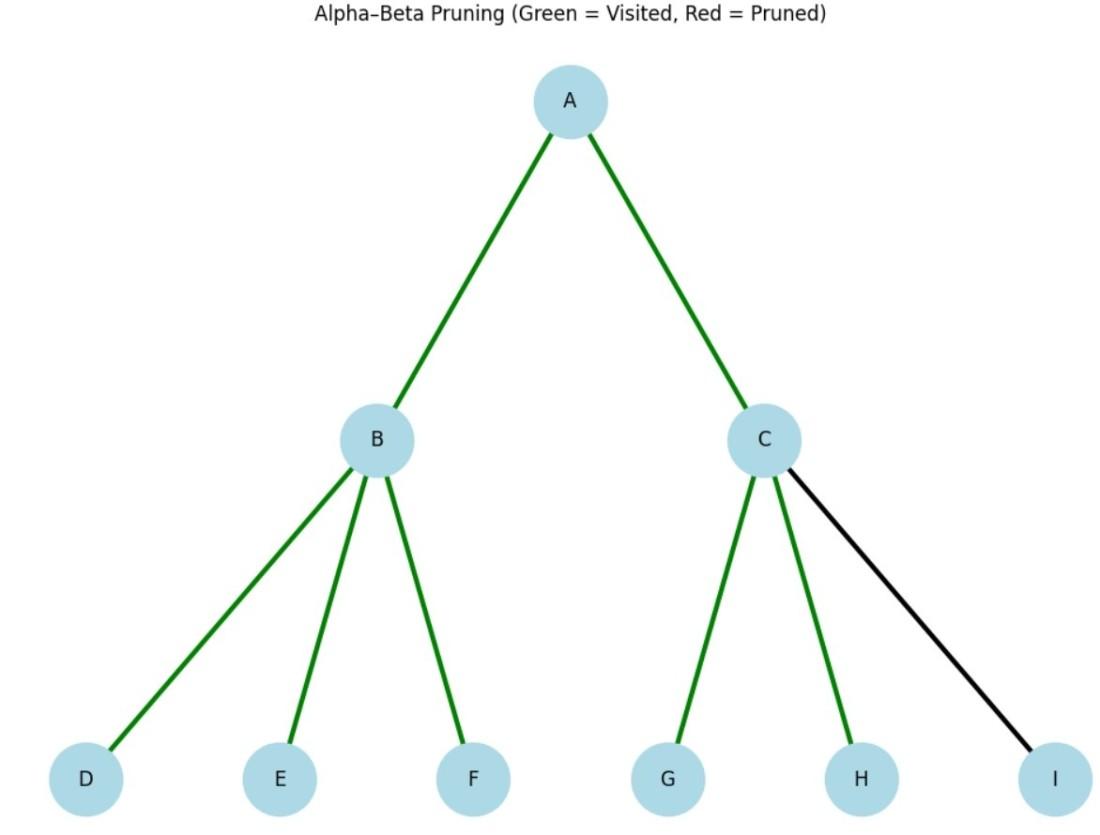
Each edge in the tree is checked against visited_edges to identify whether it was visited or pruned during Alpha-Beta pruning.
Edges are color-coded: green for visited paths, red for pruned branches, and black for untouched edges.
NetworkX and Graphviz are used to position and draw the tree with clear hierarchical layout.
Matplotlib displays the final tree, visually showing how pruning reduces unnecessary exploration.